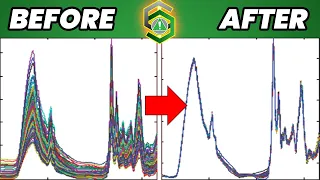
hi and welcome to the idq pro tutorial series my name is Helena and today I'll be talking about how to use the cevitzy goalie filter in idcube Pro the filter Smooths raw noise signal data from the spectral coordinate using a least squares digital polynomial filter to start you'll want to load a file and then go to filtering and enhancement and select suvitzy goalie smoothing the pop-up window will ask for two parameters polynomial order and frame size polynomial order corresponds to the degree of the polynomial fitted to the points in the moving frame the default value
is 2. polynomial order value must be smaller than the frame size if the frame size is a positive integer the default value is 10. frame size modifies the frame size for the smoothing function for example if the frame size value is 0.05 the window size is equal to five percent of the number of points in the total number of channels for more information regarding how the algorithm Works go to itcubes.com documentation once you've chosen your polynomial order and your frame size you'll click apply it's important to note that higher frame size values smooth the signal
more but there is an increase in computation time yeah the smoothing of the Spectra occurs in a pixel by pixel manner when the process is complete the new image will replace the original image a pop-up message will inform the user that the process is complete click ok to remove the message box foreign