one of the linchpins of on-prem systems is the aggressive use of IP addresses to balance scatter and manage traffic coming into your environment this is built into the configuration of your routers firewalls and most of the hardware and software you've got lying around as you migrate portions of your environment to the cloud however you have to be aware that this IP address logic will change in various ways as such it's crucial to plan ahead for your IP address changes that could affect your workloads and how they interact with internal and public network traffic in this
episode I'll be covering private and public IPS on Google cloud and how you can achieve remappable IP addresses for your cloud resources stay tuned the main challenge is that you can't simply move your existing IP addresses to the cloud along with your services cloud providers and data centers have a limited pool of IP addresses that they own and they often reuse previously assigned IPs in order to maximize them the result is that your services will receive a dynamically assigned internal and public IP address which by default are ephemeral meaning if you restart those instances you'll
lose those IPS for companies in this situation there are basically two solutions which you could run through defined firewall rules by using tags instead of IP addresses forward traffic through a managed load balancer with a static IP of course both will work but they both come with a large downside as your cloud IP is continued to change they'll break any dependencies your services might have on those IPS which are hard coded or require a network admin to manually change which can quickly turn into a nightmare of maintenance for example let's say you spin up your
first back-end machines in the cloud and decide to tear them down for a period of time to save on costs suddenly when you're ready to get them up and running again you notice that you lost those dynamically assign IPS only to find new ones now you have to reconfigure your on-prem app and any firewall rules to point to the new public IP of your cloud back-end this can grow pretty tiresome and unwieldy over large environments thankfully Google cloud allows you to get around the situation by reserving static IPS for your services so if your VM
is shut down you can retain the same internal and public IPS when you spin it back up what this means is that you can feel relaxed knowing that if you point a forwarding rule firewall role or application to your cloud instance IP from within or out of the V PC network you won't need to reconfigure the IPS each time you shut down your instances this really comes in handy if you are dependent on a specific IP address for your service and need to prevent your teammates from being able to use that address and the best
part you can even promote a previously ephemeral IP to be a static one helping you cut corners in a few places let's dive into IP is a bit more for compute engine you can assign one internal and one public IP address for each VM it's important to note that you don't need public IPS for your VMs within the same V PC to communicate and this can really help network performance on the other hand if you need the VM to communicate with the internet or any VM in a different VP C Network your VM has to
have a public IP address unless you've set up some sort of proxy or VPN and the other network for both cases of internal and public IP addresses you can choose ephemeral and static IPs let's start with internal IPs when you create a VM unless you specify an internal IP within your subnet range Google will just assign your VM and ephemeral internal IP from your subnet range you can reserve one later on and assign it to your VM if you decide you need a static internal IP later for public IP is the same applies unless you
assign your VM a reserved static public IP Google will assign an ephemeral public IP randomly from a pool or you can choose not to assign a public IP whatsoever which can be good for keeping instances from being exposed to the public Internet and reduce security risk later on you can always assign one there's also a way to create a custom public IP on GCP as well but I'll point you to the documentation linked below let's walk through IP setup let's take a look at a VM I just created with apache2 installed deployed in u.s. East
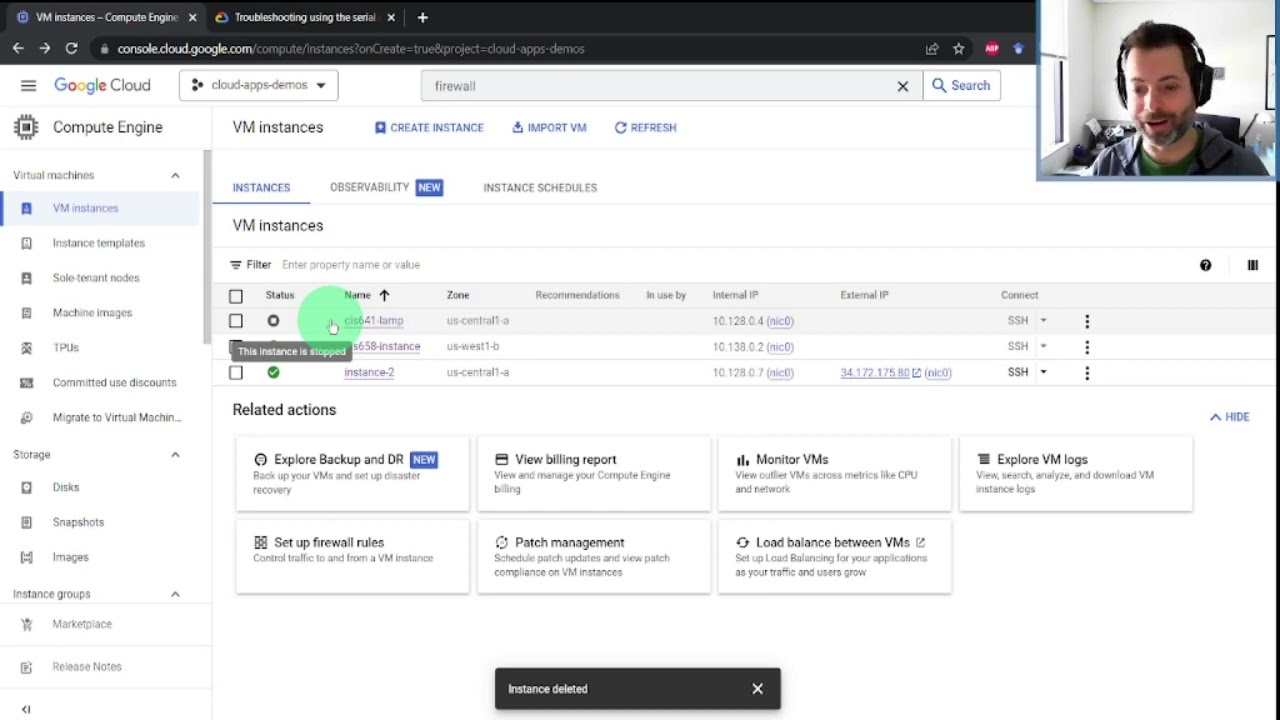
one first head to the networking tab by default you're given an ephemeral internal and public address I'm going to remove the ephemeral public IP and you can now see it has no public IP address it's important to note that if you're an internal VM talking to other internal VMs then you need to be using the internal address for the best performance otherwise your internal VM has to travel back to the public internet which can slow it down now as I mentioned by default your VMs will use ephemeral public IPs but sometimes you need static ones
and that won't change over time thankfully you can create this right in Google cloud go to the network tab and then in external IP addresses create a static one and note that we can also just promote an ephemeral one you want to create the IP in the same region as the instance unless you're doing global forwarding because static IP is our regional resources you can assign the IP to the instance right from here and now you see we have a new static public IP address assigned to the instance and as long as you have the
right firewall set up to allow HTTP traffic on port 80 now you can see that we have access to the web page through the new static IP address once you understand how IP addresses are affected when different actions are performed in your overall architecture you start to realize the importance of using remappable IP addresses especially for a front end servers in the cloud but what if you don't want a public IP address in order to maintain higher security yet you still want to be able to do things like fetch updates from the public Internet stay
tuned for the next episode to find out how and remember optimizing your network means freeing up your bandwidth [Music]