[Music] looks like my last video on cursor is gaining more and more popularity because cursor is truly just changing the coding game anyone can now code combined with CLA 3.5 Sonic versal riplet to create almost anything from Full stack applications to software to coding out a code base so what is the new Buzz with cursor well basically they introduced this new feature called cursor composer this is a really cool feature that will'll be able to write code for the app while editing multiple files and instead of suggesting code changes in a chat you can now
apply it manually or just append content as you ask for it it's going to allow you to create apps from scratch just by chatting with it including creating and editing all of the necessary things that are essential for it now in my last video with just one single prompt I was able to create a task manager web app now this is a functional calendar task manager that has the ability to add tasks and this is something that is quite minus in terms of the output compared to what other people have created for example someone had
created an 11 Labs helper app where it will basically generate speech right from your menu bar and you can easily drag it into your video editor for smooth AI voice servers now this is something that was created with the help of cursor's composer and I want you guys to take a look at this demo video showcase the functionality of this app hey friends I'm excited to show you a demo of the 11 Labs native app that I just made with cursor composer over a day on the weekend so the first thing you'll see is you
have this new button in the Mac menu bar and when you click it it brings up this 11 laabs helper this is working cool it indeed Works uh and you can see it's got my voices the different models that we have uh it allows you to generate speech so I've got this really cool uh 11 Labs orb here but it is too quiet uh so let's give it a voice and this is I think going to be great for voiceovers for creators who are working with videos and they just need to drag in that speech
file I'm going to generate that speech and so I can just click and drag and bring it right into my video editor and so now I can just hit play hello everyone this is a demonstration of this app cool now in this other example someone in 60 seconds used composer to basically build an entire authentication system from a single instruction file and you can see that this is a fully functional authentication uh system that has been developed with composer and this was by just simply giving it a prompt and it was able to complete that
task based off of the composer now this next demo will blow your mind because an 8-year-old child builds a fullon chatot with the help help of cursor now guys we're literally screwed and it's quite astonishing how easy it is to Simply code with cursor as you can see this child was practically able to use it and give it simple instructions to create her chat Bo now here's another example where someone was able to Output a generation of an investment income dashboard now from all of these outputs we're seeing a common line coming out of it
where it shows that cursor is truly an amazing AI tool that will enhance the way you use AI as well as get the best output with the help of it now this is a great new tool that is something that we're going to be covering throughout today's video now I know I made another video on cursor before like a couple of days ago so what's the point of making another video on it well this is because I want to showcase more capabilities of the cursor composer feature as well as a couple new upat that have
been released now this is where I'm going to be showcasing how you can get started and showcase a lot of cool things associated with it now for the people who do not know cursor is an IDE similar to how vs code is it's a code editor and it's actually integrated AI as a main component of it where you're going to be able to do various things and this is where you have auto code generation multi-line code edits the smart rewrites cursor prediction you have an AI chat component with the in the ID where you're going
to be able to ask questions for your code base reference your code can utilize images ask the web instant ply and so much more there's so many different features that you would want to utilize cursor over es code because of the integration of AI within this IDE and now with the integration of cursor composer a new feature that will help you elevate your Generations I definitely see this becoming the best ID that's out there and you can easily get started and download this for free so what I want you guys to do is head over
to the cursor. comom website which I'll leave a link to as well as all the other links that I use in today's video in the description below once you have done that download for free once you have done that for your operating system just simply open it up and it will basically prompt open an installer this is where you will set up cursor and install it locally once that is done you can simply open it up and you can get started with cursor and there you go you have cursor opened up now what you can
do is open up with a folder or open with an ssh in this case what we're going to be doing is just simply opening up a new folder so let's open up a random folder in which we want to work in and now what you can do is utilize all the different commands such as control K which is a really cool feature that they have introduced for example control K is where you're going to be able to edit and write code with AI to edit just try selecting some code and just click edit just type
in control K and you can select anything and you can get fast edits terminal control K quick questions and such forth but what we're going to be doing is showcasing almost all the features that we would want to get started with cursor I showcased this in my last video and this is where you can simply open up a chat function where you can just simply press command plus L and you can start getting a basic outline of whatever you want to work on this is a chat component which you can see on the right hand
panel and in this case you can upload a ux design of what you want to replicate and once you have created the basic structure with a chat function you can then use the composer function which is command plus shift plus I and this is where in this case it's refining the outline further of the ux replication with user prompts and this is to develop the content and the structure of your design and within a couple seconds we're going to be able to see that it will replicate the ux it'll start generating the code it'll install
all the dependen es that are necessary it'll even create folders for you which you can see on the left hand side being created such as the Styles in CSS as well as a JavaScript and within a couple seconds we're going to have it so that the web page can be opened up on our HTML and with the help of the composer this dashboard was fully replicated and it was able to generate almost all the functionalities of it now in my last video people were actually having trouble starting up or enabling composer because it doesn't actually
show up right away you need to go over to the help and you want to click on show all commands and what you want to do is search up composer you want to enable the composer and once you have done that you can then press command shift I and you're going to be able to open up this window to start working or adding files to the composer so in this case you can create a new text file or next text prompt and this is where you can name it whatever you want or the V for
example and what you can do is you can add a detailed plan of what you want to create so in this case I want to create a really cool uh let's say snake game and I want it to be really interact once you have specified this you can then simply just click enter and what you can do is then create a new composer so now that we have that file created world of AI you can then send in that uh instruction or what you would want to do is have the chat function which is command
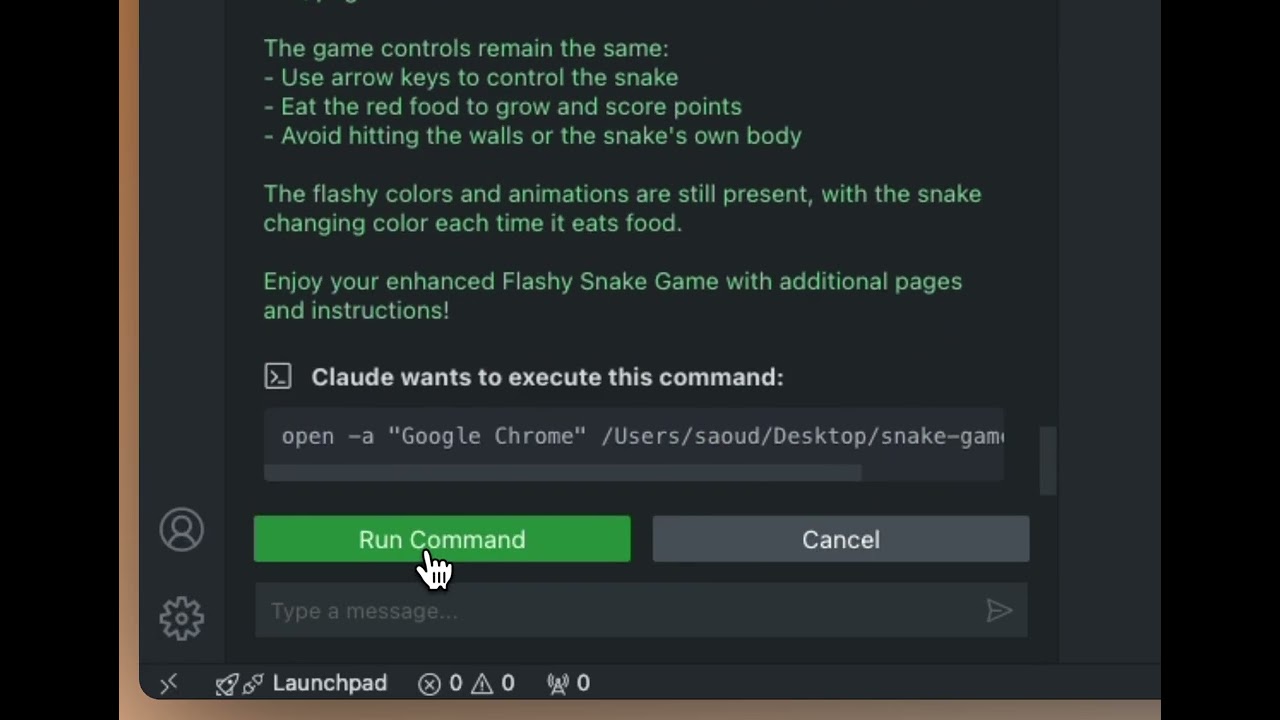
L and the reason why I say this is because if you create the structure before you use a composer the output will be better let me go ahead and create the structure and then we can move forward once you have created the structure you can then send in that same prompt into the composer and this is where it's going to modify the changes that are necessary in your file and it will basically also add more files if necessary into terms of installing different dependencies that are required and there you go we have our snake game
finally created and this was something that I was able to develop with the help of the composer this is the capability of this amazing tool and you can see that this is a really interactive and cool game that was able to easily develop with a really cool animation and a lot of cool color now this example is truly unique this is an image editor that was configured and built by cursor's composer this is is a really cool new app that was developed and you can see that there's various different types of filters as well as
effects that you can use to create and edit these pictures this is a Chrome extension app that was developed with cursor and this is something that took him approximately 1 hour to create now I'm not saying that you're going to be able to create this with one single prompt right away but you can see that this is something that is going to give you the right tools and the right basic Avenue to create whatever you want as you can just keep on iterating and working with the composer by chatting with it and the cloud 3.5
Sonic model to iterate on your designs iterate on what you want to generate and with with a few clicks as well as a few generations and creating different requirements you're going to be able to configure and create whatever you want with cursor composer now going back to my snake game I want to mention a really cool thing that they have done with the command I feature feature once you have specified your requirements what you can also do is specify what sort of files you want to add and enter or toggle into the composer and this
way it will reference your prior code base or your prior files so that it can reference better generation or reference your past generations for better Generations in the future and that's a really cool thing that they integrated recently and this way you're going to be able to utilize this composer to affect your full code base now there's truly so much more to this so it is definitely up to you to explore and basically try out this new feature of cursor's composer so with that thought guys I hope you enjoyed today's video and you got some
sort of value out of it I hope you enjoyed today's new update on the composer I'll definitely be making more videos and showcasing maybe a step-by-step process where I create a really cool functional app not your generic Generations like such as a snake game or a finance app something more interactive and something that is quite usable so with that that guys I hope you enjoyed today's video I'll leave all the links that I use in today's video in the description below make sure you follow me on Twitter great way for you to stay up today
latest AI news and lastly make sure you guys subscribe turn on notification Bell like this video and check out our previous videos so you can stay up to date latest AI news but with that thought guys have an amazing day spread positivity and I'll see you guys fairly shortly peace out fell