can chat GPT remember previous conversations earlier this year in February 2024 open aai started testing a new feature called memory which allows chat GPT to remember your past chats in order to make future conversations more personalized helpful and tailored to your preferences and as of September 2024 memory is now available for free no additional cost for all chat GPT free plus team and Enterprise users it's not yet available through the API though if you are looking to integrate chat GPT memory in your product or application and memory is really handy for things like your personal
preferences for example maybe you're a vegetarian and you want chat GPT to remember that every time you ask for a recipe or meal plan or maybe you're using chat GPT for Content creation like I do and I want J gbt to remember my writing style based on analyzing my previous posts in short you can think of memory just like our own memory I remember my friend's name what they like what they don't like and chat GPT can do the same I'll show you where to find chat gpt's memory how to use it how to add
things to the memory how to edit the memory and how to clear the memory so first let's go to chat GPT and log in and then in the upper right hand corner click your profile click settings and then click personalization and here you want to make sure memory is toggled on just like we talked about memory allows chat tobt to be more helpful as you chat picking up on important details and preferences to tailor its ANS anwers to you so first make sure this is on it should be green like this and then when you
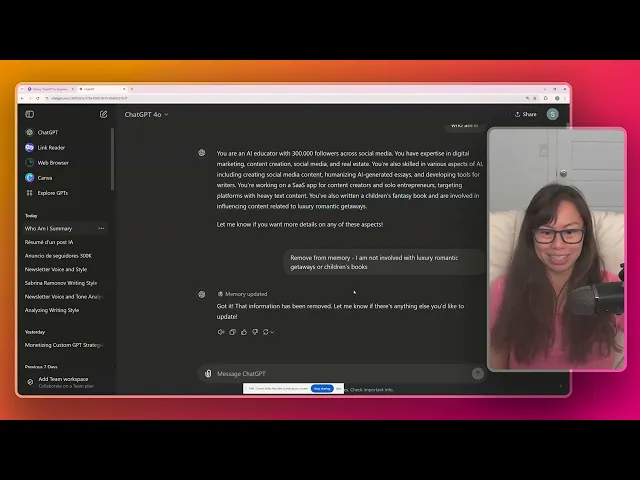
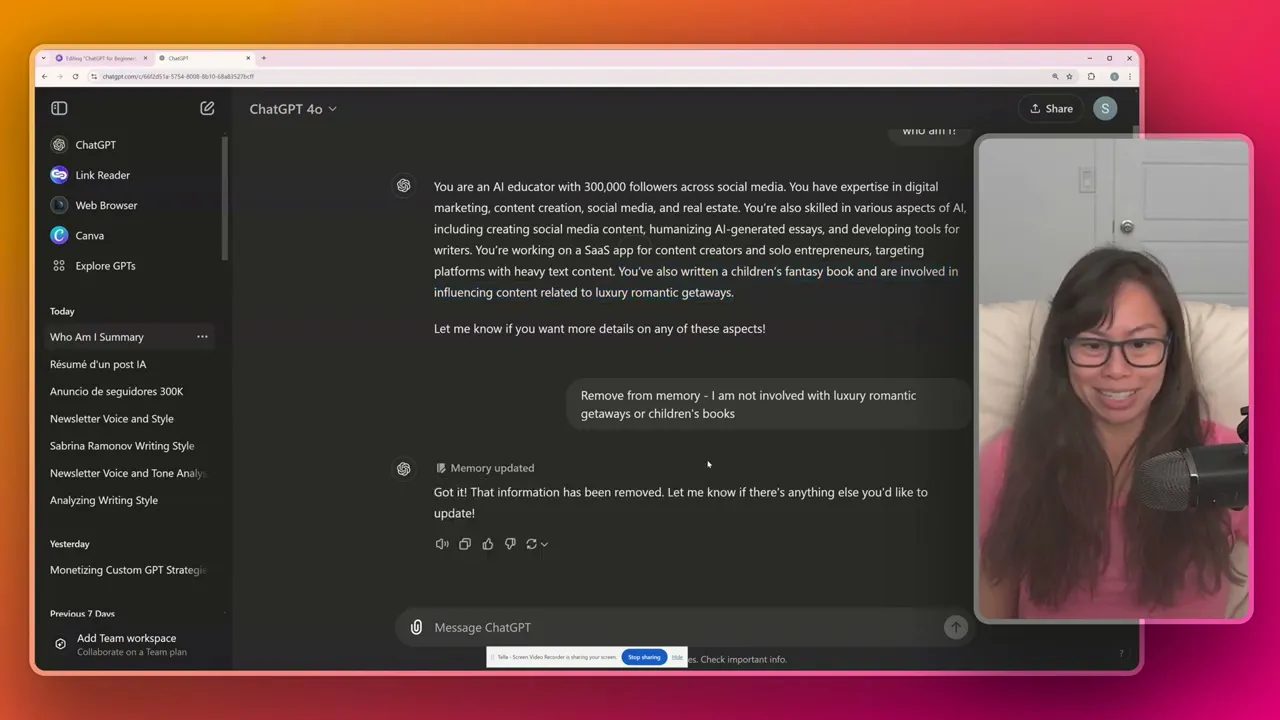
click manage you will actually see all of the different pieces of information stored in chat Up's memory we're going to dive into that in a bit but first let's try out this memory feature okay so if I type who am I chat GPT actually pulled the response from my memory you are an AI educator with 300,000 followers across social media and we can go ahead and check that by going back to the memory so setting personalization manage here one of the last things that I added to the memory is that I've reached 300,000 followers across
social media as an AI educator now part of this is incorrect because I test a lot of different prompts and sometimes things get added to memory that aren't accurate so here I have not actually written a children's fantasy book and I'm not an influencer when it comes to luxury romantic getaways so let's say remove from memory I am not involved with luxury romantic getaways or children's books okay and here you can see memory updated so all I did was I told chat GPT hey this this is incorrect please remove this from your memory and it
said memory updated forget the information that the user is involved with luxury romantic getaways and children's books this is a direct link to manage memory so you don't have to click a bunch of times to open it boom okay this opens it here and then let's ask again who am I all right it has removed that part about luxxury romantic getaways and children's books and replaced it with other information from memory experience in math and prefer professional me messaging without too many emojis now let's say I want to teach chat GPT how to sound like
me how to write like me which is really useful if you are a student in school a journalist a content creator using AI to facilitate creation so go ahead let's open a new chat and in this prompt I'm going to tell chat gbt to read and analyze two newsletters that I've previously written and I'm telling chaty PT to analyze my voice tone and writing style because I'm going to ask chbt to emulate it in future prompts and I highly recommend following along so feel free to replace these two links here with your own blog posts
or remove this all together and paste in something you've previously written so now you can see chat GPT searched both of those sites chat GPT for beginners one and part two and it summarized my writing style conversational and accessible tone my writing structured broken into clear sections my voice is friendly and supportive aiming to empower beginners to use chat PC confidently oh thank you Chachi PT her style Blends education with engagement now I want to tell Chachi PT to remember my writing style add this to memory this is my preferred writing style okay and you
can see memory updated again okay prefers a writing style that is conversational accessible blah blah blah and again let's click manage memories to see it so this is the new one that we just added this is the one that we added previously in this video and what you can do here is manage all of these pieces of memory Strat GPT will try to automatically identify pieces of information that it thinks are your preferences and added to memory but sometimes it's wrong sometimes you don't want those pieces of information added to memory like I try a
lot of stuff out and I don't necessarily want it added to memory here for example I wouldn't want this in memory so you can go ahead and delete the things that you feel are not relevant so here it says forget right so click that and chat yout will forget the following piece of information this cannot be undone so click forgets here's another one so I am not a real estate media professional I was probably just trying a prompt I don't think I'm an expert in math I have a little bit of background in math I'm
going to click forget there I recommend you do this on a regular basis to just to check that chat is learning all of your references correctly chat GPT is now trained to automatically try and identify key pieces of information and automatically add it to your memory but sometimes it gets it wrong so that's why I recommend going in here to manage your memory see what pieces of information chat GT has added here and clean it up by clicking forget for pieces of information that are not relevant to you and you can go ahead and clear
this memory entirely so if you click clear chat gpt's memory it's going to remove all of this let's say you want to start from scratch start from from a blank slate the key thing is that you're in control of all of this data so if chat GPT is automatically added private or sensitive information that you don't want stored in its memory go to the memory and remove it there overall the new memory feature makes chat GPT much more personalized and helpful because you don't have to teach it your preferences in every single conversation so highly
recommend using it getting familiar with it and whenever you see something like memory updated just go ahead and hover over that to see what chat GPT has added to the memory and manage your memories on a somewhat regular basis just to check that it contains accurate preferen