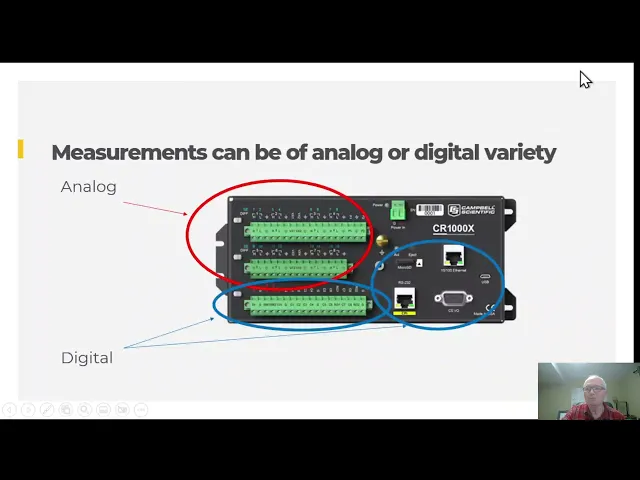
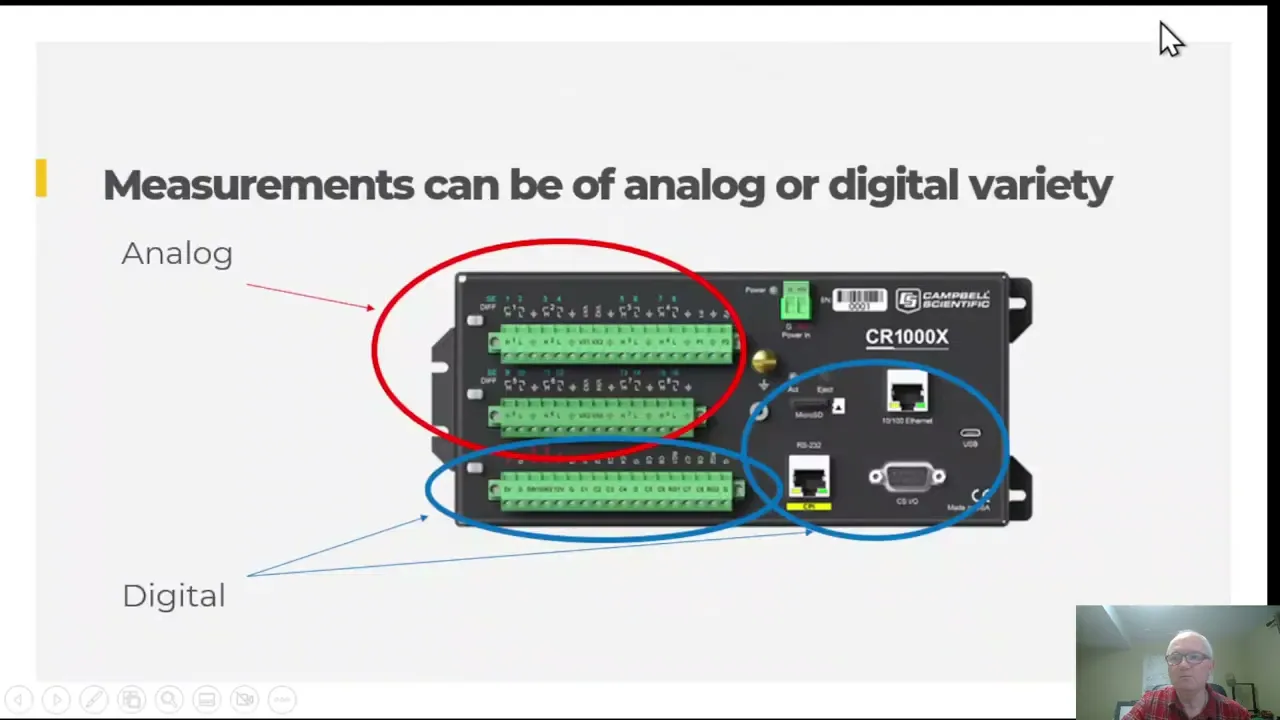
welcome to Campbell scientific Learning Center the goal of this introductory video is to help you understand in general terms what chemical scientific measurement devices do and we will be getting into specifics of the procedures to do all these steps as you progress through online courses later on so what is a Campbell's scientific Data Logger a Data Logger is one of our core products used on all seven continents around the world in a host of different applications and it is a device that can remotely and independently collect measurements processed values that store them in memory and then deliver them to the data to the correct destination here's a picture of several different models and a few of our sensors some data loggers are bigger some smaller some didn't have many terminal connections for wires and now there's not so many the Data Logger on one hand is a measurement system which can measure analog and digital sensors the part circled in red is the analog section of the Data Logger and the part Circle in blue is for digital Communications data loggers are powered by a 12 volt battery something similar to a car battery most car batteries and when used in the lab or out in the environment with an enclosure or a tripod Tower solar panel sensors cellular modem they can measure environmental changes in real time we talked about analog signals so what is an analog signal usually the signal comes from a voltage and as it comes in as a voltage or a series or pulses of voltage now so you may ask well what is voltage well it is an electrical force that can cause electrons to flow through a circuit if you have ever clicked lift a 9 volt DC battery to see if it's completely dead which I did as my youth as you see if it still has some juice in it for example and then you felt the effects of the analog voltage pushing the electrons across the saliva on your tongue causing the nerves in your tongue to react and jerk away analog voltages Let's see we talked about analog voltage signals uh let's see one of the key components of the analog to digital converter for the analog signal and the ADC will compare the analog voltages or signals to a reference voltage and give you a number another example of analog to digital converters are multimeters which you may be familiar with the diagram this diagram symbolically shows the signals coming from your sensors to the analog to digital converter notice that there is a calibrated voltage reference in there that uses for the comparison now to I would like to demo for you the process of powering up equipment connecting the computer Data Logger together performing and modifying a program to improve some of the test measurements so what do we need to start doing that well we are going to need a Data Logger some kind of a power supply like you can see in the top of this image or could be USB power supply we need Communications which could also be USB cable we'll use that and today and or it could be IP or some other you know cellular or other some other method and then it needs some sensors so I've wired up some sensors already to help with that so let me go to the other view here and here is our our Data Logger so I'm going to power it up here with this 12 volt power supply and we'll see this light come on when I do that yeah I'm gonna set up this Communication cable plug that in right there and now I have a variety of sensors right here I'm also going to introduce a little bit of a a problem on this station I'm going to run an extension cord right across the wiring panel here so that it will have some effect on my measurements so that I can see those effects of that let me plug that in I've got that plugged in I'm going to run it right across here so it's near those sensor wires and then over here I've got a a little a couple five volt Chargers and I'm going to just plug in my cell phone and we will see the effects of that as well so now I'm going to fire up the software I already have the software running and let me change over to the software view here and where there's the let me move this out of the way for a moment there it is okay so I've got the software here and I'm going to go to the connect screen right here and let me move that back I guess that's okay and I'm going to connect to the station and so now I'm connected the station and I want to see what the values are so I can click them here but I'm going to go through these measurements one at a time and show those to you so I'm going to go right here and I'm going to um I'm going to um show you these measurements while we're looking at the readings from Those sensors so let me move this over a little bit and let me switch the screens again for a moment okay now the very first measurement here is this one so I'm going to warm up this sensor and up here on the graph you'll see that the signal is going way up notice that the the signal responds really quickly it said 31 degrees over here and down here it was sitting about 26 degrees this is degree c um so notice that this is kind of Jumpy and jittery okay and let me do the second one here which is this one here the blue one and notice that it too is is going up and and getting warm and it's not quite as jittery so let me show you what I have done with this so let me move this out of the way for a minute and go back to this display over here there we go and what I've done is I changed a couple uh one setting in the in the readings between the first the red wire the red measurement and the blue measurement the thing I changed was the range code I changed it from 5000 millivolts to one thousand and so doing that helped us to have a much uh smoother reading it's not so jumpy well let's let's warm up the next sensor the third one here which I think is this one right here that should be the green one so you can see the green ones going up now and notice that the green one is even better than the blue one okay so what did we do there so if I go down here on the blue one I change the range code down even further from 1000 to 200. so the range code even flattened that out more okay now let's see if we go um to the next Channel after that and we made another little change there let me go to this one this should be the black one yeah now look at the black one it's even smoother than this green one so what did I do there to make that a better measurement okay so now let me go back and show you the what a change I made there and the change I made there was that I kept it at 200 but this time instead of doing a really fast measurement of 15 000 Hertz or one over fifteen thousand would be the time period of that to a little bit slower measurement and that filtered out all of the AC noise from this cable running right past those wires this white cable and now if I come back and look at the very last one it's even smoother there let me warm that one up it's right by this wire get that one warmed up and so it's going up now and look how that one's even a tiny bit smoother than that one okay and so that one let me show you the the difference there um that was um leaving those all the same but changing it from false to true to do or to repeat the measurement with the signals inverted and it takes out more measurement more um more noise in the system so we've seen that you have an ability to change the the settings uh in your measurement and that's what the Data Logger is about trying to get the perfect measurement for what you need and where you uh where your where you're working on that okay so um let's go to the next slide here and let me go back to the software view here not the software the um you know the presentation here so as you've seen in this demo we can fine tune the analog measurements to get some best possible measurements of the sensor uh in the center of the environment you're trying to measure we need to overcome obstacles to making those measurements a more improved unless with less uncertainty in them right and so some of the obstacles that uh that I've mentioned on this slide okay I've used some of these in the demo for example a resolution of the analog to digital converter it's like the steps or jumps in the number of numbers on the screen listed as range another one electrical noise added to the signal called integration time that was the effects of that electrical power line going right past Those sensors and then they're static capacitance settling time noises and other things about that and the engineering Engineers it seems like need to find a way to select which trade-offs they need to choose when they are are making decisions like that and so if you're willing to sacrifice some of those effects for speed for example then you could you could do that so uh the gain part of this diagram I sent you before when we looked at the ADC over here the game part is where if you have a five volt signal it'll just go straight through into the 80d converter and be compared and you'll get your number out but if you jump to the 1000 volt millivolt range or the 200 millivolt range then you amplify that signal to match it to this to the size of the reference here and that allows you to amplify the um the resolution now here's an example of the resolution so let's say that you have a 5 Volt range here you've got all these bits some of them are above the five volt limit to keep make sure you can get all the way to the 5 volts or negative 5 volts so we have 2 to the 24th power on our 80d which gives you a resolution of about 16 million bits so you have 16 million little bins here where the measurement could be placed in its location and that's really good but imagine if you took those same 16 million and spread them out only over one plus or minus one thousand millivolts okay and so that would give you a more resolution it'd be five times better resolution okay or maybe you're going to the 200 millivolt range and you're spreading all those 16 million bins or bits over a smaller range there and so this is where you get your your uh your resolution uh of your measurement on those different ranges okay and now I want to talk about the selling time a little bit more the settling time is uh where you have your signal it's got some internal resistance here it's going in and then it gets connected up to the 80d circuit and the past the whole capacitor will hold that voltage as best it can and you need some settling time for the voltage to come out through the internal impedance of the sensor and come into this circuit if it's got a really high impedance it may take a while you might have to settle for a while so the sensor connected to the ADC circuitry and the sensor and the Data Logger will have different voltage levels so that and and they're different impedance so we give the combined circuit some flexible time to equalize that settling times so you can play with that as needed here's an example of this switch over here connecting okay so it connects up and then the then the sensor once it's connected to the Circuit the different voltage levels from the two devices will now start flowing together okay so this could be a negative signal so we'll start charging that capacitor negative or maybe it's positive and we charge it up positive and then we need to give it time to flatten out and be stable okay and then the integration happens and the integration is where the voltage um that is being measured by the 80d circuit is average for just the right amount of time to filter out like any grid noise for example okay and so and then of course with your range code you'll get the best possible resolution on that measurement and then there's a reset that happens and that's when the channel is opened up and disconnected so another channel can be connected for the next measurement for example and the voltage is is allowed to return to where it needs to be now the the grid noise that we're trying to filter out it could be a positive signal that's being imposed like this like it was happening on these sensors from this electrical power cord yeah so it can give you a little bit of a positive error or it can give you a little bit of a negative error on the negative half of the cycle and that could add or subtract from your signal slightly and so that can cause that little Ripple that we saw on the measurement as it does a real quick measurement there so I wanted to explain how that might look so uh to give you a sense of this um the time it takes to make a measurement on the Data Logger and the trade-offs you must select the space between these two lines is one second during that one second you would have maybe 50 or 60 cycles of grid powered domains and depending on the country you're located in here we can see that the sine wave over one second would be 60 cycles of alternating positive and negative possible errors induced on the signal in other words there would be 120 flips of the polarity or 60 hertz one tenth of a second you'd have five or six Cycles depending on which country you're in so this is uh tenths of a second or milliseconds up here and so one tenth of a second would be six Cycles so you'd have these six cycles and then if you looked at just one cycle from Peak to Peak or from where across zero to Crossing zero you would just have that one cycle and that would be . 0166 seconds or 16.
6 milliseconds or or be at 0. 02 seconds if you're in a 50 hertz country now as we saw in the demo a small portion of that voltage perhaps millivolts or micro volts could be coupled with or joined uh with our sensor signal and the measurement analog voltage causing uh similarly shaped but small noise Ripple or error in the measurement so here we saw this just a minute ago and notice that the sensor is connected on single end and channel one here the voltage went positive at this time well we can change the settling time here to be fast normal or slow so if we did a faster measurement then what we would see is the settling time would be shortened up here and also with the F Notch we did a fast measurement before but we and then I changed it to 60 hertz but you could also do a slow so you could do fast or slow and that would mean that maybe you this fast one would shorten up that time even more so that you don't do as much averaging on that measurement so here's an example of that chart from before and notice the settling time is either really long like this whereas waiting for the signal to really flatten out or maybe it's the default or maybe it's really fast okay and then of course the same thing for the integration time it can be really fast fifteen thousand or it could be 60 hertz or it could be really long so let's show that on this graph up here for comparison so here we've got a really fast settling time and the fastest possible integration time so you could do thousands of measurements per second because each measurement only takes 31 microseconds or 0. 031 milliseconds or we can do the default settings that we talked about here and then that would be a half a millisecond and then 16.
6 or 16. 67 milliseconds so that would take um a little bit longer so you couldn't do a thousands you could probably do dozens of measurements per second or if you wanted the best possible measurement where you're slowing everything down and trying to integrate for the most longest possible time to filter out the most things you can then in this case it will you'd only get about three measurements per second those are the trade-offs that you're making in the Data Logger okay and that would take about 260 milliseconds once you've got that uh that settling done and the averaging done that not the average number comes out here and it looks like this when it comes out it's a bunch of ones and zeros okay and so this is uh actually um what we would call a four byte floating Point number so there's actually uh 32 bits here so divided by four that would be eight the first eight bits the second eight bits the third eight bits and the fourth eight bits okay now uh when you see it on the screen it doesn't look like this because we've already converted that to you in what are called ASCII characters so what is aspy well there was a chart developed back in the 60s probably uh when they were figuring out how to do um digital measurements on the space spaceships and things like that the Space Race uh they came up with the American Standard code for information interchange and so it uses these combinations of ones and zeros here to get all these different uh characters so you can see on the screen so we could see the numbers right here so that would be used to demonstrate what that voltage was and the numbers and you just have a bunch of those numbers together like 1. 5 six two three eight nine for example in this case or it could be letters so you could write words and you can have punctuation and different things as well and so on the screen you'll see a seven digit digital representation of those 32 bits that came out of the 80 converter and then in memory you can actually save some space by having a two-bit floating Point number in ASCII characters well it'll be converted into asking characters when it comes back out of the Data Logger but I would only use half as many bits to share that number and once you have that number it's kind of broken up into a sign the mantissa which is the actual seven digits you're looking at and then the exponent tells you where the decimal place is placed so it's how big or small that number is okay and some of the measurement devices that we have talked about aren't analog but they're actually digital numbers so let's talk about that for a minute here's an example of a digital sensor the hydro view 10 is a slender vertical sensor in the middle of the picture here the outer shell has been cut open in the picture to give you an idea of how the radiation Shield does its work how it gets and how it doesn't get the sensor doesn't get hot from the Sun directly but it lets the air that has been warmed up move through the shield here and then we can measure the temperature of the air going through there and then there's a inside that sensor uh the sensor has a circuit board that measures the temperature and relative humidity using similar ADC circuitry that we've seen before and then after digitizing and scaling the value to its correct calibrated values it transfers them to the Data Logger digitally through ASCII coding formats of ones and zeros using the SDI 12 command protocol with the serial device the interface a 1200 pod um over uh over the wire back to the communication port on the Data Logger so here's a drawing of that and here's the sensor it's sending its digital ones and zeros coming over here into this port and the actual ones and zeros would look approximately like this it just looks like it went to zeros or ones and it can be decoded into something called hex where you take this number and represent this from 0 to 9 and a through f and then the next one same thing so the three is here the zero here and then this would be the two and the B and it goes on and on but when it converts into ASCII which is what we want to see on the screen or decimal it would it would be a zero and a plus 16.
035 degrees C plus 34.