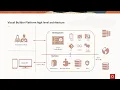
i'm here to talk about oracle visual builder studio and give you a product overview today visual builder is what you use to build apps it is a the term has been used rapid application development low code high productivity it's a visual development environment thus the name visual builder in addition to creating applications visually in terms of laying out ui and creating connections it also includes now a fully integrated agile collaborative development version control and continuous delivery automation system as well so that's what i'm going to talk about today is what how you can use visual
builder visual builder studio within integration cloud to deliver your applications for your customers so kind of the really the three key use cases we see visual builder being used for as extending oracle cloud applications so this is actually very common for us somebody a customer has deployed an oracle sas application like erp or crm cx hcm and they need to have some additional functionality added i mean this is as i'm sure you've all experienced very common in the enterprise no sas application covers 100 of the use cases each enterprise is unique in some way and
so they're going to need either additional data objects or additional processes or additional integrations or additional screens to deliver that that new functionality or that extended functionality that they need on top of it so this is a very common use case the kind of the three ways people deploy applications this way is they either build a web app that they uh style and uh in the look and feel of the sas application and they embed it back into the sas application so it looks and feels like part of the sas app they can build completely
standalone applications uh web applications that can have a completely different look and feel match up data from a whole bunch of different data sources you can use tools like process and integration to add in other elements of their enterprise or their infrastructure and then also they can deploy mobile applications so this can be in the form of a packaged uh application that goes through an app store or more uh up-to-date technologies like progressive web application delivery so visual builder supports all those scenarios the other use case that's very common is people just need to build
apps this is very common in a departmental sense where you need something to you need to solve a problem a small very kind of unique direct problem you can build an application within minutes generally to solve that of course the more complex the the application the longer it takes and the more effort it takes around it but you know they'll say you need something to track expenses uh for your for your sales people that is something that you can build very quickly and easily to solve that very specific need i mean you have all those
deployment options available to you as well to deliver it and then another very common use case of course is using the ci cd tools and the devops environment to do project planning team collaboration as well as continuous integration integration continuous development automation so that would be running through build steps uh more packaging steps of automating essentially the process of taking an application from the development phase out to production into and pushing to multiple data centers and however it is that you designed or need to deliver the application within the oracle cloud so kind of the
key capabilities is that visual builder is completely cloud native some browser-based platform when you're working with it you're going to be primarily interacting through a browser with that said and we'll talk about this a little bit more later it is a environment that generates all standard source code and so that you're going to see standard javascript standard html5 css3 json rest these are all human readable text editable files that can get stored into a git repository so you could continue to work on that application outside of the browser by doing a local uh checkout and
working with those files any changes you make and you check back in when they get checked backed out in the visual portion of the development environment then that gets reflected in the environment so it's a two-way system between doing visual development and doing code development within the browser as well you can do some coding as well there's editors that are provided it's really easy to use we focused on making sure we're productive so things like doing ui layout making sure that the applications are responsive connecting up to services interacting with integrations cloud applications processes working
with backend logic all this stuff can be done visually and declaratively and again these tools generate source code that you can look at and modify so there's no black boxes necessarily that are gonna hide what you've done visually to generate um your application uh there's a complete life cycle that's supported so you could take it from inception of the project writing out your user stories planning your sprints tracking the progress on a sprint for example checking in in your applications doing your merge requests and delivering it through testing and through deployment and then back around
again so this is uh all the tools that you need for your complete life cycle of agile style development is there and available to you and because of our number one use case which is supporting extensions to sas applications we're fully sas integrated so we provide a cloud applications a browser that you can see through a service catalog all the business objects that are exposed by that sas service those are exposed through rest and we get that information by reading a describe file fa describe file if you're familiar with that format select a swagger or
open api 3 document these many of these fusion apps especially have very rich api sets so for example in cx you might find you know 200 business objects and within those you know hundreds of fields so you really have full access to access the information uh perform crud essentially on those objects and any other functionality that they've exposed through those rest interfaces so those of you that have been um following uh especially back to open world last year we introduced a new design system called redwood and i'm going to just touch on this because this
is kind of the future of where we're going particularly around ui design and ui experience and the reason why it's important is that redwood is a design system that we are going to be using internally and are actively using internally to deliver the next generation of fusion applications so as you're looking at your customers who want to do extension use cases where they want to embed back into the system you'll need to get familiar with redwood because you want that look and feel that's being delivered in these new applications so part of the design system
is we have it all well described and laid out it's not only how ui controls look in spacing and fonts but also some particular ux design flows and new navigation ideas that are being delivered through this we're also supporting various tools for designers not developers to design on applications using the redwood design system so that you can import those into visual builder and essentially have a design ready to go for your forms based on a designer's work now all this is being implemented in the javascript extension toolkit which is jet oracle jet if you're not
familiar with it is an open source project from oracle that's been around for a long time you could think of it as oracle's annular or react and it is the runtime framework with which we implement the redwood design system and so then you use visual builder to actually design the application itself and the visual builder studio you probably heard me mention the that term a few times now uh is a recent delivery where we combine visual builder and developer cloud so if you've been using developer cloud devcs uh visual builder studio adds in the visual
builder designer into what was previously known as developer cloud so moving forward developer cloud is now visual builder studio and includes the visual builder designer as a free entitlement to any oracle cloud user this then will get connected up to a runtime visual builder cloud service runtime which can be standalone it can be part of integration cloud and you still have the designer of course with integration cloud included and you could be part of a sas application as well so this was important for various use cases we had around supporting the future of sas applications
which i'll touch on again in a little bit but visual builder studio is a tool that you use to do your visual development for the web and mobile apps we're going to be implementing jet applications this is the tool we're using internally to build our new redwood cloud applications and this is the tool that the end users of oracle apps will use to configure the oracle apps that they deploy as well where we're going with this is that this platform is the next generation for oracle sas there's many of fusion app modules that are currently
being developed they'll be starting to be delivered this year they're going to be deploying with the new redwood design system and they're going to be supporting all the features that we we touched on which is the ability for you to extend those in standalone applications or mobile applications as well as for their end users to be able to configure and update the application directly within their sas application so this gives the business user now the ability to modify the sas app as they need to to work with it it's similar to the way lightning uh
works on salesforce and that extent where non-developers can have some control over the look and feel or the amount of data that they see within a particular view within the sas application but clearly those aren't the same resources that are going to be building standalone applications or mobile applications that's going to take a developer this enables visual builder studio to be invoked directly from the sas ui and it builds in all the ci cd to enable the it team that's deploying the sas service to have the governance over those changes if they want to push
them back to a broader set of users or allow a single user to make those changes that they need to as well so it's really a new way to make future oracle sas applications very extensible for the end user customer but all that leads to a big opportunity and capability for oracle partners to deliver sas application extensions having a full-fledged development environment and devops environment available to them so the way that we deliver on this is we provide declarative tools to drive productivity when you think about rad tools of the past generally those were about
laying out ui but there's a lot more that you can do visually to make developers more productive including things like page flows dealing with actions or events uh in a visual way this is how we visually deal with an event let's say somebody presses a button that's an event that event calls this action this action can lay out various things that it can do it can call a rest endpoint it can provide some logic and we'll show an example of that here in a minute you can also integrate with any service visually so when you
want to connect up to any rest service you don't have to write code you don't have to use postman necessarily you can do all this through a visual interface within visual builder which means you can define your connection to that service you can test it within your environment you can provide all the headers and request layout and payload as well as your manager response as well all within the environment and visually and then finally we have in our run time a very convenient way to deal with data that you want to have that's local just
to the application so some data may live in the sas app some data may live in other on-premise systems that you can get through an integration but some data you may want to keep local to the application and this is where business objects are going to be useful so business objects are just tables you define a name and some fields and their types and then you start working with them um we provide rest interfaces full cred rest interfaces to those so that they can be used and integrated by other systems so for example process cloud
can easily work with business objects as a persistence layer to get access to the data that they need that it needs to work with throughout the process as opposed to having to pass all that data in to the process when you first started so that's an optional way to work with that data so full-fledged development environment using modern standard languages providing full access to that source code so that you can work with it manage it in a git repository and automate it through your development and deployment so the ci cd platform then provides all the
tools you need to plan code build test release and deploy tools like issue tracking managing and executing sprints team collaborate collaboration features like confluence abilities or wikis get get source version management so you have a full git repository us available to you and the ability to define ci cd pipelines and there's a lot of nice pipeline actions that are built in for you to for example deploy to the oracle cloud but also you can always have access to a unix shell you can do anything you want to within these ci cd pipelines i want to
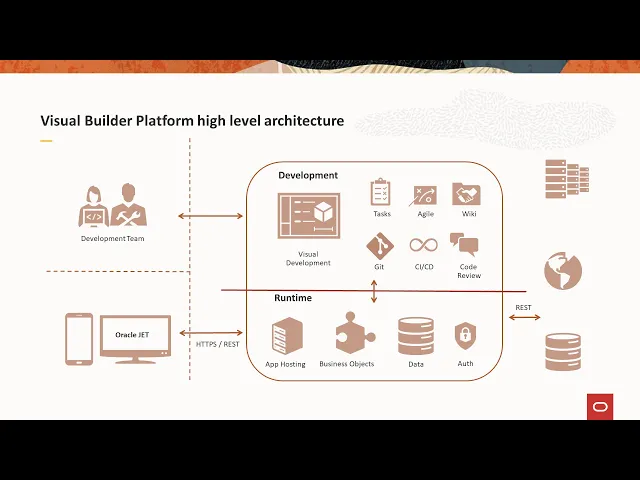
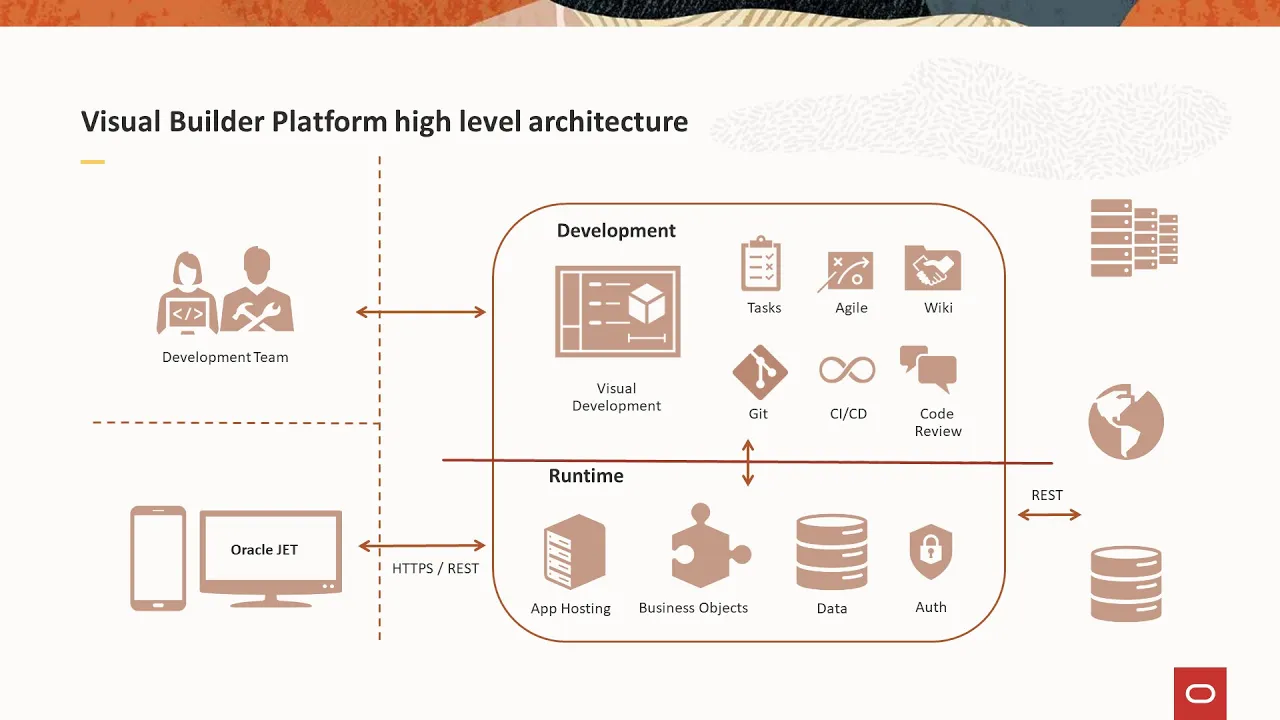
talk quickly about the architecture so as a developer you'll be interacting with the development environment so let's for example we're using visual builder studio let me start by saying visual builder cloud service which has been around for several years is the combination of this development and run time so this is what you also get today in integration cloud you get a development environment and the runtime and so what we've done is we've separated the development and experience from the runtime now we're not getting rid of that if you have visual builder cloud service you'll still
get a designer but this allows you to now have a development environment that can reference many different runtimes so depending on where you need to work with you may need to work with the dev environment move to a test environment move to a deployment or production environment and you can do that all within the same designer and you can manage things like the changes to the services that you want to connect to as well so it makes it a much more flexible uh environment and experience overall so you'll be working through the browser to interact
with all these different features the development environment interacts with the runtime through rest the runtime provides app hosting it provides the business object layer which you can also build back in logic into access to your data and an authentication proxy oops let me go back there so this is really important if you're doing oracle sso for example uh so it supports a bunch of different flavors of authentication oauth basic off a bunch of different oauth flows as well as oracle cloud login and when you use oracle cloud login what that does is it enables single
sign-on and identity propagation directly to uh the oracle sas applications in particular you can also um work with your integration cloud off which can then um work against those services as well so you have many paths that you can take to get to your uh to your service and at the end of the day we the visual builder runtime works with rest so we don't work with soap um you know there's other technologies that are out there but rest is our lingua franca for working and accessing data throughout the rest of the world all the
interactions the designer has with the runtime is through rest as well so the runtime is fully rest enabled you can get access to any of those features through rest as well when you deploy your applications your end users will interact with that runtime through a secure channel using rest calls back to that runtime and that's true for both web apps and mobile applications as well so before we get into the features maybe what i'll do is just do a quick demo um to give you a idea of what the experience looks like so here we
are in integration cloud and you'll see of course your processes and integrations but you'll also see visual builder so if i click on visual builder here now i'm into my environment i can build new applications i'm going to build go into my partner demo and this is kind of the key things you're going to be doing you're either going to be connecting to data through your local business objects or through service connections you're going to be creating apps either a mobile app or a web app and the distinction there i'll touch on web apps are
responsive down to a mobile form factor but the mobile app approach allows us to uh include more mobile specific experiences so for example uh defaulting to a list scrolling list as opposed to a table in a web app because obviously makes more sense on a mobile device using things like swipe to edit um having different navigation type of drawers these are all very mobile specific experiences and with web apps um unlike mobile apps or i should say mobile apps unlike web web apps you're going to want to sometimes package those in buildpoint through an app
store and you can also take mobile apps and deploy them as a progressive web app and then finally with artifacts we've done some specialized integration because there's such a a common usage pattern with both process and components so components are how you get new uh ui features into your environment we use the standard web component i should say the web component standard so jet uh has been on the forefront of the web component standard we enable uh web components to be easily built and shared and so this is a big movement within oracle particularly when
we're building our internal sas apps to do more sharing across the board so for example i could take you know something like content and experience and rather than me having to build ui that talks to the rest interfaces i could pull in a content and experience component that gives me a file picker that is able to go through my uh content and experience repository and i can just drag that onto my page and work with it so it's a lot more of in the vein of trying to provide a a visual experience to working with
those types of features and then of course process here's an interesting fact the majority of the visual builder usage in the oracle cloud is from integration cloud and that's because those customers in addition to having to build user interfaces um need to deploy develop and deploy custom processes so this is a very common uh use case and one that we felt needed a kind of a heightened uh integration experience and visual builder to address so that you can work with processes that way so if we go in here let's start with business objects real quick
business objects can be created uh by hand i enter a name and add some labels let's call this one task and then i can start adding fields so maybe i have a name and i have a due date um so once you've created this a couple of key things happen um one you can work with the data here this data can be um sequestered to development staging or live within the oracle or the visual builder runtime it can also be exported or imported through csv or excel spreadsheets we also have an excel front end that
you can use to work with it directly we also generate crud endpoints so you have your get for reading you have your post for creating new ones a patch for updating and delete for deleting your object so these are all now rest interfaces that can be used by other applications to interact with those visual builder business objects the metadata that describes those apis as well as the location that data can be accessed through these different staging areas you can provide security so you would have roles that are set up and for each of those roles
you can say for example authenticate you authenticate users can do all this anonymous users only want them to be able to view this information and then you can start creating those data security rules based on the role that you want to access to that and then finally you can create back-end logic so these are business rules you would create a trigger let's call this approved task and you want to do it before a insert maybe and now you have a visual way to look try to get some conditionals so let's say execute conditionally and i
want to add a condition which would be if the due date is you know after a certain date let's just pick a date then i want it to take an action and those actions can be working with those these business objects you can start a process you can perform email you can write custom code we use the groovy language this is the same runtime that our fusion applications use as well and you can also do other types of business logic back here but at the end of the day you can always go to pure groovy
and write anything that you want in the back end here so let's move on let's talk about processes real quick so processes it will read the available processes to me from the integration cloud that i'm working with and i'm able to create a alias to that so i've done one already called expense approval up here if we look at expense approval you can see all the information about working with the process through rest if you want but we also make it really easy to do this um directly from within the environment which we'll touch on
here in just a moment um let's look at service connections so service connections you have three types either you're selecting from a catalog you're defining by spec meaning you're looking at a swagger or open api three file or you can go to any kind of just endpoint so we'll start with the catalog and there's two types that we provide catalogs for one is integrations so any integration that you created a package for i can uh import and work with in this environment so we'll just pick this hello world one here and then i will also
look at the oracle cloud applications so hcm erp cx it's going to go out and read that describe file to show me all the business objects that i can work with in that environment and it's a huge list so it takes a little while to read that file and provide it once you've created that definition then visual builder can quickly call those rest apis either as part of an action or as part of a javascript that you have in your application so i've already imported one let me go look here and show it to you
this is the crm resting api i've imported the accounts business object so you can see all the different things i can do there i can do crud operations and i can run assignments as well and there's a bunch of lovs that are brought in as well that are this business object is dependent on i mentioned then that you can go and test these things but first you know if i want to go add an end point this is going to go back out and read that static file again to bring back all the business objects
i can work with and again this could take a little bit of time so we'll just skip that um but i can also go into my endpoints like say for example the get endpoint um i could see what my request looks like in terms of headers i can add any kind of static or dynamic header that i want i can set up parameters i can add a body if it's a post you're going to add a body a json body i can see what my response looks like now to get the response i need to
test it so what i'm going to do is i'm going to send my get request and here's the response so now i have my response saved and i can start working with it so let's build an app and work with it now in my web application i'm going to call this um accounts and i'm just going to quickly do two examples to make it very quick and easy i'm going to drop a table in here and i'm going to add data now this data can be my business object can be from the process it can
be from the crm it can be from the ics integration that i integrated in this case i'm going to do my account and i'm just going to pick a couple of fields maybe let's get down to organization so say primary contact name and email so this goes out makes the request this is a live request that's happening in the designer uh to bring back that information and um show it here in the ui um so the other thing i quickly wanted to show now let's say i wanted to run a process so what i would
like to do for that is i need some type of event so i'm going to add a button and in this button i'm going to ask it to approve an expense and what i'm going to do is i'm going to attach that event to an action so now this is the visual designer that we get for dealing with actions now what i want to do here is call a rest endpoint or actually what i want to do here is start a process but you can see in the actions you have many things that you can
do visually you can always go down to javascript by creating custom javascript and calling it as a module function but you have other things like managing photos and other things but here i'm going to start a process let me select the process and i need a couple of parameters so i'm going to grab my user id and i'll just grab my user id for this one so now the only last thing i'd want to do is to make sure that this worked i'll fire a notification if it worked approval sent and this would be a
confirmation so if we run the application now we will be able to hit that button approve expense and this is going to go out and start that process and now i'll have a task waiting for somebody to approve based on what i did in my process in the back end so a couple other things i just wanted to point out here is um this is where i would connect to my devops through a git repository but i would link my oracle git repository and then i would be able to pull a branch i would be
able to make my changes i could then push my branch or i could diff to see what the changes are before i push etc back in the visual builder studio what i would see is a merge request come through and so um as a particular role that can approve merges i would review it i would accept it and then i would push it into my main branch and then the next build through ci cd would deploy that feature out to whatever my automated deployment is set up to to deliver to and so in the last
four minutes here i just want to quickly cover mobile applications so this is accounts to go and we're just going to have accounts in here we'll get rid of these other two and we'll have a list instead of a table in this case so although we provide different ui design experiences for mobile versus web all of the service connections business objects components processes are all shared between those so when i go into here i can add data and i see all those same options including the accounts object and again we'll do primary contact name and
email okay so now i want to deploy this application so i have a couple of deployment options um in my settings for my mobile app i can create a build configuration this is where i would add an android or ios configuration so for example if i was like doing ios i would have to provide my developer certificate and my provisioning profile so this is the same thing that you would do if you were building a package for the apple app store we do the build for you but we need these uploaded in order to do
that build for you on the back end so that's how you would deliver a packaged application for a app store you can also add any cordova so if you're doing uh something that's unique to with hardware that's not supported by the browser so the browser by the way on mobile supports things like geolocation local file storage camera access you can do quite a bit with those features but sometimes you need access to some specialized hardware or a feature that isn't supported by cordova yet or by the browser so you'll need to use a cordova plug-in
this is the pet the architecture that we use to build our applications so you can download the the cordova source you can add your plug-ins that you need maybe you need one for augmented reality for example um and that is the the only way to deliver an augmented reality experience is through a cordova plug-in that provides then javascript that you can work with inside your application that's going to call the plug-in and that plug-in is going to call the native apis to implement the feature um so then you would upload that and you will be
able to build against that template instead of the standard template that we provide and lastly you can enable a progressive web app if you're not familiar with progressive web apps they're great they're a wonderful way to kind of get around the challenges of app stores so you don't have to go through an app store with the pwa which means if you want to update your application you don't have to push changes to the app store all the time you can just deploy your changes and the next time the app is run the customer will experience
the update but what's also nice about pwas is that they can be installed onto your application tray and look and feel just like a native application so when someone goes to um to install a pwa basically the way it will work is let me build my app here real quick is we'll give you a a qr code which points to a url that url can be accessed by any mobile browser the mobile browser then will since it sees it as a pwa will ask the end user if they want to install it to their home
screen and once they do that they get a icon on their home screen when they click on that icon the application loads uh with cached files so it's a very quick load it doesn't have to go fetch a bunch of files to load and it removes the browser chrome so it looks and feels exactly like a native application from that point forward so this has been a very popular feature as you can imagine