what do you do when your code is so fast that it's running slow okay just before we begin can we talk about something this game really needs a name as great as project stockhome is as a general code name I feel like it really deserves something better I've been trying to think of one for years but I finally think I might have a candidate so here's my proposition that I feel reflects the game Direction quite nicely why don't we call this game Daydream I'm not committing to the name yet I'd like to hear what you
think about it first so head down to the comment section if you'd like more details on why I'm proposing this name and perhaps you could leave some feedback anyway as I was [Music] saying your ears did not deceive you in that introduction our code is literally overperforming you see we spent so much time optimizing our chunk generation that we've ended up generating thousands of chunks in a single frame that's thousands of chunks we now need to send to the GPU which is no noticeably slowing our frame rate down so there's two things I'm going to
do to fix this problem first I'm going to optimize the code which will let us send more chunks every frame and secondly I'm going to reject rendering as many chunks as quickly as possible which makes room for the chunks we actually need to render with those two changes we should be able to make this boxal engine run like grease lightning let's start with optimization if you remember the meshing video you'll know that the algorithm is very simple for each Chunk we visit every block and if any of the blocks faces are exposed to air we
emit vertices to form a face that's the entire algorithm and it's both simple and slow there are far smarter ways of tackling this problem specifically there's two techniques we can employ one of the techniques will reduce the time we spend generating each mesh while the other technique will help reduce the amount of data we send to the GPU with the nice side effect that the GPU will have less data to process every frame we'll get to those techniques in a second but first we have a fundamental problem those techniques are designed to work on identical
voxal but I'm not sure if you've noticed but our voils are very not identical the consequence of this is that the vertices of the mesh carry a bunch of different data types that can't be neatly optimized so our first task is to clean up the vertices that means getting rid of things like block type from our rendering code but wait if we're not sending block type to the GPU how does it know what texture to render I'm glad you asked the trick is to send the block types directly to the GPU only using the mesh
to define the outside shape every single chunk now has a 3D texture which stores block types as different colored pixels when the GPU renders the chunk mesh I've told it to look in that texture read the color of that pixel at that 3D location and use that to figure out what block we're currently drawing the end result looks identical but with this new representation the mesh only contains shape information which makes it super easy to optimize because we've separated out the concerns all right I've teased you long enough what are the two techniques the first
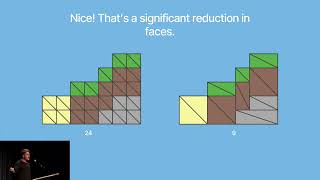
one and you've probably heard of it before is greedy meshing this is a fan favorite of Indie devs worldwide because it's very visual see this flat surface wouldn't it be nice to merge all of those small triangles together to make one big surface that's greedy meshing and Beyond looking really nice and debug mode there are actual reasons why people should implement this the first reason is the obvious one less vertices means we're using less Ram to store this mesh and when we send it to the GPU we're sending less data over the wire which speeds
up the transfer in addition we don't want to send too many vertices through primitive assembly which is the part of the rendering process where the GPU is connecting vertices together into triangles where we can it's better to shade things in rather than model things in it's the reason why textures are used in the first place we don't want to choke the GPU by forcing it to assemble more than it really needs to but there's a second more subtle reason why this is a good idea look off into the distance notice how it just turns solid
green the triangles often the distance are incredibly thin when viewed from this perspective which is one of the worst things you can do in computer Graphics you see when the GPU renders a triangle it actually renders a small region outside of the triangle that never makes it to the screen there are good reasons why this invisible region exists but it means if you have a bunch of small or thin triangles next to each other you'll be rendering those invisible regions multiple times it's basically invisible overdraw and you can waste a lot of time doing this
it's so bad that Unreal Engine 5 which has a lot of small triangles basically introduce their own rendering process to get around it luckily we won't have that problem because we can make our triangles bigger so we can avoid this issue so that's greedy meshing and every reasonable developer will Implement something like this unless they have some other concern blocking them from doing so most of often it's a performance concern because it can take a lot of extra computation to find valid triangles to merge together that's where the second technique comes in called binary meshing
this is the smart one that nobody talks about if you can represent your chunks with just solid and air blocks you can represent them with binary this unlocks a whole world of super smart optimizations because binary is the language of computers so if you represent your chunks with binary numbers then the computer gives you a bunch of specialized instructions for playing around with the bits for example you can count the number of ones or zeros you can move everything to the left or to the right you can flip all the bits and you can even
merge them together using Boolean logic so why would we care about this other than having a cool party trick well think about the code we wrote for discovering exposed faces we visit every single block in sequence which is fine so far but then we jump around to the Block's neighbors to see which ones cover up this block that jumping around is bad because computers like doing things in a single linear sequence and by jumping around like that we're breaking linearity which means the computer has to to work harder to find all the information we're asking
for rather than efficiently serving it up on a conveyor belt if we can just get all of that information once and process it in one single go then the computer can just serve the data in one go which is super fast so let's try that the way this will work is that we'll represent a stack of blocks with a bunch of ones and zeros one means there's a block there and zero means there isn't we're trying to find all the faces that are exposed in a certain direction let's say all of the left facing faces
reading these numbers from right to left we're looking for all of the places where we go from a 1 to a zero so let's copy all of the bits and shift them to the right by one place each number in this new string represents the block to the left so a zero means the left block is air and the one means the left block is solid the case we're looking for is when the left block is air so let's flip the bits so that one represents that condition being true and zero represents that condition being
false finally we can formulate this as a Boolean statement we want the current block to be solid and the left block to be air this is true when both bits are one so by adding the bits together this leaves us with what we're looking for all of the positions that are solid with the left block being air are represented with a one and all other blocks are represented with zero that's the super smart way of finding exposed faces the only thing you need to do is get your chunk into a binary representation that lets you
do that in my case I created this binary face stack representation it's basically a big array that contains the same data duplicated six times one time for every direction that faces can be exposed in for each of these directions we store rows of ones and zeros representing rows of blocks along the different directions these rows are stored as integers which let us do all of the bit manipulations using raw instructions once we've done it for all six directions which is incredibly fast the six versions of the data will represent the six views of the chunk
the six directions that the faces can be exposed in all we need to do is find the ones in those strings and turn them into faces job done so that's binary meshing and just with that alone we've seriously cut down on our render time that's because we're playing to the CPU strengths we access the blocks of the Chunk in a linear fashion we represent them in a format that's comfortable for the CPU and we use a few strategic moves to get the result we want however we've done absolutely nothing to change the format of this
mesh so it's time to revisit greedy meshing if you're curious about how greedy meshing works I have a very visual explanation over on my technical blog which I'll link down below but the 5-second explanation is you take each face you expand it sideways until you can't anymore you expand it sideways until you can't anymore and then you make the face rinse and repeat for every face you haven't covered yet see what I mean when I say it's very visual so that's all well and good but how do we combine this with our binary representation right
now we're basically presenting stacks of Faces in binary the faces are exposed along the row so we have no idea what the other rows look like sure we could look them up but we really don't want to be doing that in two directions remember linearity so if we're doing something we just want to go in One Direction so we're going to need to Swizzle our data that is we need to turn it around so our binary strings are going across the faces rather than going through them that's easy enough to do so I'll just leave
the code here roast it in the comments below but once we've done that we can take a second look at our problem using this new binary face rows representation in this representation bits inside a single string represent flush faces appearing in a row next to each other and looking at consecutive bit strings tells us about the flush faces in the other direction now we can do some magic what we're going to do is we're going to take the first bit strings and we're going to iterate over every region of consecutive ones we'll extract this region
into its own bit string and we'll compare it to the next bit string if the bit string has ones in the same position then we can expand the region one step into this direction so CLE clean out those faces from the bit string and repeat with the next one once you've done that as much as you can you now have a 2d region of combined faces you can take that region and output it as one big face now just keep on doing that until you've gone through all the bits in all the strings that's how
the greedy meshing works and with that we now have a complete binary greedy measure with some great performance characteristics as before we're playing to the CPU strengths and because our data is so uniform now we can cover a lot of ground very quickly with this technique okay in this case quite literally the ground is very covered now and what you'll notice is that this is completely invisible to the player as far as the player cares they're still just placing blocks and that's only possible because these big faces can read different blocks across the surface of
their faces and show the different textures as needed our render process is behaving a little better now we've brought down the milliseconds but it's not going to be enough on its own to hit our frame rate target consistently and we shouldn't be surprised about that fact a lot of the chunks that we're pushing to the GPU right now aren't actually visible they're either completely empty in the sky or they're completely intmed underground we don't want to generate mesh or Texture data for chunks that won't contribute to the final scene and we definitely don't want to
issue draw calls for them either so our next step is to build a rejection process that focuses our rendering resources on the chunks that matter so how do we do this let's start simple by keeping a counter of how many visible blocks there are in every chunk when a block becomes visible in the chunk for example when we replace an AIR block with something solid the counter will go up and vice versa later on we can use that counter to immediately determine if a chunk is empty empty chunks don't need meshes block types or Draw
cools so we don't have to consider them at all with this optimization alone we save a significant amount of performance because if you think about it we've basically halfed our workflow another easy win is to check the number of vertices in every chunk renderer if the chunk has no vertices in its mesh then drawing that chunk will do absolutely nothing and we can completely skip the draw call you'll be surprised how much performance you can save this way so it just goes to show that you need to be care care f with GPU code now
what about those underground chunks that appear behind everything unfortunately that's less simple we could try and say any chunk that's completely surrounded by solid blocks won't be rendered but our number of vertices test already basically does that so this optimization would be useless and anyway the big problem with underground chunks is actually to do with all the caves under the ground that will be rendering triangles you never see what we really want to know then is whether we can look through a chunk in a certain direction we could use that to inform our rendering by
not drawing chunks that appear behind other chunks whether they have a bunch of empty space in them or not to implement this consider the six faces of a chunk let's say you're entering the Chunk from one side you'll take some path through the chunk and perhaps exit from Another Side given the face you started at what other faces could you have escaped from or to put it another way which faces are mutually visible through the chunk the most General solution is simple for every block on the starting side Start Spreading outwards like a floodfill and
don't stop until you've taken up as much space as possible if you touch any other sides of the Chunk in the process you can safely assume that those chunk faces are mutually visible from the starting face otherwise something blocked you from getting to the other face so those would not be mutually visible now flood filling is not a cheap solution and requires a lot of processing but there are things you can do to help with that the simplest as usual is to check if the chunk is empty an empty chunk has no obstacles that could
get in the way of visibility so this is by far the cheapest check you can get other checks include looking for missing blocks on the corners or edges of chunks where two or more faces meet at the same place it's easy to test for this and if you find any missing blocks you can assume all of the nearby chunk faces are mutually visible because they could travel through that missing block to escape through the other face these checks take on the order of micros but they can save hundreds or even thousands of microsc in practice
so it's well worth doing once we have this algorithm in place all we need to do is calculate the mutual visibility for all six faces taking advantage of the fact that visibility goes both ways if face a can see face B then face B can see face a there's no need to do the check twice then we can stall this as visibility data in the chunk and reuse it indefinitely so long as the chunk doesn't change shape with this data we can easily step through the world chunk by Chunk in the general direction we're looking
we can easily figure out what chunks are actually visible from our perspective because this will stop us from going underground we don't have to consider those chunks at all so even if they get marked as changed we don't have to do anything about them until we can actually see them so this is this is all fantastic but we've kind of glossed over an important detail of this calculating visibility is still kind of slow so we'll likely want to do the calculations in the different thread how do we deal with the chunk while we're calculating visibility
as with many things it really depends if this is the first time the chunk is being loaded in then it's trivial just do the visibility calculation as part of the loading process if it's not the first time then we need to get smarter If all we're doing is adding blocks then it's pretty safe to just reuse the data res is because if stuff stays visible behind the chunk for a bit nobody's really going to notice the problem is really about dis occlusion we want to make sure you can immediately see behind a chunk when you
break through it but we won't know for sure that you've broken through until the visibility data is finished there's ways of predicting this but my solution is more pragmatic just make sure to prioritize calculating visibility for chunks that are nearby ideally processing them immediately most people won't be able to tell hello everyone I'm Dan from the editing booth and I'm here to talk a little bit about the generate cases which is something I did not cover in the original video but I want to mention it here because there's a really good algorithm I'd like to
investigate in the future to specify the problem what we're essentially doing right now is a flood fill from the camera where we're navigating through visible paths in order to figure out which chunks are currently visible in most cases this is fine so long as you are only stepping in directions away from the camera however there are still cases where even if you're stepping away from the camera you can still step around obstacles and create these very bendy paths that just wrap around things basically defeating the point of this entire optimization by introducing overdraw again when
I was reading the prior art on this including what Minecraft's own Bedrock engine developers have written on their blogs over the years I noticed that this was an unsolved problem and they were investigating certain solutions that turned out to not generalize to 3D so generally I thought this was an unsolved problem and I was fully prepared to just not address it however it turns out there are actually solutions to this that are just so obscure that basically nobody in computer science cares about them introducing grid based visibility a technique that serves as an alternative to
raycasting giving you an approximate heuristic of how uded a path is to explain it to the best of my understanding imagine a grid of nodes and you want to find the shortest paths between the top left node and the bottom right node and you want to enumerate all of them now some of these parts will go all the way out of the way some of these parts will go nice down the diagonal and some will just be somewhere in between a little bit lumpy perhaps a common property of all of these paths is that they
will all have the same distance which is guaranteed because they're all making optimal moves they're just making them in a different order however that doesn't mean there's nothing useful we can say about the differences between these paths specifically an observation to be made is that most of these optimal paths will follow a similar path one that approximates the true optimal path only very few of them will go super out of the way in order to access the same node that means the nodes that are on the extremes are less likely to be accessed By Any
Given path compared to the nodes on the the diagonal which is closer to the true optimal path essentially you can statistically show where the optimal path would probably lie just by using some statistics about which nodes are accessed pretty cool right now let's introduce some obstacles to this node Network and as you can see the number of paths that each node intersects with has gone down for certain nodes based on where the obstacles are we know that there's some spatial relationship in this graph between where the obstacles are cut and how many parts are accessed
by a node but what exactly can we say about this I'd like you to notice a few interesting things about this operation firstly if there are no obstacles Upstream of a node then it is guaranteed that there will be perfect visibility for that node however if there are obstacles Upstream then some of the paths to that node will be cut if the obstacles are closer to the optimal path then we know that there are more paths going through there so those paths will be cut causing a larger effect on the number of paths accessing that
node whereas if the obstacle was off to the side fewer paths were going down there so those fewer paths being cut will have a smaller effect on the number of paths touching that node the end result of this is you get these kind of pum where you can see that if an obstacle is off to the side you get very lightly shaded whereas if it's closer to the direct line you get a much Deeper Shade that's essentially representing that concept of the far away pods versus the pods closer to the hot optimal path and as
it just so happens to turn out if you threshold this value with 0.5 what you get looks an awful lot like direct visibility it's it's not exact this is an approximation but it's a really good approximation and it turns out you could probably just fudge this value a little bit and get rid of all the errors that you care about so that's a really cool algorithm and I just wanted to mention it here because Trey sent it to me and I immediately just lost my mind because this solves so many problems and it's literally a
solution I didn't know existed however as cool as this algorithm is the actual implementation of it will have to wait for another day I haven't had enough time to play around with it and I'd rather get this video out than have it play even longer so that I can play with a new algorithm that maybe might not even work that's all I wanted to talk about back to Dan in the past now with these two changes in place our performance is looking quite incredible the stutters are gone and compared to older versions of the game
without infinite loading this new version actually performs substantially better with over 30% higher FPS not bad for a single video with these performance improvements under our belt we're finally ready to tackle more complicated world generation without stalling our frame rate doing proper world generation is far from Easy in fact everyone I've seen on YouTube does at least one thing inefficiently most implementations are super hard to run in parallel and sometimes it doesn't even produce the same results every time but that's not going to be stockhome I'm going to spill the beans on techniques you might
never have seen before and we're going to write the most robust World Generation code on YouTube but while you're waiting for that video why not brush up on the game design of stockhome so you can follow along when I talk about what environmental features I want to generate




![Doubling the speed of my game's graphics [Voxel Devlog #18]](https://img.youtube.com/vi/P2bGF6GPmfc/mqdefault.jpg)