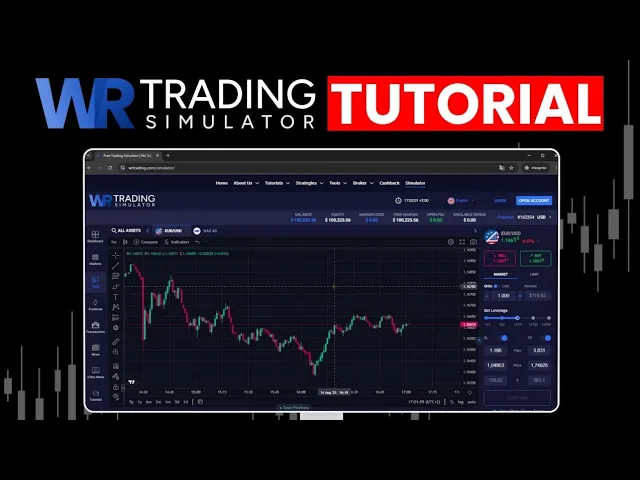
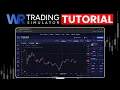
In this video, I will explain to you how to use our trading simulator on WR Trading. I will show you all the functions you will need to trade in a virtual trading account without risking any real money. Let's get started here.
Congratulations, you made the first right step in your trading journey. A trading simulator is always a good thing to try out new strategies, to test new knowledge, to learn about the markets without risking real money. Our trading simulator here on WR Trading, you will find the simulator on the menu right here directly always on our website or just Google Wring Simulator and there you will find this trading platform.
The virtual balance is topped up $200,000. You see the directly the virtual balance here and you are able to create an additional account on this platform here on just on clicking on open an account or if you already have an account click here on login and you can log in with your trading account on the W trading simulator. I will explain to you now step by step what you need to know about the functions here on the trading platform and how to use them.
Let's start from the left side. the left side. This is one of the most important things here you can use on the trading simulator.
It's the market selection. You see it here. If you click on the markets here, this selection or asset selection is opening.
You can close it by this X to have more space for the chart. But if you want to open a new market, you click on the market list. And here you see different markets.
They are listed by hot assets. And you can also type here an asset name in like Bitcoin for example and the asset will show up or you can use a stock like BMW stock and you can find this asset here. If you go on this menu items here and scroll around you will find the different asset classes like crypto different cryptocurrencies.
We have the currencies, forex trading here. You can choose over 30 different currencies. You can choose different stocks.
You can choose commodities like oil and um some metals. You can choose indices here. Most popular things here are the NASDAQ 100, S&P 500, the big American indices.
And you can all find these in our trading platform here for free. Another important thing is that these assets you see here on the platform, these are real market assets. So the price is real.
There's no delay from the current market data. If you compare this markets here, the market prices to different other trading platform. It's the same prices.
So we do not delay any market data. And you have the current prices on our trading simulator platform. So here on the left side the market selection.
This is a very important feature of our trading platform. Then you see more things like trade. If you click on this this menu will close and you can start to trade.
If you go here you see that your positions and different other stuff news like video news or tutorials. But yeah, they are not so important for trying out trading here on the platform. Now I have chosen the ducks.
Let me choose another asset like um we can we can choose the Euro dollar. It's one of the most important and most popular asset to trade the Euro dollar high volume based currency pair euro versus dollar and you can trade it here with leverage. On the upper side you see your account belongs, you see your margin, you see your equity and your profit and loss.
I think everybody should understand this. And now you here you see the chart. This is another important feature of the trading platform.
Obviously here you make your analysis and we have a lot of tools, ton of different indicators tools here on the platform. You can find them on the left menu here on the left chart menu. We have drawing tools like trend lines.
You can draw them. We have horizontal lines and some more. Just click here and you will find a bunch of tools.
These are more than 100 different tools to make an analysis on this trading simulator and you can use them for free. Also indicators or yeah more drawing tools like the Fibonacci retracement which is very popular. We have more drawing tools like rectangles, um, highlighters and if you like to make a note, you can do this with a text box.
So everything is here. Another interesting thing is this tool here. This is a riskreward tool.
So this tool is for planning a trade. You can plan your risk. You can you can plan your profit with this tool.
just um yeah manufacture it in the chart and you are good to go. These are the tools for trading on the left side and yeah there's everything you need for technical analysis and analyze the charts. Then here you see on the upper left corner you see the different time frames.
You can change the time frame of this chart. So it's set to 1 minute. You can but you can change it to 1 hour.
What does it mean? We see here different candles. And if we change this time frames here from 1 minute to 1 hour for example, the chart will change.
So it's because what the time frame it's depending on your candles here. And if you're doing a 1 hourly chart, that means one candle here is uh the duration with one hour. If you change it to daily, that means one candle here has the time duration of one day.
So this can be changed depending on your trading style, what you like to do. Do you like um yeah short-term trading? Do you like um long-term trading?
Here you can change the time frame. Then you also can change the chart type. You can change it to the to the line chart and some more.
But yeah, the candlestick chart is the best chart for more information points on the price. So these are the tools for analyzing the market. Then you can expand for example the chart that looks a little bit bigger and yeah I show you now how to trade on the right side here.
This is the most important thing the feature on the trading platform here is it how to trade on this assets and yeah you can buy and you can sell that means you can invest in rising prices you can invest in falling prices. So you can profit from both ways. If the price goes up, if the price goes down, you can profit from both ways.
If you make the right forecast and using the right direction here, just make the analysis and let's say, okay, this price here, it will make an reversal like this. And I say I want to buy. It's pretty cheap now.
I want to buy. So, I click here on the buy button. Then there's option of the market and the limit order.
The market order will transfer you directly into the market with the limit order. You can set up a price like I say I want to open this trade uh when it hits $2. Then I open the trade automatically.
This is a pending order. I mostly use market order for trading. Then you choose the units.
So that means the position size of your trade and you can change it also to lots. Lots is the most popular Yeah. uh position size here when you trade that just means one lot means 100,000 units.
So this is a trading language here and yeah you just need to know so but you can keep it on units. Let's say I want to buy 100,000 units of the Euro dollar and here on the right side you see the amount which I need for opening this position because this is margin trading. When you set up the leverage of 1 to 10 or 1 to 100 you see the amount decreases.
If I'm using more leverage here, now it's only $233. If I doing less leverage, this amount increases. So if I having more leverage, I can use smaller amounts of money to open a bigger position that's behind the leverage.
And you can try it out here. So I'm using 100 leverage, for example, and I want to open this trade. Then if we go below, there are options for the takerit and the stop-loss.
the stop loss. This will limit you the risk. It says if I buy here, if I buy here and the price goes down below there, for example, I'm out of the trade.
The trade will close automatically. Okay, this the other way around would be the takerit. If I buy here and I'm using a takerit on this price or I'm using a pip or an amount, then it will close automatically the order in profit and you are good to go.
So these are important features. If you have a strategy, please use stop-loss and take profit. Stop loss is more important to limit your risk.
And yeah, take profit also is important to to secure the profits. Yeah, set up the stop-loss, take profit. I have it right now.
And if we go below here, we see some more infos about the order like pip value, how much money is it, the leverage I'm using, the open price, the loss, the probable loss here by my stop loss would be $1,000 and the profit would be over $5,000. Now I place the order if I click here on confirm buy. So my order is opened here.
The trade is successfully opened and I can manage this trade also here. If I go below here and click on open positions, I see my current position in the market. And there you see the opening time.
You see the direction, you see the symbol, the units, that means the position size, the amount, that means here how much money I'm used from the margin. You also see here how much it is on the margin used and what is your free margin. So you can do whatever you want with the free margin.
And here you see the opening price again and the commission. No commission, no swaps, current profit and loss, stop-loss and take profit. Yeah, that's how to open a trade.
If you want to close this trade, just click on close trade and you will close your position. So I will do this. My position is closed.
So that's it. How to use our trading simulator on WR trading. Go to WR trading.
You're on the simulator. If you want to practice on simulated money here, this is the right way to go and you can learn there by yourself more about the financial markets.