hey everyone today I'm going to show you smart segments smart segments is a really powerful feature within n that allows you to group wallets based on criteria that you set to find it go to the sidebar and click on Smart segments as you can imagine to create your own segment you just need to go to new segment you can see all the different criteria that we have within smart segments here on the ad condition sector ranging from holding tokens to holding nfts and you can also exclude labels I think excluding labels is a really powerful
tool to use after you set the initial segment so that you can kind of curate it to find really interesting addresses for this example I'm going to look into AI as a wider Trend and I'm going to just pick out a few tokens in the AI sector to see what they're hold what these addresses are holding what else are they holding and go from there so we'll go to holds token and go to effect I'm going to set a minimum amount of $5,000 because I want addresses that are a bit chunkier and then I'm also
going to go to render which can find here and again I'm going to set 5,000 just Del it so what we're going to do now is just the segment and this will bring all the addresses that meet this criteria at this point now you can set dates to create different date ranges so you can find addresses that meet this criteria over a specific time period maybe before the the um AI narrative started to pump um but for this s example I'm just going to do keep it very very simple so what you can see here
is a bunch of exchanges and contracts this isn't as useful as I'd like it to be because I'm really interested in individual addresses that are catching narratives and that are making money binance isn't going to do that because they're in exchange so we're going to go again to add condition I'm going to exclude label and I'm going to go to contract exchange and mu now I just save that and it's going to update again and so while this data is loading um we can now start seeing these interesting addresses come through we see millions and
millions and millions and millions and so I have so many addresses right now I think the criteria that I've set needs to be changed so I'm going to go back here I'm going to change the amount here so I'm going to say fair because it's a over a billion dollars for da market cap I'm going to go to $15,000 here and so this is a really new feature that we added into your segments to make it really easy is that you can just adjust the criteria within there and then B we can adjust it without
having to leave the smart segment you've created so this is a point that we want to really emphasize when it comes to Smart segment is that when you're curating your group of wallets you can keep playing around the conditions to find something that's more interesting so we' managed to dial it down again we found this render so what I'm also going to say is I'm going to look into an interesting token just for the sake of this example I'm going to use the M token Pepe and I'm going to set a minimum amount of $1
and see if there's any interesting addresses here I'm choosing Pepe because I want to see AI narratives and also if they're holding any meme coins and the reason I'm doing that is to see how hot they are on trends the way that I use Smart segments is I often use it to try and catch Trends so whether it's the AI side of things meme coins I can group these addresses and then what we have is interesting feature called um smart segment profile which bues all these addresses together and then you can see exactly what they're
holding so as you can see here the wallets matching this criteria is now only 141 this could be quite actionable so what I'm going to do is quickly click through these and see if there's any interesting addresses already we can see smart money and we can see the net worth and also some of the work labels so we can see a degenerate robit depositor so maybe this is something that's quite interesting so you know what after flicking through this I'm going to say yeah the criteria here in this SM segement is really interesting so I'm
going to save it and I'm going to do name it so called it AI mcoin Trend and then going give it a description so I remember what this is for so addresses capture Ai and new points and press save so what you'll see now is that the status of this segment is comparing and then you'll see it soon turn already and so while we wait for that we're go to smart seg profile it you can see this here and now all this does it combines all the addresses that we set based on the criteria and
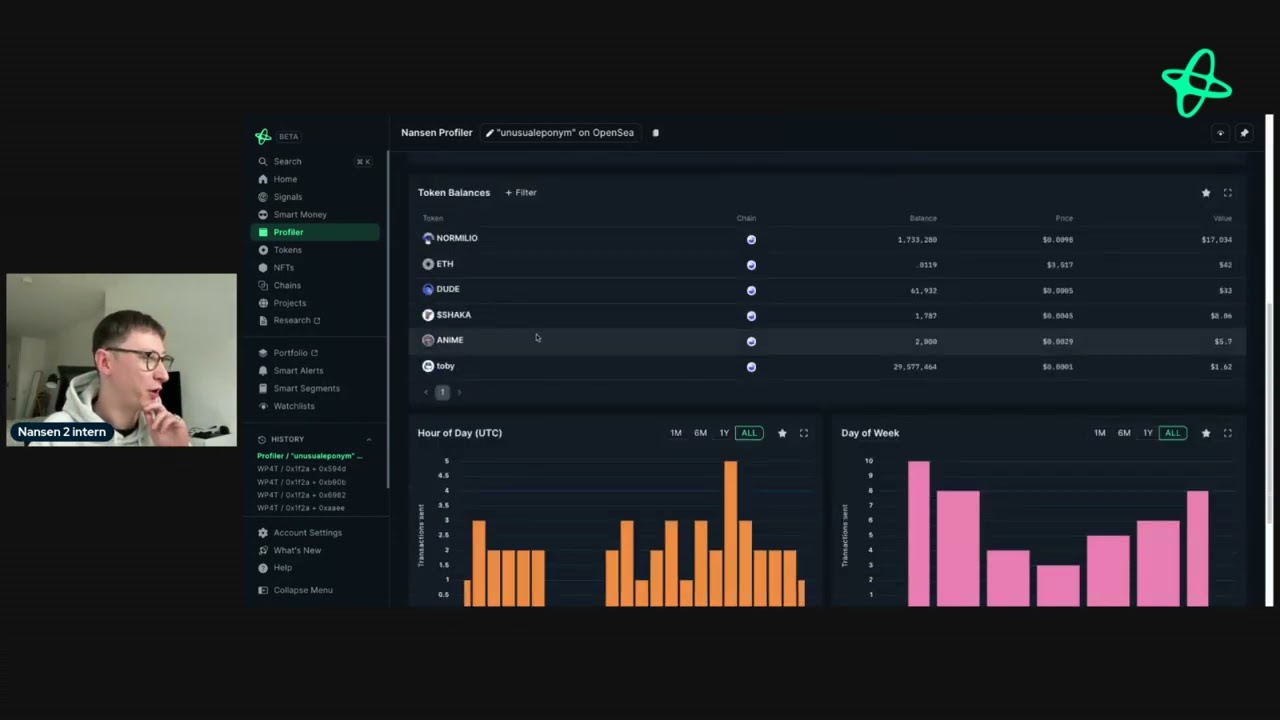
you can see that criteria here and if you wish to adjust it you can just manage the segment here so of these 141 addresses we can see in the past month their performance their top tokens and let's see if we can find anything interesting so what we can see here is the top token on ethereum is this token x c h n we can see ship we can see e we can see link and we can see other interesting tokens how does this look when we look at all the chains that n and supports at
the time of this video we can still see that each tokens remain to be the dominant ones here so we're going to see meme tokens we can see the AI tokens here which gaming tokens another AI token and from here we can just start filtering through to see if we find anything interesting Toshi which is a base me quties up here so maybe there are some addresses here that are buying this token and we're going start seeing how diverse these these addresses are so maybe there's something here that's quite actionable we can see the biggest
wallets in here we can see the counterparties so this would be the addresses that these addresses are interacting with maybe the these addresses that have been engaged with the mem coins also have other addresses so there's a wider section of basket of addresses we we can also see transactions and layout filters and these transactions that we see right now within the smart segment profiler will be based on all the addresses so we can see maybe the most active and least active and so while we wait for that to wait I think this is really interesting
piure especially within smart segments because when you can start seeing these addresses in real time making transactions we can then take a look into them and see what they're doing and then from there what I like to do is then set custom labels or smart on these addresses so I can stay updated what they're doing in real time so for this I'm going to go to ethereum and then I'm going to look at these trades so the time of doing this video the AI narrative is popping off so I'm really interested in seeing what are
there any address is buying or selling AI tokens so as we can see here there's an address that's moving some of this render to buy bit if I'm looking at some more tokens we're seeing that there's an transfer here which is interesting you know what the value of these transfers are varying and I'm really interested in the big transactions here so go to the value minimum value of $5,000 now you can see all the juicy stuff and so as you can see there's loads of transactions happening in real time we're seeing some active addresses moving
funds to bance or buy bit so let's take a look and see what this address is doing so what we can do is go through these addresses we can right click and then we can go to what profile for token to see the wallet's activity with um the token and just using this as an example we can try and find an address so I've gone to this active e millionaire and we can see that they've be sending funds to bybit binance and bybit we can see the cost Bas is up 85% we can see that
they're slowly reducing the position here so this might be a really good indicator for me if i h the token so what I'm going to do here would be to add the address to my watch list and say active be millionaire labels here I'm going to put the segment as the label so that would be Ai mecoin and then because the token that they're looking into is render I'm going to save that as label as well add the address to my watch list so if I were to look at render Holdings I can see the
who bought Who Sold or activity I can see these custom labels within nanson and recognize that this address is an address that I previously uh looked into I've set some labels and I can stay updated with it so that's just one way that you can use Smart segments the beauty of smart segments as a feature is that it allows you to curate your own Alpha and then take that Alpha for you to do some research find interesting addresses find Trends and get Edge in the market if you have any questions about how to use Smart
segements reach out to us on Twitter or email us at support len.






![#18 Jonas Gantenbein [Head of Digital Assets, Bank Frick]](https://img.youtube.com/vi/7EJ0QVHy5Tk/maxresdefault.jpg)