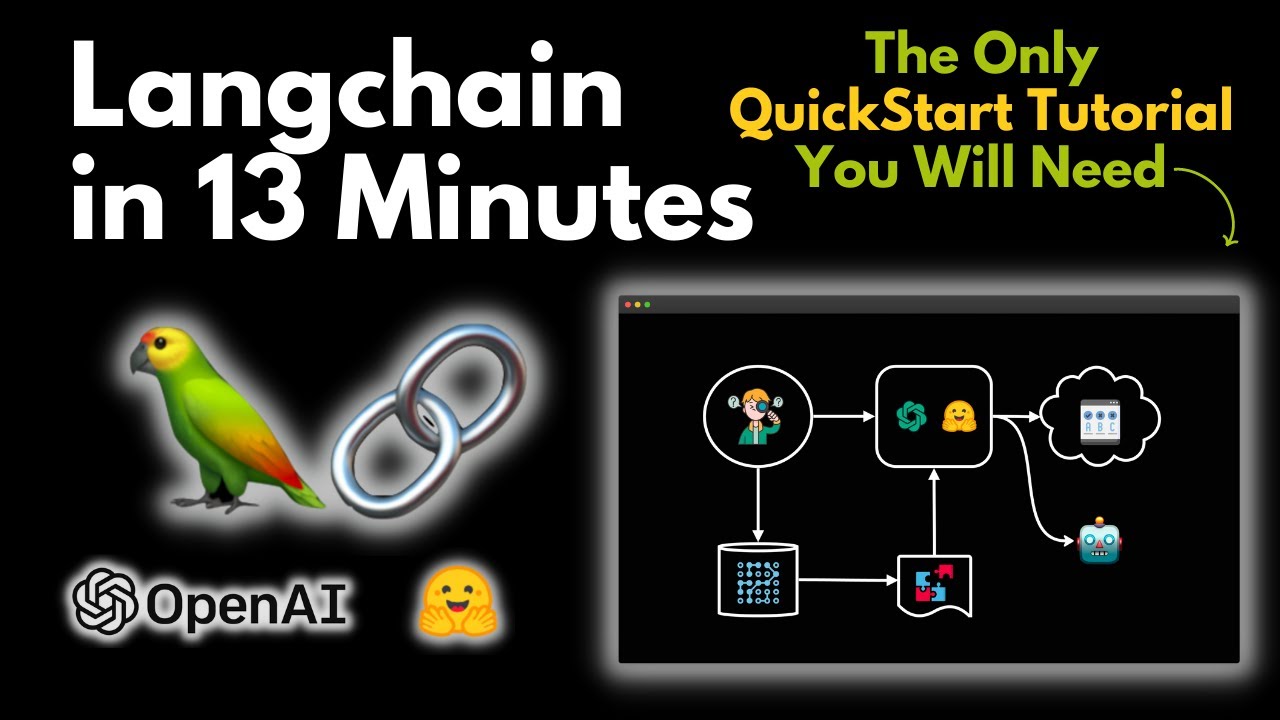
hi everyone so in this video I'm going to be talking a little bit about an intro to Lang chain and actually over the series of videos I'm going to go quite in depth about what you can do with Lang chain all about how different parts of it work and how you can build applications with this in this particular video I'm going to just start off by talking about why we want Lang chain and then jumping into a little bit about what it is and how we can get started with the basics of using it to
access large language models so first up large language models as apps so large language models are great at generating something new from scratch or via sort of a conditional generation so for example basically all they're doing is giving us probability distribution of the next token based on a set of tokens that we're putting into this and it turns out this is great for making stories for doing a whole bunch of different tasks only recently in the past year or so people have worked out ways to fine-tune these with rlhf and a variety of other sort
of add-ons in the sort of prompt space to get the best out of these kind of models and it turns out once we can do that we can get some really good results from these large language models the problem is that they still can't access the traditional software stack in a normal way so if we want to build like an app with one of these things we need some kind of way to interface between the large language model and the traditional software stat if we want to build things like chat Bots or something that uses
search or external data then often a large language model alone is not going to be enough a perfect example of this is the way that large language models are not storing state so each call to the large language model is individual if we want to have a conversation State going with the large language model then each time that we call that model we're going to have to pass back in at least if not all of the conversation we've had at least the key parts of that and that raises a whole bunch of challenges or do
we just pass it in verbatim which might be fine if the conversation only goes for a few rounds but if you've got a long conversation you're going to probably have to summarize it or find other ways to do this because the large language models have a very finite span of tokens that we can pass into these things most of these things are going up to sort of 10 24 2048 tokens that we can pass in some of the new ones can go much bigger and maybe this is something we'll see or get better over time
but it's still you know that's still a finite amount and if you wanted to do something with large documents with other things you need ways to think about how do we interact with the language model so what is Lang chain so Lang chain really is a tool or a framework that allows us to build fully featured apps that interact with the normal software stack it allows us to manage our use of large language models and prompts and then how we deal with both the language models and prompts it also allows us to integrate to the
traditional software stack like apis tools things like calculators Etc and then also things like databases and various data sources that we want to look things up on so often people ask okay why not just make our own for this kind of thing and while it can be easy to build something simple with prompting large language model once you start doing things that get a little bit more complicated with manipulating The Prompt with adding in memory Etc things get complicated very quickly so the open source Community is really picked up on Lang chain as being an
exciting project it's been developed really quickly by a large group of people and it's becoming a de facto standard for ways to build apps around these large language models everything starts with a prompt in fact everything in Lang chain is built around prompts their key to everything that you're going to be doing with Lang Chan so let's talk a little bit about what prompting is and the idea of prompt templates in Lang chain so what is prompting basically prompting is just getting the model to generate text conditioned on some input text so these models are
generally built to just keep predicting the next token which is often going to be the next word and assemble a text that way so it's taking the input that you've given it the prompt and then continuing from that the prompts themselves have a massive influence on the output so much so that this has led to a whole field of what people are now calling prompt engineering early on prompts were very simple you would have very simple questions that people would use when was Marcus Aurelius emperor and you would hope that the large language model had
learned enough in its weights to basically answer that and just generate a output for the end at the end of that that it would have some sort of end of a sentence token so it would stop generating two and as the models have gotten better they've gone from these kind of simple prompts to now much more complicated prompts and now we see prompts that people are giving whole sort of contacts and a variety of things in the prompt to generate the output one of the papers that were key in this was the instruct GPT paper
and while this wasn't the first paper to use the reinforcement from Human feedback technique it certainly was one of the main ones in establishing that this was really good for fine-tuning your models to take prompts that could be much more useful than just very simple sort of prompts and we can look at these kind of prompts from the instructor GPT paper we can see that there are different types of prompts in there the paper itself has got a whole bunch of different prompts in there you can also see in this one here that we've got
the idea of what we call fuse shot template going on so the idea of where we're not only just going to tell the prompt something we're actually going to give it some examples as well and then we're going to get it to generate a new answer or a new example there so in Lang chain this is all handled by prompt templates so one of the key things is to sort of know what the different parts of prompts are because what you will do is in LinkedIn you will build a prompt and you will inject different
things in there so an example of this would be here we've got a simple sort of prompt that starts off with a context it tells the model that you're a digital assistant who helps users create business names based on descriptions of businesses you provide catchy short catchy names then it gives some examples and the examples in a special way so it's basically giving them in a way that the model will then learn to generate given this example this is this would be an example of a short catchy name then we can pass in the question
or the task and then we can prime it for the output here and this is something that is done a lot in Lang chain but it's also done in a lot of the other prompting systems that are out there so you'll see things like this where here it's basically saying here's an message to me injecting in some information here are some bullet points for a reply again injecting some information and then prompting the model to give us a response with this so these this can be done for a whole bunch of different tasks it can
be done for classification it can be done for a variety of different things all right let's jump into the code and have a look at how Lang chain handles both normal prompts and few shot learning prompts where we're going to be giving it examples as well okay so let's jump into the code so here you can see I've basically got a collab set up the collab will be in the description so you can just play with this yourself I first off we're just installing some packages so I'm installing the openai package so that we can
use the gpt3 DaVinci models we're installing the Lang chain package itself we're also installing the hugging face Hub here so this basically allows us to Ping the end points for open AI with the open AI one and also ping the endpoints for the hugging face Hub here as well so you will need to go in get your keys for these and then once you've basically got a token for each of these set up you can just drop them in there and then this will basically work for you all right so if I come down here
first off all we're going to do is basically load a language model and prompt it with some text so you can see here in this first one I'm just bringing in the open AI model the open AI model that I'm going to use here is the the text DaVinci zero zero three which at the time of recording is the latest one I'm going to use quite a high temperature so we get a random output I'm also going to set it to just give us a Max tokens of 256. in this case it's probably Overkill but
uh you know this is how you can determine how much output you want from the model so now we've basically got our prompt here of why did the chicken cross the road and all we're going to do is basically just pass that prompt into the LL to the large language model and then print that out and see what the the output that we get is and we can see that okay it came back with you know to to get to the other side obviously not massively original we could even run this again it may give
us something different although that enter is probably you know pretty pretty common to get there if we change this to to a duck or something we may even get something a little bit different okay we're still getting the same thing I the by playing around with this though you can then start to see like okay how much effect your prompt is going to have so that's using the open AI model if you wanted to use one of the free hugging face models we can basically do the same thing and here I'm just setting up a
hugging face uh version of the Google flan T5 XL model so this is not the biggest one the biggest one is XXL but I'm not sure they're actually supporting you know that on their endpoints at the moment unless you've you're paying for it so this one is definitely nowhere near as big a model as The DaVinci open AI DaVinci model but you'll see that we'll still get some sort of coherent response from this and you'll notice that this one that this response is different if we run it again okay we're still getting this the same
sort of thing but we're getting different responses from each of these but it's basically doing the same thing we're picking a large language model and getting a response back from it so that is just a sort of raw prompt if we want to start actually setting up some prompt templates this is where Lang chain starts to become really useful so here we can sort of say okay we want to make a a little app that our app is going to take in a description of a restaurant and create a name for that restaurant so this
is my prompt my prompt is I want you to act as a naming consultant for new restaurants return a list of rest return a list of restaurant names just change that of restaurant names it should be short catchy and easy to remember it should relate to the type of restaurant you are naming right what are some good names for a restaurant that is and then we're going to pass in a restaurant description here and this is where Lang chain will will basically enable us to our description into the prompt here so if we had a
user typing something in they wouldn't actually see this prompt right they would actually just type in what their their description was and then using this prompt we would ping the back end model and get the output for this so to do this we set up a prompt template and the prompt template so you'll notice this is very similar to an F string in Python here the prompt template we basically just just work out what the the template is which in this case is going to be our restaurant template and we've we're going to what are
we going to inject what are going to be the in input variables here so this is going to be the restaurant description here so we can just go through set that up and now we've created this prompt template and you know here is actually just creating it again yeah so now if we want to you know try something out we can basically look and see okay would that you know what's this going to do so one of the ways we can do without peeing the actual large language model itself we can just basically say all
right for this prompt template format it with the restaurant description equals and we're going to go for this description here so you'll see that when we do this we're going to get you know I the whole prompt plus our restaurant description that's been injected into that prompt so a restaurant description was a Greek place that serves fresh lambs of Lucky's and other Greek food is what we want there I and you can see that we're getting the full thing there so now if we basically take this we can I we can and you see I've
done a few of these up here so we'll play around with a few of these now I can basically say right okay the lane change I'm going to set up a chain now I'll talk about a lot more about what chains are in the next video but this is basically just a very simple large language model chain that we're going to prompt it and it's going to give us you know we it's going to return the output of the model here so our chain is going to be a large language model chain we're going to
pass in the language model that we're using in this case that's the open AI model and we're going to get back a you know we're going to pass in our prompt template that we've created and then we're going to inject into that this description so we'll start off with just the description the basic description it's for the Greek restaurant so let's see when we run this what are we getting back from open AI that we can use and we can see sure enough it's given us 10 restaurant names that we could go for the Olive
Tree maybe yeah I guess you know Athena's kitchen a gnd lights Souvlaki Grill all of these are related to our description up here of the Greek place so if we wanted to try something like you know a burger place that is themed with baseball memorabilia so now all I'm doing here is just injecting in the different restaurant description into the exact same prompt template that we had before right we haven't changed the prompt template and we can see now sure enough we've now got things related to Burgers and to baseball that we expected here all
right for a third so the third one here was I was trying to basically get it to sort of say something like a cafe that is that has live Hard Rock music and memorabilia some may say even Hard Rock Cafe but let's say will it actually you know generate something like that foreign it's generating things sort of around this and they're certainly you know appropriate names for what it is that we're going for here all right so that should give you a sense of like the basics of just setting up a standard prompt template and
setting up your standard you know language model to get started the next level for doing this and I've taken this from the link chain examples is that what we call a few shot temp a few shot prompt template so here we're actually going to pass in some examples and it's not drastically different than what we've done before right we've already got we've already got it you know so that we're going to set up up for you know a prompt a prompt template and in this case we're going to basically we're going to basically give it
a word and we want it to return the antonym for that word so we've given some examples here of like the word happy it should return sad the word tall it should return short Etc so now because we're passing in multiple things we're passing in you know some examples and stuff as well in here what we're going to do is we're going to have our prompt template all right and we're going to have a prefix and a suffix to this so we're now just sort of building up the parts of the prompt so that it
all goes together with this so we've got our you know our standard sort of example of the you know where we're setting up the the template we've then got our few shop templates where we're going to pass in examples we're going to start you know a prefix for this we're going to start with a suffix for this so you can see that what it's going to do is that it's going to basically create a prompt and we should be able to actually you know we should be able to to see this by by running this
we can actually see that okay it this is the whole prompt that it's creating right it's created give the antonym of every input that was our prefix that we had there then it's basically giving you know some examples of these right these are the examples that we set up here and then finally we're passing in the word that we want to do this for we're going to basically return this back right so for what we've got here now if we come down and run this we can basically do the exact same thing that we did
with the first prompt we can just pass in here our input is going to be big and I can just basically run this and we're getting back small right which is the antonym in this case the the idea here though is that we're not actually seeing the whole prompt so you often won't want to show your users your whole prompt for something like this so this is a simple way of you know making prompts with the prompt templates you've got your standard prompt template and then you've got your few shot Tom few shot prompt template
as well remember the key thing with the fuse shot one is going to be the examples so you could actually have a whole series of examples in here all right and that's the example is just showing an example of what the input is and then what's going to be the corresponding output that you would expect for that particular thing okay in the next video we're going to be looking at tools and chains in Lang chain and how they come together to start being able to make the building block of apps so if you're interested in
finding out more about this please subscribe to get notified of the latest videos Etc see you in the next video bye for now
![LangChain Master Class For Beginners 2024 [+20 Examples, LangChain V0.2]](https://img.youtube.com/vi/yF9kGESAi3M/maxresdefault.jpg)
![[1hr Talk] Intro to Large Language Models](https://img.youtube.com/vi/zjkBMFhNj_g/maxresdefault.jpg)
![Langchain Agents [2024 UPDATE] - Beginner Friendly](https://img.youtube.com/vi/WVUITosaG-g/maxresdefault.jpg)