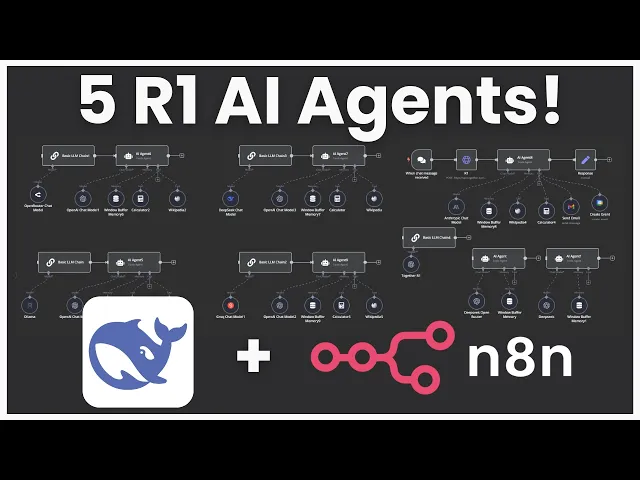
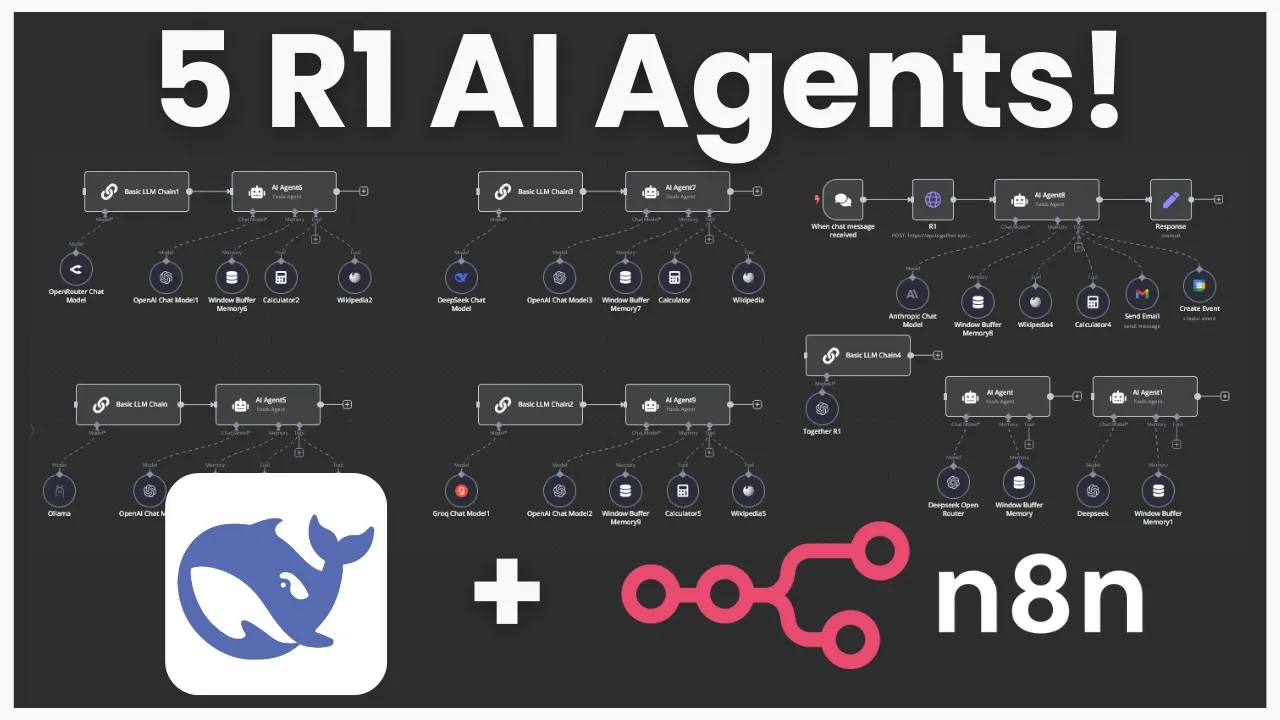
what's going on guys Josh pokok here now on this channel we've covered deep Seek many different times deep seek V3 deep seek R1 and I'm sure loads of you guys have been seeing tons of people talk about deep seek and maybe show you a few different ways how to actually use it I've been getting a lot of different questions of people asking me hey Josh what is the most practical way to use deep seek to start building AI agents and as many of you guys know one of my favorite ways to build AI agents is through a no code platform called N8 n now don't get me wrong I love building AI agents in raw code as well but a lot of the time you really don't need all that and nadn is in my opinion the best no code AI automation tool because not only does it have the most advanced features and is very developer friendly but it is also open source and you can self-host it on your own server and they even just got a new deep seek chat model node as well as an open router node so you can easily integrate these models into your n AI agents now in today's video I'm going to go over five different ways you can use deep seek R1 within NN I'm going to show you the basics on how you can start using deep seek R1 in your AI agent workflows within n8n and then of course you can build upon this and start customizing it for your specific use case you'll also be able to grab the raw Json absolutely for free and import it over into your nadn instance as well so you can get a good head start on implementing deep seek to today so without Ado let's Dive Right In all right guys so like I mentioned I've covered deep seek before on this channel as well as NN many different times so I want to quickly start off by the old method on how to use deep seek within nadm and I'm just going to briefly touch over this because I just want to give you a sense if you don't already know what the new update Ina so before you would actually have to use an open AI node and you would have to basically go add a new connection and in your connection you would have to drop down to add a base URL and you would either have to use open router like so add your open router API key or over here you would have to go over to this one add a uh another same open AI credential right here and change the base URL to deep seeks API and this is still good to know because if you are using maybe some of the other um platforms that I'm going to show you in just a second this can actually be very useful all right so let's start by doing a highle overview of each five of these right here so of course you could count this as six but I'm just going to go over the five new ones so first things first we have open router okay second we have the Deep seek API third we have hosting at locally with AMA fourth we have fast inference time with Gro and then fifth we have different thirdparty providers okay so all right so I'm going to start at number one go in depth on each specific one the pros and cons of each when you may want to use this specific one and how you can actually set each and every one of these up now guys if you want this exact workflow the complete Json so you can just import it over into your naden instance then make sure to join our stride AI Academy Down Below in the description it is currently 100% for free and it's going to have a a lot of behind the scenes resources templates tools trainings Etc that isn't on YouTube here so make sure to join while it is still free it may not be in the future so with the open router flow what we're doing here is we're using a basic llm chain so if you go over here you click on Advanced AI you can see basic llm chain now you could just use another AI agent tool it really doesn't matter I just use basic llm chain because that node right here as you see it doesn't have memory or tooling because if you don't already know deep seek R1 unfortunately at the moment does not have tool calling capabilities so how are we actually going to use this in our AI agents well the beauty behind deep seek R1 is it is really good at thinking so we can actually feed that chain of thought into our actual execution agent so this is like the planner agent that will plan the specific task or question that you're asking it and then this will be the execution agent or the agent that actually has access to different tool calling I hope that makes sense also too guys if you're new to n8n I'd recommend checking out my 49 minute video it's an in-depth n8n course with a 79 page document that you can download for free that will get you set up with nadn I also show you how to self-host it on kifi so you can literally have a powerful AI agent Foundation 100% for free okay so with the open router model of course we are using the open router node right here for our model so you just go to open router you add that router right there and then you're going to click on create new credential you're just going to add in your API key very very simple you don't have to do the base URL anymore and then you can actually just select this drop down menu and select any model you want so if we type in R1 right here you'll see that there are the distilled versions there's the normal version and then there's even the free version now the free version will be a little bit slower but if you do really just want something that's 100% for free you could go ahead try this out I'm going to go ahead use the normal version for now all right and just so you can see this working I'm attaching the chat node right here and we're going to test it out all right so I'm asking at what is there to do for fun in Toronto as you can see our basic llm chat right here is querying our one and it is now thinking now unfortunately we don't get to see the streamed response of the thinking right here but we will get to see it when it is actually done okay sometimes deep seek will take very very long or it will get stuck in a loop so that is just one warning right now so I'm actually going to try this again all right guys so at the moment deep seek API as well as the open router one are either not working or very very slow I'm sure that some of you guys already know that deep seeks API was down for many days um due to a attack so um I'm sure it will be working in the future maybe by the time you're watching this but as of now I won't be able to test these ones for you but I will be able to test the other ones so I'll quickly go over deep seek one this one's pretty straightforward it's the exact same as the open router except we're using the Deep seek node right here so you simply just go in add your credentials get your API key from Deep seek so that's platform. deep seek. com I'll leave a link Down Below in the description for that and that's how you interact with the Deep seek and the open router node all right so it actually seems that deep seek is working for open router as well as the Deep seek API within the old versions so you can use these right now it actually could be just with something to do with this new update that nend pushed so maybe it's something on their end I'm sure they'll have it fixed either very soon in the new update or maybe it's just a glitch are you tired of pouring thousands of dollars into appointment Setters only to watch leads slip away imagine having a team of elite sales agents booking qualified appointments for you around the clock no more wasted time on training no more frustration with performance and no more draining your budget on inconsistent and expensive call centers introducing stride agents AI powered appointment centers that work 24/7 never get tired and book appointments while you sleep trained on thousands of successful conversations our AI agents perform human teams at just on10th of the cost join the ranks of businesses that doubled their appointments and booking rates in just a matter of weeks don't get left behind in the AI Revolution visit stride agents.
com now and transform your entire sales process with cuttingedge AI technology it's time to accelerate your stride with AI agents but if you want to use it from either open router or deep seek. com you can use these methods still they will still work okay the next method we're going to cover is fast inference time with grow gr so this is great because you can Leverage The Power of a reasoning model with the fast inference time chips from Gro if you're not familiar with Gro it's Gro with a Q not with a K and you can simply go here sign up for free and start using their platform which I'm going to show you in just a second and essentially they just have really really fast chips so that means really fast inference time so we're just adding this grock node right here we're adding our credentials just like we normally would pasting in our API key and then here for the model we're selecting the deep seek R1 distill llama 70b so this isn't the biggest model so it's not going to be as strong but it is 70b which is still pretty good it's distilled from llama and it's going to be blazing fast so we're going to go ahead and ask it what's fun to do in Toronto as you can see it's querying the gro model right here and it's already done it's passing it on to this AI agent right here which is using open AI GPT 40 mini and boom So within the AI agent you can actually add really any prompt you want but this may not be the best one you definitely would probably want to change it and customize it but I'll just quickly go over it with you so I'm using a reasoning model to answer questions and I'm feeding you the response to expand upon or to improve it you have access to certain tools that you can call if needed and here's the question I asked and then we're linking to the question and then here is the response generated and then we're linking to the response so we can see here r1's response here so Toronto the largest city in Canada uh we can visit iconic land marks explore cultural and artistic venues enjoy nature and outdoor activities sports and entertainment food and nightlife day trips seasonal activities shopping museums history etc etc and then we can see the output from this model so it's saying this is a r Rand of response blah blah blah let's expand upon it and then it's going in depth talking about specific ones such as CN Tower uh caloma different things like that and making the answer even better now if you actually using this for a specific use case I would recommend adding additional tools like I'll show you in the one over here which has more tools these ones over here are really basic just with a calculator tool and a Wikipedia tool but I would recommend giving the agent more tools so it can actually make the answer even better or add some additional stuff to it all right so the fourth way to use deep seek R1 in n8n is hosting it locally and this is one of my favorite ones but it also comes with a few different negatives which is that it will be a bit slower but the positive is that it is is not hosted by anyone else your data is 100% secure on your server and if you have very sensitive data this may be a good option for you but if you want to host any bigger models you're definitely going to need a powerful server with some gpus so guys in this example we're going to be using one of the smaller models we're actually using the smallest model right now which is deep seek R1 1. 5 now you can use any olama model here now you may be wondering how do I actually use olama so if you go to ama.
com I'll leave a link down below you go to download right here make an account and then you can download for Linux or wherever the case may be if you're on a server you're probably going to want to use Linux right and the way you do this may vary depending on your setup so if you're having any issues with this or you want to customize it just talk to chat GPT and it will help you out here but for my specific example I'm hosting my server on kulfi so the way that works is the individual n8n instance is in a Docker container so you could install oama on that Docker container specifically but I'm actually going to be installing it on the server and there's a few different ways you can do this I'm just going to go over the way that I did it and I'll leave these commands in the description down below so to get your server IP address you can simply just run this command and this is on Ubuntu so you run this command it's going to show you the server IP and then you're going to run that download command to get olama of course and then you're going to download the specific model you want so if you go to olama and you go to deep seek R1 you can select one of these models right here unless you have a very powerful server you're probably not going to want to go over 8B right here but once you select the model that you want you're going to simply just copy the command right here and then run it in your terminal it's going to download that model very simple and then you're just going to want to exit out of the chat once it downloads that model because it's automatically going to bring you there next you're going to want to export your environment variables for ol so this is going to allow it so no matter what Docker container or whatever you're going to be able to access olama on that server now you may not want to do it this way for a particular reason I'm just showing you how I did it so you simply just run export olama host and then this right here then you're going to restart olama to apply those changes running this command and then next you're going to put in the nadn base URL for olama which you got that server IP with this command and you're just going to fill this in right here the port is 11434 so if we go to my olama right here you can see we got our base URL right here and we're good to go so if we go ahead and reuse this message what's fun to do in Toronto and we send it now we can see that we're using the olama model right here which is the smallest R1 model all right and it did take a long time just because we're running this locally but as you can see now it's using the actual agent with 04 Mini and boom now we have it so Toronto Canada's largest city is full of vibrant diverse experiences dive into history historical sites take a walk iconic Landscapes dinner and night life all that good stuff formatted really nicely as you can see we leverag the power of the r R1 reasoning model with open AI model here and like I mentioned I would add different tools depending on what you're actually building the use case for so our last method to use deep seek in n8n is through third-party providers so these are typically going to be on North America servers the ones I show you in today's video are at least and I'm specifically going to be showing you together AI just because I don't want to show you every single one but a few other providers that you could use are deep infra cluster. aai fireworks. a and if you want to find more providers you can simply just go to deep seek R1 on open router and under it you'll see providers for R1 we have fireworks cluster together AI deep seek deep infra nebus AI Studio novita AI featherless Avon so you can see some of these are actually down but the green ones are up and running so in this workflow right here you can see that there is two potential options to go ahead and use this one is through an HTTP right here which will be calling together AI so you can see this HTTP request is just a post request to an endpoint right here this is the URL and then we're passing in this header right here and we're passing in this Json body if you're wondering where I got this simply just going to the together AI API and we go to curl right here if you go to any of one of these websites um API docs you'll be able to get this information you can see a post request right here our endpoint URL authorization is Bearer and then our API token our content type right here for that header and then this right here is our Json body we would just simply switch out the model name right here to R1 and then here you can see our content is our question right here so if you go here we can see deep seek R1 right here and then our query is the Json from our chat node so if we go ahead here and reuse this same question we can see that it is querying together AI right here and the beauty about this method is you're going to be getting to use the strongest deep seek R1 model the biggest one that you wouldn't be able to host on your computer you would need a very very expensive computer to actually be able to host this and you're not using it on Chinese servers where your data is at Jeopardy you're actually using it on North American servers it's definitely a lot safer in terms of your data privacy again in this time you can see we're actually using anthropics clae Sonet 3.
5 right here you can see that this agent actually has access to a lot more tools so it's using Wikipedia right here here so if we look at the logs right here we can see it got the CN Tower from Wikipedia it got the Toronto Islands right here and then boom our output right here you can see that it got all the information it used from its tools and Incorporated that into its answers Niagara Falls Blue Jays game bunch of different stuff here now you could also switch this HTTP node over back to a basic llm chain like we were using before and within this basic llm chain we're actually using a open AI node right here and we're doing that same method that we did before where we're using the base URL for together AI base URL adding that API key here and then manually entering the model through expression not fixed and we're just adding deep seek R1 right here so you could replace the HTTP node with the basic llm chain if you want if that's easier but both methods work fine now like I said this is just a starting point I gave you some ideas here of potential tool calls that you could have like sending an email or Crea event but you could really get creative and incorporate this to do a lot of different stuff leveraging the power of deep seek r1's reasoning with some other Frontier models like 01 mini or Claude Sonet now like I mentioned before guys if you want to deeper dive into All Things N and AI rag agents definitely check out this video that I'll leave link down below where I give away different free templates and show you an in-depth course and training on how to use NN if you got any value from this video whatsoever guys I would appreciate it if you subscribe like the video and comment down below letting me know it really motivates me to bring more value to you guys and like I said make sure to subscribe to stay tuned because I'm definitely going to be doing a lot more n8n videos AI agent videos and even deep seek R1 open source AI videos if you're new to the channel we upload videos all the time on ai ai agents Marketing sales business growth but not just about building AI agents how you can actually build a business around them whether it's selling AI agents like an AI agent automation consultancy marketing agency or implement them into your own business whatever the case may be if you guys haven't already joined our free Facebook group and Discord Channel stri community. com I'll leave a link down below and then like I mentioned guys if you want the free Json and workflow from this video make sure to join stride AI Academy I'm going to be posting it in there for free so you can get that copy it over into your NAD so you can get started with this right away and then also too guys if you run a business and you want my team to implement AI agents into your business or coach you on how to actually build these AI agents so you can sell them for 2 to 10K plus to other businesses then book a call down below at executiv strat.