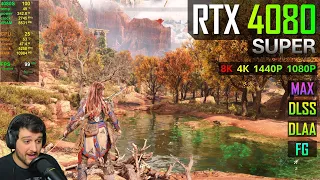
all right so Horizon forbidden wish just launched on the PC today 5:00 my time and today we'll be testing the performance on p with an aex 470 super that 470 super is paired with an Intel i5 14600 KF CPU and that again is paired with ddr5 a 6400 megat transfers per second CL 32 memory I've got all the specs on the screen right now so today we'll be doing the tests in Reverse once again we'll be starting at 4K then we'll move down to 1440 pm then down to 1080p all right so at the moment we're at 4K but uh not really benchmarking settings just yet so let's go over the settings here quickly currently we're at 4K and uh these are all the settings here I do have dlss enabled here but I'm going to just uh enable dlaa and a disable frame generation right so this is just for Native uh display testing and then Graphics is set to very high I mean I did select the very high preset and then I'm just upping an esotropic filtering now to 16 times and uh that's basically all that I changed there and I'm going to be testing in this small area yeah it is quite a demanding area uh I don't want to spoil anything too much but it definitely it'll give you an idea of what the performance is like and as you can see native da 4k on the very highest settings without any upscaling off frame generation we are getting almost 60 frames per second on the 470 super not uh not terrible at all I mean this GPU is targeted as a 1440p uh GPU or the marketing is targeted towards more 1440p gameplay and for it to almost maintain 60 frames per second almost hit 60 frames per second I should say um in a very very good looking game at 4K native with daa I think that's pretty impressive actually and uh all the while using 220 wats of power so just one I think like I don't know what they did here but uh the textures like on the rocks and on the ground everything just looks phenomenal like especially the textures if we have a look at these rocks here these are are at 4K obviously and uh it it really looks really really good all right so that's uh that's native so if you want to get 60 frames per second I think dialysis quality should get you there let's go ahead and enable that quickly so just note that I do have Dynamic resolutions cing disabled you can enable it to and setad a target of 60 frames per second it'll then dynamically adjust the resolution but for benchmarking purposes we're not going to be doing that so we'll just be using DSS set2 quality with no frame generation yeah and if we go back to the game and uh Refresh on numbers now we getting 74 frames per second well I did think we'll be able to maintain 60 frames per second a little bit further on it does get slightly more debonding but but not much I did play a little bit I just started a new game for the benchmarking R the game looks it really looks uh brilliant I did notice some ghosting issues with the dlss and frame not even with frame generation just look at her hair like I'm not sure if it'll come across in the YouTube video but there is some ghosting some artifacting there maybe they can they can sort that out it's not the end of the world I do think that if you were just the the sharpness and motion blur and all that kind of stuff you you should be able to to get rid of the the ghosting there to to a certain degree anyway but there you go maintaining 60 frames per second at 4K with the DLS ass set quality so not really 4K but um on the highest sitting definitely uh commendable all right so let's go ahead and just uh see if we can actually uh get a high frame rate here by just enabling frame generation I think it's yeah so we've got frame generation remember we had around 70 70 frames per second give sake and uh that's good enough for for you to start an opening frame generation I do recommend a base frame rate of around 60 frames per second before enabling it because uh it does increase input latency and the higher your base frame rate the the less impactful the additional in latency would be so still getting around 90 frames per second so almost a high refresh rate experience here on a very gorgeous uh good looking game and not uh not even aggressive up scanning right so I do think nx's did a very good job here with the port it looks great it runs great so far and uh Color Me impressed I mean this is not even really a a very high end GP and this is considered mid-range uh spec-wise not pricewise all right so let's lower the the quality preset here so if we go to Graphics let's just uh set it to high you'll see that it does set it to four times inotropic I'm just going to set it back to to 16 so just remember the the high reset just with the 16 times an esotropic filtering it just makes the textures look a little bit better especially in the distance so let's go ahead and do that but then also we'll just going to disable frame generation here and we'll use uh daa again so native 4K just on the on the high preset without any frame generation let's see what the difference is in performance nothing so going from very high to high netted us basically nothing which is kind of strange uh I mean all our uh everything else looks pretty much the same it does seem like the highs are slightly higher uh I mean I saw a 58 there but on average it looks pretty much the same and the frame time gra is not really that smooth looking we are looking at uh frame times of around 20 milliseconds yeah at times I mean that's uh that's 50 frames per second so let's just see what happens if we just drop this down to the medium preset or I'm just going to drop this down to to four times right so now it's really the high preset let's see if it actually makes a difference in the performance I don't think it would it doesn't Okay so I mean that that basically affects the vram more than anything okay so if we if we go ahead and drop this down to medium everything is medium two times an isotropic like this you can really bump up if you've got the vram I don't think it needs to be that low so let's see and now we are almost at 60 frames per second native like it's really not I I do think it'll probably be better just to enable the the high preset or the very high preset just as deal as quality to get 60 frames per second because over here we are on the medium preset and we're not able to maintain 60 frames per second it does dep below 60 at times like this still a very good experience but if you targeting for a locked 60 it might not it not might not satisfy your needs unless you enable DRS which is dynamic resolution scaling I'm pretty sure it'll maintain 60 frames per second then all right so lastly let's just uh enable the low preset and whatever it's I think it's called the the low preset I just did check earlier so now we've got trilinear texture filtering not even any inotropic does it have bilinear as well no so only TR linear and inotropic that's good so let's see what our frame rate boost here is like five frames per second okay five six so 10% boost in the frame rate here it'll probably still drop below 60 frames per second at times so actually the very high preset dlss quality is your best bet at 4K if you if you're using an ax 470 super I'm pretty sure an ax 470 would be able to H 60 frames per second as well with the D Ass quality at 4K um I mean once again it's not 4K because it's up scil 4K uh but you know what I mean but even on low the game does still look pretty good but there is definitely significant less detail on the ground here it's maybe just my imagination but uh it does it does look slightly less detailed but but that's to be expected the water looks pretty good everything else the low PR it still looks pretty decent right but once again the very high preset with the DSis quality and maybe enable frame generation if you want just a slightly higher frame rate all right sorry just before we drop the resolution I'm back at 4K here and just on the very high preset still and I just want to check other dlss uh methodes so I'm on dlss balance at the moment with no frame generation so let's just get our numbers back up here and getting 80 frames per 70 not sure there was a big increase going from theis quality theis balanced so we are hitting just over 90 frames per second cresting the hill there I mean this is definitely not terrible considering we're running it very high with the 4K resolution output so definitely I'm getting stuck definitely not terrible at all so let's just see if we if we enable d this Frame generation here quickly if that uh increases our frame rate a little bit so let's just enable that so we went from around 80 to just over 90 100 frames per second there let's just see what happens once we C the hilia if she can stop coughing so 100 I mean we didn't gain that much by abling frame generation so once again it's just uh you know the GPU is is slightly limited these settings Prim generation is not going to help that much all right so let's just see what happens if we then just uh use another or more aggressive upscaling here if we just drop this down to Performance and uh just disable frame generation just making sure everything is off Etc so let's do that uh oops and we're really not gaining much here which is quite strange so game definitely doesn't scale that well with the dlss settings but just looking at it like you you wouldn't say that this is DSS uh performance it really does look very good with the 4K output we managed hit 100 frames per second cresting the hill there so like 3 frames per second better than with the LSS balanced and uh I'm just going to stand still here and see if we actually can see a difference with the frame generation although I highly doubt it I think the results would be pretty similar so sorry if we look there 80 88 frames per second and then if we go ahead and enable frame generation with dlss set to Performance so 88 goes to 104 okay so there we go if we want uh a decent close to high refresh rate experience at 4K output the lsis performance which renders internally at 1080p then up SC to 4K with frame generation gets us just uh just over 100 frames per second here and as I mentioned earlier the game still looks extremely good you can notice some fuzziness or fizziness or blurriness or whatever you want to call it in the grass during movement but this game does look very good I'm not going to to deny that I've been looking forward to this game for quite a a bit I've actually I was actually looking forward a little bit more to Drgon's Dogma too but I've seen some of the the early performance reviews and it's going to be a shocker when it comes to Performance unless there's a good day one patch so I just decided to to buy this game instead and do a few videos on it all right uh now it's time to drop the resolution to 1440p all right we're now back on the very high preset uh just once again enabling 16 times and isotropic we're at 1440p uh daa so no Dynamic resolution scanning no frame generation no up scanning whatsoever and uh no vsync so off we go right so once again just going to be testing in this small area and I did test this earlier spoiler reload I did not drop below 60 frames per second once uh during my hour of testing or so and uh at these settings so if you are aiming for a consistent 60 frames per second you this this is actually this will get you that you can maybe just lock the the frame rate to 60 frames per second even and uh you'll have a very very smooth uh frame time graph as well so the frame pacing would be very even as well and uh it's a very very smooth experience I'd assume a lot of people would be playing this with the controller I I personally did uh I played Horizon zero Dawn with controller on the PC but mainly because I played it on the PS4 Pro when it launched and then if you do play with the controller the input latency is even less noticeable at lower frame range all right let's go ahead and enable dlss and then we'll enable some frame generation as well once again we'll just use dlss set your quality and no frame generation for now and uh go ahead and see what kind of performance gains we get uh there we go so we almost getting a high refresh rate experience depending on what you call it a high refresh rate experience obviously I consider High 20 frames per second that but I mean 90 frames per second and above definitely very very smooth looking the motion fluidity whoops what's happening there this keyboard of mine is very very weird I never double tapped but it it does dive um anyway this is just my my benchmarking piece is keyboard I do need a new keyboard anyway um so got an average of 107 frames per second yet 1440p with DL set quality on the very high preset definitely very decent for the ax 470 super i' I'd say average of 105 and I 1% and 0. 1% lows are sitting at 77 and 69 respectively and uh also very respectable right now I've just going to enable some frame generation here and then we'll move the presets down a bit all right so DS has quality frame generation enabled still on the very high preer just with the 16 times isotropic filtering and uh let's enable all that and now we are getting 120 frames per second are we using okay so I just do that to make sure that there's no frame R cap because uh previously I did see that it it locks 220 frames per second which uh made me believe vsync was May been able to something anyway so running around here getting a a high refresh rate experience and even with the keyboard and mouse the imput latency is definitely not really noticeable to somebody like me but uh that's maybe just a skill issue I I do like frame generation whether it's from AMD or Nvidia uh FSR 3's frame generation does have some issues in some games but generally I do like the tech I I do prefer a high refresh rate experience so that's just my opinion you can use frame generation and you can't there are people that like it there are some people who don't like it uh to each their own right uh luckily that's what uh PC gaming is all about you can there's a setting for literally everybody all right so an average th of 123 frames per second uh 1% L are sitting at 107 and our 0. 1% L are sitting at 79 now strangely enough vram usage is sitting at 7.
3 gig so definitely not even vram intensive game either so very very good very well optimized for a launch title I'd say so far all right uh let's uh move down the presets a little bit and uh see what kind of performance we're getting sorry before we do that I SP enable da a and then frame generation so no upskilling just with the frame generation enabled yeah I do have a reflex enabled as well just want to see what kind of performance we are getting here remember D LSS frame generation does not increase performance it's inserting fake frames interated frames getting around 90 100 frames per second here I do feel the Imp latency slightly more than when dysis quality was enabled I'll do a I'll do a little bit of a more in-depth video including latency Etc what you can or the latency that GeForce experience actually reports on just to give you a better idea once again playing with the controller you'll probably won't you probably won't feel this but with a keyboard and mouse I can now slightly feel the latency but if you do want native resolution with a very very good anti- aing that's what daa is all about da with frame generation you can consider it otherwise just run native da without frame generation or any upscaling and you'll get 60 frames per second plus anyway all right uh now it's time to change the the presets a little bit right so we're just going to try the high preset once again there was no difference at 4K so I just want to I just want to see if there's a difference at 1440p let's just make sure the frame Generation all that kind of stuff is disabled so no frame gen no deis s upscaling and just a high preset we we got between 60 and 70 frames per second previously now we're getting 80 frames per second so I mean going up to 90 there so there there is I think there's a a slight increase in performance at 1440p dropping down to the high preset I mean over there we we almost hit 100 frames per second so if you if you are aiming for around 90 frames per second the high preset probably will we get you close to that closer 290 um more often than not I do think but all right just looking at the grass here definitely on the low preset the grass had a lot less detail all right just Mak sure of that but still a very good experience this these games function very well at 60 frames per second it's not the the fastest Pac firstperson shter game so 60 frames per second is uh is perfectly fine but uh me personally I do like a high refresher experience as I've said multiple times in the video so that's basically what I'm personally aiming for right so let's see if we drop this down to the medium preset I want to see if we can get a constant 90 frames per second not that there's any uh any value in that uh Beyond just seeing 90 frames per second on the monitor you probably you won't notice the difference between 80 and 90 frames per second um just by by looking at it right interestingly enough we we actually gained quite a bit dropping down to the medium preset so we're still not there where we were with the very high preset and de as atic quality I mean over here we we were getting just over 130 frames per second and uh average was uh just well in the mid 120s so definitely consider using the high or the very high preset with a little bit of upscaling the upscaling tick in this uh in this game is pretty good the up scanning implementation so not a lot of uh visual quality loss there all right so I'm just going to use the medium preset again and as we are now going to enable some dialysis and then frame generation just for those of you who are insane and want like 200 frames per second let's see if we can actually get that right so just the LSS quality here and uh go ahead and apply that so if we go ahead and uh refresh our numbers not getting 15 frames per second it actually feels very good um this is a very very fluid and responsive game now 160 frames per second 170 frames per second we're still not CPU bound look at the GP usage we are running at 99% GP usage there and frame generation is not even enabled so frame generation when you are GPU bound generally like increases your your frame rate by around 30% like I mean it does differ from game to game but that's just uh pretty much what I've seen around 30% but once you start being CPU bound that increase can actually increase to 50% and above right but we're not see CB bound and uh got an average there of 153 frames per second uh 1% L are sitting at 118 and 0. 1% Lo at 107 so definitely very very good experience all right uh let's enable frame generation and and actually see how high we can push the frame rate here all right uh everything is still the same and uh let's go ahead okay so are we tapping out at 150 frames per second here just want to see something if we disable frame generation here do we actually see a difference I've I've seen this before WF frame generation does not make a a difference at all okay so 147 frames per second and with the frame generation enabled that goes to 150 something okay so doesn't make a big difference when we are sitting at 100 and something something frames per second 150 something frames per second so we gained 7 8 frames per second yeah so there goes our dream no more 200 frames per second I don't think it'll be I don't think it's doable with this specific GPU maybe at 1080p although like we we need to get that uh without frame generation we need to get close to that because as you can see frame generation did not increase our frame rate that much it did on the higher quality settings so it's it's maybe just that the the GPU is running out of steam pushing these high frame rates that frame generation is just not able to to insert interpolated frames quickly enough for a meaningful difference but uh I mean that's pure speculation all right uh that's it for 1440p let's go down to 1080p all right and there we go 211 frames per second all right all right so if we actually just uh play the game the way it should be played let's just go down and I know that there's maybe not a lot of people playing at 1080p within autic 470 super there are some people who want a higher frame rate and uh that's perfectly fine like uh you use the the GPU as you see fit however you want uh that's why I'm testing at all the different resolutions here unfortunately I don't have uh an ultra wide monitor otherwise I would have tested at Ultra wide resolutions as well so all right here we go at 1080p on the very high preset getting maybe slightly more than okay now not climbed up a little bit definitely more than at 1440p now it it took a little bit of time to actually increase that much but it is it's fluctuating quite a lot sure previously when we cred this heel it also fluctuated quite a bit but we going from 130 down to the '90s so not that consistent all right but just some very very short runs here at 1080p got an average there of 104 1% low are sitting at 74 and our 0. 1% low are sitting at another respectable 69 ah damn it there changes all right so I'm just going to leave it on the very high preset here let's enable some dlss although I'm not the oops I'm not the biggest fan of upscaling at 1080p I've mentioned it before i' I'll mention it again it does become slightly blurry sometimes it can still look better than native Tia implementations when people say that we don't mean that the resolution itself looks better it's just that the antialising looks better with the dlss but over here dlss at 1080p I do start to notice that in the foliage and the distance especially there's a lot of artifacting not artifacting but shimmering and detail missing blurriness a lot little bit of fuzziness not not entirely sure how to explain it English is not my native language but uh it does look kind of blurry we did gain a little bit in the frame rate there so if that's what you're looking for there you go you can use dlss uh to increase your frame rate a little bit and uh if we then enable frame generation here let's go ahead and do that quickly so from 110 to35 frames per second now the game just the motion fluidity is just amazing like at 144 frames per second it's uh it's unlike any Horizon zero Dawn game that I've uh tried before I mean the the PC version of horizon zero Dawn did not have frame generation so you had to lower the settings quite a bit and use aggressive uping to actually hit these kind of frame rates and uh with the help of frame generation this game can actually push higher frame rates than Horizon zero Dawn that came before it right obviously at the expense of some aecting some visual quality loss and some input latency um just look at the tip of hero if I if I move there's quite a bit of ghosting there that's just uh especially if there's stuff in the background that's just what you'll you'll have to contend with if you use the lsis at uh at these low resolutions right but I just wanted to test that anyway as you can see we're still not uh CPU B which is quite impressive considering we're not even running at 1080p we're running lower than 1080p with the ls atic quality so let's just uh drop all this down sorry I did not mean to apply all that kind of stuff I just wanted to drop this down to the to the medium preset and then disable dlss just with daa and no frame generation here let's see medium preed native d a still getting 140 Fram per second right so so now we are getting actually we're getting a high frame rate at uh 1440p medium then at uh a very high using dlss and uh frame generation so this is actually there we go 199 frames per second so if you if you want to max out 165 HZ monitor there you go here's the settings you need to use at 1080p on the medium preset native there you go getting a pretty high refresh rate experience and our lows are actually very respectable as well right an average there of 160 frames per second our 1% lows are sitting at 119 and our 0.