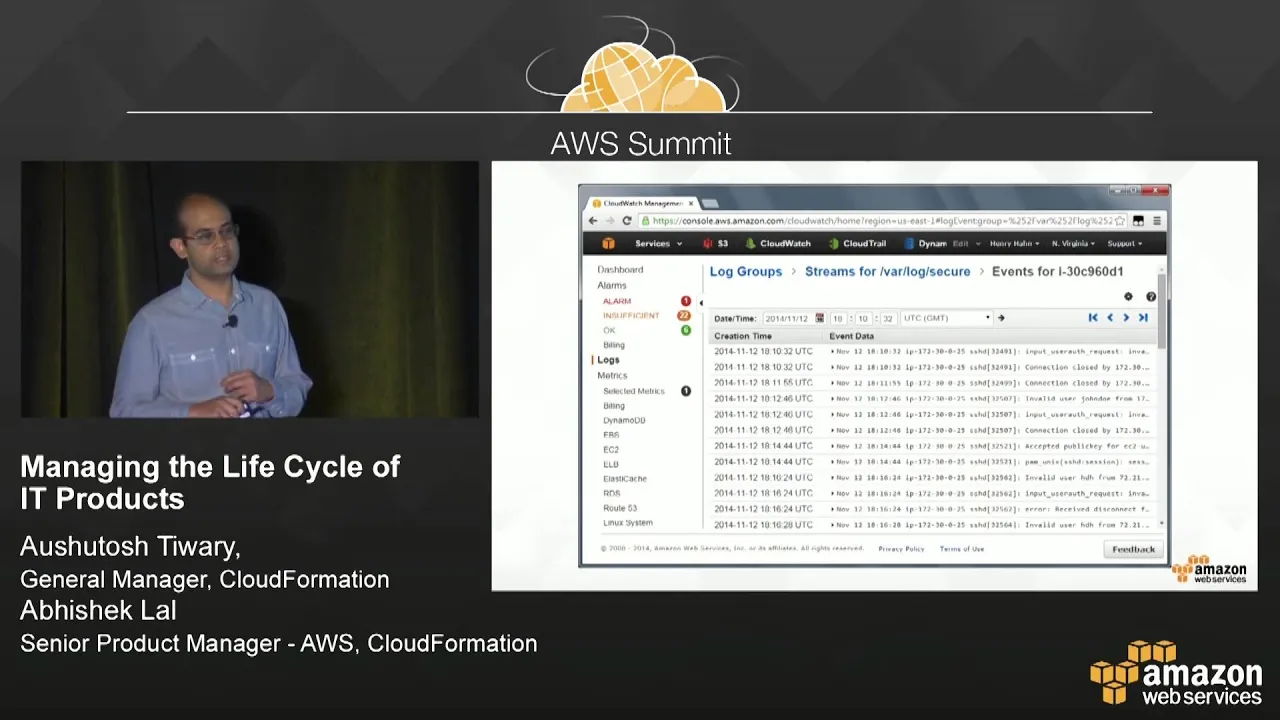
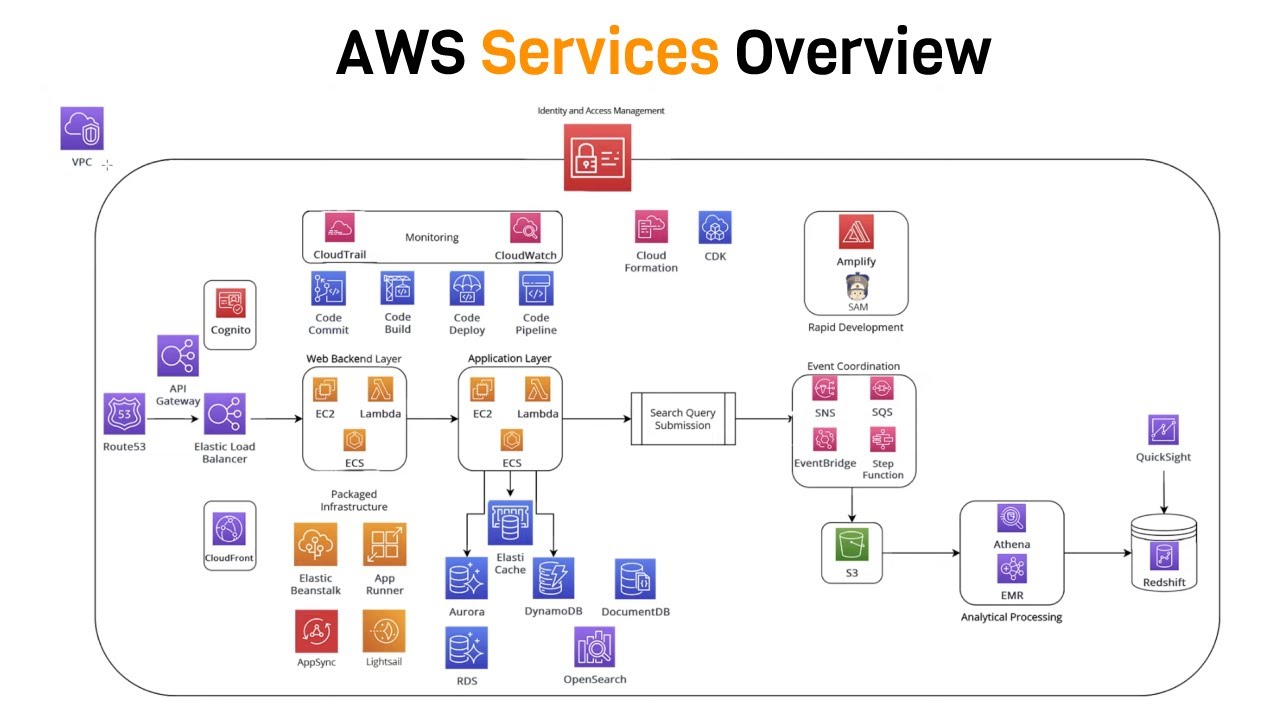
good afternoon welcome to this session on managing the life cycle of your enterprise workloads in aws as it products what we're going to talk about here is how you think about your enterprise workloads as it products and how do you manage them today on premises and in aws we will also talk about some of the tools and the best practices that aws provides to help you with that i'm ashitash i'm the general manager for a set of these tools that are focused on helping enterprise customers joining me is abhishek law who's the product manager for aws service catalog aws service catalog is a recently announced uh service that is a key component of a lot of the things that we're going to talk about today including some of the other services uh i would encourage you to you know ask questions and there'll be certain places where i'll pause the other alternative is to come up to me at the end of the presentation because we have a lot of content to cover and i'd be happy to take questions at that point okay so let's go ahead and get started so let's first start with what is an id product the way we think of it products we think of things like servers databases desktops dev and test environments line of business applications these are the kinds of things we see our enterprise customers treating as it products and managing them in aws are there any key things that i missed out that you think are critical workloads that you manage in aws that do not fall in this category if there are please raise your hand and you know tell me great when you're managing these products there are six key things that most of our customers do they define the product so it's usually the it administrator who defines the product typically this definition is done in terms of documents that they write they then publish the product in some sort of a portal or a spreadsheet users have access to these portals and spreadsheets and they're able to go find the products and they interact with the it admins through tickets saying i would like a server or a desktop or a database provision for me or a dev test environment at that point the it administrator then goes and provisions that product for the user usually this is done either manually or through a combination of scripts and then once it's provisioned they're responsible for monitoring and managing these products using a set of tools and then they make sure that these products that are launched comply with the organizational policies these are the six key things that are done today unfortunately most of these things are done manually today and the interaction between the user and the it administrator is usually in the form of tickets if you were to launch these products if you were to take these products or these workloads into the cloud and manage them there things would be done a little bit differently it would involve a lot less manual steps and a lot more self-service tools and automation that you'd be using so for example the it administrator would define a server server configuration or a database configuration or a desktop environment typically using some sort of infrastructure as code then they would publish that in a service catalog users would instead of cutting tickets would go to the service catalog and find the products that they're looking for they would then select and launch those products in a self-service manner without the involvement of the it administrator with the help of automation and then they would monitor then the i. t administrators would once again take over and monitor and manage that environment using a combination of metrics visualizations and alerts through automation and they would track and govern that by looking at change logs audit logs change events and setting alerts on all of these things so this is how typically product lifecycle is managed in a cloud if you were to do that in aws you would use the following sets of aws tools to do this so for example as the the administrator i would define my the architecture of my product using cloudformation cloudformation templates written in json i would publish them in aws service catalog users would go to aws service catalog in a as a self-service portal be able to find it and then provision and launch it from there and customers would use cloudwatch aws config and aws cloudtrail to monitor manage and track and govern these products okay so these are the key stages of how things are done with today and how they would be done in the cloud let me now walk you through how these set of tools these suite of tools interact to help you manage these products in aws so first as i mentioned there's administrators and there's end users administrators define their products using cloudformation templates and we'll give you details behind all of these this is just the high-level introduction and we'll walk you through how this is actually done once the product definition is complete there's a way for the administrator to publish them in aws service catalog at that point users are able to find these products by searching and browsing and listing things and then they would provision it by pressing a button that ends up creating a cloud formation stack for those of you who are familiar with cloudformation this is a well-known concept it's a collection of resources that are running on behalf of the user okay once these stacks are launched the it administrator automatically sets up a set of monitoring constructs using cloudwatch that are able to track the health of these cloudformation stacks set alerts and then if some alerts are exceeded the thresholds are exceeded the the administrator is notified of that as the stack is used there are changes that happen to them based on user actions or administrative actions there's two kinds of changes that happen either people access them or people actually modify these stacks the modify the change events leading to the because of the modification of these stacks are recorded through aws config and are made available to the administrator so they can use it for tracking problems or figuring out if things are still in compliance and access patterns the api calls that lead to the access of these resources are tracked through aws cloud trail and stored in s3 buckets which are once again available through the to the administrator so this flow that i just described shows you how from the beginning when a product when the id administrator creates a product and goes through all the different stages of the life cycle as it is operated and managed by them and how users access these it products and leverage them for their business now let's take one of these we'll go through each of these stages and drill into more detail and talk about what is done and how it is done so let's take cloud formation and talk in more detail about aws cloud formation so the aws cloud formation allows you to define the architecture of your it product it does this by allowing you to create templates of your infrastructure as well as your applications what you're inherently doing in json is you're specifying the resources that you're going to consume as part of this product and the way these resources are related once you have a template like this then you can store these templates you can version them you can give it to somebody else duplicate them or you can launch them as stacks and then make changes to the running stack by modifying these templates you can also integrate these templates with other tools for continuous integration and continuous deployment and other management tools that we'll talk about let me now invite abhishek to give you a quick flavor of how cloudformation works through a set of screenshots abhishek thank you so for the demo of a cloud formation today i thought i'll take a typical uh product or scenario and walk through all the pieces you would go to actually build a cloud formation template for it from the example today i'm going to use a food catalog website so let's say this company has marketing campaigns and one of the campaigns is for a food catalog and now we need to create a website for it what are all the components that i need to create in order to deliver this functionality this end to end functionality as a website security that's primary so i'm going to start with a security group so that i have a boundary in which i'm going to put all my resources i'm going to add the actual web servers now a single web server is probably not going to be enough i want to scale it based on the requirements and the workload so i'm going to take several of these instances and put it in an auto scaling group now as an administrator i get to decide what the parameters of the auto scaling group what the thresholds are and all of those items and i can absolve the user from making those choices because i understand the system and i can make the best choices for them it needs a load balanced endpoint to be able to route requests to these instances and then there needs to be all the approved packages so based on my requirements policies whatever the customer needs are i might have approved versions of popular web package frameworks which i can then include in there now most likely this website will need access to external resources or external services in this example i've taken customer database so on the food catalog website there might be some customer information they can be an inventory service which checks how many orders have been shipped or fulfilled and then based on user input they could be a recommendation service these are all external services to this website but this website will need to interact with them so i need to when i configure the website use all of these as inputs to capture when an instance is created and this can vary based on which department or which user or which region this is provisioned for a user to be able to use the product what do i need to give them what's my exposed sort of information to them it's just the url all they need is the url from which to go and use the website everything else for the user is infrastructure behind the scenes it is not their concern and of course over time i can add things like caching as well as all the right cloud watch alarms and alerts so that i can monitor this website and track all the uh usage for it this is what i can capture in my cloudformation template the first item there you see our resources each line item i talked about here is a resource security group web server group load balancer all of them are resources so in the resources section i get to define line by line all the things that are associated with the stack the next section is the inputs those are parameters now these parameters some of them may be user provided and some parameters may be looked up by me using mapping some user requests or things like that so these are values which go in and i can encapsulate them as parameters in the template note how i've shown some examples of allowed values and no echo these are ways in which you can not show the user values you can track these values you can pass them but you can never show them to the user that way you can keep those values hidden if you want that and then finally there is the section about outputs as the load balancer instance is created when the stack is being implemented when the stack is being created i do not have that value up front so i can route the value using the get at function and give folks the dns name based on the load balancer endpoint provision so cloud formation is very rich in this way that based on all the stack actions and all the provisioning which happens i can take those values and pass them back as outputs as needed to the user with this you can see i have all the basic resources created and the last aspect is cloud formation init cloud formation init is where it hooks into all the other tools let's say you use chef for configuring uh you know your packages or you use other web app package configuration technologies within that template you can use cloud formation in it to go install all your packages and software on that so end to end you'll be able to create a it product design it use a tool like cloud forma which looks at an existing environment and spits out the json all this json code which you need apply the right parameters which you need the right outputs for the user and you're ready with a infrastructure as code template for your product thanks abhishek so what we've done so far is we've defined the architecture of your id product now let's talk about how we're going to take that and publish that in the aws service catalog what are some of the benefits of doing it and what are the sequence of steps that you go through and then we'll go back and have another quick demo walkthrough of that in a few seconds sorry in a few minutes so it it often appears that id administrators and developers have different goals i. t administrators want control and visibility of their i.
t environments and they want to make sure that things are running and they're in compliance with the organization policies developers on the other hand are looking for agility the shortest path between getting between them and getting things done which means self-service and a way of getting things done so that they can quickly launch their products in the market so reduce time to market now it appears that these two things are in conflict however through aws service catalog we allow developers and administrators to collaborate to meet both their objectives and help the organization be successful the way we do this is we allow developers oh sorry we allow it administrators to have well-defined standardized products that are pre-approved to comply published in the catalog and developers no longer have to cut tickets and wait for it admins to respond they can just go find the right things launch and get the agility and time to market needs out of that there are so why would you use the service catalog there's two fundamental use cases that most customers use this for one is dev test environments and the second one is publishing line of business apps that they want their users to use the benefits of this are to the organization you get an organization that is much more compliant with their regulations and policies and they are able to manage cost better for administrators it improves automation and increases standardization it controls access reduces errors and centralizes the management and finally for developers and application users this means that they get a personalized portal that they use from which they can find the things that they look for launch it in a self-service manager manner and consume this without taking up valuable time from the ide administrator let's now talk about how service catalog what are the set of steps you as an it administrator would have to do in order to use the service catalog okay the first thing you would do is you would create the notion of a portfolio a portfolio is a container in which you put products and you grant access to users to put to specific portfolios once you've created a portfolio then you author a set of cloudformation templates which we already talked about earlier and then you package these templates into a product and you create a product within a portfolio or associated with a portfolio once that is done then you constrain a portfolio for example you might want to say that i have a line of business app that i have licenses for only 50 users so do not allow more than 50 launches of a product out of that or you can say because of you know certain regular regulatory requirements i will not allow these products to be launched outside of the north american zone okay so these are all constraints that you can put so that your users have to comply with it without having to go back and check every instance the way it is running users on the other hand have access to a specific portal they come browse the products they select the right one they're able to launch it which creates cloudformation stacks and then as the stacks change both users and administrators are automatically notified if a new version comes along the user is allowed to say would you like to upgrade to a new version the administrator is told that somebody has changed a resource which causes this stack to be non-compliant these are all some of the key functions of aws service catalog now let me have abhishek walk you through a few slides on how aws service catalog works so you get a better sense of that thank you aws service catalog was announced in reinvent the service will release soon in this demo today i want to start you with the administrator experience as you saw both administrators and end users interact with this service so in this demo we are going to go through both experiences as an administrator your key functions with the service are creating a portfolio adding and managing products and managing access to those products so let me click get started you can see i already have a couple of portfolios but for this scenario let me create a new portfolio a portfolio as ashitosh mentioned is your own personal instance of a catalog every portfolio you create gives you all the functionality of the catalog for yourself you can add products to it you can give users access you can add constraints to it so here i'm creating a brand new instance of a catalog for myself simple values to specify i give it a name description owner hit create and my portfolio is ready now within this portfolio i'm going to click upload new product uploading a product is a four step process the first step is to provide basic information so here i'm going to provide my website i'm going to say it's going to be a simple campaign website provided by central i t and i can give it a little bit of a description clicking next i'm taken to the support details as you are the administrator providing this product to your users you get to provide what's the best way for them to contact you in case they have issues they have questions so you you serve as the front line of being able to help your users with your products so you provide any of that information and then move next to actually providing the template details in our last demo we already created the website cloudformation template i can just click browse and upload that very template it's really key to note here service catalog uses hundred percent cloud formation compliant templates there's no change there's no difference there's no special editions you need to do so you can very easily move back and forth between using the catalog to vend your products or directly using cloud formation depending on what your scenario is once i've uploaded the template i provide version details you can imagine over the lifetime you will be creating different versions of the product so this is version one and then i get a nice summary view so in these three easy steps i've provided all the information needed to package my infrastructure as a it product and to list that into the catalog i hit save the product is uploaded it shows success here at this point i can go to my portfolio and add this product to my portfolio the marketing department portfolio for me represents a department of users you can slice and dice your portfolios in whichever way you want it could be by region it could be by customer it could be by subsidiary in this case i've chosen department so in my marketing department portfolio i'm going to click add existing product here i get to search all the products i see the product i just created the simple campaign site i can select that and hit add product to portfolio i click on that button and you can see the product was successfully added looking at the portfolio i see a couple more sections here my portfolio is my container for constraints my portfolio is my user access point as well as adding tags so in the next few steps i have shown i go through add users and groups and specify the right iam users im groups or roles if you are using federated access for this product and then i've added some tags tags is a great way of managing your resources a great way of doing cross charging and billing association as well as managing access permissions and what the catalog does for you it is enforces tags once you add a tag on a portfolio every product instantiated from it will get those tags if you add a tag on a product every instantiation of that will get that tag the end user will not be able to remove or change those tags so this is a key piece of control which you get as an administrator with that let me switch to the end user experience as an admin i'm done i have created my portfolio given users access this is a different portal where the end user logs in and looks at their dashboard you can see it's a very very simple view all they see is the products which they have access to the specific list as well as the stacks which they had created for this case i'm actually going to go drill into the details for the elb website and click launch the simple site the launch wizard for the end user is again a step-by-step wizard to get you from a product to a running instance of it the first step you get to define your stack name and choose the version you want to launch once i have done that i click next this is where i'm presented with the parameter questions now as we talked about earlier parameters is a great way of letting you customize letting the end user customize stuff and as an admin you get to control this experience control the layout control the values you ask them and you can translate them into whatever internal values for example i can ask small medium large for the size of the website and translate to the max size of the auto scaling group which i have the user doesn't need to know what an auto scaling group is the user doesn't need to know what the size is but i can ask for that value once i've done that i can add any tags which i need and click go to my summary view and click launch as simple as that the end user has gone and provisioned in a self-service manner their own stack the stack goes into launching state i can monitor its details once all the resources get provisioned all the outputs are done it shows as complete and i get the url for my website as the output so you can see how service catalog from both the administrator and end user perspective is a very simple workflow which lets people you know add products manage portfolios and then end users go and launch those products okay so now we've created a product defined it published it users have found it and launched it and what you end up at that point is the cloud formation stack now the administrator is responsible for monitoring the health of that stack and making sure that it continues to work as advertised they would use aws cloudwatch for doing that cloudwatch is a monitoring service that aws provides it has roughly about 300 metrics that are built into it wherever those metrics don't suffice you can always add your own publish your own custom metrics it gives you the ability to not just monitor those metrics and view the progress of those metrics but also set up automated alerts on those metrics and it provides you a place where you can centrally store logs that you're monitoring and archive them so that you can go back in time and look at those again the key use cases that are enabled by aws cloud watch include monitoring metrics and logs so specifically what you're looking for is errors exceptions http responses these are all recorded and stored you can then take that data and you can analyze that metrics data you can do that using graphs or we have another aws service that does a more automated analysis of this called aws trusted advisor that would analyze these logs and give you guidance on some of the actions that you might take there's a centralized repository of these logs and metrics that are stored off the box on which it is actually recorded you can watch the logs as it's being run without having to actually connect to the host and then you can correlate system status with the changes that are happening on these machines which are the change events to give you a quick demo of that we'll have abhishek back here again thank you for cloudwatch logs actually for cloudwatch today in the demo i actually want to focus on cloudwatch logs logs are one of the richest sources of metrics these logs could be generated on your aws ec2 instances or these logs could be generated in your own on-premises data center or it could be from your laptop or a box sitting under your desk the demo i will show you today shows a scenario where you are actually importing these logs from a machine running outside outside the aws cloud when you go to the logs portal in cloud watch this is your first experience that you would see if you have not used the logs feature yet the three steps it asks you to follow is install the legend monitor which is actually see what are the metrics that show up based on the logs and then finally access these and create alerts and alarms on that we'll go through each of those steps i'm going to skip the install agent step there are a lot of good material available outside out there for you you can use different there are different agents for different kinds of architectures os's and everything available it's very easy to get started and most of times you don't even have to change the defaults you just click enter on the defaults and you'll be up and going once i have done installing of my agent and it starts sending data this is what it would look like in my portal the getting started experience is gone and i actually start seeing an instance of a log group so here you see var log secure i'm sending all the login related logs from my linux machine let me click into that let me see what i see there i see there is one log stream coming in what that means is there is one ec2 instance probably or sorry one laptop or one machine which you are running which is sending those logs let me click in and see the details there so as simple as just installing an agent on your box and starting it you have the ability to now go into the cloud and go view your logs from there let me jump back and say now that i have the logs available i probably want to create a metric from it metric are aggregations metrics are ways in which i can track a particular in a particular kind of event in that so i'm going to click on add metric filter and it gives me a very simple filter pattern matching to create a particular metric in this case i can select the existing logs if i scroll down and see that there is a login event which is what i want to track so for patterns if i do show examples it gives me error info warning all of these are simple examples which i can click and use them for pattern matching for this demo i'm actually going to use invalid user which means i want to track an event where someone tries to log in who is not a valid user with that simple pattern i can do test pattern and clicking on that shows me that there is a single test result which means there already is one instance in the existing logs with that pattern i like this metric i'm going to click assign metric and create it once i have created this metric i get to assign the metric details which is a namespace and a name namespace and the name are very much cloudwatch metrics dimensions which you can use with your existing metrics too i provide a namespace a name and i have the metric ready once i have a filter i don't want to go keep sitting and watching it i want to set an alarm for it so what does that take let's go through that experience so i'm going to get create alarm and it asks me for some basic information name description and then the key value is what is the threshold at which i want it to warrant i probably don't want to see it every time so i'm going to do it for every two instances in one period which means that in a five minute period if i see two instances i want to trigger this alarm and once this alarm is running i want it to notify me so i actually want a notification to be sent out cloudwatch is really powerful because of the actions it can take on your behalf it can send notifications but it can also do other actions like auto scale groups so you can really think of this as the automation power which reduces administration work for you all of these things can happen on their own in this case it's a security issue and i want to be notified so i'm going to choose that and i'm going to get create alarm and that's it in these many steps i took an existing machine which was you know running outside the aws cloud installed an agent send my data up created a metric and have an alarm for it which will notify me it doesn't stop there there is a lot of rich functionality which is available there are several more examples available in which for example i can look for patterns so here the two examples i show is http 4xx patterns which means we can look at your data in a column by column format and create pattern matching for each column it's not just simple text search so very rich capability available for you and really helps you automate your workflows thanks abhishek so at this point the administrator has defined it defined the product launched allowed users to launch it they're able to monitor and manage it now let's talk about compliance and governance that is done through aws config if you so aws config provides three capabilities it's a managed service that allows the customers to get an inventory of your aws resources lets you audit the resources the configuration history of those resources as changes happen and then finally notifies you of configuration changes as and when they're happening so essentially what's happening here is there are resources on your on on the left hand side aws config sits in the middle as changes are happening to those resources so there's different versions of each of these resources that are happening aws config is actually sitting in that middle of that pipeline and recording these events it is then able to take this information store it in a database and build a history of each object and the change versions of those objects so they change events that happen and then you're able to look at the streams of the changes that have happened to do auditing and a set of other use cases so what are the key use cases that are solved by aws config the first one is it lets you understand what resources do i have in my account it lets you discover them second any time when something goes wrong the first question that people ask is what has changed it lets you answer that question third if something goes wrong what is the evidence that that was the change that happened that caused this so you can go back and look at history to determine that next as you're making a change you want to understand what will this change actually affect you can figure that out from the relationship information that aws config has and finally it allows you to do security analysis because of all these changes i started out in a safe state am i still safe these are the key sets of capabilities that aws config provides for your product that lets the it administrator govern the products that are being launched and make sure they are compliant abhishek will quickly walk you through some of the quick uh sort of a quick demo behind that thank you for the config demo i want to show you how easy it is to get started with this service if i have never used config before and i go into the portal i'll be presented with the getting started page simple setup detailed visibility and non-disruptive click get started and in a single page you can provide all the values needed to get config up and running the first thing is do i want notifications for changes by default you can choose whether you want to get notified or you just want to choose an s3 bucket a storage bucket in which all your change logs are stored once you've selected that the bucket name and whether you want to get notifications in terms of the specific topics which you want to do you can hit continue and you will be able to have config start recording all your information in this screen i'm showing you the lookup experience in which once i have some changes recorded what are the different ways i can go look at that information i'll start by typing in a particular tag that i want to look at all production tagged instances notice how it gives me a timeline view of an ec2 instance all the changes the time log when they were made and everything is made available for me if i want to see a particular version i can go see all the nitty gritty details everything from the ip address of the person who called and made that change log change request i can go see all of those details there is a notion of relationships which are captured by config so if i drill into that i see everything associated with this ec2 instance a network an interface a vpc and all of that information is available in there so i can go and look and see if any particular instance and see the configuration details of that so you can keep moving back and forth in this timeline and go and investigate troubleshoot look at what was going on in there all your existing tools can still be used with this data aws config has several partners who have come in and integrated with config data once it is available this can be to provide visualizations this can be to integrate with your existing processes i'll show you a few examples splunk red hat second watch all of these are partners where tools use aws config data and integrate with your existing processes and your existing tools cloud nexa is another example so very easy to get started integrates with all your existing uh tools and processes thanks abhishek so we are now on to the last service that it administrators would use to govern their environment or manage the compliance as the resources are being used there are api calls that are being made against those aws cloudtrail actually records those api calls so it sits in the stream of those api calls it's recording those api calls and then it maintains logs of these api calls and you're it's able to deliver that to the customer and then you're able to analyze those and draw conclusions and figure out where things might if the right person has access the right resource at the right time there are four key use cases that are enabled by cloudtrail the first one obviously is security analysis who accessed my resources why and when second you get a history of all the api calls that were made to aws resources third you're able to troubleshoot operational issues in a manner very similar to aws config we talked about something went wrong you want to know what change was made and then you want to know who made that change well cloudtrail will tell you who made that change and finally as a resource is or as a stack is evolving you want to make sure that the right people who are authorized to access it are only the people who are accessing it so it helps you with compliance in that way so for a quick short demo to abhishek and then we'll talk briefly about uh the aws marketplace that you've heard about earlier thank you cloudtrail is another of the management services as ashitosh mentioned talks about the audit scenario it's probably the simplest service to get started with you see on the top there is a slider you just go into your account and click on it's basically that simple at that point cloudtrail is fully enabled to go and start logging in all the actions the api calls as well as the details about who made the api call into an s3 bucket of your choosing so here you can see i've specified the s3 bucket and the console shows me when was the last time there was a log delivered to that in cloudwatch demo earlier i just showed you how logging is a great way of tracking metrics well once you're tracking user actions why not create metrics out of that and that's where the power of these services working together really shines through with a single click you can take your cloud trail logs and enable them to be visible in cloud watch and just as i had shown you with external logs now you can go add metrics add alarms and create actions based on those alarms so you don't have to go sit around waiting for these buckets to show up and that processes there's already cloud watch available for you which will take these logs consume them and let you achieve all the scenarios which you want to achieve with that you can of course use the portal to go look at different logs we have some basic filtering available so this is for the quick troubleshooting scenario you want to really quickly go and see hey by resource type or by event name or by the particular resource name what was event was going on so the portal helps you with troubleshooting too as well as the integration with cloudwatch helps you with the automated alarming and metric tracking in there there is a lot of compression and storage benefits which cloudwatch cloudtrail also gives you so you get about a bunch of storage savings as these logs are archived because a lot of times you might have regulations to keep them for a long time and that is all saving for you accrued just by default of using the service there's several partner solutions with cloudtrail 2. the same way as we saw with the config partners have come in and integrated their solutions so if you're using any of these tools and anything like that cloudtrail will very easily integrate and extend with that back to ashtang thanks so let me just recap what we've talked about so far we've talked about how to manage the life cycle of an i. t product in aws starting with the administrator who defines the architecture of the product in cloud formation templates publishes it in the service catalog users come and find those templates they launch them and conduct their business functions that creates a cloud formation the cloudformation stack can then be monitored using cloudwatch you can set alerts on it you can track changes that are being made to that stack through aws config and then you can track access to that all of this helps you with governance compliance and monitoring of the stack once it has been launched and it's in operations so this is the total end-to-end picture of how to use aws services to manage your enterprise workloads as it products in aws there's one component that we haven't talked about so far which is most of these apply if you've built your own stack sorry your own template or your own line of business app however if you want to purchase an application how does aws help you with that how do you purchase an application and run it in aws and manage it through the same process if you attended the keynote this morning by steven urban you probably saw him talk about talk a lot about two things aws service catalog and aws marketplace these two capabilities will work together so if you want to evaluate and then eventually procure software in an easy self-service manner easy to consume easy to get build you should look at aws marketplace aws marketplace is a commerce site that allows you to quickly get access to software that is provided by thousands of vendors who publish their products in aws marketplace it has a very similar buying experience that you would find in something like amazon.
![Kubernetes Crash Course for Absolute Beginners [NEW]](https://img.youtube.com/vi/s_o8dwzRlu4/maxresdefault.jpg)





![1 Hour Course [Salesforce Administrator Certification Exam]](https://img.youtube.com/vi/19VTXemdr_o/maxresdefault.jpg)