in today's video I want to introduce you to the concept of mixture of agents this concept was basically published last year which goes into the concept of mixing multiple llms together to get a better output to demonstrate this better to you if you go onto together AI page there a nice graph showcases how this actually works basically it takes a simple input from you instead of chatting with just one AI agent or with one llm you implement four llm and these are from different providers yeah so it could be one from open AI chbt uh
the other one from Claude from Gemini you name it so after passing it to all those four mamps the output of each of them will be sent next to the aggregator llm which basically takes all those four individual outputs and combines them and Aggregates them into a super output basically which will improve the output of just using one llm now back in NN let me show you how to build this in NN for your better understanding this is not a whole AI agent this is rather a building block for a larger AI agent the best
use case comes into my mind would be to either you optimize for the lowest cost so you take the lower-end llms but you want to increase the quality of them so you use four different ones to mix their outputs to a better single output right or you want to take the um workhorses of all those llm providers like GPT 40 or CLA Sonet or Gemini Pro and optimize for Quality when it comes to Flagship models not the reasoning models the reasoning models are actually capable by its own way so you don't it's not a replacement
for Chain of Thought thinking of llms this is just a way to improve the output instead of taking it just from one llm to talk simultaneously to four at the same time to get better output so how do we do this let me tell you what I used this for I basically thought let me use this as a building block for a prompt engineering basically let's say you built this for a client and they are most likely not really sophisticated when it comes to prompt engineering right so when you build a AI agent for them
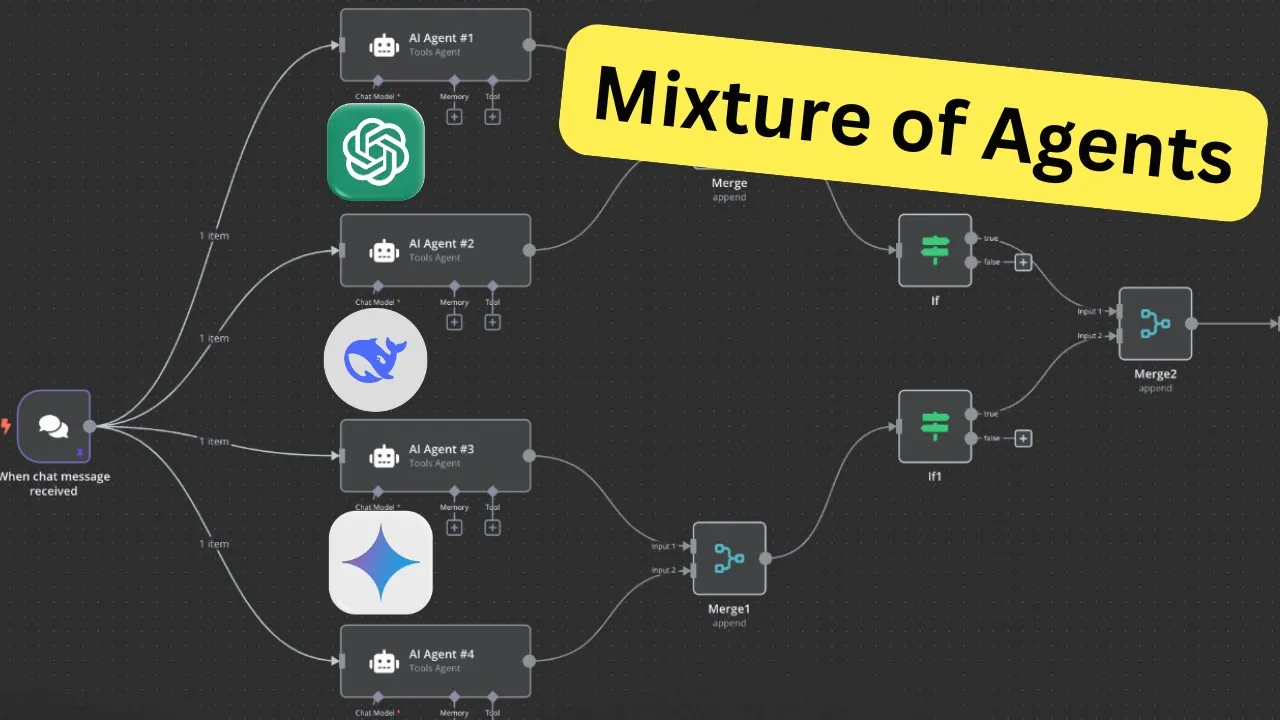
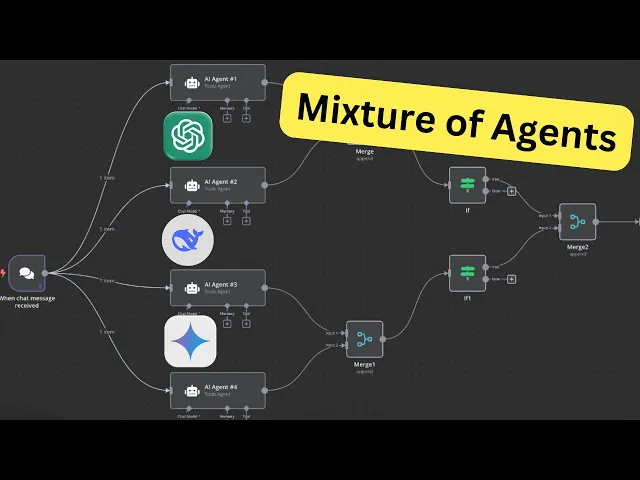
you could use this building block mixture of agents to take a simple prompt or the request from the human user and improve it with an AI prompt engineer so basically you have your regular chat input then instead of talking to just one llm you take four as you can see I implemented four different models I will show you in a sec how to access them and this way the simple input will be processed by four different models these are basically each individually are prompt Engineers so they will create based on this super simple chat input
from a human user that has not knowledge of any prompt engineering to improve it then basically merge them together aggregated them here to one prompt and this aggregator basically mixes it or creates a superior output so I will go into each note to Showcase you how to build this yourself so after setting up the chat input it's basically just a on chat trigger I just pinned it so I don't have to uh type in my simple request every single time then we have a simple AI agent nothing fancy in here you see as you can
see takes the chat input and then the prompt is basically a prompt engineering prompt that takes the simple chat input and creates a much better output or a better prompt to pass it to the actual next AI agent after this building block so how do you get the different models I used a simple open AI chat model node so from open router selected one of their models in this case Gemini Pro by the way uh for testing purposes you can use just fre models to test so you don't have to dedicate any funding to open
router in the beginning and then just duplicated it four times and changed the model each and every time just to Showcase you how to get this done let's create a dummy AI agent node to Showcase you how to set it up get your AI agent tool node add option system prompt and then write in your prompt engineering prompt in here then for the model let me then for the model select open air chat model then instead of using the regular open a API you add properties and then base URL right and here we will replace
this one for that first go to open router in open router just sign up then and you can just click on one model doesn't matter which one go to API scroll down and copy this URL up to the V1 go back into n and then and pass the base URL reference in here then for the credentials go back to open router click on Keys then create a new key let call mine's test copy the API key as you can see I created already already mine so I select open router for you you just create a
new one rename it paste your API key and save it and then you can select your open eye router right so let me delete this next when building is with basically we merge it in in a pair of two merge the first one append those two nothing fancy in here the same for the second one as you can see the same for the second one nothing here special then there was a issue with I had to build this in a way that it waits till this second merge actually happens to then merge them together otherwise
you will encounter an error so for that I just created this if node and basically changes to not empty so waits for the merge one uh this is merge zero basically the first one um and waits until the second merge is run successfully to then merge it in the next step those previous merges together aggregate it and then the aggregator let me first run it and then you will see each step even better so since I pinned my chat input I just run the test workflow now you see it waits here till the second one
is also done before it passes it to the next merge note and that's it now let's if you look at the output of the first aggregate took the outputs then you can see it's basically combine them first to a all four outputs to one output but raw outputs so zero is one one is two and the last one then we pass it to the actual llm aggregator node or agent this one takes all four its prompt is basically also based on the Risen framework to aggregate it take all those four outputs 1 2 3 4
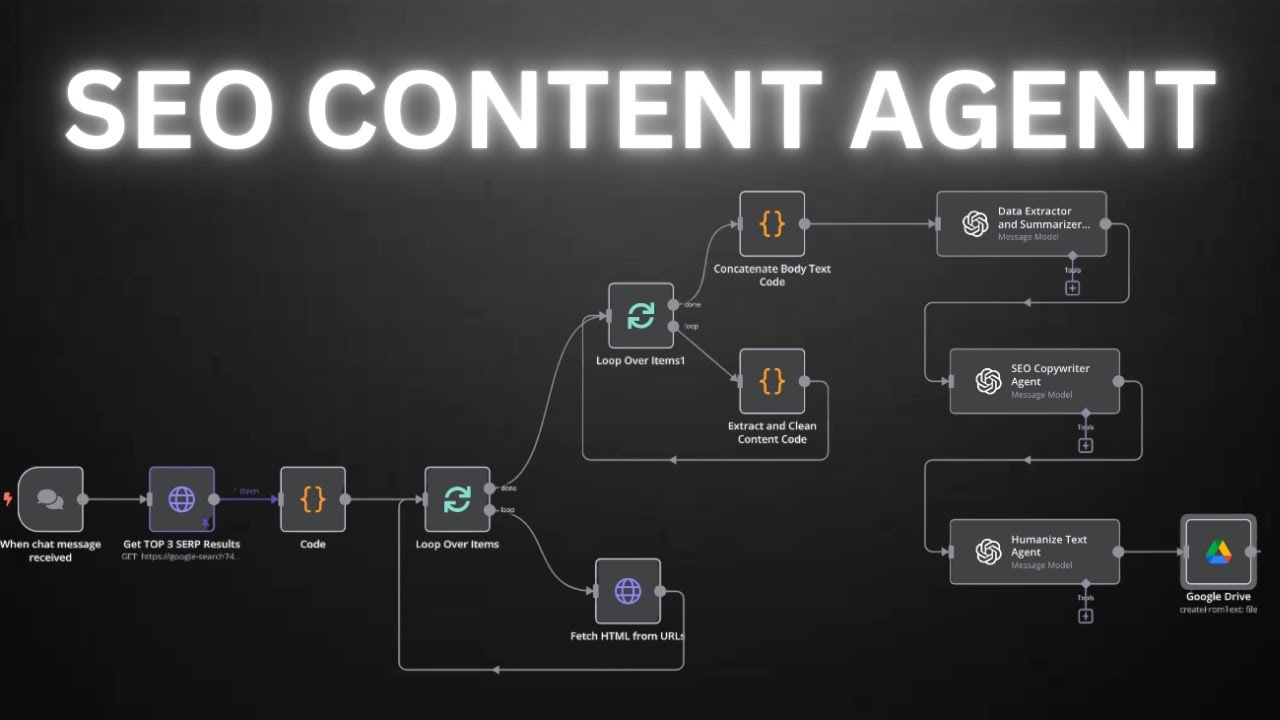
and then creates a super prompt so in the next step as I said earlier this would be just a building block to create as a pre-processing of the simple chat input and then connect it to a SEO writing chain of Agents basically to write a SEO blog post but based on the superior prompt which we pass in to this agent so here you have clear instruction that will be passed instead of just a simple input as you can see here this is super simple the llm it's too wake instead of being explicit what what you
actually want on the prompt engineering building block of this mixture of Agents does basically that for us so we will run this as a whole by the way if this is too much for you in each steps you can also download my templates in my previously launched School Community where I share all my templates for you to download where we have regular q&as where you can ask me anything and we will basically just help each other out achieving our goals in the world of AI agents so can check out go to classrooms select one of
my previous tutorials click on it and download here the template so back to NN and now let's run the whole system let me test the workflow again and here in my Google Drive is the finished blog post yeah and that's it for today let me know in the comments below what you think and what would be a even better use case for this mixture of Agents so till next time AI agent out

![Building AI Agents: Chat Trigger, Memory, and System/User Messages Explained [Part 1]](https://img.youtube.com/vi/yzvLfHb0nqE/maxresdefault.jpg)