Hello and welcome to this session on what is tensorflow today we're going to see what is deep learning very briefly and then we will talk about what are the various libraries that are available for developing deep learning applications and then we will focus on tensorflow and what are the various advantages why we should use tensorflow what is tensorflow and then we will talk about what are tensors which are as the name suggests Tensorflow consists of tensors and then they are executed in a certain graphical format of flow like a graph and that's why it is
named as such tensorflow and we will see how to write programs in tensorflow the programming language of course will be python but there is a certain way in which you write a deep learning application or a program in tensorflow so we will take a look at that this basic introductory session for beginners and then we will see one Implementation of tensorflow code one full end to end and that's pretty much it what you can expect from this quickly wanted to mention that there are certain prerequisites before you actually go through this the expectation is that
you at least have some idea about some programming language and preferably python if you know python absolutely it will be much easier to understand the code as such but even if you know any other programming language i think It will be okay and you will at least be able to understand the python code in addition to that this also involves especially the case study you will or the case implementation you will be able to understand only if you have some idea about machine learning so in case you are very new to machine learning and python
everything then it may be a good idea to check other tutorials that we have uploaded on let's say about python and also about machine learning so that You get a basic understanding and then come back here otherwise it may be very difficult to understand this tutorial all right so having said that let's get started so what is deep learning again this video is not about deep learning but there are other videos we have created in detail about what is deep learning in this video we'll just touch upon the basics so that that's like a nice
segue into tensorflow so deep learning is um in a way a subset of Machine learning and we use primarily neural networks in deep learning and the underlying technology behind artificial intelligence is deep learning and here we teach them how to recognize let's say images or voice and so on and so forth so it is a learning mechanism but here unlike traditional machine learning the data is far more complicated and far more unstructured like it could be primarily in the form of images or audio files or text files And one of the core components of deep
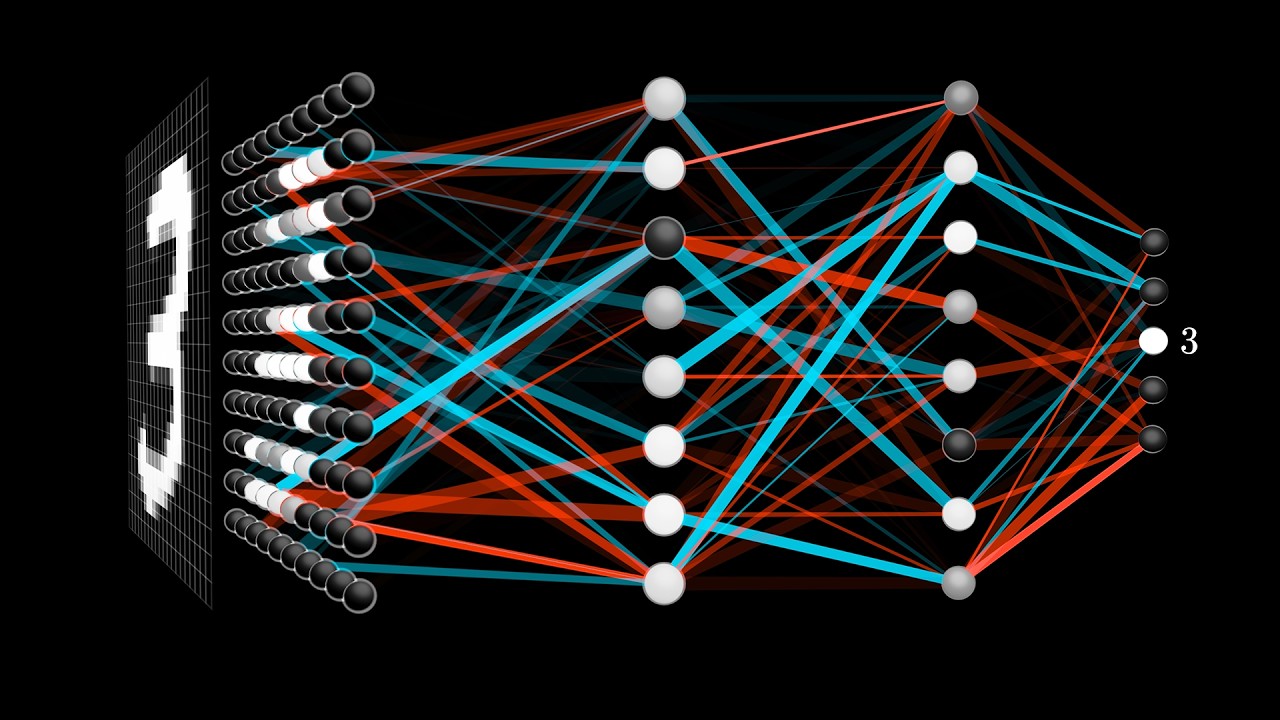
learning is neural network and a neural network somewhat looks like this there is something known as an input layer and then there is an output layer and in between there are a bunch of hidden layers so typically there would be at least one hidden layer and anything more than one hidden layer is known as a deep neural network so any neural network with more than three layers altogether right is known as a deep neural network All right so what are the functions of the various layers let's take a quick look so the input layer accepts
the input so this could be in the form of let's say if it is an image it could be the pixel values of the images so that's what the input layer does and then it passes on to the hidden layers and the hidden layers in turn perform certain computations and they have what is known as as a part of the training they have these weights and biases that they keep Updating till the training process is complete and each neuron has multiple weights and there will be one bias and these are like variables and we will
see when we go into the tensorflow code what we actually mean by that and so that's what the hidden layer does it does a bunch of computation and passes its values to the output layer and then the output layer in turn gives the output it could be in the form of a class so for example if we are doing Classification it tells us which class a particular image maybe belongs to for example let's say if this is a image classification application then the input could be a bunch of images of maybe cats and dogs and
the output will be like it will say okay if this is activated this gives a zero and this gives a one that means it is a cat if this gives a one and this gives a zero that means it is a dot so that is a kind of a binary classification and that can Be extended with multiple neurons on the output side to have many more classes for example or it can also be used for regression as well not necessarily only classification again since this video is not about deep learning or machine learning or neural
network we will probably not go into a lot of details but you can check other videos where we have given a lot more details about neural networks and deep learning and so on so in order to develop a deep Learning application how do you go about primarily there are two or three components that are required in order to develop deep learning application you need obviously a programming language so typically python is used and that's what we are going to use in this particular video but you can also use other languages like java or c plus
plus and so on and there are some libraries that are readily available and for primarily for doing um machine learning and deep Learning programming so these are a list of libraries these are by no means the exhaustive list but some of the most common ones like keras thiano tensorflow and so on and so forth tensorflow has nowadays become very very popular this is developed by google and it is an open source library and keras was there before now keras has actually now become a part of tensorflow as well so it is one player about tensorflow
so in that sense they're well integrated so Combination of keras and uh tensorflow is uh pretty good then of course you have a torch and dl4j and so on and so forth so there are multiple libraries but this video is about tensorflow and we will be focusing on tensorflow what are the benefits of tensorflow and what are its components and our towards the end we will show you a code in python we've written a code in python by the way tensorflow can be used with multiple languages it supports multiple languages Though python is by far
the most popular language so let's take a look at what exactly is tensorflow and why we are so excited about tensorflow so tensorflow offers apis now we can earlier without when these libraries none of these libraries were there even then we were doing people were doing machine learning and deep learning and so on but the coding mechanism was much more complicated what these libraries like tensorflow offer is They provide kind of a high level api so that we don't have to go really deep into writing all the stuff that is required let's say to prepare
a neural network and to even configure or even to program a neuron and so on right so these are done by the library so all you need to do is they offer a higher level api you need to use that api and call that api and maybe pass the data and that would pretty much it's much easier rather than actually going down and Writing everything by yourself so tensorflow that way it offers apis for to write your code in python or even c plus and so on other languages java as well it has an integration
with r as well apparently okay and it supports cpus as well as gpus now deep learning applications are very compute intensive especially the training process needs a lot of computation it takes very long as you can imagine that because the the data size is large and there are so many Iterative processes there are so much of mathematical calculations matrix multiplication and so on and so forth so for that if you perform these activities on a normal cpu typically it would take much longer but gpus are graphical processing units you must have heard gpus in the
context of games and so on because where you need the screen needs to be of high resolution and the images need to be of high resolution and so on so gpus that As the name such as graphical processing unit were originally designed for that but since they are very good at handling this kind of iterative calculations and so on now they are kind of they are being used or leveraged rather for doing or developing deep learning applications and tensorflow supports gpus as well as cpus so i think that's one of the major advantages of tensorflow
as well now again what is exactly tensorflow it's a open source library developed by google And open source and primarily for deep learning development but tensorflow also supports traditional machine learning by the way so if you want to do some traditional machine learning we can do it however it is probably a bit of an overhead to use tensorflow for doing traditional machine learning and this is really good for performing deep learning activities and again if you want to get into more details about what's the difference between machine learning and Deep learning there is another video
about it you can probably take a look at that video what else it is developed originally for large numerical computations so originally when tensorflow was developed they never thought of it as a keeping deep learning in mind but ultimately it so happened that it's really very good for deep learning development and therefore google has open sourced it and tensorflow as the name suggests the data Is in the form of what is known as tensors these are like multi-dimensional arrays and they are very handy in handling large amounts of data and we will see that as
well as we move forward and then of course the execution mechanism is in the form of graphs so that makes it much easier to execute this code in a distributed manner across a cluster of computers and and also using gpus and so on and so forth right so that's a quick overview about what is Uh tensorflow we will see a little bit more detail the two major components that is basically the tensors and the graphs let's take a look at what they are so what are tensors tensor is as i mentioned earlier it is like
a multi-dimensional array in which the data is stored now when we are doing deep learning especially the training process you will have large amounts of data and the data is in typically in a very complicated format and it really Helps when you are able to put this use this or store it in a compact way and so tensors actually offer a very nice and compact way of storing the data handling the data during computation this is not really for storing on your hard disk or things like that but in memory when you are doing the
computation tenses are really really very handy in terms of keeping the data compact because they are like multi-dimensional arrays so the data is stored in tensors And then it is fed into the neural network and then you get the output all right so there are some terms associated with tensors let's get ourselves familiarized one is uh the dimension and another is the rank so what is dimension typically dimension is like the number of elements in a way so for example this is a five by four dimension tensor and then you can have again the multi-dimensions
right so you can this can be like three by three by three so That is uh the dimension and then you have ranks so what are tensor ranks ranks are basically traditionally we would have thought of as dimensions that is actually in this case it is called rank so it becomes easier when we see examples so a tensor's rank is supposed to be zero when there is only one element we also call this as scalar so just one element and this is not really a vector it's just an element like 200 it's also known as
a scalar so such a Tensor is supposed to be having a rank of zero then you have let's say a one dimensional array this is a vector with a row of elements this has rank of one now if you have traditionally what we called as a two-dimensional like a matrix for example then the rank is two and in this case the rank is three and it can have more ranks as well as i mentioned it is like a multi-dimensional array so you can have rank five six and so on okay so those are the Terminologies
in tensorflow terms dimensions and ranks so this is just to make sure that we are picking the same language so whenever we talk about the rank of a tensor you understand what exactly is meant by that now in addition to tensors in which the data is actually stored all right so the data is stored in the tensors and then once you have the data there is a computation that needs to be done now the computation happens in the form of graphs so what we Typically in a tensorflow program what we do is it's not like
traditional programming where you just write a bunch of lines and then everything gets executed in sequence here we prepare graphs various nodes and then these are executed in the form of a session and they use the data from these tensors now i know this is a slightly new concept for a lot of you so it may be a little difficult to probably understand in the first cut but when we look at the code When we go into the tutorial the code walkthrough i think that time it will become much clearer as well but to start
with just uh we need to keep in mind that we have to first prepare a graph and when you're preparing the graph no none of the code is actually getting executed you write the code to prepare the graph and then you execute that graph so that's the way by creating a session that's the way tensorflow program works so and each of these Computation is represented as what is known as a data flow graph and we will also see that whenever you start tensorflow when you create an object tensorflow object there will be what is known
as the default graph and then if required i know probably in the beginning it may not be required but in more advanced programming you can actually have multiple graphs instead of the default graph you can create your own graph and have multiple graphs and Use it as well but there is always whenever you create a tensorflow object there will be a default graph and this will be very nicely illustrated in the example code that we will take to explain this so there it becomes much clearer than in these slides so the graph gets executed and
it processes all the data that we are feeding all the external data will be fed in the form of what is known as placeholders and then you have variables and constants again This will also become clear when we take a look at the code and once you have the graph then the execution can be enabled either on regular cpus or on gpus and also in a distributed mode so that the processing becomes much faster as i mentioned the training of the models in deep learning takes extremely long because of the large amount of data and
therefore using tensorflow actually makes it much easier to write the code for gpus or cpus and then execute it in A distributed manner so this is how the tensorflow program looks so there is uh you need to build a computational graph that's the first step and then you execute that graph so the first step is to write the code for preparing the graph and then you create what is known as a session and then in that session you ask the session to execute this graph so this will again become much clearer when we look at
the code now what are the various elements of a Tensorflow program as i mentioned tensorflow program is slightly different from regular programming that we do so even if you're familiar with python this may still be new for you the way you write a tensorflow program is different from the regular python programming that you would have done or even machine learning program you would have written some machine learning program using scikit-learn or regular python libraries This is different from even that so let us see what are the various elements so first of all the way we
handle data inside of a program itself is a little different from how we normally do in a normal programming language a variable is a variable in your program right so you have anything that can keep changing you just create as a variable or even constants in fact are actually created as variables but in tensorflow the storage in the program consists of three Types one is constants another is variable and the third is a placeholder so and they are there is a lot of difference between these types and we will see how they vary and how
they are used and so on so constants are like variables which cannot be changed so for example if you define a constant like this this is how you define a constant by the way the simplest format is like this like for example b is equal to tf dot constant and then you give a value Here the slightly more advanced version is you also specify the type so you say tf.constant 2.0 tf load 32 so the type is of type float now in case of constants you cannot during the computation you cannot really change these values
so for example if you want to change the value of b from 3 to 5 or any other number it is not possible so that is the meaning of constant all right so then we have variables so variables we are all familiar with what Are variables whenever we use programming we use variables so this is pretty much the same this is the way you define variables df dot variable now one thing you need to note is this is the only type in which we have v capital okay constant has c the small c and placeholder
as small p but variable as capital v and tf.variable and then you give the a value and then you can specify what is the type and then you can use the variable change the variable At any point in time with a different value and so on you can update the variable and so on so we will see all of this in the code i will illustrate how a variable is defined and how it can be changed whereas a constant cannot be changed and so on and so forth and then we have placeholders placeholders are really
a special type and this may be something completely new for many of us who have been doing programming but in tensorflow this is a Completely new concept so this is very important to understand this placeholders are like variables but only thing is that they are used for feeding the data from outside so typically when you are performing some computations you need to load data from a file or from an image file or from a csv file or whatever so there is a provision with the special kind of variables which can be fed in a regular
basis because the reason one of the reasons for having This kind of provision is that if you get the entire input in one shot typically it may be very difficult to handle the memory and so on so i think that was the reason they came up with this mechanism where you can feed in patches and there is a certain way of populating the placeholder we call this feed dig feed underscore date and this is a parameter name by the way and you feed the placeholders right that is the meaning here so there is a certain
way Of feeding the placeholders and we will again see this in the example code as we move forward okay so there are three types one is the constant which cannot be changed once you assign a value then you have variables which are like normal variables we are all familiar with and then you have placeholders this is primarily for feeding data from usually from outside but of course you can also for temporary testing purpose you can feed within the program as well but Primarily the purpose of a placeholder is to get data from outside so all
right so those were the constants variables and placeholders that is how you handle data within the tensorflow program and then you create a graph and once you create a graph then you have what is known as a session and then you create a session object and you create a session and then you run a particular computation or a node or an operation and so typically what you need to do is Every variable or a computation that you perform is like an operation or a node within a graph so initially the graph will be what is
known as the default graph the moment you create a tensorflow object or tf this tf here you see this is the tensorflow object and again in the code when we go into the code it will become much easier to understand so when you create a tensorflow object there is like a default graph which doesn't have any operations no nodes or Anything like that so it's like a clean slate the moment you assign variables or constants or placeholders each of them is in tensorflow terms it is known as an operation again you need to get familiar
with these terms and they are not very intuitive this is not really an operation you're just creating a constant or a variable but and this c is equal to a into b would traditionally or would intuitively be an operation here You're actually performing an operation but in tensorflow terms each of these everything is an operation so if you're creating a constant that is an operation another constant or variable that's an operation so you can actually run each of these and they're also known as referred to as nodes and when you're in your session you will
actually run each of these you can potentially run each of these nodes okay so a typical example would look like this so You have two constants created a is equal to tf.constant its value is 5 b is equal to this and then you say c is equal to a into b and then you create a session now remember all this you're just creating a graph at this point no execution has happened all right so only at this point once you create a session and then you say session or says dot run c is when actually
this whole thing will get executed all right so that is a different way of programming compared to Our traditional way of writing programs so you need to get used to this new format and when we look at the code as we move forward and when we look in the jupiter notebook it will become much easier probably to understand this rather than in the slide so these are the slides showing the code but what we can do is go straight into the lab and take a look at the various examples that are there and starting from
the very basic one how you create Variables and so these are some of the slides that are showing so this is about how to create variables how to create constants and the variables or constants can also be strings so this is like our first hello world program and we will talk about placeholders how to define a placeholder and how to execute and populate the placeholder values into placeholder we will see these examples in the lab actually i will run the code and We will also perform a small computation of adding and multiplying these variables and
we will in the end we will take up a use case implementation using tensorflow so let's first go and see those examples and then come back and i'll explain this use case and then we will execute the use case in the lab so let's go and check our lab okay so i'm in the jupyter notebook environment and this is one of the development environments we can use this is regular Python anytime you do python programming we use gypted notebook or there are rather of course there are other ways of using other tools like pycharm and
so on but for this particular tutorial i'm comfortable using jupyter notebook so i will show you in jupiter notebook so this is the very basic example to demonstrate how to create variables and constants and placeholders and what is the difference between them how they behave and so on and as i mentioned the Assumption here is that you know at least some basic python programming or some programming language so at least you understand the code here and first two pieces of code you will not need machine learning background but when we do the use case or
the case study there it is expected that you know at least some basic machine learning concepts so in case you need to brush up the machine learning part you may have to do that before you go to the third one but here Just at least some idea of programming will be sufficient so what are we doing here in this particular line or in this particular cell we are importing tensorflow it is uh as i mentioned it is a library so we are importing tensorflow and we are calling it tf so this is just a name
you can give it any name but it is very common and everywhere wherever tensorflow programming is done it is always named as tf but you can name anything actually okay so this will Import the tensorflow into my session now this is the way to create a variable so let's start by creating a variable and this is the name of my variable i'm starting by giving a name called 0 and i say 0 is equal to tf dot variable and then i'm giving the value of the variable here so this is the very basic way and
the simplest way to create a variable we will see a little later there are other formats as well but the bare minimum way of creating a variable Is this so i'm creating a variable by the name zero and as i mentioned you need to pay attention to the capital v here in case of variable it is a capital v uppercase constant and placeholders are lowercase now i'm creating a constant and the constant i'm naming it as 1 and the way to create a constant is tf dot constant and then you give the value of the
constant so the value of the variable here is 0 and the value of Constant here is one and again constant you can also have additional parameters like a name and so on probably you must have seen in other tutorials or in other places where the code is written but the basic format to construct to create a constant is this this is sufficient to create a constant so i created one variable and one constant now what else can we do again here there is no real execution happening we are just building a graph we have not
yet executed any Tensorflow code we are building a graph and i will show you how the graph looks as well first let us understand the constants and variables and so on and then i will show you how the graph is generated and so on so what i want to do here is i want to add 0 and 1 and put it into a new variable called new value so what i do here tensorflow offers these methods like add assign multiply or you have matrix multiplication matmul And so on right so i will use one of
those methods which is tf.add and then pass these two as parameters so we can add a variable and a constant there are no restrictions on that so this is a variable and this is a constant so if i do this it will be okay i did not execute this code so it is giving an error now we are good okay so what it has done is new value will be equal to tf dot add 0 1 so then we have one variable and one constant now let's say I want to change the value of the
variable because that is possible right so we want to change the value of the variable to something some new value so we have in this case new value has 1 because we added a zero and a one so new value has one now i want to assign this to this originally what we called as zero so i will call that as update is equal to tf dot assign so assign is basically changing the value so that's what we are going to do here now it has Not complained we'll just say fine right there are no
issues now let us try this something similar with this one as well so 0 is a variable so we were able to change the value and we will in a little while we will see what exactly those values are but before doing that now let's say i will uncomment this part and i want to do something similar for my constant right 1 is a constant now i want to let's say change the value of the constant and Make that also something different okay so if i execute this piece of code it will give an error
now again the error message may not be very intuitive this doesn't say that you cannot do this for a constant it will just say tensor object has no attribute assign now that sometimes may be confusing especially when you're starting but the meaning here is that one is a constant and you're trying to modify the constant so it will not allow that's the reason it Is complaining so let's put that back in the comment and okay so that is done so only variables you can modify now what you have to do let's skip this piece of
code i'll come back to this in a bit but let's say we start by creating you remember i told you we need to create a session so the way to create a session there are a couple of ways of creating a session but this is for beginners this is the easiest way all you need to do is Assign a variable called says or you can give any name and that is equal to tf dot session that is the session method here and you create a session object by the name says now what i'll do is
i'll skip this as well i there is a purpose behind that now let's go ahead and run this piece of particular operation remember i mentioned that everything you need to run so as of now the code has not really got executed tensorflow code has not got executed you only created The graph so only when you run through the session is when that actually the program gets executed so when you do this now you see observe that it is giving an error okay the reason behind that is remember we skip these two lines of code for
variables okay this and then this now this is something very very important to observe if you have variables in your code what i mean by that is let's say you're not using variables but you have only Constants and placeholders then this will not complain and you will not get this error but in our case we also have variables so whenever you have variables in that case you need to do an initialization and this is just a standard code there is nothing that we need to add or modify or anything like that this is a standard
piece of code you create this name of course can be anything you can give us any name but this global variables initializer is What you need to call tf.global variables initializer this will kind of initialize all the variables that you may be using and then again remember this doesn't execute anything right so all you're doing here is you're creating an operation but in order to run that operation you need to also run this known as run init underscore op so this operation you need to run after creating the session all right so we executed this
Now let us execute this and now when i run this piece of code it will run successfully okay i hope you observed that so it is whenever you use variables these two lines of code one is the operation you need to create an operation for saying global variables initializer and then you need to run before running anything else you need to do a session.run this operation okay again only if you're using variables of course you invariably in All your programs you will use variables you cannot just write a program with constants and placeholders so you
can pretty much assume that this has to be there in pretty much all the programs now again why this has not been taken care of in the library that's a different question but you need to keep in mind and always remember if you don't do this for whatever reason if you're forgotten you will get an error and the error won't be Intuitive so you need to remember this that this could be because of the variables okay good so we have seen how to create a constant and we have seen how to create a variable and
we have seen that you cannot modify or update a constant and we have also seen if you have variables that you need to execute or have these two lines of code to initialize the variables and then we have seen that after creating a graph how to run the graph in a session and i Will show you a little bit more in detail how exactly the graph gets created and how it gets executed but this was the first very quick code on creating variables and constants now we will keep going and we will also show you
or i will show you the placeholders but before that one more small piece of code so this is how you write a for loop okay so we are saying five times you run this piece of code now like any python program this is Nothing different so you have a for loop and this is indented that's the reason and therefore you say session.run update so this will run five times and it will get printed that's all so update will run for five times each time it will come and do this particular operation that's all we are
we are asking the system to do so let me just run that and show you let me yeah so it will okay so it has done five times one that's four it is basically adding if You recall it starts from zero it adds one to zero then one to one one to two and so on so it's nothing but it is generating five numbers one two three four five that's it okay so then you can also have your constants as strings for example so you can also work in a similar way you can work with
string so most of the computation happens mainly on numerical values so we normally hand handle numbers but There will be situations where you may have to handle strings as well or text as well so this is an example of text operation so you can similar to numbers you just create strings or store in constants instead of a number you say hello is equal to tf.constant and then you assign the string that you want it to be assigned and then the next one is one more string which is for world and then you say add these
two so it is nothing but concatenation of these two Words hello and world so we will do that and remember this is only creation of the graph right so in order to actually execute this graph you need to run the session now you need to keep in mind we don't have to create the session once again because once you create a session till you close the session it remains valid okay so we have created this session here now till you say says dot close it will remain For you so that's why we did not create
one more so we are just reusing that session says dot run hello world so in this hello world what is the operation that we are doing here the operation is add these two concatenate these two so if i run this it will print hello world okay now that's string operation now we will take a look at placeholders so this is slightly more complicated and something new even for people who have been writing programs so but i'll just Explain it with uh with a quick example first of all how do you declare or create a placeholder
you just do tf.placeholder and the p is lowercase only in case of variables the v is uppercase but otherwise constant and placeholders it is lowercase and you just say because as i mentioned this is a placeholder it doesn't have any value so you unlike a constant or your variable you can't usually you will not specify any value you just say what type Of placeholder you want and very often most of the cases it is a floating point so we just say placeholder of type float32 so this tf dot float32 tells the system that it is
a floating point okay and then so let me just run this and then you can do some or define some computation like for example b is equal to a into 2. now remember here right now a has no value but what we are saying here is at any point later on when a gets some value then b should be equal To twice the value of a that's all we are saying here okay and also as i mentioned earlier we are not yet executing anything we are just creating the graph here okay so now you have
that now how do you feed the value or populate the placeholder there is a certain syntax in which you can populate the placeholder and you do that using what is known as a dictionary you're all probably familiar those with python especially must be familiar with the Dictionaries so you need to create a dictionary and then pass that in order to feed the placeholder so in this particular example if i want to run something if i want to calculate or compute b obviously i need to feed the value of a so the value of a i'm
feeding using this dictionary and i'm saying that a is equal to 3. now there are multiple ways of populating the value of a because it typically this won't be just a single a scalar value like in This case right remember scalar so it's just one value one number typically it would be a vector or or a tensor very often it is a tensor so we will see step by step so we can start with the very basic example where a can be a scalar so in this case a is equal to 3 that's what we
are saying feed underscore dict in this case feed underscore dict is the name of a variable by the way so you can't give anything else here so if you just say feed is equal to this it will Give you an error all right so keep that in mind either you specify feed underscore dick is equal to and give the dictionary pass the dictionary or you straight away like in this case this is another format so let's see first let me execute this it has given 6 okay i think let me see if i can clear
out this particular cell so it becomes easier to understand okay so it is giving you six let me do that once again clear out this and then okay and let me change the Format so this is one way of doing it another way is you don't even have to specify the name of this parameter feed underscore dict you just pass the dictionary and it will execute okay but typically this makes the code readable so that's the reason most of the places whenever you find tensorflow code you will see that they explicitly mention field underscore date
so that the code is readable otherwise it can get confusing so i will also Comment this and retain the other format okay so i hope it's clear so what we are doing here we are running the operation b and what exactly is b is twice a a into 2 so therefore what we are doing and a has not been doesn't have any value out here right so that's why we are feeding the value of a and then the operation gets completed so a gets a value of 3 and then it gets multiplied by 2 because
that's what we said here therefore b Gets a value of 6 and that's what is being fed into a result and that's what is getting printed here okay now as i mentioned a need not be just a scalar value it can be a vector with a multi-dimension array and so on and so forth so let's start showing you examples of that again let me just clear out the outputs let me clear this and let me also clear this for now okay you can also do before running up this you could we Could also do clear
all output all output clear it will clear everything but that will we'll have to start all over again so i'm just doing individually all right so in this example we are taking a one dimension array where rank is equal to one and i'm feeding three four five now let us see what happens if i run this right as you can imagine it gets multiplied each number gets multiplied so the result is 6 8 10 okay now as i Said it can get more complicated now let's say this is a multi-dimensional vector so if you what
happens if you feed this okay so as you can see this is pretty complicated now but if you feed this again all you're doing is there is okay there is a slight change here again you can also create your dictionary outside and feed that here you don't have to directly do it here like in this case you see there are variations of the exact syntax in The way you write it right so there is a slight variation so in this case you are creating the dictionary straight away here kind of inline but here you created
the dictionary separately because it's more complicated and then you are passing that dictionary here so i said dictionary is equal to a and then i'm saying this is what should be the value of a this is and i'm feeding that and then i'm using directly that dictionary here okay so this is equivalent to Putting this code here right so if we execute this what happens same so you get because a was a let's say this is a 3 by four by two right so that is one yeah three by four by two right so you
see here this is a multi-dimensional array so you feed that and the values you see here it is one two three it became two four six four five six became eight ten twelve seven eight nine became 14 16 18 and so on and so forth okay i hope now You got an idea about placeholders and in real life what happens is you typically won't create these dictionaries manually in since this is a quick demo we did this you will actually read the data into this dictionary and then you feed that when you're doing the computation
okay so it could be a csv file or it could be a image file so the input is basically read and fed in usually it is also done in patches so You don't read the entire thing because they can be large amount of data so that is the idea behind having these placeholders and the way we feed these placeholders there is a provision that is a deliberately that has been made a provision for this kind of getting data into the program in chunks okay now in this particular example we will close the session here and
then i will show you what is the other way of creating a session right so now if i close the Session here now if i try to do anything with the session it will give us an error so i will probably not do that right now now there is another way or another format and this is a very common way of using the session but i didn't want to start off with this because this could get a little confusing the a simpler way was to create session saying says is equal to tf.session but typically you
will do it in what is known as a with block this is a very Common way of creating sessions so once you have the graph you would execute the graph in a session using a width block and this is the syntax so you say with df dot session assess all right and then you put all your code here so what will happen is you don't have to explicitly close the session the moment this width block gets completed the session gets closed okay so let's just take a quick look at this example now if i uh
let me clear this Current output be clear okay so this is the hello world example a little bit earlier we did that so i'm doing with tf.session assassin result is equal to says dot run hello plus world and then i say print result okay so within this width block i am doing all my computation and this gets executed now let's say i try to run remember i created a session here now if i want to let's say do something like run sesh dot run a it is giving an error because the Session is no longer
valid right so you cannot either you have to run this if you want to run this you have to run this in this with block or you shouldn't have closed the session here right you remember this we said session.close so since we have closed the session there is no uh active session therefore it is giving an error okay now there is a third way of creating a session but for now i will skip it because that is very very Specific to the notebooks and and so on so we will just avoid it you start with
for beginners i think the best way is to start with creating a separate session and then writing your code and then closing your session now of course remember if you don't do this part says dot close it will not give any error or anything like that only thing is that it's a good practice and your resources will get released otherwise if you do multiple of these programs if They are running then your resources will get blocked that's the only thing and to start with it is it is simpler to do it this way so initially
when you're doing you start with this but as you move forward as you become familiar with tensorflow programming i would recommend all of you to get into this model most of the programming tensorflow programming is done like this with df dot session as says okay all right so that was one book or one page of a code That we have done explaining about variables constants and placeholders now let me explain how the graph works so in this example we are going to see how the graph is created how the graph gets executed and so on
okay now that we got a understanding of constants and variables and placeholders okay so we will start as usual by importing our library and as i said whenever you create a tf or tensorflow object there will be what is known as a default graph And you can get a handle of that by saying get default graph so let's do that and you can display the operations remember every node in the graph is considered as an operation right so as of now as you can see we have not done anything we have not created a constant
or variable or nothing right so there was there is no operation so by the way let's do one thing let's start with the all output clear so that I don't have to again do individually so i'll just run these two lines of code okay now so yeah so we have the default graph and as of now there are no operations so there is a method called get underscore operations which will kind of display or show what are the various operations that have been performed on the graph so as i said to start with they have
no operations being performed so when i try to display It's empty there are no nothing is there no operations okay now let's see what happens when we slowly step by step start writing or building the graph so my first step may be to create a constant okay remember in the previous example i have shown you how to create a constant in the most simple or the simplest way which is like constant and then the number right now a small extension of that is you can actually give a name to your constant now again This need
not be the same i can say a is equal to name and xyz i can give anything here okay this is just for your reference but here for simplicity because there is a purpose why i am using the same name as the name of the variable and there are other reasons as well why you would give a name again to a constant or a variable this is again useful when we are using what is known as tensorboard otherwise it doesn't have much value this additional name doesn't Have much value in this our case also we
will be seeing the graph and that's why i'm using this but otherwise this having additionally a name usually doesn't add much value all right so let's create a constant i created a constant now let us see what's going on in the graph so i will just say operations is equal to get operations and if you see here now you remember here it was blank now you see the first operation is showing up and this a that's the reason i put here So it is showing as a and it says that okay you have performed an
operation and there is a constant you have created a constant okay all right so let's move on let's say we want to create a second constant and this is b so if i see what does what are the operations list of operations that have been performed you see here there are two of them so you have operation a which is a constant then you have an operation b another constant you recall we in the term Operation here is not very intuitive right so we are just creating constants or numbers or variables and it is saying
it's an operation but that's that's a terminology in tensorflow everything is an operation here okay all right so then what else let's say i want to create a third operation and that is basically adding which is this is a real operation in normal sense as well so let's say i'm creating c which is Adding a and b and the c value obviously will be a plus b okay now if we want to see what is in c and we say c you see here it is not showing 30 it just says it is a tensor
and it is of type in 32 right because we have not executed the graph we are still only building the graph i hope this makes it easy to understand okay so we are just building the graph we have till we do remember till we do a session And run a particular operation you're not actually executing anything okay you're just building the graph all right so now let us see what are the operations we have done a b and now c so you will see there are three of them a b and c okay now let's
do one more operation which is d and here i am doing multiplication remember we did a tf.ad now i'll do tf.multiply and i'm multiplying a and b and i'm calling this operation as d so a Has i think 10 and b has 20 so d will be actually 200 when we execute it right now it is just a tensor and it is of shape in 32 okay and once again we can see what are the operations abcd and let's do one last operation here which is e which is once again multiplication of c and d
now that c has 30 which is a plus b and d has 200 which is a into b so Now c into d will be 30 into 200 which is which is equal to 6000 but as we have seen earlier that multiplication will not happen right now so now you have built a fairly simple but operation graph which consists of a b c d e one two three four five operations okay so you built a small it's not a very complicated one but a simple graph now you need to execute these operations so what you
need to do you need to create a session Okay so says dot tf is equal to session and then you can run these session print says dot run e now am i missing something do i have to initialize the variables that's a question for you think and tell me do i have to initialize the variables that remember i ran one piece of code i think you must have got the answer i don't have to because i am just using all constants here i have not used any variable here right so i don't have to Write
execute that piece of code to initialize the variables so i can just create a session and run any of the operations that i want to run so in this case i am running session e operation e right this operation e now i can actually run individually instead of doing directly e i could have run only a or i could have run b and so on and so forth but in this case i have run e which in turn will do all the required computations which is for Example assigning the value to a and b and
c doing the multiplication and so on all those operations will be performed which are required to do the computation of e okay now there is a small piece of code that you can use to find out what are the various operations that are there in this particular graph in this case of course it was very easy very straightforward i have created abcde but in normal programming in real life this can sometimes help to see How what is there in your graph what kind of operations are going on in your graph so you can write this
piece of code and it may sometimes help debugging as well okay all right so i finished my session what do we have to do we need to close the session right because i did not use the width block so i need to close the session as a good practice so i close the section good so that's how the graph works uh i hope it was Helpful in understanding how variables and constants and placeholders are created in the previous example we saw and how exactly you create a graph and then you actually execute that graph that's
the way tensorflow program works that's the structure of tensorflow program okay so now that we understood the structure of tensorflow programming let's take an example and a classification example and take some real Data from from outside external data csv file and try to solve a classification problem for that let's first go back to the slides and understand what is the problem statement and then we will come back okay so what is the case here we have some census data and which has all these features or variables like um the age of a person what class
work class what is his education what is his marital status Gender and so on and so forth so there are a bunch of a bunch of features that are available and we have to basically classify or not classify we have to build a model for classifying whether the income of this person is above 50k or below 50k okay so there is actually a label data available we will then try to build a model and then see what is the accuracy so that this is a Typical machine learning problem actually but as i said tensorflow can
be used for doing machine learning as well so we will as a simple example we will take uh machine learning so this is how the high level the code looks and in tensorflow programming we also take a help of regular python libraries like for example it could be numpy or it could be scikit-learn or it could be pandas in this case and because before you Actually develop or before you train your model create your model you need to prepare the data into a certain format and sometimes if you're doing machine learning activity you all are
familiar those familiar with machine learning will know you need to split your data into training and test data sets so all that can be done using a regular non-tensorflow libraries right so these are like regular python libraries and scikit-learn and so on so we use that And then prepare the data and then use tensorflow for performing either the machine learning or deep learning activity now so what is the advantage of using tensorflow the main advantage is that tensorflow offers high level apis right we talked about that so in this case we will be using i'll
explain what is in the slide but before that i wanted to just show you what is the api that we will be using so we will be using the estimator api we will be using the Estimator api to create a classifier what is known as a linear classifier now in order to do that you need to prepare the data and you need to prepare the data into a certain structure or format and the api itself needs to be fed in a certain way so that is exactly what we are doing before we get into the
regular tensorflow code okay so these slides will quickly show you what exactly is happening but i will take you into jupiter notebook and run that code and Show you so here we are importing the data the data is the name of the file is census underscore data.csv it's a csv file and then there is uh income bracket is one of the columns which basically is our target that is what is used that is the label rather but this doesn't have numeric values so it has the income so we need to convert that into binary values
either 0 or 1. so that's what we are doing here and then we are splitting Using scikit learn we are doing splitting of the data into test and training right so this is a standard psychic learn people some of you who are familiar with machine traditional machine learning and you have done machine learning in python using scikit learn will immediately recognize this this is a sk learning scikit learn and there is a readily available method to split the data into training and test that's what we are Doing here and then you need to create what
is known as feature columns and input functions before you can call the api estimator api that's what we are doing here and there are and also there is there are different ways of creating the feature columns for numeric values and for categorical values or rather for continuous values and categorical values okay so that's what has been Two types we are doing here we will see again in the code as well and then you create your model so this is basically model is equal to df.estimator linear classifier and then you're feeding the feature columns and also
subsequently you will call the training by passing the input function and you specify how many iterations to be done for the training process and again this is all typical machine learning process So there is nothing specific for tensorflow here and then you evaluate your model because this is classification model so you can again take help of the scikit-learn to test the accuracy and get the reports evaluation perform the evaluation and get the report like this one right so this is the classification report and you will see what is the precision recall f1 score and so
on again this is a standard machine learning process all Right so that's pretty much as far as the code here is concerned once again let me take you into our lab and we will get started with this particular code now let me clear out the outputs so that you can step by step you can see the output so this is our data and we will actually this is just a display here the code starts from here so before when we start with our tensorflow part of it as i mentioned we now remember in The previous
examples the data was kind of cooked up internally we created some data and we were using it right the constant variables and so on here is a real life example so you are actually getting data from outside so you know before we get into tensorflow this is actually regular python code so we are using pandas for example to create our data frame so we will import pandas and then we will basically read our file into a pandas data frame and this is how The data looks right and if you do a head it will give
you about six readings or observations five or six observations and then you can take a look at how your data is looking so for example you have age work class education and so on and so forth and you see here this last column income underscore bracket it says whether the income is greater than 50k or less than 50k so this cannot be Understood or this cannot be fed into our model or you know so that's the reason we need to convert this this will not be understood right so this needs to be converted saying okay
maybe less than 50 k is 0 and greater than 50 k is 1 so that conversion needs to be done before we feed it into our model so that's what we are going to do as we move forward so this is the code for doing that okay so we take this and Then we define a function and then we run that function so now we have wherever it is less than 50k it will have 0 and greater than 50k it will have 1. so we have now updated the data then the next part is to
split our data into training and test data set so how are we going to do that we again will take the standard python library which is scikit-learn sk learn library and We use an existing function there which is a train test split and what we are doing here is basically splitting the data into i'm sorry i need to run this and then this okay sorry about that so once i run this what is what are we doing here again those are familiar with scikit-learn will immediately recognize i am splitting this into test and train i'm
saying test size is 30 so 30 of the data Should go into test and training should have 70 okay so that's all we are doing 0.3 indicates 30 so you can again this can be individual preferences some people do it like 50 50 some people 20 and in our case we are doing 70 30. so training is 70 and test is 30. okay all right so we have so far we've been doing regular non-tensorflow stuff so preparing the data so that we can now use for Tensorflow and in tensorflow what we are doing is we
will be using the api called estimator now estimator in order to call estimator you need to prepare what is known as feature columns so feature columns have to be in a certain format basically it is nothing but the columns we have to put them in a certain format and then when we are calling the the training we need to pass what is known as an input function again a certain way in which you need to pass that function So that is what we need to do before we create the model and run the model for
training so the next few lines will be doing that quick look at before we even get in once again into the tensorflow code so this is just showing us what are the various columns names of the columns of this data okay so that is what is shown here and this is more for when i was writing the code i could copy paste from here that's the reason i this line of code is there instead of typing in These values okay good so now is where the actual tensorflow action starts so i import tensorflow and now
i will use this feature column functionality to create my feature columns and there is a certain construct how you create the feature columns again probably the details of that is out of scope here but just that you need to know that we need to create feature columns and the way you create feature columns For continuous values and for categorical values is slightly different and that's the reason you have two different blocks okay so for categorical values you need to use what is known as tf dot feature column dot categorical column width vocabulary list and again
within this again there are two ways in which you can create for categorical values one is a vocabulary list where you know how many types are there so for example Gender column can have only male and female so in such a case there are let's say a finite number of values for a given column then you use a column with vocabulary list okay so and then you say what is the name of the column and what are the possible values so in this case male and female now there will be situations where the the values
that this column can have okay first of all it is a categorical column that means it can have names or Some non-numerical values but the number of values is probably unknown or undefined so for example occupation now occupation can have any value it can be self-employed it can be a software professional bank a teacher doctor so so many possibilities are there and we don't know in the given data how many occupations have been listed right so that is where you use what is known as categorical column with hash bucket and You specify the hash bucket
size so what it what this says is there can be a maximum of thousand such values so typically if you give a safe number safely large number so that you don't run out of these number of occupations so i think thousand is a safe number i don't think there will be more than thousand occupations in a given data so that's the idea behind it but that's a judgment call we need to take what should be the size of this bucket size Right hash bucket size so these are two different types for categorical values for creating
the feature column so we will execute this for all the categorical columns obviously you need to know the type of the columns and that is where if you see right at the beginning this information was provided what is the data type and you see here the column name and what whether it is continuous or categorical this information is provided in the census Data wherever we pick this census data from by the way this was picked from online from a government website and we stored locally so on that website it is mentioned the details of this
data were mentioned and they have mentioned whether each of these columns is categorical or continuous so that information we have to use and we have to create feature columns using this categorical method for the categorical type of Columns and then for numeric or continuous values you just use what is known as feature column dot numeric column okay so these are all continuous or numeric values like age education number capital gain capital loss hours per word these are all numerical values or continuous values right so you just say tf dot feature underscore column dot numeric underscore
column and then give the name of the column so once you do that i think i Have executed the previous one yeah this one now so your feature columns are ready and you need to basically create a vector of all these columns and we call that as feet underscore calls which is which is like a short form for feature columns now as you have seen i mentioned earlier also there are two things that are needed one is the feature columns and another is the input function so feature columns to first create the model and Then
to train the model you need to create an input function so now we have the feature columns ready next is to create an input function and there is a certain way in which you need to this construct is pretty much a very common construct so we will use that so the input function takes these x and y values for training and tests you remember these are the x strain is the x values of the training data set and y train is the labels of the training data Set so that's what we are using here x
train y train and then we specify what is the batch size batch size you remember i mentioned this is what will say how many records need to be read each time right so typically in when we are doing the training process we don't get the entire data in one shot we do it in batches so what size you specify here number of epochs in this case we just say none but number of epochs is again uh probably the definition is not Required here but at a very high level how many times the entire data has
to be passed through the model right so if you have thousand records and you pass all the thousand records three times for training purpose then you call that as three epochs right so there is a difference between the batch size and epochs so when let's say we have thousand records and you're saying batch size is 100 that means there will be 10 batches right so if you take 10 batches Then that is one epoch gets completed okay then you the training obviously doesn't get completed in one round okay so you need to pass this data
again maybe a second time or a third time till you get the right accuracy that is known as epochs okay again if you need more details about this you may have to go through the machine learning tutorial i think it becomes much clearer okay so you have your input function as well let's execute that okay and now we are Ready to create the use the api right so what will we do we will create the linear classifier using tf.estimator.linearclassifier and this guy needs feature columns right so that's why we created we did all that so
much of manipulations to create this feature columns so we have feature columns so we pass that and we create our model there may be a few warnings don't worry about that so we will just ignore that and now We use that model and we actually what we did is we created an instance of the model we have not really run anything we just created a instance of the model now we will create the node for training so model dot train and this needs the input function remember we we created the input function so we need
to pass the input function and then we say the steps is now telling how many iterations this training has to be run so we are saying 5000 and This may be it will probably take a little long so we will okay but that's fine i think we will leave it 5000. sometimes if you have probably a less powerful machine you can cut it down to maybe thousand or something like that but in this case i have a fairly powerful system so i think it shouldn't take much long let's go ahead and give couple of minutes
for it to get over okay so let us go back Yeah i think this is done you see here the the hourglass has disappeared that means this computation is done yes okay this is done right saving checkpoint for 5000 that means it is done so training is done so now what we have to do we need to do the evaluation so again this is a standard machine learning method so methodology rather so training has been done with the training data set now you Need to evaluate using your test data set so that's what we are
doing here for example you see here x underscore test is your the test data set remember we used scikit-learn to split the data into training and test data set so x underscore test and a quick question why are we not using y underscore test here like we did in case of uh training obviously we are expecting the model to predict the values y values right so that's why we don't pass the y values Here all right so let's execute this for doing the evaluation all right and then we put them in a proper format because
the output doesn't come out in a proper format so we put it in a lisp format and then we can just check yeah so this is done and we can check what is the first element in this what is the probabilities and so on so it's just a quick way to see if the values are There or not you can take any value here right any element here all right now that the testing is done what we need to do again we will probably put them in some kind of for this is more of a
formatting thing we will just run through quickly and then we will use once again scikit-learn for finding out the accuracy and so on because scikit-learn offers what is known as a classification report functionality so we will use that and find out how well Our model has performed so you see here again people with machine learning background will be immediately able to recognize this so it gives us what is the precision what is the recall and f1 score this is pretty much like you're getting like almost 85 percent accuracy which is pretty okay and um there
are other ways to increase the accuracy for example you can run the training for more iterations That is one way get more data and so on and so forth or user this is a linear classifier we could you have used a non-linear classifier and so on so again multiple ways of doing it to increase the accuracy but the idea here was to quickly show you a piece of tensorflow code and that's what we have done here all right so let's go back to our presentation and let's see so what are the key takeaways from this
session uh we saw what is at a Very high level what is deep learning and what are the various libraries that are available for writing deep learning programs and then we focused on tensorflow we saw what is tensorflow what are the elements of tensorflow how to write a tensorflow program what are the elements of a tensorflow program what are the various type storage types like variables and uh placeholders and constants and what is the difference between them and how to Construct a graph and execute a graph so we have seen all of that and then
in the end we went through a case and executed a piece of code for uh classification so with that i hope this was helpful we come to the end of this thank you very much for your attention and if there are any comments please put it in the comment section and if you have any questions provide your email id and we will try our best to respond to your queries or questions thank you once Again bye hi there if you like this video subscribe to the simply learn youtube channel and click here to watch similar
videos turn it up and get certified click here