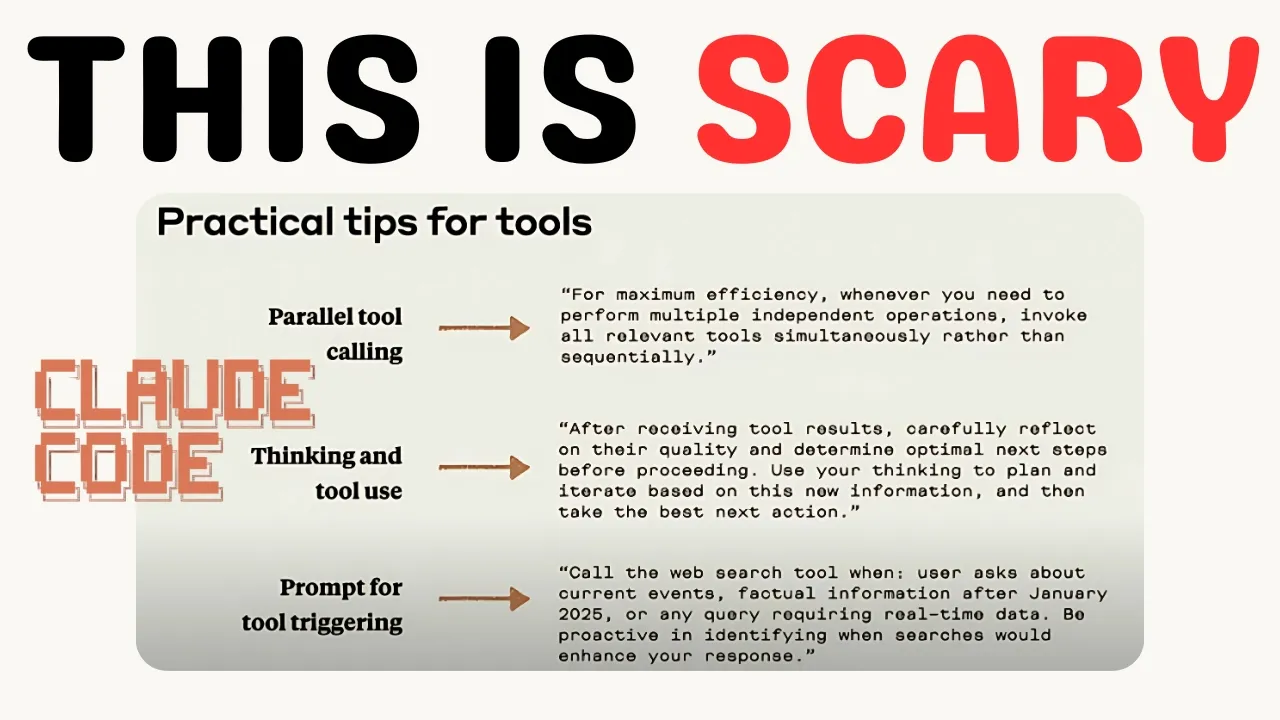
Okay, guys. I'm going to show you something today using Clawude Code. It's a prompt from Anthropic themselves that makes Claude code about 1,000 times faster.
I used this at an airport the uh on Friday when my flight was delayed. I got my new Mac out and within 45 minutes, I had coded a whole new feature for my SAS harbor SEO. That is not an exaggeration.
This codebase is massive. It read the entire codebase, coded me a front end and backend new feature in under 30 minutes. That's why I'm going to be talking about this today.
Now, I'm going to be using this on WSL, which is Windows subsection Linux. You can also just use it on Mac um or Linux itself, right? But I'm going to be using WSL today because I have a Windows computer and I did not know how powerful Claude Code was until I actually sat and made this new feature.
Just a little bit of context on Harbor. Harbert has I think uh let's say 150 files that are important to to you know that you'd have to understand. And I got this idea actually from Anthropic themselves.
If you watch, I highly recommend watching um these that basically they only have four I think it is live streams on their entire channel. I recommend watching all of these. I'm going to show you two things from this live stream this live stream today that just absolutely crazy stuff guys.
So the first is that apparently something like well I think it's 100% 100% of all anthropic employees use cla code every day. Now obviously they would say that but I mean from what I experienced at the airport I can see why harbor used to take me I would say on average 5 days four or five days to make a new feature. For example, this feature here which finds guest post prospects.
It took me about four or five days to make, right? Uh I didn't even make the front end either. It took two weeks for a front front end developer to uh make this entire system.
But I mean there's a lot of stuff here. There's the whole uh backlinking scaling thing and you know stuff like that. So that's why it took so long.
I'm not complaining about how long it took. Obviously, I understand dev work takes a long time, but I can't show you it cuz it's on my Mac, but I made this entirely new feature for Harbor in 30 minutes. From turning my Mac on for the first time to making a new feature with Claude Code.
Okay, so I'm going to show you a few things that help me do that today. So, if I just go on um a command prompt, right, this is just you just go on command prompt. I already have WSL installed.
Just use chat GBT, right? And just say, "Help me install Ubuntu on my Windows machine. " Right?
Follow all the steps. Make sure you get it going. Okay?
I had to do a little bit of stuff um to get this working. Just keep feeding the errors to Churchbt. Eventually, it will all make sense, right?
So, now I should just be able to write Claude unless it's not going to work. Okay, it worked. Perfect.
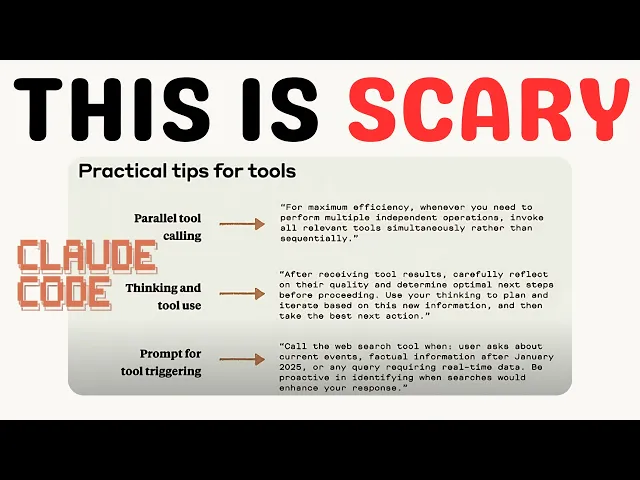
So, the prompt that Anthropic recommends. Okay. Um I'll show you a little bit of um how this works with GitHub and you know files and things like that.
Oh, so this is actually really cool. I didn't realize this Windows subsection for Linux actually has access to your Windows machine. That's a huge game changer because actually I can do something like I can just make a local here.
So let's just open local. I didn't even know this was possible. This is I'm kind of stupid for not realizing this.
I went down the docker route just cuz I didn't actually fully understand WSL. People told me to check out WSL. I did finally and yeah, it's uh pretty amazing.
So, let's call this hot dog for absolutely no reason just because I was struggling to think of a name and it was the first thing that came into my head. And we'll just make this quickly just to see if this works. I don't see why it wouldn't work though.
I'll show you the prompt in a second, guys. It's just something like this will take clawed code out the box 3 hours. I'm going to show you something that will make it possible in 10 minutes or 5 minutes.
Right? So, this should finish pretty quickly. This um this is where I found this prompt.
It was this one here. Taking claw to the next level. It's actually this prompt here.
Parallel to calling. We'll get it in one second. Let's just uh site folder here.
And then that should give us the site folder. So right click, copy as path. And then can I just CD that?
No. Okay. Oh, it works.
Look. So you got to do some weird CD for some reason, but it's it is here. Local sites.
It's got like a weird slash in it. But if you copy that from up there and then CD into it and then we actually have a list of them right here. So I can just CD hot dog, right?
And then dear that is so cool. And then we can write Claude and now we're inside our WordPress directory. That is huge.
I did not know that was possible. Um let me log in cuz I thought I was logged in but seems like I'm not. Okay.
So just watch this process for two seconds. So this is before the prompt, right? I'm just going to say um make me a golf club directory um uh on inside this WordPress website uh which is installed locally.
Start by reading the files then make the directory. Okay. So just watch this.
Okay. I'll show you just you can see it's using a tool. When this pops up it's using a tool.
Okay. Okay. Why is this so fast?
What is going on? So, it's actually doing it pretty quickly already, but when you have like hundreds of tool users. So, let's just uh wait.
Let's interrupt a sec. Wait. Start by finding some information about a um course in Ireland.
then make a JSON file for that to then populate the site. Okay, so let's see. Okay, so yeah, you can see it's still I I don't know what's happened between now and Friday, but it does seem a lot quicker.
I don't know if I've already run the prompt, but let's just exit this, right? Because I I know for a fact that this is quicker, right? So I'm just going to grab this prompt here.
I'll just choose chat GBT is probably the easiest way to do it. This is what I kind of use chat GPT for. Um, transcribe this.
Okay. So, it should Okay, that was pretty quick. There we go.
And then we're going to feed this here. And now it should do everything a little bit more quickly. Now, I'm going to change one more thing actually, just quickly.
So, I'm just going to exit. I'm going to do claude code yolo mode on Google. And I'm going to grab um this command here and then run it again.
Yes, I accept. And then you can do history. So you should just be able to do claude continue, but I'm not sure how to do both at the same time.
Dangerously allow browsing and claude continue. Yeah. classic.
So, it's one or the other, I guess. So, we'll just do claude continue here. Oh, wait.
We just do claude resume and I'll choose the correct one. There we go. So, look.
Basically, the way this works is you can see these three tool calls here. Fetch one, fetch two, and fetch three. I don't know if you noticed, but fetch two took longer than the other two.
But it did them all at the same time because it's using kind of this asynchronous, if that's the right word, approach to tool calling. There are some that it probably can't like web search, right? But you previously if you didn't do this prompt right it would be impossible that these three fetches would be done at the same time and the you can see that this one took the longest to load probably because of their website right so that's proof that they did they were done all at the same time right because all three of them were out and the third one finished before the second one which is impossible unless you run this prompt Guys, I'm not going to lie.
Max plan with Opus 4, in my opinion, I've never experienced anything even close to it when it comes to dealing with a large code base. A lot of people think that I don't really do like big coding tasks that I just make like a Next. js website here and a WordPress website there and stuff like that.
But like I developed most of what you can see on at least the brain of what happens when you click generate content with harbor and also the same with the research tool and the topic scaler and the linker everything was made by me and AI right okay so I'll leave the prompt in the description of this video I've got a lot more to talk about with claude code guys I'm pretty obsessed with this tool to be honest with you I saw this in action though I really did like I was when I when when I first started building the tool for Harbor, it was just taking ages and then I remembered from watching this video that we could basically make it go even faster and honestly it went from like taking 2 and 1/2 hours to make a WordPress website to 20 minutes to make a entire harbor feature. So definitely check this out guys. I'll leave the prompts in the description of the video.
Thank you so much for watching. If you're watching all the way to the end of the video, you're an absolute legend. And I'll see you very, very soon with some more content.