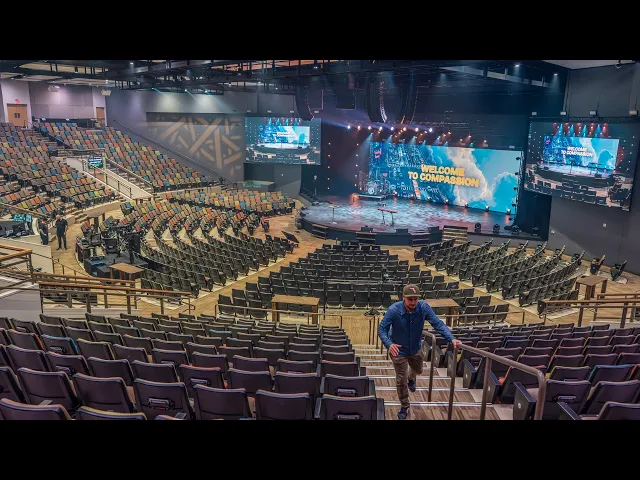
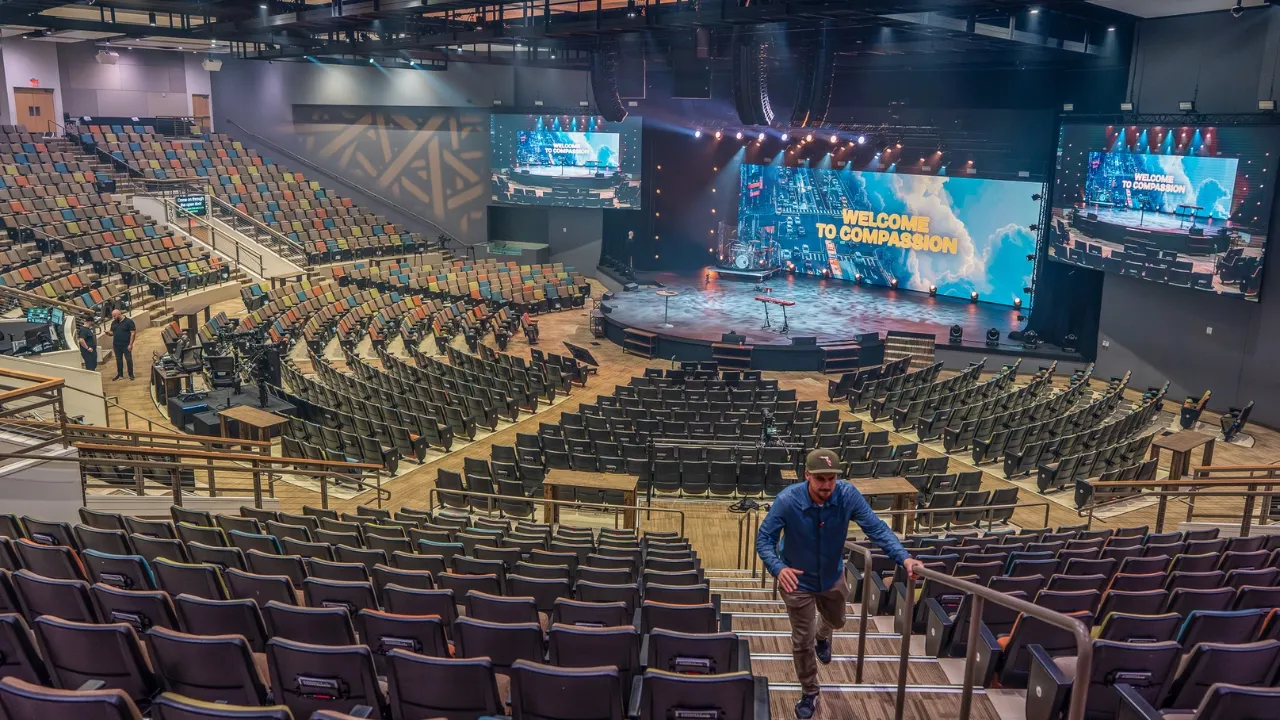
Hey, what are you doing out here? It's time for another episode of Worship Tech Tour. So, hop in on in this bad boy and uh let's go check out Compassion Church. So, in today's episode of Worship Tech Tour, we're going to walk you through some pretty incredible systems they have here at Compassion Church, their state-of-the-art broadcast video setup with Red Komodo cameras and incredible Canon lenses. Uh, their audio system that has a Digo Quantum console. They've got a 50 foot wide LED screen. But the thing that I'm most impressed about is the team and the
systems they have operating it all and the infrastructure that underlies it all. It's it's going to be a great episode to sit back, relax, enjoy some popcorn. You are going to nerd out like crazy over the infrastructure that they got here. So, here's the team uh just waiting for us here. We'll just pull up in their little shop in the back of the church. Try not to run into anything. All right. Well, meet the team here at Compassion. We've got Tyler, who is executive producer. Executive production director. Director. We've got Matt on audio. Kevin on
produ another producer. What What's your role? Uh, associate director production. He's director of production. Associate director. Associate. Okay. You are his associate. There we go. And then look at this familiar face here, Kobe Grinder. Um, the one and only from Tik Tok. So, you are my Tik Tok inspiration. Appreciate it. So, let's uh let's head on in here, guys. So, welcome to Compassion Christian Church. Let's dive into another episode of Worship Tech Tour. Let's check out front of house. And Matt, you are audio engineer, correct? Yep. Mix engineer. Mix engineer. What's your actual title? So,
my full title is production systems engineer. Um, but I also handle audio here at our Henderson campus. Okay. Um, so what am I looking at right now? So, this is a Digo Quantum 5. We've had it for about a year now. Um, it's a massive desk, but we do everything from front of house. So, we do front of house for the room, obviously. We also do monitors for the band from front of house. And all of our broadcast stuff comes from this desk. Um, we also have a really cool feature that we have 64 channels
back and forth to our comm System. So, we're able to do um cool stuff like talk backs to the band from com to the band. Mixes to the comm system, that kind of thing. Yeah. Okay. Why did you guys go with a quantum versus some of the other options out there? What were the other options you considered? Um so, we So, originally we were an Avid house. We had an Avid um SXL previously, which was end of life. Um so, we were looking at another Avid desk. Um, our main issue was price point versus uh
capabilities or like quality, you know, how many inputs versus outputs. Um, because we're handing a lot of IO. Yeah. So, we we went specifically with this desk because of IO count. Also, Digo is a great um customer service company, you know. I would say like they they're always um like even for like a church, you know, they're really good at like like answering phones at 6:00 in the morning on a Sunday to help out with problems, that kind of stuff. They're just really great um really great company to work with. You know what these button
these buttons remind me of? Like the old like arcade games buttons. They're nice buttons. Yeah, they're nice. It's just it's different. You don't like feel that on other consoles. Yeah, it's a really pretty desk, too. Lots of fun colors, you know. Yeah. Yeah. So, the the What's the input output count? So, this desk can do 255 inputs by like 100 something outputs, I think. And how do they count those? Are they mono inputs or or is that stereo inputs? They're all mono. So, a stereo channel can do two inputs. This desk also does like 71
or 51 surround stuff, too, which we don't use, but yeah. Um, there's also that's five inputs, six inputs. U we're only using about 150 right now with the stage boxes plus um we're doing digital inputs for playback for like CG machines and stuff like that and of course the clearcom system. Got it. And then walk me through how do you like lay out the console? Sure. So I do it I call it rock and roll style. Um um so we it's uh outputs or inputs outputs inputs. Okay. Um, so with the dig code, what's really
cool about it is you can put anything anywhere and customize inputs, outputs on your fader banks. So it's 100% customizable. Um, but I just keep it simple. Um, all of our campuses have digos, so we kind of keep the layout kind of similar. So any any uh staff member can go to any campus and be familiar with the layout kind of thing. Yeah. Um, so on the left side are all of our basically our band inputs. So, drums, guitars, keys, playback. Yep. Drums, guitars, keys, and tracks, playback. This is all like siege machines, resi, that
kind of stuff. Uh, effects returns on this side. So, um, drum reverbs, vocal reverbs, vocal delays, all that kind of fun stuff. Um, and usually in the center, I live on my VCAs or DCAs, whichever you prefer. Um, typical DCAs, drums, bass, guitars, keys, tracks. Um, I have a effects a vocal effects master and a band master for the entire band and vocal master for the entire vocal group. Nice. And on the right side, first thing we hit are actually all of the hosting mics is what I like to call them. So, all of our
pastor mics, all of our host handheld, host body packs, that kind of thing. Yep. Babry mics. Um, and then we switch down into our vocal group, which we have 12 vocal channels. We have a lot of Vocalists usually. Um those are all just used for vocalist. They all go through waves. They all get processed. That kind of thing. Um and then we have just for our online campus. So online does Oh, I'm sorry. So our online does um through welcome in the room live. So I have all that stuff coming from them. Um so this
is the custom ones. This is just all the online microphones, the online CG machines. um all the special stuff we get from them like there is a program that we'll probably talk about later called Zoom ISO we get from online the live view when they do remote broadcast from a different campus that kind of stuff comes in there. Mhm. Um that one is another copy of playback stuff. So if I can't get it here I can get it over there you know and that's everything else is just utility stuff. Yeah. Yeah. The uh did I
say Beyonce? Yeah. That's a really long push delay. So it's like a quarter note just I call it Beyonce because it's like back in like the early 2000s that was her kind of thing for concerts, you know. So I just label that ever since then. That's great. The uh Okay, so walk us through the logic of the how you're mixing for online again one more time and like it's all coming from a a matrix here or Yeah. So our online broadcast is basically a mix of the subgroups for the house. Okay. So, it does like
it does basically it's a house feed. We're able to adjust levels like oh the drums are too high. We can bring down the online drum level in general. Yeah. Um that goes to a different desk or online desk which is operated by a volunteer and they get the left the broadcast mix basically which is just worship. It's just band stuff. Can they control the groups or you have to control them here? We control them from here. Okay. And you're just p you're just putting on headphones. I'm putting headphones and check in real quick. make sure
it's all clean and not clipping or it's balanced pretty well. Um, and they get all the online stuff. So, they get online CG stuff, they get uh the online host mics, and they mix it back there. Got it. Yeah. Yep. What's that console back there for? Is it It's a really old Avid. Okay. It's a D show Dow profile. It was our It was our original front of house desk in our old room. Yeah. Um, and we fixed it up. So, the same same thing happened like CO happened and we like, "Oh, we need online
ministry kind of thing." So, we're like, we have this desk sitting here, so let's see if we can fix it and put it back to life. And so, that's what we did. Yep. And then is waves is integrated right here. Okay. But then how how does the integration work with the this Console and waves and getting the sound to and from? So, there is um just like any other wave setup, there's an external wave server which is back here in this rack behind us. Um and there's a Waves card built into the desk. So, you
can get a Digi Co with a built-in waves card, which what we did. Um, and the integration is really cool because it um, it basically follows the desk, so I can control waves from the console. So, if I select our snare drum, it brings up the snare drum channel for me automatically. And this is a touch screen. Oh, yeah. Okay, got it. Yeah, perfect. Yeah. And so, it also has you can use your touch to turn, too. So, if I really want to get a knob, I can select something and then I go in there
with a desk knob and control. Nice. Does this Oh, this touch turn knob will always sync with whatever. Yeah, whoever you have touched. That's nice. Um, and it's really cool because uh it isn't like an external thing like there's an external server. So, Digi Code knows that it's talking to it. So, if it ever does fail, there's a setting that just turns off all the inserts automatically for you. So, it just keeps going. Yeah. If like waves does crash, which is never really happened to me before. Yep. Like once or twice, but it's really rare.
Uh let's look at your uh if you want to get a good shot of this guy here. Look at your rack. what you got going here. So, we've got all the vocals getting So, what's V veq? Never used that one before. Pig child. Pig. How do you say that? Pig P. I call Pu child. P. I don't know if that's right. French or something. I don't know. Yeah, it's fancy. It's name after a guy. Six. You got siblance. And then uh any any tuning happening anywhere? Yes. So, I put tuning on a different rack. Okay.
Um, so all of our autotunes are just on their own single rack. Um, and I do that because I have a kill autotune button on the desk itself. So it's going through on the input channels on the digo. I have an A insert and a B insert. So all the autotunes go through the B insert. So I can hit this button and kill all the autotunes across the entire desk. Oh, it just turns off that insert on all the That's cool. I never I never seen that or thought about just giving it a different rack
because then you're saying so right now what if the autotunes are live my input is coming from the the first rack channel strip for the vocals that does all the processing. Are you doing tuning first or last after? Yeah. Got it. So like right now because this is like vocal 2 outputs D31 here But then if I go to your autotune for two here is it I guess how yeah how is that routing logic working then? So it's basically two route points um on the Waves card. So uh insert one just goes through like uh
channel one and the card and back through channel input channel one to the card. And so autotune is further down the list. It's like, oh, you're using two inserts on the channel. Two separate inserts. Okay. So, it's not going from the sound grid into another into another rack. It's going from digo through sound grid once and then back through the channel strip and out the other insert to the next one with tuning. That's cool. Okay. Um, and so the only reason I'm able to do that is because um, like I said, we also do from
front of house. I actually double patched all my vocal channels secretly on a different layer. Um, so the vocal channels are zero latency. They don't go through waves. Um, they can't hear tuning because that's on the primary channel for the house. So all the inner stuff is clean for their vocal channels anyway. Exactly. Yeah. How do you uh like how clean is clean? Are you giving them some compression or anything like that or I'm doing basically um I do a notch. I Basically do a highp pass plus like a low mid notch just to clean
it up. Yeah. Um and then a safety comp a safety limiter so they don't like you know damage their hearing kind of thing. Y um yeah so then how are they managing their mixes like so they we use a a software called clang which also integrated into the desk um which I have pulled up here actually I can show you it's uh it's called immersive um mixing so it does um 16 channels uh stereo uh intermix channels. Yeah. Um, and what's really cool, these are all my so I have master control over clang, so I
can see everything. Um, so these are our um, these are all of our band members from last week. So these are all their different mixes up top. And so they can basically see this on an iPad or an iPhone or an Android, any kind of device. They can have a Surface or and basically any it's crossplatform. So that's one of the reasons we got it because it's really Yeah. Um, anybody can who has a Droid. It's not like cuz the Avid was uh iOS specific. You couldn't use on Droid. Yeah. Um so Clang does 16
stereo inputs. Oh yeah. 16 stereo mixes or mixes. It's 64 inputs to Clang per per person. Great. So everybody gets um 64 channels. So it's it's basic. We color code it. So you know drums, bass, um guitars, keys, tracks, click and guide. Is clang just receiving whatever audio protocol that comes from Digo or is it Dante? How does it Yeah. So there there's um so Digo has DMI cards in the back of it. So there's just a card that goes in the back of the desk. Um that runs it's basically a little mini computer that
runs all this. Um but it's really cool about it which I didn't think people would like. It's um it's it's a 3D immersive. Yeah. Um, so you can actually not just do a left right pan. You can actually place it earth in a 3D space around your head. Yep. Yep. Um, which is what this represents. And it's kind of doing that with the the magic of adding maybe some reverb or something like that. Yeah. It's all it's all delay and phase. Delay and phase. Okay. Got it. So, um, you have to have both inerson to
actually have this work, otherwise it sounds really weird. Yeah. Um, and I always we always came from like just a little left right mix kind of avion situation before this. So I thought our band members who'd been on It for years would hate it, but they're the first ones like, "Hey, this is great. We love this. We can put the click on top of our heads and put the drums behind us kind of thing." Y So all of our members really take take to this really well. They really enjoy it. Um, looking at your workspace
here. So you got the standup desk. So do you bring it up and down to whatever level you need? Yeah, we have a sit mode and a stand mode. So that's Oh, there's sit mode. Nice. So, and Tyler has his has the levels cuz he's really tall. Yeah. You've got the nice Yeah. Cable management with standup desks is always fun because you got to leave the slack for it. Yeah. We had to build like a massive loom to it. Yep. And then you've got your keyboard and mouse under here. What's this thing? That's the console
keyboard. Oh, okay. Um, it has an on screen keyboard, but Digo is weird and they they have to have a UK keyboard to work. Oh, okay. So, that comes with a desk built in like that. Yep. keyboard, mouse, uh, Stream Deck. What are you triggering with Stream Deck here? Um, so Stream Deck does a lot of stuff for us. Of course, we use Companion um to control a lot of the stuff in the building. Um, the main thing we use it for here is I have my own page. Um, so a lot of that Page
will switch my multiv- view over here. So I can see Oh, yeah. different multiv- view shots. Yep. Um, it does building modes. So all of our building is controlled by CUCIs. Um so I can put it into what we call service mode or rehearsal mode. So either there's like just house music in the lobby or it switches over to the desk, that kind of thing for services. Yep. Um we control our switcher from here. We can control uh TVs on and off from here. Um there's a lot. Yeah, I like that. I never seen one
of these guys for the mic meter. So or the level meters and a clock. That's a cool little You get a closeup of that. Yeah, it's just a little uh monitor we got off Amazon a couple almost a year ago now. Um Oh, it's just a monitor. What app is running it? Uh we're running smart on our machine. It's on the same machine over here. It's hidden away. My clang. That's a cool idea for a monitor right right above the console. Nice low profile. But this usually sits here and gives us our um RTA information.
Yeah. So you can see smarts running on there and then they that monitor's just plugged into the computer. Yep. Yep. It's just a separate screen we just dug over the Yeah. SPL bank so I can I can always have eyes on it. That's a toggle. Yeah, it's like it's just go on Amazon and search like small mini wide screens. You can find them pretty easily. All right. Then you got the foot pedal down here. The MIDI foot controller. Yeah. Yeah. Hidden back there. What are you doing? Yeah. What's that for? Uh, so that does a
couple things that I just have it for funsy stuff. So like I can do tap tempos on the desk with it. Um, I can switch like screen banks and stuff. I don't do anything that can like kill audio or like snapshots in case I accidentally bump a wrong button or whatever. Um, and the pedals do like rides on certain things. So, like I can do a plus minus 5 dB ride on an effects fader or like if I do have like house mics, I can like bump them up and bump them back down kind of
thing. Oh, that's cool. Without having to dig through the desk to like grab a fader really quick. Yeah, we got four limbs. You might as well use them all when you're running sound. Yeah. Wow. And then a little rack setup here. We noted your wave server earlier. Uh what else do we have going down here? Um, so the only thing I'm really using are we have two reverbs. Um, I just have an extra snare verb just for really big songs, you know, that that need a super big snare verb. Um, and this is Beyonce. This
is the Beyonce delay. It's it's like a one word push. So, I just like I press a button, it sends that one phrase through. Y I don't use it that often, but special events. The sound of the the old school lexicons, like you just like the sound of it. Yeah. Um, I just I'm really particular about like my reverb sounds and my snare especially. I have a hard time finding ones I like in Waves. Um, because we don't we don't have all of them, right? Um, so we we had this laying around and I was
like, let me try that and it's just give me what I want, you know? Yeah, that's great. Um, yeah. And you get some tie lines for audio. Yep. So, yeah, this patches back to our amp room and also jumps up to the booth upstairs in case we have to patch something to a computer real quick. that kind of thing. Um, yeah. All right. That's a great That's pretty epic front of house. Um, we can move on to this looks like a producer station. Yep. That's Kevin's world. All right, Kevin. Really fast. Do you want to
talk about comm audio integration? Would that be Yeah, here if you want to do it. You got This is your com. I think you might like it. Yeah, I use it for coms. It does. I think he might has a headset on, but that's that's part of the cool like comm integration thing is that I can like solo a mix. I have I have a solo bus on the desk. I can also pipe coms into so I can always hear comm. That's how I listen to com normally is I put the headset on and I
just listen to comms that way. So I only listen for key moments like transitions, video times, that kind of stuff. This is this is actually a custom audio multiv- view that I have. Um, so this is really helpful because I get to see all of our graphics machines. I can see what they're they're playing, their levels are playing at. So I can see if I'm getting audio from them. I also see what I'm sending out to our resi encoders, um, our online mix, what their audio is doing. So I can see our input signals and
output signals that I'm sending out. Um, and we also have a custom tab up here that I can see what our lobby is doing. So, if it's in rehearsal mode or the service mode, um if we change it on the stream deck, it will change and tell me that, oh, this is in rehearsal mode or are you going live to the lobby? That kind of thing audio wise. That's cool. Yeah. Having the visual reference is super important. Yeah. So, like I can see, oh, we're not getting audio on CG1. The video is playing, but I'm
not getting it from it or it's on my end. That kind of thing. Yep. Yep. Okay, that's it. Sorry, man. Look at this uh command center you got here, Kevin. Yeah. Four screens. Yeah. Never enough. I like I like the tilted uh monitors down here. This is not touchcreen, right? No, it's not not we're not that cool yet. But it's better now you can like if I'm sitting here as producer, I can like see what's going on. I can see everything here. It's probably better when the lights are down so you don't have glare as
you're trying to read right there. But yeah, exactly. So yeah, uh this is my station here where I sit each Sunday. And so I guess I can kind of walk you through. Uh up top there's just two multi- views. Um top left there is what we call like our producer multiv- view. So upstairs is actually a volunteer producer. Um and so that just kind of gives you the most important stuff. You know, your CGs, you know, preview program, all that kind of stuff. On the right is kind of like our our point of view POV
multiv- view. So that way I can see pretty much anywhere I need to see both in this room and in a couple other places. So you can see there's some backstage. Yep. Exactly. I can see our online studio video control. So, I can see if like if I'm trying to call Colby, I can see if he's there or not or whatever. Um, and then a couple shots in the room as well that can help as well. And then also in the bottom center, you can see our student center, which is a different room, uh, in
the building. I can see what's happening in there because we have simultaneous student services at the same time as here. So, um, that's that. Um, going down here to the right, that's just a resi decoder. And so, I'm the one who actually we're we're one church with seven locations. So, pre-ervice and our sermon go out from here to our six other locations. And so I'm the one who puts in those cues um you know each Sunday for our six other campuses so they know when their in andouts are and they can queue it up. Um
so the Yeah. So your line cut for broadcast is going into a resi encoder. It gets into their This is a control software. Yeah. Right. And then you're the one saying, "Okay, at this moment this is where you need to start sermon for your broadcast campus uh or your satellite campus and this is where it ends." Yep. Do you guys what else do you do with Resi? Like do you do any um is it just the video with the baked in audio? Are you sending any multitrack audio to camp? Uh yeah. So we send as
far as audio goes there's pretty much three different feeds they get. So they get yeah program left right they get uh basically talkers. So like uh well actually it's it might be four technically because they get left right they get pastor is one they get hosts which is another one and then they get playback so video. So, It's four stereo uh feeds that they can choose from um depending on the needs. Um are the campuses all doing the same set list? Mhm. Yes. So, we're centrally programmed church. So, songs are the same, service orders the
same, timing is the same, all that stuff. Yeah. Y and at each campus, you do have a dedicated production lead there. That's right. Yeah. So, every campus has a full-time production staff person there and then everything else is run by serve team members, volunteers. Yeah. Yep. And they're all um permanent locations like they're not portable. That's right. Yeah. Yep. Awesome. Um and then yeah, the last monitor here is uh just remote desktop pretty much. So I can look in and see and slashcontrol if I need to all the key things. So on the right side
of that monitor is our two CG machines. Um which, you know, I can show you in just a moment. Upstairs in the middle there is our lights. So Vista, um on the bottom is actually um workbench, wireless workbench. So, I can keep an eye on the pastor's mics, host mics. Those are really the only things I keep an eye on. Make sure, you know, they're on when he goes up. They're not, you know, popping or whatever before he he starts talking, so I can have a visuals on all that beforehand. And then on the left
is supposed to be Slack, but our ISP is down right now. So, we have no network. Uh, but that's how we uh that's how we communicate with our staff across all the other campuses is in Slack. Um, and so I'll give them heads up about cues And stuff like that. I like the advantage of using remote desktop for just like mostly monitoring everything and then you can even because remote desktop is Wait, is that the Apple native one? Yeah. Yeah. And then you just uh are you able to like save all these like settings or
do you have to like log into everyone on your No. Yeah. Yeah. No, it Yeah, we just I just click in it logs in. Yeah. Yeah. And then the um and then Yeah, you can toggle between observe mode so then you don't accidentally like click on someone doing something like that. But if if something goes wrong or there's some kind of mistake, I can pop in there instantly and try to fix it or whatever. Yeah. Yeah. Cuz it's it it's almost a little more advantageous for this type of role than a KVM might be, right?
Because I feel like because to see I don't know if KVMs that let you like see all everything simultaneously like that. It's also a lot cheaper than a KVM system. Yeah, totally. Well, cuz is the computer is this machine this computer itself on a KVM or is it here somewhere? No, it's here. Yeah, exactly. Yeah. No, that's great. Um, but yeah, and then, uh, Stream Deck on your left there. Yep. Um, I'll let Colby talk a lot more about the the really smart stuff behind Stream Deck, but I think he's using the satellite system. Is
that right, Colby? Great. I got that right. All I know is that it does what I needed to do. So, um, I've got a utility page right there. Uh, if I hit this guy. Yep. And so that the top section there just changes this multiv- view. If I need to see something else, um, you know, I can switch that. or that second row is just the specific cameras that you saw on that POV. Did I just break it? It's okay. Sometimes switching between certain inputs, it there's a little bit of it doesn't want me to
go really fast. That's right. Yeah. Yeah. But then the second row is those those POV cameras. I can make them full screen on there if I need to, you know, see something. Oh, that is cool. Um so like that's the stage left one. Uh there it is. So yeah, I can see usually our pastor sits here and so or you know host and stuff. So if I can't if people are standing, I can't see is he here, you know, whatever. The bottom two, the blue ones, we have a center confidence monitor that's right under our
camera one and two, and that just controls what goes to that. So, most of the time we send program feed to that. But for some moments or certain communicators, we have like a a makeshift teleprompter type setup. And so, I can switch between who's talking, program feed or the teleprompter for what they need. So, that's what that is. Um, that's my my special page. Yeah, the top left one is back to the POV if that's what you're looking for. Yeah. Um, and then yeah, I think that's pretty much all the stuff for that that stream
that's specific to me. There's a lot of other stuff obviously on there like Matt said, but so explain to me on a Sunday, what are the typical roles that you're overseeing and directing? Sure. Yeah. So, my role at least at the Henderson campus, I'm over pretty much the in room experience. And so, obviously down here on the lower level, it's me and Matt. Matt's running audio. I sit here as kind of the I don't like executive producer, I guess. Um, but then upstairs, which you know, we'll go go see in a second, there's CG operator,
lighting operator, and a producer. So, like I said, producer is actually a serve team member, a volunteer, um, who kind of is like the air traffic controller, you know, queuing people to do certain things. Yeah. Um, which they're like very well experienced. Like our producers are amazing. And so I'm pretty much just overseeing all of that. And so I'm taking in all those different things and, you know, trying to make sure everything goes smoothly. Um, but then outside of that, we have a stage team. You know, bring stuff on and off. um cue, you know,
talent to come on and off, whatever. Um and then obviously we have camera operators in the room um which I know Col Kobe will talk about that. Um and yeah, and then back in video there's a whole team of video people, but in the room that's pretty much it. Yeah. Yeah. And I want I think it's good for people listening and watching to understand the the importance of a producer role. And a lot of times in small to mediumsiz churches, like the sound person or the CG operator is the producer, too. Yeah. And that's where
it gets overwhelming. You could simplify and hopefully bring the stress levels down on Sunday if you found another volunteer and like maybe you give some tips on what that could look like, but someone who could be like, "Hey, they've got the planning center, you know, list of what's happening on the during the service or just a simple spreadsheet and they're the ones like fielding anything or or making sure everybody's on the same page because it's hard when you're operating sound or CG to think and see what's going on." Right. But then even for you guys,
it's a big enough operation to justify your role as more kind of executive level overseeing all of it. So then another producer like you said is that air traffic controller who's like on the comms more. So if you you can you cannot be on comms I'm sure for a minute if you have to. That's the thing like it's huge because if let's say something does happen, something breaks, something malfunctions or you know we also oversee production in like our kids' rooms and those the student room you know if something goes down over there I'm free
nine times out of 10 to go handle that knowing that this room is going to be totally fine because the producer is overseeing it and you talk about like picking you know someone maybe from your volunteer team or whatever like all of our producers started somewhere else on our team. No one comes to our team as like I want to be a producer. If you're a producer then you start on CG. If if you're interested in being a producer, you start on CG, you start on lights, you start on something. And over time, as you
get comfortable with the what we do here, and as we get comfortable with you and we trust you more, then you get into, you know, the producer type. Yeah. It's got to be someone who like is detail oriented, kind of can see ahead what's coming up next and gets us and Yeah. gets and and not afraid to like kind of take command of a situation to like give the queue, give the call out. Exactly. Yep. Um, it's great. Yeah. So, a couple audio interfaces. You've got this. This is This is your Mac. No, that's that's
the uh that's the audio one. That's the audio Mac waves and stuff. But then is is this one yours? The Mac Mini. Yes, exactly. Yeah. Um Cisco, more tie lines, battery backup. Yep. Very cool. Pretty simple. Um radio for talking with security, medical, whatever. And I just tie it into my free pack. Yep. Um which we have back here. So Oh, yeah. Or the free pack. And then yeah, it ties into the the jack here. Y it's a little bit of a Oh, I'm missing the other cable, but yeah, it it ties in there. So
that way I can monitor, you know, security channels, um medical and then obviously if something in here happens, I can radio them. So So from a comm standpoint, you're talking to front of house. Uh light is lighting up here. We'll talk about that. Your video control room, CG. Yep. the other producer up there backstage stage manager team. Yep. Exactly. Um and you're using the clearcom free speak for everybody. That's right. Yeah. Well, yeah. Some there the stationary positions have panels, but yeah. Exactly. Yeah. For for wireless it's all free speak. Yep. So, yeah, that's my
little You've got the st You got the stand up. Do you ever use it or do you Exactly. Yeah. Yeah. Yeah. So, yeah. When we're, you know, in singing and stuff like that, I'll stand up and vibe out, you know. Okay. So, yeah, that's it. Let's go up to uh lighting world. Yeah. All right. What's your guys' uh workflow for lighting? Like how you're programming it on a weekly basis and getting it set up for whoever operates it on. Sure. Yeah. So, our service flow by and large is pretty pretty standard each week. So, there's
not a whole lot of variations. I mean, sometimes there are, but so for the most part, we're working from the previous week as far as our key elements. you know, pre-ervice, uh, Walk-in, welcome, all that kind of stuff. And all we change each week is for the most part, you know, the songs. Um, and so, yeah, we do it on a like a weekly basis as far as like the actual Q lists and stuff. Um, and then we go back and, you know, some if it's a song we've already done, we'll we'll pull that song
from a previous week and all that kind of stuff. Um, but yeah, as far as volunteers go, we we program everything ahead of time. So, volunteers are just advancing cues um when it comes to that. So, um, and then, yeah, I don't know what's this. Yeah. So, this is the green hippo. This is, um, the the software for the center LED wall that's down there. And so, Vista is actually sending cues to, uh, the hippo to change uh, you know, what's what's happening up there. So, is it almost like Resolum or something? Uh, yeah, in
some ways. Yeah, it's it's similar idea, but basically in Vista, this is a DMX fixture. And so if if you look over here, right here, that's the hippo. And so we set what um you know, whatever setup we have over here, you know, this is Q7 on the hippo. So on this lighting queue, it's sending signal to the hippo that it wants to pull the the seventh Q right there. And so as you know, if we go through the Songs and stuff, it's going to pull, you know, the different different lines here. So that's all
Matt. Matt's really smart. So you got them talking to each other. Um, and so that's the idea. Um, because wait with the in terms of what's happening on the screen, so you're adjusting brightness throughout the service or just like in general. Yeah. Yeah. All the above content and, you know, effects and parameters and stuff. So if I go to the stinger video that we do at the start of each service, you know, it blacks out and then I go to the first song here, it advances down to song one. Okay. That kind of stuff. And
that way it's all linked and tied and timing wise as lights change, the center wall changes, that kind of stuff, you know. So that that content that v that motion graphic is it living in the the hippo? Yes. It's not living in propresent. That's right. Nope. It's all in the hippo. Yeah. Okay. So um but could the hippo pull in like an NDI feed or something? Yes. Yeah. It can it can pull in all kinds. It can pull in our IMAG feed, you know. It's it's it's capable of pretty much, you know, any of those
inputs. So um but yeah, that's that's kind of how those things talk to each other. Yeah. So it can take in uh six different SDI inputs and then also we key in you know alpha key our lyrics on the center. Uh actually if I go back to the song um and then I can pop in our lyrics uh for that song. You'll see it's uh on the center there. And so it's got, you know, all these different layers here. And so this is the background and this is the uh the key source. But then if
I wanted to like adjust the Right. How much? Right. Now that one's at a little Yeah. It's like it messes it up if you don't have the full brightness. That's right. 80 81 is the sweet spot. Yeah. Um but yeah, and there's different ways to, you know, overlay stuff like that. Alpha key, luma key, whatever. So cool. All right. Starting here on this very front truss. These are Auras. Uh Aura washes from Martin. Love these. Um, often times they're either out pointed out like this or more often they're pointed straight down over our, you know,
front of stage, you know, talkers or whomever. Um, so those are great. Um, the next set of washes that are in the air, these are all rushes, rush washes, and they just give, you know, a pretty even wash over the whole stage and and they're movers as well, so we can run effects on them and stuff. Uh, the profiles in the air, these are, uh, Matte quantums. Um, couple of them are showing their age. I think they're pushing 10 years now. Uh, which is kind of crazy, but um, they're still great fixtures. Um, then that's
everything for in the air as far as moving fixtures. We have these towers on the side here. These are chromaq color ones. Um, the color on these are pretty phenomenal. Really love those. Um, then let's see. We can do Oh, the floor wash underneath the wall. That's also rushes, identical to the rushes that are in the air. Um, and then we have these floor profiles that are on the Oops. that are on the wings over here. These are really old uh MH1 profiles. Rush MH1 I think they are. Uh, super super old. Actually hand-me-downs from
another church, but they work. Um, and so we'll take that. And then these guys are new additions. This is a find from Colby. Uh, these are made by a company called Opsk. Like, it's one of these random Amazon brands, but they're super affordable. Um, and yeah, the colors on them are actually quite good and they're pretty bright and super cheap. I don't even remember how much they are per $109 per says. Yeah, they're pretty insane. Um, but they've worked so far and I love them at, you know, as blinders, but I also even love them
in in low percentages like how they just kind of glow whatever color you want, you know, over our walls and stuff is pretty cool. Um, so yeah, those are uh I think all the the actual, you know, special fixtures as far as front light. Um, we use the uh ETC Source 4 Luster. I Think they're series 2. Um, and so we have a million of those, like a lot of them. Um, and so we use them for all of our front light. They are the full color range. And so you can see sometimes we'll we'll
hit the the front line with white always, but then the back line we tend to color them a little bit to try and give a little bit of separation like on camera, a little bit of depth. So it's not just a a wash of color. You know, the the backline will be just slightly tinted to match the song. um that way they're lit, but also again it kind of adds layers, a little bit of depth um to what we see. So those are front light. Um house lights, these are the chromacque inspires. Those are uh
showing their age. This building is 10 years old this year and so some of them are starting to have some color issues, but um but for the most part, they've been they've been very good and love the colors on them. Um even though they are starting to show kind of their age a little bit, but yeah, these are, you know, full color house lights. So we can do whatever run you know effects if you know we're getting crazy or whatever. Um so we have individual control of each u each light here in the room. Um
so yeah I think those are all all the fixtures. Talk about the universes. Oh yeah. So, um, we have, uh, capability to do infinite universes, which is pretty cool. But, um, we're we're pretty much running on, I mean, how many do we go to right now? You know, 10ish, maybe 12 universes across all these that we're using. You know, some random one-off things on these later universes, but probably About 12 universes that we're we're fully using here. So, uh, yeah, that's pretty much Yeah, exactly. Yeah, that's pretty much it. So, for lights, does that cover
what you're looking for? Yes, sir. What What is happening over here? All right. So, uh, we can start, I guess, CG first. Um, so over here we have two separate CG machines. We call them CG1, CG2. Um, and so on the left is CG1. That is, um, all of our I think it's the other mouse there in the middle. I'll get you GCG1. So on the left CG1 is all of our full screen content and videos, those types of things. So things that need to go full screen on our side screens. Um and yeah, sometimes
sermon slides, those kinds of things. So full screen graphics, full screen videos. On the right is anything that needs to be um is lower thirds like keyed on. Um those are that's a different um setup. That's center screen. normally they're lower thirds um for for Sunday morning when we're running IMAG obviously but that's all uh lyrics name plates those kinds of things um uh that are on the the separate you know CG1 and CD2 type thing so um and these operators are here most of the time yeah 100% of the time it's one operator operating
both the cool thing is like there's never a need that they're never running both at the same time and so they're just kind of bouncing back and forth between CG1 and CG2 one operator So yeah so this is their clearcom Yep. Yeah, that's their panel. Yep. And so, yeah, they can uh they have access to our channel A, which is just our main, um, you know, production channel. If they wanted to listen to our camera, you know, calls, they could. They they really shouldn't at CG station, but it's there. Um, and then the other thing
that's really important is click and guide. They they can hear that as well. And so, they know verse, chorus, whatever is coming up next when they're running lyrics. Super helpful. Um, so yeah, that's that's CG there. And then uh this is the producer station we were talking about earlier. So this is a serve team member who sits here. They get that multiv- view, that same multiv- view that we we talked about downstairs. Um and they'll have their you know playing center rundown sheet and be calling the the service to um to everybody. And so yeah,
do you ever wish these positions were in like a different room, isolated room or actually no. We've talked about it, but I I think it's very important for this person to feel the room. Um because there are certain moments that yeah uh like for example we do communion every week and that's a moment where we have to feel the room. This person makes the call when to move from this uh reflective communion moment that's just instrumental that kind of stuff into an actual song that everyone's going to sing together. And so this person needs to
feel the room um for stuff like that. And so we've thought about it but I think at the end of the day it's really important for them to be in the room. And then because of that, I I think it's very important for this person to be within arms reach and talking distance of this person. Um and so that way, you know, especially when it comes to sermons, um they can be pointing at slides, you know, that need to go up or whatever. These two just have to be in constant communication. And so because this
person's out here, I I want the CG OP out here. What is this person going off of for ser? Is it just a planning center? Yeah, it's just a planning center sheet. Yeah, I should have printed one off for you, but uh yeah, it's just a planning center sheet. And on that, I make a ton of notes that help this person um and the whole team honestly, you know, hopefully be prepared. And so, they just walk in and they they kind of know what they're doing with very little, you know, um kind of guidance from
me for the most part. So, y um but yeah, and the other thing that this this station has that the other stations don't have, they do have a band talkback. Um, and so like I was talking about some of those transition moments, they're the ones queuing the worship team to go into the next um, thing or coming out of a video. They're counting down the end of a video so the worship team knows when to fire the next song, that kind of stuff. Um, so yeah, that's what that station is. Uh, let's talk about the
space in general and the PA system. I don't know if Matt' be kind of cool if could you just run some audio through? I'd love to hear the Yeah, I know where he he will definitely be the PA expert. Um uh so 10-year-old building you said? Yep. 2016 this room opened. This whole part of the building opened 2016. Um but yeah, this room seats 267. Um we've recently removed a couple seats for some communion um stations and stuff like that, but typically it I feel like that's it's a good size where it still doesn't feel
that huge, right? It's definitely especially because of the the angle and the degrees, you know, that the the the seats go around. It definitely feels more intimate than a 2000 seat room to me at least. Yep. Yeah. Yeah. Lots of treatment went into it. Looks like you got the plenty of panels around the room. It sounds good in here. Um Yeah. Are those cloud are those clouds actually like absorbing? Yes. Audio. Those are treated clouds. Matt, walk us through the PA design here. Yeah. So, we have a JBL U VTX rig. Uh, the main arrays
consist of there are four of them. They consist of V20 boxes. I think there's nine in each, eight, eight or nine in each array. Um, we have 12 dual 18s. Um, yeah, 12 dual 18s. Uh, there's six in the air, six under the stage. Um, I'm not sure. They're not the VTX subs. They're different model of JBL Subs, but they're still in the same family. Yeah, I'd never seen that like arrangement of the subs like that kind of in the triangle. Yeah, I haven't either. What? I haven't either. So, um this was designed 10 years
ago by uh we started we hired a design firm called Debbree. Uhhuh. Um when we designed this building and they designed all the PA system for us. Um I think Wait, so they were like an architecture firm that also does PAS? No, they're they they're a integration design a production integration design company. Okay. Um they do I'm not sure what they've done recently, but did they not did they just design? They didn't build it. No, Summit did the build. Okay, got it. Yeah. Um but now Summit does all of our integration and build. They do
design build. Yeah, they do both for us now. Yeah. Um but this so basically the way they set up is that so this this array on this side is in time with this sub they're on the same plane together. Oh. Um same thing for that side. And then same thing with the center too. Uh they're all on the same plane. Um we do we used to do when we first started we used to do a reverse stereo. So center was left was left, right was right and then the outside mirrored. So there's a full stereo
image across the room. Um but we quickly realized that the two outside arrays got over overlapped too much. So we're getting a lot of phase problems with um just walking around the room. So we did so now we do some mono on the sides and then stereo in the center. Yeah. Um and then we have JBL front fills across the front of the stage to get the really first two or three rows. Yep. Um and all the delays like 13 delays. Yep. 13 delays. Yeah. Um, which we actually don't use. They're turned off right now.
Um, when they first designed this building, it's kind of a funny story. They first designed this building, it was supposed to be an extra supposed to be a full 280° around the stage. Oh. Um, and so our architect was like, "No, let's not do that." And so they brought the sides in and brought the back in a little bit and they didn't tell our design firm when they did that. So we're like, "Here's this PA. We got to hang it." And so they just did the best they could. Um, but this so the PA is
plenty enough to like the top two or three boxes like fill. We've had it retuned, you know, since then. So they just use those top three to fill the whole top area. Yep. Coverage with coverage. It's So now the delay speakers are just ornaments. There's ornaments, You know. We we've we've contemplated like turning them around to do some surround stuff. We're like, "Nah, that's lame. We're not doing that. It's too much work." You know, so they're up there. They're hard to get. You know, we would have taken them down, but Yeah. They're really hard to
get to cuz that's all fixed seating, you know, and it's all stairs. Yep. So yeah, man. And then these are all Are they JBL amps, too, or what's Yeah, it's all crown. So, it's the same it's the same family. Got it. Um, all the processing, all the processing is in built into the amps. Um, let's go. Can we go see the audio rack world? Absolutely. Uh, such a nice backstage area, loading dock. Yeah, loading dock and our shops right through there. So, we just push stuff straight through. It's a truck height dock, so Oh, nice.
Yes. Makes it really easy for like freight deliveries and y stuff like that. Whoa. Okay. Pretty. Yeah. This is our very colorful rack room. Um this is So these are Yeah. So those are all the PA all the amps for the main PA system for the main arrays. Okay. Um, this is all of the subs. Yeah. And the front fills. Yep. And all the lobby stuff's done through here, too. Okay. Um, all right. Let's Let's go through the tour. Mac Studio. Yep. My Mac Studio is our tracks rig. Um, right below that, it plugs the
interface right below it, which is a Moto 24 IO. So, we have 24 channels of tracks we can use if we wanted to. We're only using 16 right now. Yep. Um, KVM goes side stage. So the worship master pastor can set it up and control it with a has a loop pad on his keyboard. Nice. Um below that is a guitar speaker emulator. Um all of our guitarists for the past um past 5 years have used emulator pedal. They've used keers or so we haven't used that in a long time. Yeah. But in the oneoff
chance that someone has a guitar cab. Yeah. That will actually take like you unplug their speaker and plug their speaker output. We can route it through our stage and it gives us an extra output to come to our console with. Oh, cool. Um, because our stage managers are so close, you have to have a quiet stage as much as possible. So, guitar amps on the stage or Yeah. You know, We used to have ISO boxes. We got rid of them because once again, no one in the past 5 years has ever used a amp. Yeah.
Yeah. Um, the Palmer That's the Palmer Musical Instruments emulator. Check that out. Super cool. Sounds really good. Yeah. Um, so this is your Digo? Yep. Pre all your preamps. Yep. These are our two Digo stage boxes. Oh, okay. They are in there. Yeah. Wow. Um, lots of inputs, lots of outputs. Um, lots of tie lines here. Lots of tie lines. Yeah, we have a Those are all our tie lines to the stage. So, anywhere that a musician wants Well, anywhere that Kevin Kevin usually tells me like where he wants you the positions to be for
camera position, lighting, that kind of stuff. So I just move around and stage wherever. Yep. Super useful. Yep. Um so this is Yeah, they're almost there just a almost a copy in each track there. Yeah, pretty much. Um we do have some of the stuff that we added later like a couple years ago after we you know so we add our online ministry. So this is a is our catnake. This was actually out to our lobby. Um so our lobby has cat 5 patch panels but no audio. Um, so all their wireless is actually out
there in their online studio and that's how we get it back to the the racks is through that cat patch. Oh, cool. Um, on this side is our RF rack plus our networking rack. Um, we have most of our stuff is is uh our mics are all Axient. Um we have 16 channels accent and then we have four channels that we use for we use the um ULX or QLX D4s for um guitar packs. So all of our acoustic guitars are on these guys. Yep. So you've got 4 8 12 16 of Axiient four QLX.
Then you got all the 16 channels of stereo ears. Yeah, the 1000 the PSM 1000s. Yeah, these are these are pretty new to us. We used to be a Sennheiser. Uh we used to have the old G3s. Yeah. Uh they just went they stopped uh servicing them, manufacturing them. So um we want all So this is all connected to wireless workbench. So it was just an easier easy decision for us to go. Sure. Um so super easy for us to deploy um frequencies that kind of thing. We can manage all the wireless. We do have
show link too with our all of our axient stuff which um show link basically monitors um our all of our off. So if like let's say the passers mic was starting to like the signal was starting to get interrupted by something uh wireless workbench actually keeps a list of backup frequencies and so show link will automatically push that frequency out to the pack and change receiver at the same time without audio drop. Oh wow. It's pretty cool. Yeah. Super neat. Wow. Yeah. So this is uh man one three racks just for audio audio world. Amps
IO RF. Love it. What's this one? That is lighting stuff. It's pretty a lot more boring. Is it like is it like lint and stuff like the circuits and breakers and Yeah. So, there's there's a there's an audio lint panel. So, a little bit of lighting storage. Um some broken fixtures, some stuff. And then, uh yeah, lighting network here. Uh we use pathboards. And so basically it's like a DMX gateway, you know, over network type stuff. And so uh that's where that comes into here. And then this is the chromacq uh control stuff for the
house lights um that we talked about out there. Um and then yeah, behind us is all power stuff. And then these are actually power inverters over here on the left. These Phillips for the house lights. Oh, okay. A couple other things, but mainly house lights. Yeah. You think this is boring, but I like this stuff cuz I'm like this is the the fun stuff. You know, at the end of the day, this is one of the most important rooms, I guess. So, Yeah, cuz these these these uh which is it the LRP? I think that's
the model of the lint, which it can like take in DMX and you've got all your These are probably the motorized circuits or these are Yeah, these Yeah, these are the motorized circuits that are in here. So the very boring but very important, very expensive stuff. That's right. So y cool. So this is where um this basically where we just charge all of our stuff. All of our stuff is rechargeable, has batteries. Um our old wireless system used be the UFHR stuff. We have to change batteries out almost between every service. And that was costing
almost as much money per year as just to get rechargeable stuff. So, um, what's really cool about it, once again, it's on the network, too. So, wireless workbench can show me the battery charge levels, battery health as they're charging, that kind of thing. Um, they all just they're all built in. We just slide them in there. And those What are these guys? So, those are for um our our head passers pack. Okay. So, he uses uh he wears two. He has a double headset. Uh-huh. Um, so he wears two micro packs so they don't weigh
him down as much cuz the other ones are pretty heavy. Yeah. Um, and so those are for his little micro packs. Is this for the worship leader? That is. And he has a he has a talkback. Well, yeah, the talk back built into the Axient cuz basically it will output two channels or how's it does the accent? Does the receiver have more than four outputs? Yes, it does. So the cool thing about the Axient is uh it has the four XLR outputs like a normal. It has a different uh quarter inch output. Yeah. It also
has Dante built in. Yeah. So you can you can tell it which uh in wire in workbench if you want it the button press to go to either Dante output, the XLR output or the quarterinch output. Yeah, that's cool. That's that's pretty neat. We actually have two of those. So that's our worship pastor. Um, and our host this way with the label in the front. Yep. Who would have thought? Um, and our host actually has the same thing, but it is a different version. Um, so or it's right here under his and so he can
if our host is side stage like he needs to talk to Kevin. This is what this button is for. He can he can do like this and it cuts him out the PA and talks directly to Kevin's comm set. Oh, that's so if something happens or he's like, "Hey, can you put my notes up real quick or something?" Yeah. You know, he can he can do that. Um Yeah. So, this top one is basically storage. Y um all of our extra capsules, grills, um body packs, and then this is a bunch of random stuff. Extra
batteries. Um that's our DI drawer. Keep all our DI boxes. DI drawer. Everybody needs a DI drawer. Uh it's quarter in for our band. Uh extra mics, which, you know, I don't use anymore. And that's a rat's nest of Xclar cables. Uh, same thing. That's a bunch of power and a bunch of random stuff. Yeah, but toolbox. Yeah. What do you got in the bigger compartment? So, in the bigger compartment, I have the I have the stands and the shelves of shame. That's a great idea. I love that having a big tool like the stands
thing. Stands always like you don't know where the heck you're going to put them. Yeah. So, these are all extra ones. We we keep the ones out for our vocalists that that use them. Um, and so they know that they're here all the time. They grab them. They put them back sometimes. Um, and we have all of our guitar stands over here too for all of our guitarists. Like little headphones or what do they keep here? Yep. So they So we we take care of charging everything. Um, and then everybody gets a label for every
weekend and we put their in packs, mics. Oh, okay. Cool. Um, the bass has a pack, acoustics have a pack, that kind of thing. So they all go in there for So they don't have to mess with the charging docks. They're just find their name. They find their name and that's what they use. It's a smart system and they they like it. Uh we we were trying I was trying to go to um a mic board and just like line up and be really cool. But they like having the cubby to put their like their
in ear like container in or their sunglasses or whatever. That's their little little cubby they keep their stuff in. So Yep. It's a great idea. Yep. All right. So for our pastor, we have a couple maybe a little bit unique things that we do um with him slash for him uh to help him, you know, kind of be comfortable but also um have some redundancy. So first thing audio-wise um he wears two packs and wears a mic that has two elements. So um these are the Sure Micro Packs. Just a lot lighter. Um especially if
you're wearing two, it's a lot light. I love how small those are. They're tiny. Yeah. No antenna, external antenna either. Like it's pretty crazy. Yeah, they're really really small, but they're awesome. Um, and then this is the um the what is it? CO28WD or Something like that. One of the um I can't remember the exact model, but it's got a double um a point source double element on it. Um and so, especially Marcus, our our lead pastor, he's got a a pretty bushy beard, you know, going on here. So, it kind of kind of blends
in pretty well um with that. Well, the Okay. So, cuz you've got the two outputs here that go to each of the pack. That's right. And then, wait, what was the manufacturer? This point source. Oh, point source is the actual bra. Okay. Exactly. It's a point source headset. They they make it like this. Yeah. This is what they make it for. And so, the idea it's not like stereo. It's not left, right? You know, it's it's redundancy. You have a primary and a backup. And so, like we all know like the worst feeling in the
world is your pastor comes out and his mic starts popping or whatever. It's the worst. And so, you know, if that happens, you know, say maybe one of these connections is loose or there's an issue with the cable or whatever, Matt can just switch over. He's got actually like a macro on his desk that switches the pastor backup like that. You know, same settings, you know, EQ, all that kind of stuff. Um, and so that's what that's for. Um, yeah, we the sermon is the most important part of what we do. And so having that
redundancy is like great peace of mind. Well, especially when you're broadcasting the same message to all the campuses, right? So there's a lot uh there is a lot more at stake if you just have one point of failure here, right? And that makes sense, right? Yeah. So that that's super important for us. Um yeah, I mentioned Marcus. So prior to Marcus, our lead pastor, Cam Huxford, was here for 40 Years. Just amazing, you know, God used him to build this church to what it is, you know. Um and so end of 2024, Marcus came on
as our new lead pastor. Um, and he's he's a teacher, you know, and so he likes to notate and draw and and write and those kinds of things. And so we kind of worked with him to figure out a system that would work to where he could actually do that, um, live as he's as he's preaching. So, um, we came up with, um, this system here. So, I'll walk through, let me get this set up here. So, walk through a couple things. Um, so we came up with this system, um, to where he can, um,
notate and stuff like that. So, he uses an iPad. Uh, he uses an Apple Pencil. I don't have a pencil with me right now, so we'll just go I'll just use my finger. But we use Keynote first off. That's the presentation software. Um, and then that allows him to notate and stuff. But what's cool about this is how this is ending up in our video system. So we use something called the air server, which is basically like a fancy uh Apple TV. Um, and so this is actually screen mirroring. It's casting to the air server,
which the air server can go HDMI out into converters and stuff into our video system. And so Colby uh in video world is actually able to DVE key um part of uh you know what we're seeing here. And so he's actually uh going to work on pulling that up for us in program here in a second. Um but the idea is the right half of the screen of his iPad is public. That's what goes out to the world. The left little third here is his own personal notes. So Marcus Memorizes his his messages. Um but
not necessarily word for word. He's got notes here, little bullets and pointers and things to help him remember certain things. But when he gets to scripture or an image or wants to notate or whatever, he goes here and then now he can, you know, using his pencil or using finger, you know, he can circle and underline and, you know, draw smiley faces and whatever else that, you know, you wanted he wanted to do. Um, and so that's the idea. Yeah. Where the left portion is private. It's his notes. It helps him remember what he's what's
coming up next or whatever. The right side is what goes out um to to our program feed. That's crazy because like you said, Colby sees the whole thing coming in and he just keys out that one side. Exactly. Yeah. He he keys out the left that left chunk which Yeah. he's got up and program now. How reliable has the air server situation been? Has it knock on wood? 100% reliable. He's never had any dropouts. So as long as the network is Yeah. So the air server can do two different things. It can be on your
network, which which is what how we have it because it's actually in the video racks back there. Um, it can also put out its own its own like private network. So, if it was if you're taking it portable or whatever, you can have the air server with you on platform or whatever. Um, and it can connect direct to that. So, we've got it on our production network. Yeah. Um, which is which is great. Um, so yeah, that's that's his setup here, which is awesome. And then the last part of his setup is this this little
multiv- view floor monitor down here. And so there's four different things that um he can see. Obviously top left is his his timers, his clock, not just him. Anyone who's up here on the platform, they can see their clock. Top right is a direct feed of this iPad as you can see. And so not not keyed out or anything. You can just see if that's mainly to see if it's connected to the air server because if it's not, there's color bars and so that way he can verify that he's connected. Um bottom left is video
countdown. So anytime he's coming out of a video or anyone on platforms coming out of a video, they can see how much time is left in the video. And then bottom right is just stage messages. Um and so look at that. put a stage message. So if there's something that um that we need to communicate to him or to anybody, we can send a message there. So that's what that is. And then the other thing that's important to Marcus is the center conference that's right back there. Um so Marcus likes to see what's on program
behind him without having to turn and look at what's behind him. So he can see if his slides are up. He can see, you know, video that's before him, whatever. Um that way he doesn't have to turn around. Um and then also we sometimes change that center conference to be more of a teleprompter style for other communicators um hosting moments a couple one of our other actual teaching pastors uses a somewhat of a teleprompter setup. So we change the Input to that TV but most of the time it's on program. So yeah the air server
down there you can see it has tallies that the red box is that way he knows that's that's when it's live. He can either look obviously that TV or look down there. How does he just connects to it? Uh, or do you have it all connected for him by the time he gets up here? No, he does it. He does it all. He's He's pretty techsavvy. He does it all himself. And the other thing I should have mentioned, this means that he controls his slides, you know. So, he's the one advancing his slides at his
timing. And so, it's a little bit of a of a dance, you know, cuz we're back there watching, Colobby, myself are watching. When is he advancing? Or one of our biggest cues is when when does he grab the pencil? You know, he's about to write, you know, that kind of stuff. But it's really cool because he controls the timing of his slides, you know. So, one thing that we do, we talked about redundancy with the mics. I always export uh this straight from his iPad just as you know JPEGs out of Keynote and put it
in our Proresenter machine. That way, if something happens, if this does crash, if he does lose connection, we're not totally screwed with no slides. We can switch that that uh that key setup there. He can Colobby can change the input from the air server to our CG. That way, we can at least have scripture. Obviously, you can't write on it, but um we always have that backup as well. So pretty much everything sermon related we try to make redundant um that way just in case we we're covered. Got it. So the the stack one more
time is solid network um an iPad Pro any device server can run connect Anything but yes iPad Apple or Android too. Yeah. Yeah, it does stream to a device keynote on that here particular or it could be whatever presentation software it could be Canva whatever they want right but this keynote is the reason because it does the drawing feature easily and then the um the air server itself which is just a unit that can live in an equipment rack um and then has a video SD does it have SDI out HDMI HDMI out converted but
yeah that goes into your video system but then you need all the video infrastructure to route all the video get it to the displays it needs to go. You guys have a nice advanced video system which we'll dive into later which gives you all the multi- view capability and the the ability to key it as well. That's important for how we've got it set up here, you know, with that split view. Yeah, exactly. So, it is a you know, you can it seems like you can start with a simple setup with this solution, but if
you have a more robust network and video infrastructure, it can get as advanced as what we see here. That's right. So yeah, just so I'm sure a lot of lead passers will see this and this looks simple, but there is quite a bit of advanced uh infrastructure they have behind the scenes to make the output of it um really powerful. That's fair. So only a couple six figures in there. Yeah, the air server is like 900 bucks. Exactly. Well, yeah, that's a very like accessible sol. And again, you can you can start off with that,
but like to make it as slick as what you guys have, it requires some more packing. Exactly. And then the allimp important fan. It's off right now, but it's on a DMX dimmer. So when Marcus is up here sweating, the fan is on. Helps helps keep the sweat down. No, just kidding. But yeah, that's pretty much the setup. That's that's a very important little thing. Yes, it is. Yeah, it gets hot up here. So yeah, try to He's up here for 35 40 minutes. So yeah, that's pretty much I think that's pretty much all of
the the pastor setup up here. Yep. What the little POV camera on the front? What's up? That's for ASL, for sign language. So, in our 11:00 service on Sundays, there's a sign language interpreter that has a seat that Yeah. Uh, they put right there. And so, they get a separate um Oh, which is why it's all marked off for that. Right. Exactly. Yeah. They get a separate like stream feed essentially. That's like a pictureand picture, you know, program feed plus the ASL translator feed for uh again, it's a it's a small group that kind of
streams that online. Yeah. Um, so that's what that's for. Yep. While we're here, I've seen all the catwalks you guys have, too. That's great. Yeah. If you want, I'm sure Kobe will take you up there. I'm good. It is. It is quite the network of catwalks. It I mean, it goes super wide. You can see it out there. Yeah. Those are all the the front lights, you know. Like I said, we have a ton of the the source fors, but Wow. Yeah. Oh, yeah. Why don't you guys just turn those on? Yeah. Nice. Oh, with
your phone. Nice. Wow. Do you didn't talk about Hazer? Oh, yeah. Nope. We don't We don't use I'm just kidding. Uh what are you talking about? It's just Yeah, it's just this just that fog. We just capture it and bring it in. No, it's uh uh MDG ATM E, right? That's the new model. The E. Um that's the Hazer. And you can kind of see the tube, like the black tube that's running along. Yeah, I see that. Yeah. So, the Hazer is actually over here on the right. the purple and it's got an inline fan
that is connected to this tube and in the tube there's you know a scattered bunch of little holes we poked through. Yep. Um again that's a Matt and Colby invention. Um took a lot of trial and error but yeah it helps just more even dissipation of the of the haze and it's worked really really well. Um so yeah. Uh Matt, let's do a mking walk through your drum set here. Sweet. Yeah. So this um it's a Lugwood kit. Uh we're on campus with a lugwig kit because I specifically asked for because I think they sound
really good. Um so snare, we have our traditional bootleg 57 that's taped to it because you know it's also um we have a sure um SM81 on the bottom on the bottom mic for the snare. The two um the rack tom and the first floor tom those are both Earthworks microphones. I think they're models DM20s. Um, and then on the third tom, we have a Sennheiser. Um, that picks us up a little because it's such a big floor tom, it picks up a little bit better. Um, all the toms have triggers on them that we
use for gating. They're not sables, they're just gates. Um, because those Earthworks mics are so sensitive that if I didn't have a trigger, the gates just be open all the time because they're such a high volume mic. They do sound really good. Um, we have, uh, 214s for the overheads. Those sound amazing. Um, they give a really good just image of the whole kit. Um, and then the only we only other one we have, we have a High hat mic, which I believe it's either a road or it's a can't remember what that one is.
Might be a Sennheiser. It's a little Siser pencil. I can't see. It's a Synheiser. We'll call it Synheiser. Yep. Um, and we also have another Sure. Uh, pencil condenser under the ride just to get that really high like ting ting ting from the the ride symbol. That's back up under there. Oh, yeah. Yep. Right there. Um, in our kick, we have um the inside we have a Sure Beta 91A and a Sennheiser in the port. Nice. Um, and a cool thing about that I try to do with this kit, um, is that since we have
the we have the goblin drum shield around the front, um, it is so it sits so tight in there with with the shield that I don't want a bunch of stands. So, the only stands we have are actually the two overhead stands. Everything else is attached to the drum itself or it's attached to the um Oh, yeah. tom rack. Yeah, that's cool. I like how clean that Um, and so also that's a really good idea if like we have we have volunteer drummers that change every week. So they like to reposition the kit to fit
them a little bit better. So that way I don't have to come up here every week and move stands around. They just move the drum and it moves with them. So that's pretty cool. Um, we also have an SPD to your left that they use during like padding moments. So they'll underscore a pastor with a keyboard and a couple light pads and clicks and stuff. Um, and we also have a drum talk bag. It's right behind you. They spin around and there's a foot pedal by your right foot for your left foot. They can Oh
yeah, the rolls pedal. Nice. Nice. Nice. Yeah. Just got some subn snakes for all your mics. We try to keep because we um we could we broadcast everything. We try to keep everything super clean. So everything we try to loom um to keep together as neat as possible so there's not a bunch of cables running everywhere. What is this big old red thing? tube direct box. This is our base rig and that's a that's a tube DI. That's a red DIY. Um, so it's just a tube like it's a little bit it's a little bit
dirtier signal. Um, I get two inputs from the bass. It's the just a direct radio cleandi and then the warm tube sound that I blend together. Yeah. Um, and they actually use uh we have for all our bass players, we have the Sure wireless tuner pedal. Y So it's the GLX. They'll have the pack. So once again, like during sermon time, they just wear their guitar out here and they can walk off the stage. There's no, you know, upstairs here. There's no guitars on stage during sermon, that kind of thing. Yep. Keyboard. This is a
nice Yeah, we just got this one. Oh, nice. Um, all of our campuses just switched over to to this keyboard. Yep. Um, this is where our worship pastor leaves worship from every week. So, he's a keys player. Um, and he So, he she also fires the tracks from here. um that we we only had this about two weeks and Nord's brand new. So, we got to figure out a solution to get his pad to fit better because sometimes it hits, but we're working on that. Oh, like what if you just like what if you just
put some Velcro? Yeah, we're thinking of like Velcro or like 3D printing a shelf that sticks out or holds it up above. Yeah, cuz he doesn't really use the Cuz he's So, he's triggering the songs from here. Yep. Yep. Yep. Um which is another thing we did. So, we also like to he likes to during rehearsal, he likes to face the band during rehearsal. Mhm. So, this whole keyboard setup is all loomed together. It's all connected. So, power, signal, plus we have a KVM that actually runs this trackpad to our tracks machine. Yeah. I see
your extender right here. Yep. And you got your DI box and then you get power. Yeah. And so, it used to be it used to have a really old Yamaha motif that weighed like 75 lbs. Mhm. And so, I got really tired of carrying that stupid thing around. Yeah. So, I got this this thing with this keyboard with the wheels. So, I unlock them and just roll it off the stage and roll it back. And if he's not playing, it's a really quick like disconnect. Cuz I was even um I was thinking about that for
my own church of like, man, if we have someone who wants to lead worship from the front with keys, how do you like have it just get out of the way quick easily, especially with a small stage? And he was actually not here this weekend. He was at he was out of town this weekend. So, we had another Keys player play. And so because she like she's not leading, she's not singing like vocally, we just rolled it back there and locked it again, you know. It's all ready to go. It's excess lives there, goes to
that floor box. Yep. You have all these floor boxes that went back to those tines and patch bays. Nice monitor outputs, too, if you want floor wedges that work. So that's pretty that's pretty cool things. Um, when they built these floor boxes back in the back 10 years ago, we did have a bunch of guitar players that, like I said, like to have amps. Um, so they actually wired them reverse. So that's a there's a NL4 in that in that monitor connection. Uhhuh. So the first two go to an amp and the other two come
back to the um to the Palmer DI box. So we can just plug a guitar amp and go both directions and they crossartired it so you can never like double patch it and blow something up. Yep. Yep. It's pretty nifty. Cool. Uh are all your um trusses and stuff on motors or most? Most most of them are. Yeah. Well, you have all the catwalks anyway. Yeah. So two of them two of them are on motors. The whole LED wall truss is on motors. We can we can we can adjust it if we want to. Nice.
Um the back truss with all the light with most lights in it. And this like the two light heavy trusses are on one ton motors. The restaurant just manual chain hoist. Wow. Take a minute to get a workout, you know, bringing that up and down. Yeah. But this is a Uniluin LED wall. So these are the URM3 panels. This is a 2.6 mm wall. This is our six unolin wall and we've been really happy with the results here. These are 500 x 500 mil panels. So they're the square ones. I prefer square over rectangle because
they're a lot easier to do different uh configurations. You're not restricted to kind of the rectangles. Uh this is our biggest configuration. This is all the panels we have put together. In the future, we're going to consider like spacing them out, doing columns, stuff like this. So there's a lot of flexibility. This is flown with four two-tonon motors. Um, and so we can take it up or down or spread it out um, how we see fit. This for so signal flow, we're using a Novasar MX2000 Pro for the processor. And so that gets uh, HDMI
in from our media server, the Green Hippo that Kevin was talking about. And so it goes HDMI in. It's sending 4K into the processor. Um, because this is technically a 5K wide canvas. So I think the resolution is 5760 by 1728. So it's pretty large canvas size especially when you get 2.6 millimeter pixel. It's a lot of data that's required for that. So that has three strands of fiber that come through our ceiling and drop to the back of the wall. And then on the back of the wall we have a Novastar fiber converter. We
have three of those which gives us 10 uh like RJ45 outputs. Okay. So there's 30 um data ends on this wall just for this alone. Wow. So, this configuration, it's 30 panels wide by nine panels high. Okay. Which feet, what is it? 50 ft wide and I think it's 7 16 or 17 ft high. Okay. Yeah. And it weighs about I think it's 4,500 lb, not including rigging. What? Yeah, that's actually lighter than I would have thought. Yeah, it's not bad. And then the side screens, these are So, this is new. This is We've had
it for a couple weeks at this point. This was done with the original install of the building, so it's coming up on 10 years old. We don't have any extra spare modules to replace, so if something goes out, we're going to be out of luck and have to go ship it off and get it repaired. Um, it's aged pretty well. Uh, the the main difference between this and our center wall. Our our center wall will do a true black. Like, if the image is black, the pixels are basically off, whereas this one, it's not totally
uh totally black. You can even see like there's a little slither on the bottom of the wall and the top of the wall Because they're trying to crop it to a exact 16 by9. Um Matt, what are what is this wall the panels? As abson. It's not absent. As this is this is really not like our center wall is like a touring wall style where we can keep it very simple and break it up. This one's kind of more of a permanent install, but it is flown from uh truss in our ceiling. Yep. Then the
other displays, you've got your confidence monitors. Yep. So, we have a lot of confidence monitors, four, five, six of them. The uh ones above all the door are mainly from CG2. So, those are mainly running lyrics. So, you can see the current and upcoming slide. And then in the center, like Kevin said, this is a program monitor, particularly for our main our lead passer who prefers that. And then we've got the bottom one which is a multiv- view from one of our video switchers that has a fourbox um specifically for the communicators. Love it. Okay.
Well, when we're in the room, do let's talk. We talked about videos. We can start from the source at cameras. Do you want to start on that side of it and then we'll make it back? So, let's start with camera one and two. Yep. Let's go. All right. So, with this like starting off, we did the platform. So, we we had a volunteer make this from scratch. Um and we were kind of strategic. We had a couple requirements. the height wise is specific to match similar height to the stage and get the operator at a
comfortable level. Um, and then we added stairs for convenience and cool LED and stuff. Uh, you can see though that the tripods are actually not really tripods. There's no like leg spreading or anything. They go straight through a hole into the concrete slab so that there's no real vibration, low in frequency subs. There's nothing really rattling there. Yeah. And then if you're the camera operators on the platform, they're totally isolated from the actual pedestal because there's no they can't transfer the energy or the movement there, which is really great. So, starting with this is camera
one over here. Yeah, we've got uh the savvy pole. So, these are both savvy poles. Uh there's actually a crank under the platform, so I can crank it up and raise the camera up or down. I think it's like plus or minus a foot. We're not really doing that. Um, we could I have it kind of match and we kind of set and forget, but like when install if we wanted to go up a little bit, we can easily do that. So, both of these guys do that. All of our cameras are red Komoto X's.
So, Um, that would be the camera body right here. And then we have the uh, red IO module. The main thing we're using this that that gives us is gen lock. So, all of our cameras are gen locked together with our video switcher and the LED wall. So everything has the same starting frame and there's uh no like sync issues there. Yeah. So the camera body, the IO module, and then back here is a fiber back. So all of our wired cameras are using multidine silverbacks. Um and what this does is instead of having a
huge loom of SDI out and gen lock in and data cable and tally and intercom, it's all coming through this one single uh fiber cable, which our floor pockets under here have fiber um going back to our rack rooms. Whoa. And then back here, we're using the red small HD monitor, which is really great because it gives you all control of the camera settings. So, I can uh easily change frame rate or the ISO right here. These are remotely controlled from the control room as far as settings. So, the volunteers really not operating it. Um,
but they have the control if they need to. Yeah. And then So, nice. We use Canon for our lens and uh lens control. So, they have the zoom and focus here. Oh yeah. Um and they can adjust the speed and stuff like that. And then they have the um focus or the focus demand on the left hand. That is so nice. Oh, it's so smooth. And canon glass. Oh man, that's ridiculous. So we have focus peaking turned on on most of these monitors and it's like an operator preference. So if you pull and focus here
other way, you'll see it start glowing green. So the operator knows they're in focus. Oh, that's great. as well as this is the border around the monitor is glowing green which means the camera is in preview. Uh camera two which is actually live right now. You can see on this one it's uh glowing red so that the operator has preview and program tally as well as on the front of the lens there's a physical tally light on both sides so that the person on stage can see which camera is live at what time. So we
have tally in the monitor for the operator and then tally on the lens for the um person on stage. Big boy lens here. That's right. 50 to a thousand. This is definitely a really nice lens. We're about 45 feet away from the stage. When we were shopping for lenses and trying to figure out what the the best situation is, we I knew I wanted to go Canon. I I just love Canon the way it looks, the feel. Um it's definitely one of the nicest lenses on the market that's offered. Um and so 50 to 1000
is our camera one. This is our main like waist up follow of the worship leader or the pastor. Yeah. And so I was willing to put a lot of um energy and resources making sure we have a really great camera one. And we can it also has has an extender on the lens so I can actually get to 100 1,500 mm which is like right here on stage. We don't ever use that because you lose a stop of light but we have that ability if our pastor Oh, that's why it got darker when I was
like Oh, yeah. Once you ramp to the end of the lens, it will uh Got it. Uh close the iris a little bit. Um, but if our pastor has like a prop or something and we need to like punch in, we have the ability to do that, which is really great. Um, so yeah, and then on this side we have a uh cyan view Rio. So like obviously we have the cinema bodies. They're really not made for like live broadcast. So this is a great little device that kind of bridges uh taking the amazing image
that this camera can produce but give us like live production uh abilities which would be camera control tally stuff like that. So this literally just connects to our network. It's going through the fiberback for that connection. Um but this lets us shade the camera and the lens and it's also what connects to this tally light and that's just all basically over the network. So the unit this is like Summit just made their own little case. 3D printed. Okay. So, it's this little unit about the size of like a converter or something, Right? Like a Blackmagic
S converter or something. So, then you're saying like when you're adjusting exposure color on the camera, it's not using the like just the red control interface or we can do both. So, we actually have a Scan view RCP. So, we have physical like controller. We can shade the lens, increase ISO, basically any setting in the camera we can remotely control through View or the like your traditional broadcast controllers. Exactly. So, we have a shader that can physically control all our but the way if you don't want to get those, you could just like remotely control
the cameras with the the app that Red has, right? Either over like the Wi-Fi antenna or the USB out literally this USB out goes straight into this Rio. That's how it gets the control from the camera. And then it just these Wait, so these cables are going into the camera. Uh so this USB is what's converting to this USBC for camera control. Uh and then uh this is network and then one of these is power for the device. One is for lens control and then the last one's for the tally light and this is the
scan view brand. Oh because you can control the lens from broadcast too, Right? Yeah. So it's basically two independent things. You have the lens and then you have the camera. Wow. We can actually I can zoom and focus all the lenses remotely through the RCP. The issue with that is it takes the controls away from this. So the camera can only either have the controls from the operator or from the control room. So we have that feature turned off but that's something that we can uh definitely So good. Yeah. And you can see this is
now glowing yellow which means uh on the video switcher this source is in preview and in program. So the operator can determine like are they in preview? Are they in program? Are they in both? And what's really great is um if say camera one is live online but camera two is live on broadcast or sorry camera one's live like on iMac and camera two is on broadcast or online they both show that they're red so that if this camera is live anywhere it's going to the tally is going to detect that source. Yeah. Wow. And
then uh how do you guys handle any latency challenges with IMAG with this? Like so um I could shrink the amount of latency by like going direct skipping router and stuff. To me it sacrifices a little bit of the flexibility of our system. So it's just something we deal with. Having stuff genlocked will kind Of uh shrink down the um amount of latency there. Um but yeah, try to like get the cleanest signal path from camera out to uh the video router and switcher and stuff like that. Yeah. And it's you're running at 5994 for
frame rate. Yeah. So our entire video system is backed on 5994 1080p. Um but we're able to actually do a mock 24 which I do for worship. So I switch between 24 and 5994. Yep. Yep. And then intercom with the multidine fiberbacks. This is also handling uh intercom. So we can actually send two channels of intercom plus program audio. And so they can talk and uh increase their volume on this side. But then the operator, their headset's just right here so they can listen and talk. So multidine, explain that to me more. That's how these
fiber connections are happening. Is there like a server for it somewhere that like all that? There's there's a base station in the rack. Um, so this literally just connects from this fiber goes from the fiber back to the base station. Uh, and it's really just converting all these connections over fiber. That's really all it's doing. And on the same thing on the other end, right? So you have like your your clearcom, like you have audio feeds go to take audio, video, data, anything. Yeah. Everything. And it's just really just the purpose of like the all
the all of that IO, putting it over fiber, one cable, right? Wow. Do you think a lot of churches now should consider when you're doing design of a new space like just what if you just made sure you had the fiber run and then but also I haven't even looked into the cost of that that much like you know I guess as long as the conduit's there right that at the very least so then later down the road you can just run but the the cable itself I mean it's not that I'm sure the multi-
multidine stuff is expensive but like the cable the fiber cables like they're super unreasonable depending on the type. But yeah. Yeah. What type do you have? Uh these are I don't actually remember the the brand or the connector. Can you see what does it say? Well, it's a Nitri connector. So Nitri makes the connectors. And you could I could take this out and just put a regular Yeah, I could just swap it for like a regular like $20 Amazon uh LC single mode fiber cable and do the exact it's the terminating of fiber cables that's
like the pain. You have all the tools for that. But but okay, but that helps me understand it's like now because there's so much data going to and from these cameras, if you just get a fiber line, your cable management is going to be like crap. So it's literally it's one cable from the station. So it goes into this loom which is actually two cables. One for power cuz we're powering these locally and then which power goes into the multidine and the multidine feeds power to the rest of it. Oh wow. Uh which you can
actually do power over the fiber but in our situation our four boxes are not wired for that. So we're having to inject power. Okay. Uh with this DTAP right here. Wow. Um but yeah. And then for the fluid head, we are on the Venton. This is their new uh tripod. they the fluid head they just released which uh is really great. It has a lot of control as far as like perfect balance and uh I mean as you saw it's like very smooth and very fluid and stuff and this camera is quite heavy. So having
something that can um Oh so easy to move around and like Yeah, you're unlocked. Yeah, that's Yeah, that's so great. that very simple to follow even even when you're like trying to keep focus as you as you zoom in and out. It's not that difficult with the the focus demand is so good and smooth and the zoom demand. So if I go all the way yo just keep it right there for now. That's right. So and I tell my camera ops don't like a lot of people tend when they first do it they try to
like overgrip and like power. It's really just like your fingertips. Very small finite movements. Yeah. And I try to rest my elbows on the armrest of the the chairs. Y wow. So this this camera that camera is a replica except for the lens. That's a wider lens. The only difference for this is this is the Canon the 25 to 250. So whereas this is our main like uh waist up or tight shot, this is more of our like head to toe during hosting moments or it is uh kind of like a secondary like if somebody's
not leading the song, I'll have to grab the other like another vocalist or something like this where this job of this camera is like follow the main person. Uh this is our only other camera that's dead center of the room. So occasionally I'll have it do like a wide shot pushing in so you could see like content on the LED. Oh, that's cool. And stuff like that. I didn't even notice how we're kind of offset, right? Yeah, these split center. Um, but yeah, these are basically the same build package. The only difference being the the
lens and then just the Marshalls just for your Right. This is for internal review. So, we record at all of our campuses. We just record a wide shot of the stage with embedded program audio. Um, and it just hits a cloud and saves on like the resi platform. Um, so we're not actually using this publicly for anybody to view the service. Yep. Yep. All right, that's camera one and two. Where's the next ones? Camera three, which is the camera goat. Goat? Why do they call it a goat? I don't know. Got to ask the camera
goat guy. So, this is very similar to camera one and two. Uh, very similar build package. So, you have the same camera, the IO module, the fiberback, the monitor. The only difference being the lens. This is a Canon 17 to uh 120, so it's even wider. This is the widest lens we have in this building. Oh wow. How do we unlock this? Uh pull it towards you. That one. There you go. Oh yeah. Oh yeah. That's cool. And you see now you're in program so your tally lit up. Got to get my side shuffle side
uh walking exercise in. It definitely takes the volunteer a couple minutes to get comfortable and learn how to like step your feet so that you can keep the shot steady. Um, but it gives us a lot of like really wide dynamic shot, especially with people right in front with their h hands lifted up. You get a really great like depth of field between the people in the room and what's happening on stage. Cool. And then next would be camera 4 is the goat the stand. So camera goat is the company. I don't know the exact
model but basically they're all the same thing. It provides you the uh sled that the camera is riding on. Okay. The uh these poles and the supports. Yeah. And then all we did was our integrator provided the I think it's like schedule 40 or something just standard pipe that clamps into it. Yeah. And so that's literally uh how it goes together. It's pretty cool. Yeah, that's cool. I love that simple setup. We could while we're walking by this, this is uh just a Marshall that I have on a mic stand. And so this is recording
our ASL uh live stream. So the ASL, the sign language interpreter will sit here uh and they have people physically here. So, it kind of makes more sense why they're here. Um, but we record a PIP where it's this camera in one box and the other box is the program cut for the couple people that that watch that um online. And that's not like something we publicly stream. You have to get the code privately from the group when you're get connected and stuff like that. So, that's one of the resources we use there. Just looking
at these stage pockets here. Yep. So, we have pretty much all over the room, the floor, the stage, uh, in the upper bowl. Lots of floor pockets everywhere, which is like if I'm going to spend money, I'm going to spend money in uh infrastructure like this because you can't after the building's done, you can't really go back and read floor which being a 10-year-old space, you already had good infrastructure here. So, when you did all the camera upgrades, was it fairly straightforward for them to We had to do no real infrastructure. It was just changing
the actual camera itself. Yep. And you could you did you pull out a bunch of SDI cables that were running? There's still We have still SDI in the floor pocket and fiber. Nice. Nice. which you can look in this one if you want. This is But did they have to run a new fiber like a fiber cable? This was already here. The fiber was there already. Oh, nice. So, in this floor pocket, we have three SDI. Yep. Uh two network lines, a analog COM, which we don't actually use anymore. And then the fiber connection that
you can see this is called camera A and then power. Oh, very cool. Okay. Uh so like all this infrastructure, this was done 10 years ago. We just installed new cameras and we didn't have to change any of that. Yeah, that is I'll let you Get up there. The uh that's No, that's really cool. Wow. This uh is camera 4. So, it's basically a copy of camera 3. The only difference being the lens. This is a uh Canon 18 to 80. So, it's still a servo lens. Um but you just can't get quite quite as
far and it's a little bit tighter than the other. So, and this operator has her tension really high. Let me adjust that for you. What I love about this is it's at a really like sharp angle to the stage. So, I have the operators kind of frame the stage on the left and the room on the right so that you can kind of feel like the vast uh large space that this is in. Oh, yeah. That's that's a cool shot. And it's actually about half a foot lower than camera 3. Whereas, if this were to
be blocked by a person temporarily, it's not the end of the world where camera 3 is kind of more important for me. Um, so this one sits a little bit lower and you feel even more like a part of the the congregation worshiping. Yeah. stuff. So, as the operator, they'll just be walking around side to side, and then they still have zoom and focus control like usual. Yep. And then, so we have a baptistry here. Oh, yeah. We never really know. We usually have baptisms at least once per Sunday. Um, we just never know like
we start a service, we don't know how many the total will be or if somebody calls out or they get moved to the second service or something. So, we it's not like we can pre-plan these too too well from a production standpoint. So, when I was choosing the camera plot, trying to figure out where cameras were to go, I knew we always needed to have coverage of baptisms. So, conveniently, this is kind of like a dual purpose. They're here for the service, and then uh typically baptisms are after or before the welcome. Yeah. So, this
operator will just go to the end of the track, pan left, and then they have the the baptism shot right here. That's so cool. So, which is really cool cuz like as the person's being dunked, I have the operator kind of like truck back a little bit. Yeah. Yeah. So, you kind of get this cool energy uh movement. Yeah. Um and which I really love. That's so cool. Pretty fun. It's a very wellthoughtout camera plot. Um and those are are those all the cameras down in the on the floor. So, this is camera one through
four, five and six. So, we can go backstage. Those are handhelds. Yep. Tyler's already here with camera five. Let me see. Yep. So this is our handheld package. We have two of these. This is camera five and then camera six is over here. So a lot of the same components. We have the Komodo X. Um and then for wireless we're using terterodc ranger. So it's all basically through Vmount. So I have one Vmount battery attached to the back and then it powers passes power to the terterodc as well as to the camera. So the operator
they don't have a second battery for their monitor and for the terterodc or for the camera. It's literally just one Vmount. They take it out and pop a new one. Yeah. Um, and then for lens, this is also Canon. This is their new uh 70 70 to 200. This is the 2.8. Uh, it's a Z lens, so I could actually attach like a zoom like servo module. I don't have it on here. Um, but that's something I could do. And then Ladybug. And then this is the same monitor as the uh the other cameras. So,
they also have integrated tally through here and it's totally wireless. So, there's no external tally light or anything. It just pops up internally inside their monitor. So, cool. Uh, and that's through this uh little antenna that comes with the Komodo already. Oh, this also gives us remote camera control. So, so I can shade this camera just like I can any other camera all remotely over Wi-Fi. There's no external like gear required. Wow, that's cool. And then, so we have two terterodex. Um, We have one receiver on each side of the stage. And this is just
duplicated for camera six. So, camera five is usually on the floor getting uh like side profiles of like vocalists, a lot of the backline, guitar, bass, uh keys, and then camera six is mainly living out by the drums, getting kind of like those high energy like wraparound shots, stuff like that. Yeah. Yeah. These cameras don't have intercom uh integrated like unlike the multidines, so they're just using the uh free packs. Okay. So, we have 15 packs uh stationed around the building. This set of five are mainly designed for camera operators. So, they have their pack
and they'll just grab their headset here. Um, and it's great. They have wireless intercom, wireless video, and uh, wireless camera control. So, cool. Up here, I have a multiv- view built. Um, so the stage manager that lives back here in cameras, as they're booting up, they can see like, hey, camera 5, it's showing no link. So, I know the video director is not getting my signal, so let me check if there's an issue here. Which is really great. So, they can confirm that their camera's on before they get suited up and run out. And then
they also can like see our master clock, see Henderson and online program which is which is really cool. These operators use easy rigs. So carrying this rig, I don't know if you want to hold it, but it can get a little heavy after like 30 minutes of it. Yeah, that's heavy. And so there's this little ball mount, Which Tyler's right here with the easy rig. Oh yeah. Yeah. So it just snaps in and then it just really takes the weight of the camera. It's to get it. Yeah. So technically you could let go and the
camera will stay in place. Um, but obviously I like to have people to keep their hand on cuz it's like still handheld feel. Exactly. But it takes the weight from you, man. Yep. I like that a lot. Man, and then let's go to camera 7. Yes. This is camera 7. So, it is a dactyl cam. You can see we've got a two sets of cables from the right side of the room that fly all the way to the other side. And so, I can actually fly this over here. And you can see it's driving down
the line. This is it. So it's not like a four-point system where it's like a sky cam that can fly anywhere in the space. It's just on this one line that goes back and forth. Yeah. Um but what really great is there's foot pedals on here. So if I press the left foot pedal, it will drive to the left, which frees my hands to actually control the camera. Oh yeah, that's So I'm going to turn the camera part on. You can see it snapped up. This is the console. So this is how I would like
pan or tilt the camera. I can zoom. And I also have focus control. Oh wow. So the operator really just using their hands to control the actual camera. Y I can irish the camera as well. And they're using their feet to drive the camera side to side. So as I go That's so cool. I can zoom out. It seems like Defy has come a ways along in the past couple years with some of the I've never seen these control right uh controls before. Do you want to give it a shot? Yeah, of course. Let me
get this. That's such a dope shot. Yeah, I can teach like a brand new operator. I can give them like a five minute explanation and then it's they're really good to go. It's just crazy how these wide shots make the room feel bigger than it is. I mean, it is a big room, but Okay, so you're saying I need to do this just like a regular sustain pedal. So, I tell operators have like constant pressure on the pedal and then just control with the joystick. And then this is your zoom right here. You really don't
have to do too much with focus. Stop. Stop real quick. Let me in your The cool thing about this is I can do digital end stops. So if you're not paying attention, you could easily drive this like right into the wall, which would not be great. Oh gosh. So as you first boot up the system, you just tell it where you want to end on the right or you want to end on the left. And then on your foot pedals when you press them, it will just gradually stop at that point. So it prevents the
operator from running into the wall. Is that like uh on the end? Does it uh like how do you charge and maintain stuff? Yeah. So there's two ways. You can see the two batteries hanging underneath. The traditional way would be you get on a ladder and you swap the batteries yourself. Okay. That's not really great in our situation cuz trying to do that every Sunday morning would kind of be a a pain in the butt. But if you take your feet off the pedals, I'm going to turn this endpoint off. And you can see on
the far right there's a little kind of like a rectangle brick over there. Yeah. And so I'm going to drive these little prongs. Is there a light on there that just turned on? No, he's got it down there. Oh, okay. So it's got the little two prongs. I'm going to drive it in the charger. And now it's charging. Oh, and then it would do the other side, too. The the charger is only on the one side. Okay. So that will charge the entire rig. Oh, nice. So during the week, it's fully charged right now, but
during the week it would just dock in there and then we pull it out on a Sunday morning. So cool. And it's ready to go. And then I'm gonna set my end point right here. So I know it can't drive anywhere close to that side. Yep. Yep. And now you're you're good to take off. Okay. So that's another Komoto X with what lens was it again? It's got basically a duplication of uh camera 3. So it's a Komoto X with a Canon 70 17 to 120. Yeah. Do you have like a How fast does it
go? Uh it can go The fastest I've gone in here is like 20 miles an hour. I think they can go up to like 30 or 40. So you got to be mindful too of like it's How much do you do it during the sermon versus like so hear it? Yeah, it it is kind of loud. Uh especially if the room's really quiet. Once the PA is on and like talking heads or stuff, you can't really notice it. Uh when the room's dead silent, you're definitely going to hear it. So, you would have to go
pretty slow, like 5% to not hear it. During worship, we full send it. So, We're going like 20 something miles an hour at the max. Uh during sermon, I don't use it. So, I have the operator. Once you get in there, you can It's the other one right there. You can uh I have the operator kind of just dock it to the side as just a wide shot and then like during the final prayer of the sermon I'll have them kind of drive to get like a cool moving shot. So I really only use it
during like worship and transitions into like hosting moments. I don't use it too much during the sermon. Wow. Yeah. That's like that's so hard when you're zoomed in to like Yeah. Keep it that's when you're really at pro level here trying to be like I can turn your speed down a little bit. Yeah. I mean, I don't know why anybody would do that shot much, but the wide shots are like really cool. Or even just coming out a little bit. Do you want to go full speed? No, it's too expensive. That's cool. So, for their
monitors, there's two. This is their main light camera feed, and then this is online program. I do use this occasionally in the room, but it's majority of the time it's used specifically for the online broadcast. So, I send them the online cut so they can easily see if they're live online even when they're not live in the room. Yeah. Um, and during like you can see we're in the online studio now so they can see like we're in a hosting moment and kind of keep track of what's happening on online program. Cool. Do you want
to go look at that studio? Uh, yeah, we can go there. Is it just another red camera? No, it's different stuff. Oh, Yeah. We can go there next. Cool. Yeah, this is a cool cool place for an online studio. Right in the lobby. Right off the lobby. So, the idea is like if you're here in person, it's just a reminder that like, hey, if you're not here on a weekend or something, watch us online. We have a a total online experience that's super easy to access. Wow. So, in here, we do online kind of uh
unique compared to a lot of other churches. During hosting moments, so when the campus pastors inside the worship center doing the welcome, there will be a specific online welcome in this room with an online host. Um, so they'll cut out of the room for uh welcome for like invitation and like send off moments at the end of the service. Um, whereas it's kind of like dual hosting at the same time. So as far as production in here, we have varic cams. These are purchased back in 2020 or like when CO happened. Um, which I love
varicams. They're just kind of getting a little dated. Um, so two varicams in here and then they have a Atomos monitor. They have a full teleprompter setup and then they have one is a 18 to 80 servo lens and the other is a 70 to 200 servo. So they have the same zoom and uh focus control right here in their monitor which is really cool. Nice. So this is just like a classic studio setup where like you can throw a teleprompter, have your talking points um and and host the service from here. There's also wireless
tally uh so cuz like this is not these are not the red kimotas. They don't have multi-dines unfortunately. So, I'm having to do a little bit of like third party accessories to kind of get to the same point. Yep. And then these, this one's on a pedestal, so this uh whole tripod can go up and down pretty easy. This one's uh just a fixed one that I'd have to manually move up and down. Yeah. Then it's flexible. Looks like you get like two sets right here, right? That's cool. Yeah. The room's designed so we can
set three, four. We can move stuff around, which is really convenient to make it feel like you have five different spaces, but you're really just in the same room. Yeah. Very cool. For lighting, we have two aperture lights. Uh, and they're all on wheels and stuff, so we'll just move it with the cameras based on the the set that we're uh talking or the set that we're in at that moment. Yeah. And then for uh audio in here, so we have in this rack over here, we have four channels of Axient. So this would be
uh 20 channels of AX total if you add the other ones that Matt has. Okay. And so this sends into this converter and then it converts to like cat 5. then runs back to the rack room. That's how he gets to his stage rack. And then Really the only other thing we're using in here is the axi itself. And then we have a Ferman and then a clearcom antenna because they use the wireless free packs in here. Yeah. Right there. Yep. And then for the microphones, they have uh the Axiant handhelds and we have mic
flag so that it feels like online branded experience. Um and then the hosts in here were uh IFB. So basically it's like an inear monitor and so they have two ways of connecting to that. Either with the free sweet pack I have a little converter. Mhm. Or we bought these like iPods a long time ago. Oh wow. And so it's running what an app called agent IC which I can actually run on my phone and be like halfway across the world and access all of our intercom channels through my iPhone which is really cool. That's
so cool. So if I pull up the app you can see that there's Yeah. It's like an antique now. It might not work because we have no internet right now, but it would typically show up here and then the channel and then they can just toggle to listen or talk through it or whatnot. They're they'll only talk through their mics. I have them soloed in comm so they can the director can always hear these mics. Um but they have a comm channel. They just talk on IFB and then it goes straight to their packs or
their iPod um for communication queuing them like When to stir, when to rap, stuff like that. Yep. There's three monitors kind of in a each different area and these are all on our video router so I can easily route specific sources um so that if we move the camera they can actually use the monitor with a graphic or something like that. It makes it super convenient there. Yeah. And then lastly on this station over here is a teleprompter. So we'll have a volunteer run here on a MacBook Pro. We have a MacBook Pro that way
it's not like left out in the open all week. So, we take it back to the control room and lock it up. But, Prompter Pro 4. That's right. They're using Prompter Pro 4 as the software. And so, the script will get loaded in here and then the operator will just kind of scroll as they talk and then it pops up through the camera. Yep. So, cuz that's just like these are just monitors here sitting on the reflects it up. The these are I can monitors. Nice. Are they both getting the same? Yeah, they both get
the same script, right? And they're on the router, too. So for specific moments like for pre-ervice, it's typically not like scripted or there's no notes. So I'll patch program so they can actually see the program cut inside the camera. And then they have a little small HD monitor so they can see our master clock. This is how they stay linked with the host in the worship center. So like if we start the welcome, there will be a two minute and a half uh clock. It will start counting down on the first person when they say
their word. And then generally when it gets close to zero, they're supposed to stop and then online cuts back into the room. Um, and if the online ho or in the the host in the worship center goes over 10 seconds, well then the director's talking through the the IFB to like, hey, extend like he's still going. Stuff like that. So they'll kind of wait for in the room to be done before online can toss because if online toss is earlier than when they're still talking in the room, then you're going to see that. And it
kind of defeats the whole purpose of that. Yep. So Oh, that's so cool. Our camera numbering system. So this starts with camera 21. No, we don't have 21 cameras. Mhm. Uh in the room, it starts with 1 2 3 4 goes up from there. And then online specific stuff starts in the 20s. So this would be 21 22 23. Uh so that I could easily say camera 24 and I know oh that's an online camera or that's in the room or or whatnot. So there's a lot of like uh strategic like labeling to determine what
camera is what. And then cuz when did they build out this space? Was that So this was always a part of the lobby when this side of the building was built. Yeah. Um, it was originally used for connecting point. So like first- Time guests, they would come here and get information. It was during co kind of like renovated to create this space and then connecting point was moved to a different part of the lobby. Yeah. So jeez. But you had did you already have all the some Did you have AV connections here? There was a
couple of like original TVs. Yeah. But we had to run new a wall plate on this side and all the way back to the control room. So that's something that was not predicted in the future. Like talk about infrastructure. This is one thing that was not originally designed for in this building. So, we had to go back after the fact and and run those cables. Yeah. Cuz it get it does get to a point where it's like you can't you just can't foresee Exactly. everything that's possible. But cool. But uh yeah, walk us through. All
right. So, this is our control room. So, we have control room on this side and then uh our video racks designated to uh behind this glass wall so that we they're climate controlled and kind of in a secure environment. So, starting at the top of this left rack, we've got a couple blanks. And then below that, first of all, I got to say I I'm going to definitely steal this idea of the lit up uh logo. It's pretty sick, isn't it? Oh my gosh. And also like all the uh LED tape on the sides. These
are are like color changing, so I can make them cool colors or whatnot, which is a really nice touch. And it actually makes it easy to like read labels and see what the gear is and stuff. Yeah. So, below that is our uh Clearcom Eclipse frame. So this is our main like brain behind all of our intercom. So it's uh controlling our uh 10 different physical panels we have in control room and front of house as well as all 15 uh freee packs. Okay. And then it's got Matty ports on the back of it that
connect to the front of house console. So we're actually sending 64 channels of audio both ways at 96k. Okay. Which is crazy. Like 96k for cons. Jeez. Um, so that like we can send click and guide and uh custom mixes and uh host mics that are like pre-fader and like video channels if we want to preview them with them not in the house. So much flexibility there. Below that is a LQ uh rack unit. So this is uh made by clearcom. It takes four wire intercom in and then basically just hits it to the internet.
So at another campus, we could get the same unit and then take the clearcom channels and uh like turn them into analog audio or keep them four-wire to hit their intercom system. So we could talk comms campus to campus. It also hits it to the app. So I could pull it up on my phone and listen to five or six different uh channels of intercom anywhere in the world and talk back and forth, which is really cool. Below that is all of our networking. So we have three Cisco switches that our IT department manages. And
then anything really video related that has data comes back to this. So all the gear in this racks, they're all in patch bays right here, which then they hit to the network there. As well as like floor pockets, uh wall plates, those are all wired back here. So they'll be numbered 2, two, three, and we find it and then just pop it into the network switch. Below that, we have a Prodigy DI. So, the main thing this is doing is converting our video router for audio from uh 96k from Matt's console to 48k for our
video router. So, our video router takes audio directly in over Maddie, but it can't run at 96. So, we have to down convert to 48 for it to cross talk back and forth. Okay. It also gives us 16 channels of analog audio. So we have 16 inputs and 16 outputs uh which is going to that stage rack down below it which is specifically for our online Avid console. So uh Avid this console is only talking to the online console. So this is the only way for it to get audio from our router. So like graphic
sources uh remote video feeds that we're bringing in those all have to come through that stage rack for The online console to see it because they hit they don't hit the other stage rack with the digo. Yeah. Um, so anything video routed related with audio is coming through that stage rack for online. And then below that, we have a couple other XLR tie lines around the building to amp rooms and uh studio and stuff like that. Next for the second rack at the very top, we have a live view decoder. So we have a little
backpack unit that uh our online team will bring to other campuses. And then it's the same thing a lot of like news stations use to like do remote broadcasts in the field or a random parking lot or whatever. Yeah. So over cellular data the encoder sends to this decoder and then we're able to pull that feed with about6 seconds of latency. Sometimes we run it at a second. So we're able to get like true real time like communication back and forth with video signal with embedded audio which is really cool. That's really cool. Below that
is all of our encoders and decoders. So we have one little ray encoder uh specifically used for campus review purposes. So that little PTZ that I was showing you that gets sent to there with embedded audio just to review the service afterwards like a wide shot of the stage. Then we have uh our campus encoder. So this is what's sending to our other six locations. It gets two video feeds and then it gets eight channels of audio embedded on those Video uh feeds. So that's how we're sending to other campuses. And it's also like super
old. This is before living as one was really like publicly branded as living as one. So it's it's not even resi it's it's way back dated back from years ago. Below that we have another resi encoder which says living as one. So that's specifically for online which gets one video feed in. And then below that is the resi decoder. So if we were to ever play back a sermon for a week uh we can use that instead of having to play it off of other CG source. Yeah. Below that is our fiber cabinet. So all
the camera, the floor pockets, all those are coming through here for fiber. Uh so we'll just match the numbers and then we can patch uh stuff in the rack to the floor pockets or wall plates through that which is really great. Below here is uh a bunch of miscellaneous stuff. So we have a uh Raspberry Pi that's doing digital signage. So it just runs 24/7 outputting like a loops of graphics which goes to a decimator so we can get it SDI. Originally, we had like a ProResenter machine that was tied up doing this 24/7, but
I was like, we can buy a $100 Raspberry Pi and not have to use a $500 Mac Mini running Perresenter 247. Yeah. Is what's the Raspberry Pi running? Uh, it's called Infobeamer. So, it's just this little site we upload these little JPEGs to and it sends it and all of our campuses use this. So, we upload to this one site and then it sends everywhere. That's cool. Which is really great. Below is the air server. So, this is how our pastor can uh aircast with his iPad and then it goes to a decimator to get
it to SDI. And then we just have a couple of miscellaneous uh KVMs for specific computers. Down here, I have two Mac minis. This uh first one, and these are not really connected to monitors. They're just internal like software and stuff running that I can remote into. This one is our main companion satellite. So, it's got all the connections to all of our gear. And then uh the other stream decks are just hitting the IP of that computer uh to pull satellite from. It also is running perenter. So if I just need a a a
specific perenter computer to do a random task with, I've got a uh ultra studio that I can output SDI and also have SDI coming in as an input. So I could technically if like my encoder were to break, I would I could stream with OBS or some sort of software to as a backup redundant uh feed. This Mac Mini is running what it's called AI translate. And so with this audio interface, we send uh just a mono uh uh audio feed in and the software can detect uh the like the speaking and turn it into
uh text. Yeah. And then the user on the app can pick which language. So we have a lot of we used to have a human like translating into Spanish in a back room. Since then, now we've are using this AI software and then the operator or the user can select from like 71 different languages and it's with within about a second latency of like uh like I say a word it it will translate it on my phone within a second. Oh my gosh. Which is really cool. That's incredible. Below here we have five Mac Studios
and Sonic chassis. These all have decklink cards. So, uh CG1 and two was our front of house computers. CG3 and four is for online. And then we have a fifth one which is our Zoom ISO server. So it just is running a Zoom call and it out it can output each individual caller on its own STI output which they can hit the video router and I can hit switcher and stuff like that. Y um these are all running over KVM. So like everything's rack mounted in in a safe enclosed climate controlled environment and then it's
just a monitor and keyboard and mouse at a remote workstation that the operator uses. Is that is that the KVM? What's it? So, below that is the hippo, our green a green hippo media server. So, this is what sends uh an HDMI to our LED processor that's generating all the content for the center wall and does like all the pixel mapping and stuff like that. With the Green Hippo, I have six SDI inputs. So, I'm sending a lot of like ISO camera feeds as well as like a couple specialized memes, so I can easily tell
it what camera I want to show up on the screen. Uh, it's also getting NDI. It's getting time code so that we can link it with tracks if we have specific video that needs to be linked up. Yeah. Um, which is really cool. What did you say the black box is for? These are fiber cabinets. But what does that mean? The fiber that's terminated in the floor pockets all get terminated. That's where they come in in here. It's like a fiber patch bay. Yeah. Got it. Okay. So, I could pop in here and Oh, they're
all numbered. So, like that camera four floor pocket which said camera A, that's actually camera four coming out of right there. And it runs from here to the uh fire the the base station. Gotcha. Everything's got to have a patch bay. That's right. Um and then a bunch of UPS's at the bottom. So where where's your KVM at? Uh they're behind this. They're just those little uh AV tech or whatever. Access ones. AV access ones. They're like 100 bucks or something. So So they're just point to point. So you can't toggle between the workstations. So
if we needed to do that, we use a remote desktop to remote in. Got it. So this is just like a kind of a budget friendly version of of doing that. Spend all of our money on lenses and camera bodies. That's right. What that matters more than KVM. You're right. You're right. That will actually be seen by a person. Y uh this third rack is uh specifically a lot of like uh patchbay and router stuff. So at the very top is our uh uh reference generator. So this is gen locking our entire video system from
cameras and video switchers to LED walls like everything. This is the master clock that's pulling what's the starting frame. So that's how we get everything to communicate. So all of our CGs are all gen locked to the um so everything's getting its reference from that one device. Yeah. Below that we just have a couple of test monitors that we can easily patch sources to to see if if stuff's working. And then below here we have two video switchers. So they're both Carbonite Ultras made by Ross. And so, uh, we have one designated to Henderson, which
is this campus, and then one that's specifically for online. So, they do a separate cut with the the studio and stuff like that. So, the way Ross works is they have like a separate switcher, one this is just a one RU unit for for the switcher. Like, how many mix engines do they have? So, the top one is a 2ME and the bottom one is a 1ME, but they're you can license them. So, really could be whatever you want. Oh, you could have up like you just pay for more. Same thing with multi. What's the
highest they can do? Uh the Ultra X is not their newest one. So I'm I'm not actually sure. I think two Emies might be the max. I I would have To look it up because then the router is what's this is all the IO for all the actual video ins and outs here. Okay. So above or below the video switchers is our video patch bay. So uh any like SDI coming from a floor pocket or a wall plate comes here. So, like all of our POV cameras that we have around the room, those little Marshall
cameras, they're all coming in here. And this is how they get uh connected to the router. So, as opposed to running to the back of the router and trying to find the input, you just patch it to the back patch uh bay, which is it makes it a lot more uh easy to service stuff and change stuff around. Black is all like permanent, so like stuff we're not moving dayto-day. And then red is a temporary line. Okay. So, I can easily determine uh to keep it kind of clean and stuff like that. Yeah, cuz these
patch bays like this is the so the signal is just going in and through this right now. Yep. So this is our four CCUs for multidine. Yeah. So it runs from the base station into here and then if nothing's connected then the signal will come out and hit the router. Okay. If I wanted say camera one broke and I need to do a temporary tie, I could just plug into there and it will override the signal going to the router and that becomes camera one. Okay. But a lot of these are just direct out. So
like floor box uh 243 or 234 I could plug into there and then hit an input to the router or output. Oh yeah, cuz your all your router ends are the green. Uh yes, inputs and then below outputs. Yep. Very cool. So our router, this was done with our camera install. It's the Ross Ultrix, which is a really great platform. It's one of their newer uh routers. We're doing 122 or 28 inputs and outputs all SDI. Um, and the Ultrix is great because it's taking 122 x 122. I think it's either 122 or 128, one
of the two. I can't remember. A lot of a lot of video. And they make a larger one, too, which I think get into like the 200s and 300s. So, this is kind of their mid tier. Uh, for the Ultrix, it gets uh Do they make a smaller one? They do make a smaller one. I think they make like a This is the seven. They make a five uh and they make a one or a two. So there are lots of different sizes. No, this is an F FR5. It's 5RU. So this is the the
middle the mid tier. So the router can take uh Matty lines from front of house. And so all of our embedding and dembedding is happening internally inside the video router. So there's no like third party uh like converters doing all of that. Yep. which is really great because any input hitting the router, I can rip audio or add audio to it. There's no like I have to plug it into this random adapter that has XLR plugging into it. Like I could just change it in the software. So the flexibility is like endless of of what
I could do. Yeah. Uh it's also getting has internal multiv- views. So any input that hits the router or any output that hits the router I can route to a multiv- view and I could create a custom hunter box in one multiv- view and see all my inputs. Wow. Which you can't really do with like an ATM or something like that. No. Below that is the uh power unit that powers the the uh router. So if one of these were to go bad, you could easily swap it as opposed to like having to ship the
router out or something. And there's redundancy there with two of them. That's nice. We have an open gear card. So the only we're using open gear for two things. It's got a bunch of uh distrib distribution cards that are basically splitting all of our gen lock. So, our master clock has four outputs. It hits a bunch of splitters basically in the open gear card. And so, that's what's feeding genlock to the entire system. And then we have two AJ cards that are just HDMI to SDI for miscellaneous purposes. Um, so as opposed to having to
have a a uh converter like Velcro to the side of the rock on a shelf, it's just all housed in the open gear, which is really great. And you could buy so many different cards to to go with that. We have a bunch of blanks and then UPS. Um, so that's it for that rack. Last rack. Uh, I have at the top I have a extra decimator multiv- view. So this can do four inputs and then I can create a fourbox or a two box or one box. I really wish I had another like Ultrix
router um license, but it can get pricey. And this is I already had this on hand so we just went ahead and wired it into the system. So it gives me an additional multiv- view that I can customize from the router. Oh, cool. Um, so that's really all that's doing. Here's the base stations for the uh camera. So that's what's connects to the fiberbacks. And so that's how I'm getting the connections of uh video in and out, gen lock, camera control. Wow. Uh tally, intercom, all that's coming through those base stations right there. So fiber
connection hits that black box from the stage pocket. Then from there it comes over here. Exactly. And then but then from these devices you have all your actual network video patch cable like Okay. Exactly. Yep. It just kind of cleans up the entire system. Pretty simple. So, we have four of those. And then, uh, we have nine hyperdexs. So, the hybridex, I have a Henderson program, which is our main broadcast or our main IMAD cut. Then I have a clean version of that. So, with no lyrics or graphics overlaid, I have a online cut and
then I have online clean. So, online without any lower thirds overlaid. I'm iso recording camera 1, two, and three. Yep. Uh, and with camera ISO, I have embedded program audio with that. So, like our creative team, they'll they like to archive camera 2, which is our headto toe because that's what they use to post to social and stuff. Exactly. And it's got embedded audio. They don't have to pull it from the stream. It's literally just they grab the drive and archive it there. Yeah. Um, or if we wanted to do something, I could easily route
these to be all ISO from all seven cameras and then edit this all in post. Yep. And they're all like time code and genlock together. So like the starting frame there, it's all synced together. But yeah, if you guys do like a special like worship recording or something like that. Wow. And then the last two I just have recording multiv- views. So like uh training, I could have like a camera watch the video director multiv- view and like learn framing and um uh how how a good camera operator is running this camera and I could
say watch this and then try to replicate this. And then I'm recording another multiv- view which has like all of our fun POV angles, Marshall cameras, on social media. That's exactly how So anything I post on social media, I'm recording through this. But what's really cool is I'm embedding 18 ch no 16 channels of audio on this one drive. Oh wow. Through our router. So I'm recording Henderson program. So front of house mix, left, right, online mix, left, right. Then I have all six of our intercom party lines on that. So in editing I could
take this I could I don't have to multitrack on that. Oh wow. Okay. So like I drop it in Final Cut or or Premiere or whatever or Adobe and then I can uh expand the audio and have 16 channels of audio that are already linked together so I don't have to do anything in post which is really fun. Does if you use Da Vinci, does Blackmagic make it easier? Like if you I think I mean any software can like can expand. Yeah, I just I've seen some of the with Blackmagic devices and some of the
syncing they do with it. It's it they have some slick workflows, but wow. Yeah. So that's really before I'd have to like ask Matt to multi multitrack it at front of house and stuff and now I just hit record on the drive and it does its thing and I don't have to sync it up and post. Wow. Which is really cool. Here's our system for archiving. So um our creative team, I'll put the drives in here and then they pick it up. So like once the service is done, I have no control over the footage
or the drives. They manage all of that. So I'll pop the drives that they want. I'll put them in the pickup bin and then on Sunday afternoon they'll come and grab from the pickup. They'll archive them, put it on Our server, and then they'll return the drives in the return. And then we'll just recycle that whole process. Yep. So, and all the drives are labeled with what they are, so we could easily keep up with what's camera 3 ISO or what's the Henderson cut. Um, so it tries try to keep it like efficient and clean
like that. Here's our LED uh center LED wall processor. So, it's the Novaar MX2000 Pro. And so, this is getting one 4K HDMI signal from our media server. and then it does the three fiber outputs to the wall. So, that's really all it's doing there. And then below that is our sidecreen, uh, LED processors and scalers. Um, and those are, I think they're at least 10 years old, so it's getting, uh, pretty dated at this point. And then below that, we have a bunch of, uh, expansion rack blanks for future stuff. What I think is
actually more fun, though, is the back of the the rack. Do you want to go see? Yes. That's what I've been waiting for this whole. What's cool, too, is these are motion detected. So as you walk back here, the lights Oh, yes. So satisfying. So as you keep walking down, the lights will turn on by Yeah. I was curious on the back, especially the multi multi-dine ones. Like there's just so much stuff going in out of them, right? So like are they getting I see the a the video sync 3G 12G and then is all
the audio just over um network? So, this is the this is the intercom adapter. So, it takes uh four wire there's a four-wire intercom adapter that sends it basically analog audio and then it puts into this uh connector pin that will embed it. Um Wow. So, same thing for intercom. So, like this purple one is intercom being embedded which is actually it comes out to these guys. This is how I can embed two channels of program audio or two channels of intercom plus program audio. So it's just like I can connect to that through an
XLR basically. Yeah, guys, look at this. This is the Summit assembly technicians here. Did they build this on site? Yeah. So the typically like they build it in their warehouse and ship it here, but because this was kind of a refresh of a current system we already had, they had to send their whole team here for like two and a half weeks. Gutted it. Gutted it. Yeah. Cuz like what did you do like during that two week period? We had to create a temporary like fly pack to run services. Yeah, I was going to say
like this is like a lot of work, man. It looked really bad before. I mean this this rack is 10 years old. So, you know, as stuff breaks, you put in a temporary cable and then it gets worse and worse from there. So, I'm sure it looked nice when they put it in at first and they came back and they're like, "What did you do?" That's right. So, I try really hard to if I'm adding new gear, like run the cable nice and pretty and make it look this good. Very cool. Okay. So, yeah, that
was the over here is the video router. So, you can see these are all the micro BNC connectors because the the router would be huge if you had 400 plus BNC connectors that were the full size. Yeah. So, these are all the mini the micro and then the patch bay. And you got to start doing this. You got the Yeah. Oh, the 3D printed hangers for your BNC. So, I can get in there and unplug something. That's a great idea. I would always lose these. So like I'm glad they did that for cable color. So
purple is anything leaving the building video wise. So floor pockets, wall plates. Black is internal 12G SDI. And then green is all gen lock. So I could easily see oh this is all gen lock stuff or or whatnot. Oh yeah. So there's a color coordinated system for that. Jeez man. Yeah. The amount of data you have to get just for like one camera out there. That is mindboggling. Then all your p all your deck links the back of the KVMs. The KVMs. Well, and I I would say like they they also I bet they wish
they had a bigger room to work with. This is pretty small for how much gear? That's a lot of gear in this room. There's not a lot of space to add stuff in the future. Wow. All the all those power supplies. Yeah, it's great. Still nice and clean. And then uh what were we back over here? Oh, that's your column frame networking stage ramp. Yep. Very impressed. And then I know it's something filmed, but we have like the patch, anything to fix, fiber, stuff like that. And then I 3D printed this. Uh Oh, nice. Rack
screw holder. Yep. And we always have a drill just in case you got like emergency swap and you never know what's going to happen. Yep. So, and then patchbait cables. Yeah. And now to the control of it all. So this is you can think of it split into two sections. So the back row is specifically for online. So we have a online video director, online CG computers and then we have a video shader back here. So the uh basically these are the uh panels that remotely control the frame of the switcher. Um, and so this
is a 1M, so they only have one stripe here, but they have several uh mini, which is very close to Emmy, just has a little less keys um that you can control. So technically, I could do like three or four customized outputs from this one video switcher. So back here for monitors, they just have a preview and they have a program monitor and then they've got two multiv- views from their video switcher. So really what they're doing is they're cutting between the studio and like CG sources and then the uh main uh Henderson cut. Okay.
And then back here is CG3 and CG4. It's one operator just like at front of house. Uh that will run both computers. So this main computer is running lower thirds. So if you see right here, I'm going to click it. It will pop up. Uh and this is all built inside perenter. So like all these animations and how they come in and out, it's all done through perenter and then keyed alpha key into the switcher. Yeah. Uh CG3 is also running our clock. So as long as the operator is following along with the service like
there's a first slower or third up when the welcome Starts and stuff like this, the clocks automatically follow. And then we do like a worship bug um at the start of songs which is thrown back here. So if I click here, it will start the good plans timer. And then you can see it keyed on the the bug on top of the main output from online. So, and then CG4 is just like CG uh one in the room where it's mainly videos with audio and full screen graphics. So, um this like if the stinger that
starts the service that plays in the room and online. So, they would just take CG1 from in the room. But if they do a segment at the end of the service that's not happening in the room, they need to be able to play video uh or play a service back or something. We could easily do that from this CG source right here. And then both these stations have uh intercom panels the same as front of house. So who's like the is the person switching also directing for online? Like are they calling out like hey like
I'm about to come to like who's communicating accordingly? Yep. So I would love to have like a TD and then a director but the space theorum is kind of constricting. Yeah. So this is consolidated to one role which the video director will switch for themselves and communicate and kind of act like the online producer. So they're talking to the host uh online audio online CG and they're basically like in the camera operator in the studio kind of leading that entire team. So everybody's hitting the transition at the same time and queuing the right video at
the right time. And then so what they'll do is for worship or anything in the room during sermon, They'll take a specialized cut from the front row. So this person is not worried about cameras in the room. They're just worried about the studio stuff. Yep. Okay, that's good. So, up here on the front row, this is everything to do with in the room plus uh what's happening uh at our other campuses. So, I've got two workstations here. This is a video director and a TD. So, sometimes if I'm video directing, I sit here and I
have a TD there. Or a lot of times the video directors also TDing for themselves. Got seven. One, got one. Seven. Get a big shot here. Ready? Five. Got five. Like down or something. Ready. Four. You can do that. That's fine. Four. Got four. Full send it. One. Got one. Ready. Six. Got six. Ready. Seven. Go. Got seven. Ready. One. So they have a two-stripe panel, but they have So they have two Emmys and they have four mini. Um, and so the way I have the video switcher set up is this bottom stripe is the
main Emmy. So this is the cut that goes to IMAG as well as what goes to our other six campuses. And then this top row is what's sending to the online switcher. So I can cut camera 7 online and camera one stays in the room. Okay. Um, and so the way I do that is I could hit it up here, but it's kind of complicated to find the button. So I have custom controls mapped up here. So this top row is basically just controlling what's happening up here. So if I cut seven online, you'll see
that uh seven went live on this top stripe, which is me2 in this in this situation. Oh, cuz you cuz seven is the camera that you camera. So in a lot of situations, I would cut to seven online and keep one in the room. That's how I do that. Um and as long as the online switcher is taking the Henderson program that I'm sending them, then online will see that end result. Yep. So, like you can see right here, this top left is the online feed. So, if I as I cut through cameras, there's four
online, three online, one online, but you can see down here, I still have camera two in uh on iMac. Yeah. And then 90% of the time, the online cut is the same as what's happening in the room. So, I have a link button. So, if I click that, it just makes this top stripe follow this bottom stripe. So, if I cut one, one's going everywhere. Two's everywhere, three's everywhere, four's everywhere. But if I want to cut seven online, I would hit seven online and then I can keep cutting here and I have two separate cuts.
But then then you have to toggle when you want to go back, you back the link. Yep. Exactly. But you want to make sure you don't have seven on when you do that. Uh I mean when you hit link, it would just kind of make this cut follow this. Oh, okay. Because it's still on four. Okay. And then for keyers, I have we have two main graphics computers up here that are being keyed on. So we have CG1 and CG2. CG2 will stay keyed on the entire time. That's like lower third lyrics, name plates. Um,
so that will typically stay keyed on both up here. And then the online switcher has four total keyers. They have all access to all the CG machines. Um, because they're doing a little bit more media related stuff and less camera specific stuff. So, they have a lot more resources dedicated to that. Yep. Uh, and then over here I have a touchcreen. So, this top left monitor is really just kind of like a flex workspace. I could easily change stuff. So, you could hit the M. You may just tap twice to get the mouse over there.
But, yeah. So when you click it, you can ISO. It's ISO previewing all of those cameras. That's cool. So if I'm like in a video and I think camera one's a little soft or whatever, I could just hit it up there and see it instantly and wow be like, "Hey, camera one, you're a little soft or whatnot." What uh what are these monitors? They look really good. These are Samsung commercial displays. I couldn't tell you the exact uh model, but I have six of them. And then uh they're all on the router so I could
easily change what's going to them because they just have unistruts. The unit strut hits the floor as well as the back of the wall and they just mount straight to them with like the uh mounts. And then you got some nice task cam speakers. I like those little lamps you got in the corner. That's right. You got to get it moody in here. And they just have a speaker so they can control. We have We typically try to keep this room pretty quiet like noise wise. Um because if they have these speakers cranked up here
and they have the online speakers cranked up there, it gets really confusing. Um and so all of our program audio for online and Henderson are built into the comms. So technically we could have the speakers turned all the way off and just listen through the service through our headsets which Where's Where's your mixing console for online? It's in this room. Oh, okay. Yep. Okay. So over here is my kind of workstation. So, I have just a miscellaneous uh MacBook or iMac that I can kind of do whatever I want. Right Now, I have pulled up
the RED control app. So, I can actually control all the settings of the cameras from here. So, I could change the ISO just by clicking stuff, which is really cool. Yeah. Or you have the actual shaders back there, right? So, if I don't have a shader or I need to override or something, I could easily do that. Um, and then I can I have remote desktop, so if I need to get into uh online CG3 just like Kevin, I can This might not Okay, there is. Uh, I could easily get in and control the the
computer that way or just I really just have them pulled up and I can keep an eye on them, make sure everything's working how it should. Yep. You can also see uh this red control. It's also picking up tally information. So I can see camera one's live and two or four is live and two's in preview. Oh yeah. So, it's really cool that all that communication can talk with itself. And then down here I have a stream deck. So, um I have this is the Stream Deck Studios. The rack mounted one. It just gets POE
out of the back and then it's hitting the companion satellite. And so, the way all of our Stream Decks are set up is they're all identical in in nature. Some have access to specific things, but for the most part, they're All just very similar. So, if you walk up to a Stream Deck, you can hit the menu page and then get to the same buttons and they're the same color and the same label. So, you're not having to learn differenti systems uh compared to where you are. So, like I have control, so they hit control.
I can turn our LED wall, the side screens on and off here. Oh, cool. I can turn house lights on and off. I can turn the work lights on, the catwalk lights, confidence monitors. So, like we have six confidence monitors. It would be a pain in the butt to go hit with a remote all of them. Yeah. So, I can just hit confidence off and you can see they just all turned off. Oh, that's cool. Um, backstage TVs, I could turn those on and off. Rehearsal mode. Matt talked about like sending audio to the lobby
and stuff. I could override that very easily. I could mute CQIS. And then I'm not going to do it, but I could hit this control room off button and all these monitors and the lights would turn off. Wow. Which is fun. All this stuff I have scheduled to turn on and off. So like at Sunday morning at six o'clock, all the monitors, the LED walls, the house lights, the combat smart, I mean everything turns on. So when I walk in, I'm literally just turning on cameras. Yeah. Um because before I I would it would take
at least 30 minutes just to flip like hundreds of buttons just turning stuff on. So the more I could automate, the better. Like So it's a combination of CUCIs and companion, Right? A lot of times companions communicating to CUCIs to the device. Um and then I have a call map button. So if his console um was on, I could hit that and it would strobe his digo light. Oh yeah. So if he's not on intercom and I need to get him, I could get his attention that way. That's cool. And then if I go to
uh patch, this is just a bunch of miscellaneous patching. So this is control room monitor. So I could override and patch camera one over there or two or three or four. Uh or I could set it to follow the online program cut. Same thing with this right monitor. I could change the multiv- view. So I could uh let's do headless. This is a the com computer running companion satellite. So I could easily see that or I could pull up the YouTube stream and like monitor it that way. Um or if I wanted to see kind
of the the wide shot of the room. So pretty much every single This is why you need 128 ins and outs on your router is because like every display is coming from that router. It goes really fast. Yeah. We're I think we only have maybe 10 or so inputs and outputs still available. Wow. So yeah, it eats up pretty quickly. Wow. Yeah. Um, And then so I have like all of my the POV cameras. So if I'm like, is is Matt at front of house or whatever, I could just hit the front of house one.
It's going to take a second. But now I can see front house from here, which is really cool. Uh, most of the time it's living on this multiv- view that has all the POV cameras in it. So at the same time, I could see nine different cameras and keep an eye on stuff. Yeah. Which is really cool. Uh, and then I have a couple of miscellaneous things where I could easily stuff that I'm commonly changing the patch on, I just have set right here. Yeah. Uh, I have frame rate control of all the cameras. So,
like camera one that's in preview right now, I can set it to 24 frames. You'll see it flicker and it come back. Now it's running at 24 frames. Now it's running at 60. Oh yeah. What's also cool is if you look at the top right, you'll see those little blue labels that say camera 1 2 3 4. Oh gosh. That's saying what frame rate the actual cameras are. So if I change it to 24, you can see it's it's determining that information. So that's part of the the custom multiv- view and ROSS that does that.
That's right. It's getting a ROSS talk command from companion which is talking to the camera to determine the information. It's it's kind of confusing but it's really cool like with that like I can see the status of our hyperdex or uh our online encoder the rehearsal mode In the service. Like all of that information is just built into the multiv- view through raw stock. Wow. Yeah. It can get really overwhelming really quickly. Yeah. Uh lastly over here I just have a couple m miscellaneous things. So if I needed like for instance this is just through
an Ethernet cable. So like an emergency situation if this panel were to go offline I would have no way to control the switcher. So I have a backup here where I could cut the camera myself. Oh cool. Uh I can also fade sources if I spin this knob. It will do a dissolve. Oh that's great. So always have like redundant ways of doing stuff because you never know what's going to happen. Same thing with the online switcher. I can control their their inputs. I feel like you share funny funny moments on your socials all the
time. Failures and stuff. Yeah. Uh and then like I can start or stop her hyper decks uh from here, but you can see I just hit start hyper deck and that label turned red. That's so cool. And these are scheduled. So like I would always forget to hit the start button. Yeah. And so in Companion I just scheduled it 10 minutes before the service. It starts the recording. Yep. So it's so Companion does more of the scheduling, not CUCIs on like the or just because CUCIs can be scheduled too, right? Yeah. So, CUS is scheduling
some stuff like uh the lobby speakers, the uh lobby TVs, stuff that's not connected direct stuff that is not connected to uh CUCIs, like our Hyperbex, they don't connect to CUCIS, then I'm using Companion to do that. It's kind of funny because it's like CUCIs is such a you know pretty it's pretty expensive like protocol to to use, but then now companion is free, right? Like or I don't know if you pay have to pay licenses for some of the software for all this stuff. Oh, it is. Yeah. So, it's just that's getting crazy. Yeah.
Um, so yeah, that's kind of it for like how I control stuff. I have a comm panel here. So, I'm listening to six party lines at one time. Oh my gosh. And so, it's a lot of like determining what's priority for me to like process that information. And so, if there's an issue reported on a specific like party line, then I'll report and try to fix that. So, for main party lines, we have channel A, which is our all production party line. So like main transitions, the producer at front house, they're talking on that. Uh
we have a camera channel. So that kind of segments it so the camera ops can only hear camera and they're not hearing all this other stuff and kind of cleans it up because if everybody's on one party line, you would never be able because everybody on their free speak, can they toggle between these channels? Yep. They have all these channels to access. We have a online party line. So the online video director, the online cameras, online audio, online graphics, they're all listening to that one channel. IFB is the the ear piece I was telling you
about in the studio. So, if I talk on that, then I'm talking directly in the online host ears. Okay. Yep. Um, we have a Zoom party line. So, if we're using uh Zoom ISO to bring in guests remotely, I can talk directly to them. That's cool. And we're sending a a mix minus fee to them. So, they're getting program audio minus themselves, so they don't get the loop back. Yeah. Yeah. Plus this comm audio, so I could talk directly to the Zoom person. Wow. Then we have like a private uh staff party line. That way
we can communicate. If there's something staff specific, we can talk about that. Below here is all the audio coming into the com frame. So I told you like it's connected over Maddie. So we have uh Henderson program audio. We have online program audio. I have a specialized KBY mix. Kevin has the same thing. Tyler has the same thing. So I can ask Matt or audio engineer, hey, can you send me the MD in my mix? I can just listen to it through my mix here. Y I also have this assigned on my free pack when
I'm walking around the building. So I could be anywhere in the building and I could hear click and guide cues. I can hear talkback Channels. I could talk directly to the band through my free sweet pack anywhere in this building. Like the the like capabilities are endless when you kind of just think of what's possible with with this setup. Yeah, I have a host solo channel. So the uh two axient channels in the uh online studio, I have those pre-fadered routed to here so that I could always hear if those mics are on. I could
hear. So I can have a back and forth conversation with the online host through IFB talking to them and listening to their mics or that. So if they're off air or or not live, I could talk back and forth. And then we have a band talk back. So if I click this down, I'm talking directly to the band's in ears. I have this set too where I can't toggle it on because that would be catastrophic if you like forget this is on and you're talking to the band in the middle of the service. So I
have that set so I have to like press and hold on where these other ones I could like latch on. Yep. It gets even more complicated to where like I could hit a shift channel and I have direct lines to every person so I can talk directly to the producer. or the video director, the CG op lighting or whatnot. And then I could hit shift again and I have my first four cameras. I could talk any Those are the free speak packs basically. It seems those are uh panels. Panels. Okay. Yeah, I could actually add
free Speak packs, but I I don't have that here. Um but yeah, if I wanted to talk only to camera one or two, I could just talk Directly to them and they could hear be solo, which is cool. Oh yeah, because those guys aren't on the packs. They're they're wired wired through the multi. Yep. Uh so yeah, that's kind of that. Uh that's my setup here. That's impressive. So we have up to 11 customizable multiv- views. So this main switcher has four built into the switcher. The online switcher has two. Our uh router can do
four internally. And then I have that fifth one or that uh the extra one that's the decimator. So between that, I think that adds up to 11 maybe. Um so I have lots of flexibility on where I want to put boxes or whatnot. So starting from the bottom middle is like my main multiv- view that I watch. So this is the the camera one that the video director is looking. So they have all the cameras. Their secondary one is this one on the right which is mainly like all the CG sources, the iPad stage displays,
um any like media type stuff is right there. Yeah. This um Oh, sorry on you. Yeah, this left um bottom one is the uh online multiv- view. This person doesn't really need it. I like it in my workstation because I can kind of like keep an eye on what's going on back there. It's that person's control back there. Exactly. And then the top the top sides are basically just routable kind of flex ones that I can put whatever. And then this is probably my favorite one is the top center is our I call it the
master multiv- view. Yeah. So I'm watching all the things that are sending out from this building. So these are all mostly destination follows. So if I change the router on a center confidence at the bottom left, it would show me what's actually sending to that uh that route. Oh, that's cool. So I can keep an eye on like stuff that's happening, right? Or whatnot. Or if like our uh encoder, like the signal going to the encoder is like flickering or something or dropping out, I would be able to monitor that here with audio meters. Um
so like our resi ones, they have eight channels of audio being embedded. I could see the the meters on each one of those, which is really cool. Oh wow. This is the shader station. So we'll have a volunteer here shading all the cameras from the control room. So these are the cyan view RCPS. So they connect directly with the little Rio uh the Rio box that is on the cameras as well as the wireless cameras directly through the Komodo. So if I click here, I can push in and this monitor will follow. So this is
camera one. So I could bring the iris down. Oh wow. And shade it or I could like control the ISO all through here. You got like some reference points for them here too, right? So I have a guide because when we switch between 24 and 60, the brightness is obviously going to change. they'll they'll generally know like during uh worship, camera one is at 800 ISO and then during hosting it get it gets bumped up to 2,000 cuz the frame rate's uh going to 60. So these are just general guidelines, good starting points. So like
if we're in a video and the sermon is about to start, they go ahead and set it to 2,000. That way when the lights come up, they're pretty close to where they need to be. Yep. And then what's cool about these is there's also getting tally information so they can see, oh, I don't need to touch camera too because it's live. Yep. So, and you can just bop around and the monitor will follow you. And then I have a stream deck here. So, I can uh like if I wanted to see the multiv- view or
something, I could just hit it here. Oh, yeah. And monitor the program cut or the multiv- view. Or I could pop into specific cameras right here. Yeah, that's so cool cuz that's a nicer monitor, too. So, they can actually see the color. But, I mean, these are all the same, but see important for a shader to have like actual good monitor. Cool. This is a trench that will get us to both rows, the back row and the front row. So, there's SDI network lines, all that's running through the trench so that we can easily run
cables, which is a really cool feature. Was that a part of the original build or It was. Yeah. Yeah. That's cool. And then the It's interesting the like fire suppression system. There's no sprinklers in this room because obviously like it would destroy all the gear. Yeah. So it the doors will shut um and the alarm will go off and there's a like canister with a nozzle that will like push in gas to basically suppress the fire without using water. Oh, that's cool. So yeah. Whoa. All right. I turned the console on. I'm not sure what
happened. Uh did you break it? I don't know. I just Is it just Is it just having a good time? I think this is normal. I think this is normal. So, have you guys seen Vegas mode? No. Oh, it's called Vegas mode. So, it basically puts the console and every fader, every LED uh node into a test mode essentially. So, that's great. It's kind of cool. It's a good way to burn your motors out, but this is only 15 years old. So, Yeah, that's that's this is old school console. Yeah. So, this is where online
audio is mixed. So Matt, this is the the final send to the broadcast for online. So Matt has a left right channel from his front of house mix. That's the the matrix that he was talking about. So that will come in here and if that fader's pushed up, then basically online's hearing the front of house mix from what Matt's sending. Um so they're handling a lot of uh media channels, so videos, they've got the online uh accent, the host mics. Um so really it's pretty simple. They're they're fading between some graphic sources with uh with
audio and uh host mics. And in the front of house mix, they have a audio meter so they can consistently see kind of like what we're outputting uh for consistency. And a lot of like complaints are like it's too quiet, too loud. We can easily monitor and keep a consistent level. Whereas like in the room like talking heads are significantly lower than what the the worship would be. Yeah. Whereas like online, you kind of want to keep it at a consistent levels that way everybody's not hitting their volume up and down as as they go.
So for um setup they It's so funny how like it's like like blast back to 2009, right? Isn't this crazy? This is on its last leg, but it's it's doing the job. It's not doing much either. It's very simple setup. So this they have snapshots that are set up for them. So, the volunteer will just basically hit uh recall the next snapshot and the faders will fly up themselves and they're they're really just monitoring and and kind of uh Updating the snapshots as we go through rehearsal and the service and stuff. So, it's very simple
for inputs. They have this is just all uh media channels. So, they have house music. They have four CG channels, iPad if we wanted to pull audio through the air server. Uh they have resi playback. And then these are the the host mics. So, they have the two uh handhelds for uh the online RF. We have two extra body packs that are axient from online. And then this also is getting a copy of one of Matt's stage racks. So, technically we could put any uh input that's hitting a stage rack to here directly. So, if
we wanted to mix the full band here, technically we could do that. Wow. Um, but for consistency sakes, we don't like to do that because like Matt's this is his full like uh responsibility is like making sure the mix sounds good and then having a volunteer rotate in and out every week. There would be some um differences and consist consistencies week to week. I love these old these old uh mushroom encoders. Yeah, they're like the the Digi Design was the first interface I ever bought back when 2007. You're probably like a 2-year-old. When were you
born? 2002. Yeah. 5-year-old. So, it was like a little two two channel Digi Design interface and you got ProTools. I thought that was the coolest thing in the world. They have two monitors. So, they have the online multiv- view so they can kind of see program cut for online and some of the other channels as well as they just have the POV so they can kind of see what's going on. Wow. And then for intercom, they have another clearcom panel. So, uh they're not wearing headphones or a uh headset. It's all coming through the speaker
in here. And then they have a mic where they could talk back directly like hey talking to the online host through IFB like before air or like hey your mic's still off or whatever they could communicate that way and then they're listening to the online video director for transitions in and out of segments. Got a whole studio here though. That's right. So the idea of the tunnel is you can start in the control room where you know all the video stuff is and then if we turn this way and go this is what we call
the tunnel. So now we're going under the seating. Pardon the stuff. some guest experience stuff, you know, little bit of storage. And then it accesses another, you know, Entrance to the worship center on the right. Uh, but the tunnel keeps going. Now we're in our tunnel, production tunnel, and we have different storage rooms and our offices down here. But then the best part is you can now access front of house without going into the room. That's so cool. Right. So, just got to make sure you don't run into people in that hallway. Yeah. Exactly. Yeah.
Wow. But yeah, during service, you know, if I'm here, I need to get control room or Colby needs to come here, vice versa, we don't have to come in the room at all. We can go through the tunnel under the seating. So cool. And pop out here. Yeah, super helpful. All right, so this is going to be our backstage, right? Super exciting stuff. So you oversee all production? Yes, sir. So I'm the production director. I've been here for about seven years. Okay. uh here in Compassion. So, a couple things going on right here. This is
also kind of like storage for us. Uh we actually have a Digo uh 225 going in at one of our campuses that just came in. Oh, cool. Um so, our team uh would be the ones to install that. So, Matt, I believe that's in a couple weeks. That's going in at our Midway campus. So, we're excited about that. Um some of this is just from our Bluffton campus that is launching in a permanent building uh here in honestly a couple weeks. So, we have some LED boxes and some some empty boxes that came back that
will eventually go to storage for us, but it's kind of like a temporary spot. So, and then this is our production shop. So, we're very blessed to have a space for projects and stuff like that. Oh, so cool. So, come on in. Oh, man. Um really grateful that um this design was here. And so the cool thing is obviously this is a great space to do woodworking or any type of like materials and stuff um that's not going to get backstage dirty, but we also have a clear path right to the stage from our uh
shipping dock right here. Yeah. So um anytime we do a project or anything like that, we can literally just get a box truck in here and literally load in or load out. So it's very convenient. Um makes for a great great space. So also this is kind of cool. Um, this wasn't my idea. One of the guys came up with this, but you know, the church has all these MDG hazers, and so we kept buying all these like massive jugs of haze fluid, and the shipping cost is like $50 every time. So, we ended up
buying this massive I think it's like five gallons um 55 gallons um of NDG haze fluid. So, apparently you Can buy it. So, we have electric pump right here. So, the campus just comes and when they're low on fluid, they just pump. So, it's great. Make sure the the lawn maintenance people don't think it's scuff. Yeah. Yeah. We've had that happen a couple times, but it shouldn't be a big deal. So, yeah. Pretty cool. Can I drive the truck? Do you know how to drive stick? Yeah, absolutely. I mean, it's been like 15 years since
I've driven. Yeah. So, if you want Do you want to know the specs? Yeah. This is fun, man. It's been So, it's a little loose. Okay. It's stick and it's backwards. Yep. Yeah. Easy. Put No, you'll you'll be fine. Is he in there? Yep. Oh, yeah. He is. Let's go. Are you going to launch it, bro? You're not going to hurt it. Woo. Okay. Yeah. So, we can go this way. Follow that gravel right here. Okay. All right. So, check it out. Our church, um, we do a thing called the Journey, and it's every other
year, and essentially, it's this like outdoor outreach where, um, there's a bunch of scenic and like theater- like atmosphere. Um, and it's a Christmas outreach. And so we've had like I think we did this uh like a couple years ago. We had about 30,000 people come through. So it's a it's like a walkthrough experience. I'm going to show you. Yeah. Um but anyways, that being said, we provide like all the AV gear uh for the different scenes that you'll drive through. Yeah. And so we're talking, you know, some mobile rigs of like um couple channels
of RF, an amp, and some powered speakers or whatever. Um left to right. Go straight. It's going to be bumpy. So, hold on. I got it in first gear. Yeah, you're good. You're good. Slow. Yeah. Um and so anyways, we needed like a vehicle that could fit over these bridges that we're about to go on and be able to haul like, you know, racks of gear. And so, um we put this in the budget. And so, I'm not joking with you. Uh we were in a budget meeting and literally on the budget spreadsheet it said
mini truck. And my boss was like, "What is a mini truck?" And I was like, "Not to be disrespectful, sir, but like it's straight ahead. Straight ahead." Yep. I was like, "What trail?" Yep. Go straight. I was like, "Not to be disrespectful, but I'm literally asking for a mini truck." And then I put a picture up and everybody laughed. Um and so anyways, he he approved it and um man, it's been such an investment uh for us as a production team. So, we have a Large campus here, a physical large campus, and it's so helpful
uh for like when we're running gear. Um this is our lake right here. So across the lake um when we would move gear to these sites that you're about to drive through. So it's been huge ad for our team. So highly recommend it. And so we're going to go This is always hard, but I think it's between these trees and take a right. These get a little screwed. Yeah. Right there. Right there. You're good. You're good. It's the mini truck can handle it. Yeah. Absolutely. Cool thing though is uh this is a four-wheel drive as
well, so you're not going to get stuck. We've never gotten it stuck. So, this was built a couple years back, but then this is all of our woods and stuff, and you know, it's just like nature trails for people to walk through. And we'll we'll keep going straight. So, it's it's crazy, man. Like, our our church is actually over 62 years old. Wow. Um, which is crazy. And so, um, sorry, I'm What's These are cops. Oh, tell them to keep filming. Keep filming. Oh, yeah, they are cops. Yeah. So, these, um, this is on the
other side. We'll hit it on the way back so you can actually see. But this is one of the scenes. Um we have Bethlehem and so yeah, these guys are going to be like you're you're good. Like unless they tell us to stop like we also do a lot of training out here with law enforcement. So we have a Really good relationship with the local PD. Okay. Uh and so they may be training. Uh we'll see. We'll stop and see what's going on. Oh yeah. Hey, what's up guys? Any anything guys need need help? All
right. So anyways, this is another scene. And so, um, we would use this every night to basically load up gear, strike it because of the weather and all that good stuff. Um, and you'll keep going straight. But going back to Compassion, so 62 years old, which is crazy. Just came up on our 60th anniversary. Um, and then let's see. Um, Compassion is made up of seven campuses. Um, we have six here in Georgia and then we have one in Bluff, South Carolina. So, um, we recently picked up Bluff in a couple years ago and so,
um, we are definitely growing. Our, um, our senior pastor, Marcus Johnson, his his vision is to expand, uh, in other regional areas around us. So, that that's his vision. And so, you know, our team is here to support that. Um, and then we'll take a left here cuz wait, how long has the church been multi-sight? Um, so multi-sight, that's a great question. And we can go straight. up there. I know. Yeah. I'm surprising you with all the direction. You're good. You're not going stood back there. Okay. So, normally I would tell you go to right
where this truck is, but he's blocking everything. I'm assuming they're doing training. And that was maybe a person training. I I would assume. Oh, okay. Cuz they were all like chilling. So, yeah. Um the cool thing is we're going to try to go on this bridge. If you're comfortable making this tight turn, if you're curb Yeah. Yep. Just go slow. Just go slow. Yep. You're good. You got it. You got it. Yeah. Yeah. We'll just go straight. And this is fun, isn't it? Cuz you're like, you don't got a lot of margin, right? No. And
then uh we'll take a left and let's see if we can go over the branch. What do you think? What is this thing? This is Bethlehem. I'm going to show you. We're going to get out. We want to go over the branch. Let's try it. You sure? Yeah. This is an ATV. Go for it. Give it. Get punch it. Punch it a little bit. There you go. There you go. You're good. You're good. You're not going to hurt it, bro. I promise. I promise. All right. Let's stop right here. I'll show you real quick. Oh,
so this is the Bethlehem. Yeah. Um, yeah. So, we're seven campuses. Um, we're all so production centralized. Yep. And so, um, everybody reports uh back to us, not the campus or campus pastor. So, we're a little different with the the structure. Yeah. Um, but we feel like that's been the best for us. Yeah. Um, we're super grateful, man, for our leadership. So, three people in particular, um Marcus Johnson, he's the um he's the lead pastor, obviously. Yep. He uh really supports us from like a technology standpoint. Um Bill Gross, he's the like person over our
department. Yep. And then you have Harvey Bream, he's our executive pastor. So, they they entrust me and the team um a whole lot, man, with the resources. Yeah. Go for it. Yep. They they really do a good job of like entrusting us with like the resources that we have to steward and so we're super grateful. Oh, Eric. Oh, yeah. I'll do it. Our mission statement is we'll do anything to lead people to a life-changing relationship with Jesus Christ. And so, um, that basically drives all our decision-m, you know, everything like that. It's it's very important
to us. Yeah. Yeah. U, but we have we have a really good culture around here, specifically uh on the production team. So I have a lot of Really smart people um that work for us and you know they do a great job like I think Kevin mentioned um we basically have one production person per campus um and then we also have you know multiple people here at the broadcast campus Henderson so that'd be the exception um but that that works best for us. So, no, it's that's uh I was I think the team structure you
guys have is needed and it's great because it's like there's so much systems you got going on there that it takes a full-time video person. It takes a full-time audio person to to run it. Well, yeah, it really does. And then like for me for like my main job responsibility as the production director, like you know, typically my my thing for the Sunday morning is like I'm floating between the campuses, right? So, I'm I'm at another regional campus. I'm at Henderson and basically you can do that because these guys are taking care of 100%. Yeah.
And I have 100% trust. They do not need me. They can they can literally run the show. Um but I always tell them that like when I'm successful, I know that they will be successful. And so my my goal is uh not to be in the forefront. My my goal is to be in the background supporting them. Hey, what do you need? What can I advocate on your behalf to leadership and my my different conversations with them? you know, I hold obviously a lot of relationships with our vendors and our integrator summit. Um, and so
yeah, that that's kind of my role is like 30,000 foot view of the church. Where is the church going? Um, one of the biggest challenges right now that we're experiencing, you'll keep going through here through the trees. Um, we have a lot of aging campuses, right? And so Jake, the basically the the struggle and the balance is like, okay, we have new campuses coming online. We have older campuses that are roughly 15 years old. Yeah. So we have uh end of life, you know, happening with some of our gear. And so like how do I
how do we prioritize, you know, an older campus that needs a new lighting upgrade or a new PA console, etc. versus like investing in a new campus. Yep. And so that's that's always the challenge and a struggle. Um Yeah. Gosh, because just it's a lot of a lot of overhead that that all it has, you know, again, you could see 10 to 15 years lifespan out of most of it. Yeah. But if if at least at least the infrastructure for a lot of it was was put in like were all those campuses were did you
acquire those buildings or Yeah, that's a great question. So the majority of them we we acquired, right? Okay. Um especially the older ones. Um there's a couple exceptions. is the Bluffton campus that's launching in a couple weeks. Uh construction from the ground up. Um our Statesboro campus, it's a college town. It's roughly about an hour away from us here. Um that was built from the ground up, but the other campuses we did Acquire. And so yeah, those ones are definitely more work. So challenging, man. And there's all kinds of issues with the rooms and you
know that we just have to to mitigate. So I'll back up for you. I mean, you don't have to. If you want to just run it, it's fine. No, we'll put my skills to the test. All right. Sweet. You're doing a killer job, bro. This is one of the highlights of my uh tech tours for sure. Cool. It This thing is so fun. Great job, man. Thank you. Killed it. Well, that wraps up this episode of Worship Tech Tour. Shout out to Kobe and the whole team uh for allowing us to come and check out
their systems. Also, great job Summit AVL for the integration that you guys did here. It's really cool to admire your work. I know as I do more integration work myself, I have an appreciation, a greater appreciation now for this type of work when it's done really well. So, they did an incredible job. And uh share this video with your friends. Leave a like on the video. Let us know what your questions or comments are down below. I'm sure Kobe and the team will monitor the comments uh down here so they can answer some questions about
the system. And we'll see you guys next time.