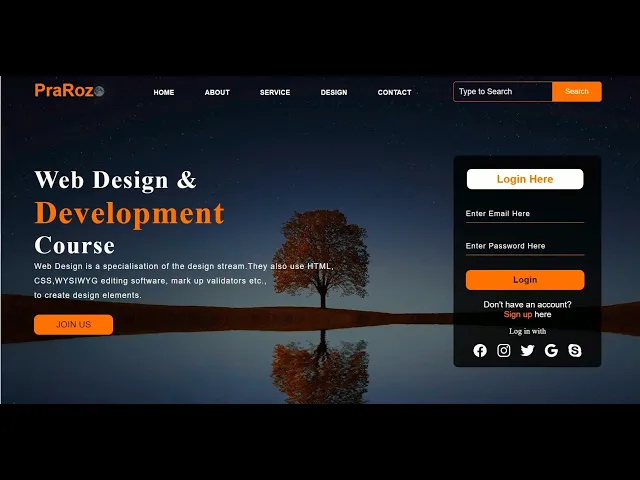
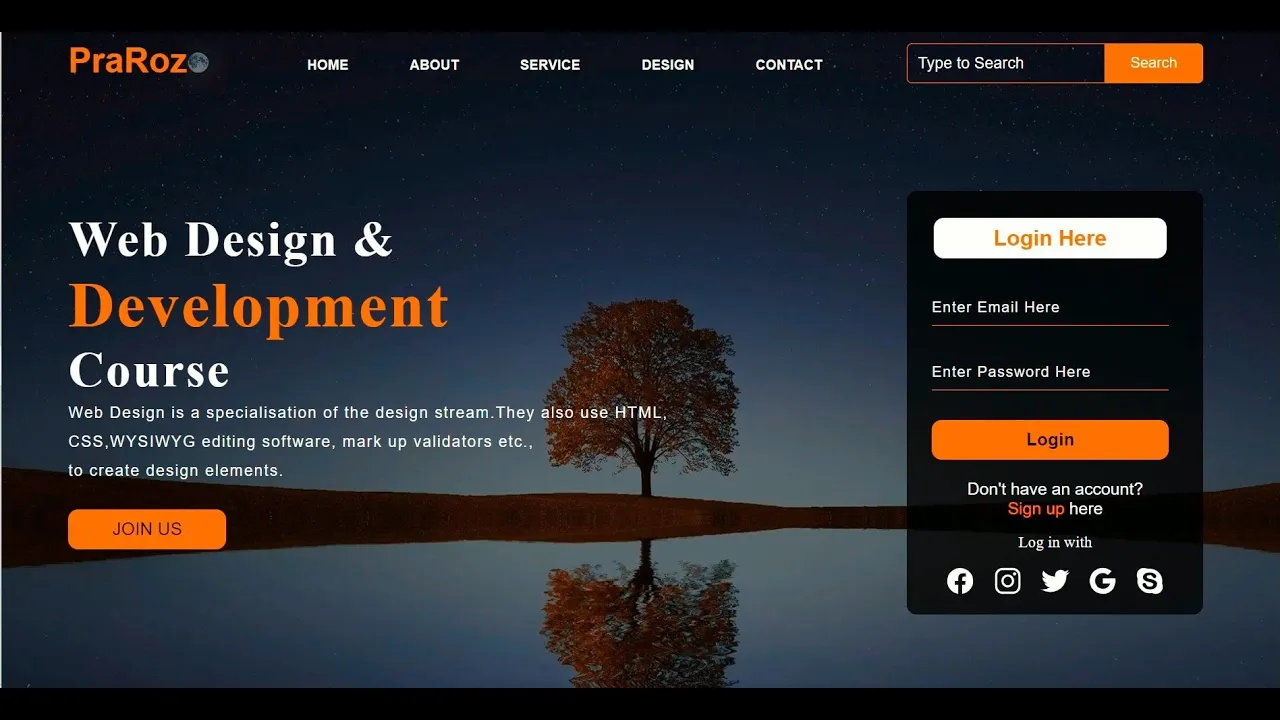
hi guys today in this video we will be learning how to create a website using html and css only these kinds of website can be used for your business purpose for your personal purpose and also can be used as a college project i have used a very simple html tags and css styling in this video so that everyone can understand including beginners very easily ok i have a folder named a website and a background image open a vs code and select a folder which you have created and create a file name index. html and dial dot css okay and delete this we don't need it and i would name my website webpage design and link this webpage with style. css okay inside the body we create a div dot main and inside the class main we create another div that is dot nav bar and inside the navigation bar we create dot icon which is for our logo class logo and name pra are z okay let's see in our browser okay here we have our logo now we go to style.
css put a margin of zero in padding also zero we go to our class main with 100 background linear gradient making our background image 50 dimmer connecting with url one 1. jpg background position of center and background size cover and height of 100 views we go back to our website and see it looks good now let's go back to next class nav bar width of 1200 pixel height of 75 pixel margin auto okay go to next dot icon width of 200 pixel float left height 70 pixel and go to dot logo and we'll keep color like orange color let's see in website yeah okay looks good now font size of 35 pixel on family area padding left 20 pixel float left and padding top 10 pixel okay now we go back to index and create another div that is for menu that is div dot menu and create unordered list inside another list we create a list and anchor tag then we copy this paste and type a home about service design and a contact now let's go back to our website okay here we have our menu go back to style. css dot menu okay here we have width of 400 pixel and float left and height of 70 pixel okay it looks good okay now we go to another list upload lift display flex and justify content center and align item also center okay let's go to our webpage and here we have okay now we go to another list inside list and we have list type none and margin left 62 pixel margin top 27 pixel and font size 14 pixel okay now it looks more good okay now we go to another list list anchor tab which is text decoration color white okay and our font family ariel and font weight bold we have transition of 0.
4 s is in out okay now we will put a hover effect in our menu color and orange okay here we have our hover effect on our menu bar now let's get back to our index and create another dip that is for search bar we put input that is for search and name placeholder type to text and class src h okay anchor tab button inside button we put a class that is btn and another search okay here we have our search bar let's get back to our style. css in class search we have width of 330 pixel float left margin left 27 0 pixel okay and dot srcs font family of times new roman width of 200 pixel height of 40 pixel and background transparent okay it looks good now we have our border one pixel solid orange and mars in top of 13 pixel okay a color of white and border right now font size 16 pixel float lift padding of 10 pixel and border bottom 5 pixel and border top border top left radius 5 pixel okay next dot btn width of 100 pixel height of 40 pixel background orange and border 2 pixel solid orange mars in top 13 pixel color white font size 15 pixel and border border top left bottom right 5 pixel and bottom also 5 pixel now we go to that btn focus outline none and also dot srcx focus outline none okay here we have error let's see okay here is 100 pixel not 100 okay here is our search box let's get back to index. html and create another div that is our description deep dot content s1 tag web design and br for break and spend development break and course okay here is our here is p tag class or paragraph type luring it some paragraph you break there and in break over here okay here is our description short description about our website and um we have a button request that is for contact and let's say and join us if you're interested okay here is our join us link okay now we get back to our dot content with 100 pixel height of auto margin also auto color would be white poisson relative okay we get to that content dot paragraph padding left would be 20 pixel padding bottom 25 pixel one family area letter spacing will be 1.
2 pixel and line height would be 30 pixel okay it looks good now we go to dot content x1 tag yeah one family of times new roman font size of 50 pixel padding left would be like 50 pixel no uh 20 pixel and margin top 9 percent uh letter spacing 2 pixel okay more better and then we will add that content for that contact that is of join us with 160 pixel height of 40 pixel and background orange border none here is our link join us and we put now margin bottom of 10 pixel margin left of 20 pixel okay now font size 18 pixel border radius of 10 pixel and cursor point pointer okay now it looks good now we need to remove that underline so we go to next class content dot cn e and we'll text decoration none okay now color put a color of black and transition will be 0. 3 is i will put a hover effect in over there background would be white okay now put a transition time a point four hours is okay now it looks more good now content dot content for a span that is inside deb for development we put orange color and font size of 60 60 pixel okay now we get back to index. html and create another div that is for our login box this is div dot form and h2 tag login here and put an input type email name email and placeholder enter email here and input for password type password and placeholder enter password here then button class btnn anchor tag here login okay here we have our login box now in view paragraph tag p class link i don't have an account and break anchor tag sign up here okay now again p tag class login a bit okay now we'll move it to right go back to style.