So good morning, good afternoon, good evening everyone. Uh today I will present you a webinar focused on the NSIS icing workflow regarding and apply to win turbine uh win turbine icing. Here during this uh webinar we will focus mainly on one product which is named fensapice which is the ANCIS product for CFDI simulation. So a little bit of of of of agenda here. So I I will talk about um first of all I will introduce the subject. So I will talk about icing in general and the mechanism that uh applies to icing. uh uh before
introducing CFD I will also speak about where this NSIS uh workflow and icing workflow sits into our suite of NSIS product and then I'll move on to the main part uh with talking about the main CFD uh solution for win turbine icing and continue with a a concrete application case which is the NRA phase 6 rotor icing. I will end up this uh presentation via workflow demonstration which would be a small video showing you the full uh workflow uh in in with the same geometry then the application case and uh we will open up for
question after a summary. So to start with an introduction uh why the subject is of importance today it's that because now um so wind farm and wind turbine are more and more installed in northern and high altitude region where of course um the region uh this kind of region have high potential for wind energy production and also stronger winds. So that makes this kind of region particularly uh so particularly interesting for uh wind farm uh production and development here. But in this kind of area uh you have more and you you need to take care
of the metogical and the weather uh event that will appear and this kind of area are also really um affected by icing. So long or short icing event that makes it uh very important to uh to to try and protect this uh the the wind turbine against icing. So not only icing can pose a an economic threat to a wind farm but also an operation threat as uh for example ice could shed from um so the wind turb blades and damage a facility or endanger also people. So in this kind of context being able to
predict uh to predict ice accession on on win turbine uh and win turbine blades and also to protect the the blade against icing is is very important and um it's particularly for ice protection system which uh we'll talk about later on whether it's anti or deicing system. um this kind of of gathering some data uh to predict this kind of phenomenon would be useful to size this kind of system. Of course, eye protection system are not coming alone. So usually have a suit comprises of uh instrumentation. So whether it's sensor camera in order to detect
the eyes and also everything around it uh which is the control system that would for example control the sequence at which you are going to switch on and off your uh for example your deicing system. So gathering this data is very important for this reason and you have multiple methods in order to uh gathering and predict and be able to predict uh ice aggression whether it's uh traditional on-site measurement uh experimental facilities such as tunnel uh setup for example uh numerical weather modeling uh but today we will focus really uh on CFD uh CFD simulation
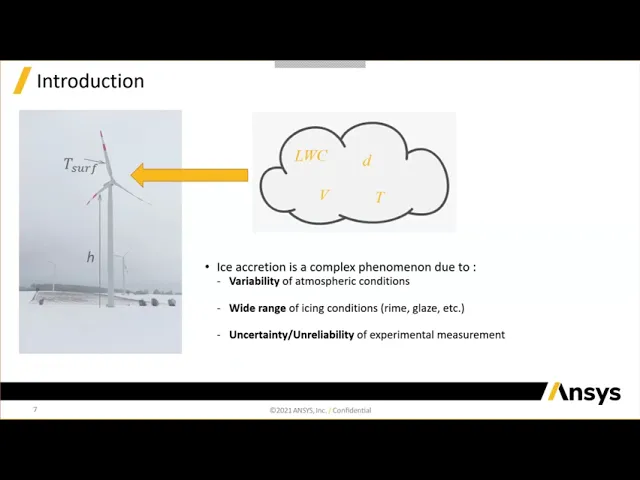
here in terms of ice accression. So ice accession and and growth is is a is clearly a very complex phenomenon because first it involves a lot of different parameter and usually each of this variable will impact greatly the final eye shape that you are getting. So typical uh in a in a typical way uh usually um atmospheric icing would occurs if rain fog or droplet contained in clouds interact with a surface uh at freezing condition and uh just if we have a look just at the icing and the droplet condition there is a lot of
different variable that will impact it. So for example, liquid water content which is the mass of water contained in in cloud droplets will impact the final uh eye shape. Uh but not only that also the diameter. So for example the mean uh the mean diameter of of droplets and the distribution of of droplets inside the cloud will also be affecting uh this phenomenon as well as velocity and temperature for the phase change for example. So this will uh this will be This will constitute mainly the droplets and icing condition. But you also have everything that
affects uh directly the ice shape such as the temperature of the surface on the blade which will be uh of the utmost importance as well as other uh parameters such as the height of the tower here that will affect the altitude and the pressure uh here and then and thus also affecting the atmospheric and icing condition. So because of that it's it's very uh complex to uh to to to know uh to predict this kind of phenomenon uh because of the wide range there is not a single type of icing there is multiple we'll speak
about that also later and reproducing this kind of setup. So the this all this condition in a experimental setup or even on a noise site measurement is very difficult uh because uh nothing is is is repeatable here. So if we have a a deeper look at how to to how this ice could affect uh could have an effect on the on on on the on the economic viability for example or of of a wind farm. So as I mentioned before, ice accession would happens uh when water droplets uh super cool here impinge on the cold
surface of the blade as you can see on the simplified scheme here. And uh this new ice uh ice shape that could be uniform or completely not uniform here uh because of its of a new roughness. So because you're adding a solid on top of this surface, you're changing the ice as a different roughness here. And this will affect uh greatly usually the airflow. So and also by thus affecting the per the aerodynamic performance um of the uh of the wind turbine blade as well as reducing the power output. And as I said before, it
could also lead to safety issues if you you you for example during a really long icing event, if you had uh ice falling uh for whatever reason uh falling and fragranting from the win blade. So in in in respect to all uh to all the the condition that I've said before, CFD uh looks very interesting compared to for example experimental gathering on measurement data or experimental data setup because of course uh the the cost of running it would be uh lower compared to measuring and reproducing the experimental in in a in a tunnel setup or
on-site measurements. because also you can predict the full range of condition. So all the atmospheric icing condition and we'll see later that this will you can have pretty much different eye shape depending on all the the condition. Uh CFD could also be used in order to protect uh to size a protection an ice protection system whether it's anti-icing or deicing or optimize it if you already have a design and uh not only that but also could be useful for the positioning of uh for example ice detection ice detection system. So with a lower cost uh
than um than every than a measurement on-site measurement or for example um win tunnel setup or ice tunnel uh setup you could uh get uh you could predict accretion in uh a lot of worst case scenarios here. So moving on to uh the CFD workflow. So I will just start by briefly introducing the the suite of product where this um so the NCIS icing workflow is sitted because it's it will be of importance later on during the the demonstration. So uh the CFD icing workflow is sits inside the NC CFD enterprise suit and this uh
suit is not only composed of the main um icing CFD ice uh software which is fenc that you can see here but also um allow you to run the full uh workflow and when I speak about full workflow I would also speak about pre and post-processing which is very important in a CFD uh setup also icing uh CFD icing setup here and this uh product FAP ice also allow you to couple uh solver so other CFD solver in the NSIS uh suite of products such as fluent which is a multi-purpose CFD and um CFX which
is also a multi-purpose CFD but since a couple of release now we have been focusing more and more its developments on turbo machinery CFD So it's uh fence supplies also have its proper uh airflow solver but if you are used to a certain uh tool uh for airflow calculation you can still uh perfectly keep using it uh without having to um to uh be used to another uh graphical user interface here. So in terms of pre- postprocessing I will also talk about it later. uh of course there's this is not the single uh all the
product that are inside this uh CFD enterprise suit but uh it will be the main uh tools that I will speak about today. So let's move on now to the main to the bulk of the subject. So I'm going to talk about now about the the the icing uh modular simulation workflow that you can see here. So in terms of icing simulation, you will get pretty much everything inside fence uh inside the fence workflow. Um but if you want to do specific uh task that would be needed to be done for any kind of CFD
uh calculation. Anyway, uh we also have some u some some tools that we are using outside of the workflow such as cat cleaning or cat creation tool as well as meshing tool and I will talk about uh the specific uh measure that you can use uh for uh fenc and the type of mesh that it accept uh as well as so if you want to use some post-processing feature you also have some inside fenc for example is the native postprocessor of fence applies but nothing prevent you to use something else if you need any other
capability or any high rendering solution for example so uh I will uh I will speak about all each of this uh of this module here that sits inside the fence now and we'll we'll talk about how everything so all the workflow is is working here so let's start by just the first phase which I will also show you during the demonstration which is CAD and cleaning cut reention and meshing. So uh fence is a CFD uh is also a CFD tool. So um you will also need to do exactly the same step than for a
typical CFD calculation uh which is cleaning or uh creation of the CAT. So you need to have a clean CAD in order to have a very uh resolved uh mesh and and in order to mesh in general here. So uh one tool that we would advise you to use is space clamp which also in an uh in the uh so tool of product. You are not of course forced to use space claim if you are used to another one but for new user for example would advise you to to use this one because it works
well with the next uh measure that I will introduce which is fluent meshing. I will also show you um the the the fluent meshing in action during the demonstration. So it's a it's an unstructured meshing and uh it's it's great for new user because you have the ability to follow up a set of task uh so it's a task based um workflow here that will let you have uh usually at the end a good quality uh mesh so either on surface or volutric mesh here. So in terms of what kind of mesh are accepted uh
in inside fencies um so you can use any pretty much any type of mesh inside fence whether it's unstructure or structure but you need the only thing that is not supported within fence is uh polyadral cells. So polyadral cells are not to be uh are not to polal cells mesh are not to be used uh within fenc but any other kind of hybrid mesh uh for example in this case tide rule with prismatic layer would work fine uh within fensap the only uh unsupported feature is polyadral cells and also hanging nodes. So moving on to
now the main uh tool. So, FAPI as I told you has uh the ability to to to has an um a module a module called for solver uh for CFD and airflow solver here which is called fence which sits inside a suite of products and uh thanks to that you would be able to uh resolve so Navia Stokes and energy equation standard CFD here as well as um some uh so as well turbulence model and for icing simulation we usually recommend two models uh which are spalat alvaras and komega sst. Of course for example in
other cfd tool you would have access to a lot of different uh turbulence model but we really recommend you and supported and the supported models one would be spalz and k omega sst inside the fence solver for airflow solver here. So in terms of uh what you are getting from this first airflow solution. So of course you need the first aerodynamic calculation with a wing that is clean of any ice. And uh then with this first calculation you will be able to uh have access to the full um to the full solution field which will
um which will then um allow you to transport um the particles to uh allow you to know for you to know which in which state the particles would be uh would have an impact on field movement and will allow you to also uh switch on the ice growth model here. So this is uh for the fence app um airflow solver. But as I told you before, you also have the ability to select any other solver within anis that you would like to use uh because of your preferences and that would be fluent or cfx. So
no restriction here. It's perfectly coupled. You can also export uh the result from fluent and and cfx inside fence without any problem. So here it's it's much more question of preferences what you you prefer here. Uh the only thing that um you would need to know for connectivity between fenc and the other code is that yeah you usually need to import a case or data file uh from fluent and a rest file from cfx for those of you who have used these two codes before. uh then you have an automatic um uh converter inside fence
up or both CFX or fluence that will take care of bringing uh the reference condition so the boundary condition of your and your mesh to fence up ice here. So you can uh also have a look at it while it's doing it and check if anything uh looks um looks incorrect and you can change anything that you need here. But of course you can also change it later on in in your uh in any of your if you set in any of the setup of inappise here. Uh but uh what is really important also is
that um here in fluent noncfx uh we have integrated also some feature that were not here in the first place because they are generic purpose um codes. So typically for example uh for um or for example for ice accression icing analysis here you would have some uh roughness model for example that will need to be selected in order to match the result of fluent and cfx to the result of the fence I solver that was used for uh validation here and typically what it will be it would be just an alternative treatment to uh to
the spatal maras NSSTK omega models here. So now jumping off to uh the particle tracking. So we have talked about uh the airflow solution. Once you have the airflow solution uh we uh you would need then to run uh a particle analysis here and the module for it is called drop 3D and it's allowing you to do particle tracking and impagement. So this is a 3D uleran water concentration model and here we are in the case where uh we have only a one-way couple between air and droplets which means that the droplets are carried by
the air uh so the air solution before but still have their own inertia and weight here. So this module would allow you to compute uh so particle impingement distribution uh so where the particle are impacting the surface and also shadow zone which are zone that are dry so free of water where the droplet are not impacting. So from this setup you could for example uh depending on the type of of condition icing condition you get uh directly be able to identify the region where to protect the wind turbine against ice aggression or uh directly try
to position your ice detector. But please note that uh this kind of of so this impingement um limit doesn't mean that this the icing limit would be the same because you can have for example uh droplets uh not freezing on impact and going uh going somewhere else in in the blade. So it might not be the definitive uh area to protect from here from drop 3D. Uh the typical value you would get for postprocessing are going to be liquid water content. Um so uh liquid water content on the surface of the blade. Here collection efficiency
which is here the ratio of water flux at the surface to the water flux at the free stream and particle velocity here. So here after so you have the airflow you are transporting the drop led by the airflow and then thanks to the third module inside fensapite that is called ice 3D you would be able to have your ice growth and also compute surface uh thermodynamics here. So the model we use here it's a 3D ice growth model and it's based on the shallow water icing model or swim. Uh basically it it it considers a
film of liquid uh water that can either partially uh or fully freeze uh on the surface of of the blade and it will take into account uh pretty much everything. So evaporation, sublimation, uh convection etc. And here from this model you are able also to compute not only the the film so extent but also the film runback. So, as I said, if you have some water that is not freezing, you the the water can run back on the on the blade here and that will allow you to know definitively what are the ice and dry
region here. Of course, it takes into account rotational effect. And the plus that you can get from this uh module is that it allows you to compute directly either ice mesh displacement or remshing around uh the um around this uh ice shape because of course here we are growing a solid uh on this uh on this surface. So it allow you to remsh around this ice and then to recomputee. So to recalculate the initial airflow solution taking into account this uh ice solid body to uh be able to understand what are the uh the impact
on the aerodynamic performance. So how much it degrades uh looking with different kind of uh eye shape. Here another thing that could be useful for this module is that you have the ability to switch on and off automatic export of the shape in cut format. So of course you could you could use directly the grid file that has been rematched by fence but if you want you can also reuse the STL or uh STL file in in a cut format or ISM for example. And in this case, you could for example use that to manufacture
the shape and then um supplement um so the supplement your uh CFD or supplement your um your uh onsite or experimental measurements in the wind tunnel using this uh eye shape in order to uh measured the impact uh and the performance degradation on this uh contaminated uh blade. Another tool that is really useful in ice 3D and we'll talk about it just now is the ability to estimate the heat load for um sizing of ice protection system. So um I will talk about it just now because it could be of a very of a very
good inter interest um for um for a user that wish to size or design their ice protection uh ice protection system here and this is a tool that is really useful because it's a quick and and low cost technique. So it usually doesn't need you to compute uh heat transfer calculation. So it means that you don't need to mesh the solid and to to to use the solid inside the simulation because it's an estimation here. So it it will just integrate the heat flux distribution to give you the required total heat load and it will
do so in two different uh cases which are the one that you can see in the typical log that you will get from this calculation. So either for fully evaporative or running uh wet condition. So for more explanation about that. So here it means that you can either do an anti-icing or deicing device. So running wet means that you [snorts] will melt the ice but um you will not evaporate the water. So it means that uh you still have a water film on the surface on on on the surface of the blade. Or you can
also compute and analyze the power. So the input power necessary to fully evaporate uh the water on uh the blade. So both are possible and both will be stated as you can see here in the log. So you can also uh so you can take this value and and apply it to uh your design and see if it's working well. You can also tweak it in order to uh be able to save a little bit of power uh later on. And this this will be used uh in the application case that I'm um we'll show
you uh later on in terms of uh interesting feature that I didn't speak uh before uh hand. So in IC3D now since a couple of release you also have the ability of computing ice shedding which means that you have um a solid mechanical stress solver which is coupled to the fence ice solution here and that will allow you to compute and to predict ice that shed on from your uh blades here or from your win turbine blades due to centrifugal forces. So I would like to very emphasize the centrifugal forces only because of course uh
ice could shed for a multitude of uh external influences uh such as uh I don't know vibration or or turbulence for example but here it will only compute eyes that shed due to centrifugal forces. So in terms of how the module work so it's inside the ice uh the ice 3D module. So let's say you compute ice you want to simulate icing for an event of 60 minutes long. Uh it's you you can choose whenever you want to pose this icing uh the this icing uh simulation in order to compute the uh the eye shedding.
So the stress solver with which switch on basically here and we'll um solve the stress equation uh check if the um element stress are above some critical value propagate the crack front and then you will see if the ice has shed or not. If it has shed then we record the info. If it didn't shed then we will just continue the calculation until the end of the 60 minutes of icing. So it's pretty much like that that it's work. So a useful information from this module that you can get is also this kind of typical
log where you can get the number of fragment uh that are being shaded from the uh blade also uh the mass of this uh fragment and uh as well as some uh useful grid uh for example grid uh of the largest shed uh largest shed ice fragment that you could then for example example reuse for doing any other kind of stress analysis. So to summarize the the workflow so here we only spoke about ice accession nothing about protecting the eyes protecting against ice accession. So the workflow is fully inside uh pensap eyes if you wish
to. So you would need to run a first airflow solution then to calculate the transport equation for the droplets being transported by this airflow solution using the drop 3D model. And then with ice 3D you will be able to uh compute the ice extent, the eye shape, the eye thickness and be able to uh directly either have a short estimation about the necessary power to completely melt the ice or completely evaporate the water onto the wing. Uh you have useful information about ice uh fragment being shaded from the uh from the from the blade or
uh and if you need uh you could switch off switch on sorry the remashing or moving uh or moving so moving the nodes around and be able to recalculate the airflow on a contaminated uh so blade in order to calculate the performance degradation here. So that's that's pretty much the workflow. Now we need to speak about the it transfer part. So because here we we we didn't talked about it too much. So in fis you also have a solution that is called CH3D which is our solution for conjugate heat transfer. And uh this solution uh
is so it's it's allowing you to u to model pretty much uh a lot of different uh ice protection systems. So in a thermal uh I will speak about thermal ice protection system here and you have two main category of system that you can model uh within fence ice. So the first one is force hot hair system. So whether it is anti-icing or deicing. So typical setup is uh is here and it's it's called it's it's called a piccolo tube. So you have a tube uh with uh holes here and uh hot air will be
coming into the small holes with jet uh impacting impinging on the internal surface at high velocity and high temperature which will contribute uh to uh melt or prevent the ice for building up on the external surface. So for this type of uh simulation, you would need not only an external domain around the the blades, but also an internal domain because you have hot hair um being uh recirculating inside uh this area and also solids. So you would need a solid uh solid zone because you would need to compute conduction through uh the solid between the
external and internal part here. So this is usually a fully 3D uh calculation. So you have a large uh 3D effect and this is often really significant and can't be neglected. So this is a system that is working very well especially in aircraft uh because of course you reusing the hot air coming from engine so you don't have to uh to heat it. Uh maybe for wind turbine is not the most efficient um the most efficient uh way of of protecting uh your uh blade because you need to heat uh to to waste some energy
and some power to eat this this air. So another solution that you could also use and that is much more used widely used in um wind turbine is the electrothermal system. So it's um it's basically pads. So thermal pads that are uh inside so the uh part the solid part of the blade. So typically you have this kind of structure where you have multiaterial structure. So with the insulation uh so erosion shield in order to protect uh the blade uh surface here uh where you could also place heating elements and that's uh that has an
advantage over uh the hot air system because you don't need to heat to spend a lot of energy heating this uh this air. You don't need to transport the air to the the inside of the of the blade. And also because you can uh this kind of setup can be switched on and off um depending on for example what the sensor or the camera for example is detecting. So depending on a special thickness. So you can uh perfectly sequence it. So you you won't have one for example you can have multiple one all around the
um so the blade and then you can have a sequence which each of this uh this one switching on and off depending on uh on what you want to achieve whether it's no ice or no water. So a small example here uh on this how it it could be working. So here uh you can see a typical example where there is in total six uh heater so heating elements. Uh you can see pretty much the extent of the eating elements looking at the graph uh just at the at the picture here. And each of this
one are going to be switched on and off a certain time that you can see here. And when uh so when the so when it switch on the ice is melted but the water is still there and then you can see the water running down on the rest of the wings and with the rest of the eater being like switched on you can see that the ice is being melted. So uh so this is pretty much how it would work and you can see in this example that it's it's working pretty well and it's matching
up pretty well with experimental data that was gathered. So this kind of system are much more efficient for wind uh turbine blade than the hair system and uh you can uh perfectly sequence it and use this kind of tweak or optimize your system using the sequence inside fence. So to summarize this workflow so we've seen the ice secretression workflow now we're seeing the conjugated transfer workflow. So here it would be the same starting point. You need to start with an airflow solution to transport the w the droplet water uh on this airflow solution. Then uh
you uh you can um you need to implement and to mesh your solid region as well as uh possibly optionally the second uh freak domain if you're working with a hot air system. And then because the conjugate transfer module is doing conjugated transfer if if you want to see what kind of eye shape you are getting after including this transfer effect you can also think about uh running an optional IC3D. So the ice 3D module that I presented you just before analysis to determine the final eye shape that you are getting including this this temperature
uh this different um temperature uh on the uh external surface here. So this is pretty much um everything for the conjugate transfer part. Uh now just a last slide uh on on this workflow. So we've seen pre-processing but we can you can also do post-processing and for this as I said you have different option. So view is the native post-processor and it's it's perfectly suited to ice uh sim icing simulation because of that. So you can you can of course use it directly inside it. But if you are an experienced user of any other tool.
So now since a couple of release already you have the ability to either use CFD post and it you will be able to transfer all the icing data directly to CFD post or if you need for example specific high quality rendering uh for your um for your for your the result of your simulation you can also be using NSI for example inside the same NC suit of product that I presented you a couple of slide before. So, um we are it's pretty much all about the um so everything about the the insis icing workflow and
what you need uh what kind of steps you need to do in order to getting to this final eye shape or optimization. uh but now let's let's go into uh a more uh concrete subject and we'll talk about a case study uh which is uh the NRE so national renewable energy laboratory phase six um that's uh is a is a case coming from a paper uh so wrote by fencice developers so on this uh case we are working uh with experimental data uh public avail public publicly available experimental data that we are using to match
up with the uh aerodynamic uh so result here. So the experimental measurements uh that uh this data come from are all coming from the NAZA wind tunnel that you can see here on this picture. And uh here is the so here is the the wind turbine um that we are going to use for uh this uh just this application case. So it's it's a very small uh it's a small wind turbine with two uh blades with five meter each uh fixed pitch and fixed speed and store regulated. So the store regulated bit would be of
importance for later on uh and we'll uh we'll speak about it later. during this uh case review in uh so regarding this the condition that were set up um for this paper. So different icing condition were simulated to see the impact of the either the icing condition or the atmospheric condition on uh the eye shape uh that you are getting uh after in order to be able to also so calculate the degradation in aerodynamic performance uh at the end of this uh of this calculation. So if we look at the case uh all scenario are
pretty much the same but for example case two differs from case one by the temperature the static air temperature that is much lower in this case. So as we spoke about before, rhyme ice will tend to uh so droplets will tend to freeze upon impact because of the very low temperature whereas glaze ice will maybe will a portion of the what the droplet will freeze upon impact and the rest can run back on the rest of the blade. So it will you will see that it will impact uh the ice uh eye shape in these
two case. Um also we are uh comparing data with the K3 which is just an approach wind speed of 22 me/s. So here it's a highspeed case. The rest is completely uh similar to the case one. And for case 4 um the a study was performed on the effect of large diameter. So it's like it's median uh it's here it's just a median uh diameter. So larger median diameter on uh on the study to see what kind of eye shape we are getting uh at the end. So all the calculation were performed with an icing
time of 60 minutes in this case. So everything is the same and and the same liquid water content. The only thing that changes is this free condition depending on the cases. So in terms of of results, so we run the calculation. Um so the the the fence developers run the calculation on on the paper and they were able to first of all run the aerodynamic calculation as we mentioned before. So uh looking at this result you can see the coefficient of pressure of each of the cases being compared to uh experimental the experimental data and
you can see that here uh at each of the different span the uh the result is quite uh similar here. So it's it's kind of the same result. So we are satisfied by the matching up of the experimental uh results and uh the uh aerodynamic airflow solution and then uh directly after so we uh did so the a drop 3D analysis was run in order to compute the the impingement limit and then uh nice 3D uh calculation was also run and here you can see the result of this uh so ice uh accretion uh result
here so it's after the water impingement uh calculation and you we can interpret the result in different ways. So if we have a look at the suction side and pressure side for all this case. So if we have a look at the case two compared to case one you see that the distribution at least in this angle of visualization looks uh similar here. But if we have a deeper look at this uh at this picture for example on here you can see that the rhyme eyes here um is a little bit thicker and create a
short of a kind of a like a curved uh lead leading edge here for example compared to the other case which makes sense because as I said ram ice tends to just freeze upon impact. So you having much more um accumulated ice. So having ice accration with a thicker uh thicker so with a thicker value here on the ramise compared to the glaz would make sense because everything tends to accrete right where it's imped. So right on the leading edge for example compared to the glaze one uh case one glaze where you have a much
finer layer of ice here. If we have a look at case three compared to case one here you can see that the extent of icing it's much bigger than on the first case which is expected because you have uh more so um so you have a speed that is much higher a wind speed that is much higher and uh but uh you can't see it right here directly on this on on this graph but the the overall thickness is usually on average uh far less uh like it's far less thick in terms of the ice
thickness compared to the uh glaze ice the first case. So here it's it's yeah spread out more the ice but with a fine layer of it in terms of the case for so we'll see it later on but here it's the worst of both word basically you have a thicker ice layer and it's also spreading out uh compared to the first case is spreading out far the extent of far bigger like for example here you have the ice going until the end. Uh so the root of the of the blade compared to on the case
one where it's stopping in midway before end. So depending on the condition the IC condition also and and the atmospheric condition you can see that here you can have very different uh results in term of eye shape. So now that after this I shape were uh computed the important thing is to analyze uh what would be the performance degradation on this so this uh on this uh so setup and if you look at this uh graph you can clearly see directly that if if we have a look between uh so on lowest uh approach wind
speed between 10 and 15 then here the uh the clean uh version. So without ice is uh has a far larger torque than the rest. Uh which means that here uh you have uh you are really losing a lot of of power. So you have a high power loss for pretty much all the cases compared to a blade an uncomontaminated blade here. So if we have a closer look it's it's all the cases are uh show power losses exceeding 30% and this one being the worst. So the larometer being the worst with more than 60%
power loss for this last step which can be explained again by if we have a look at the eye shape before by the extent and the th the the the fact that the thickness is far uh bigger in this case than all the other cases. Uh interesting thing is that you can see that compared to see if you if you have a look at the rhyme eyes or um so the L high uh L the higher like uh speed here for example you can see that it's these two cases seems to be doing better than
the other one uh compared to the worst cases and you can see that it's something uh that is replicating on higher approach wind speed. So for example, what is really interesting here is that if you see the clean uh the clean blade you can see that all practically all the cases are have a higher torque than this one at higher speed. uh which could be coming from the fact that uh as we've seen before on the on the last slide the ice uh on the leading edge is creating some very curve area and the fluid
will tend to accelerate in this uh area and will make yeah higher torque than on the clean um on the clean uh on the clean blade. But as it's a stall regulated uh here it's a stall regulated wind turbine uh this could be potentially damaging. So in general uh we are we we should avoid this kind of scenario in order not to damage uh not to put too much load on the shaft and not to damage uh the the the wind turbine here. Okay. So that's uh that's pretty much it on the performance degradation uh
side of of these cases. But now uh we can also think about what we can do. So after having seen this eye shape, what could we do in order to avoid any ice and to protect the ice against uh so uh against the to protect the the the blade against the ice. So another another study was done uh to try to design and roughly design and and size uh um so an anti-icing um so um an anti-icing ice protection system IPS here and here the module that I showed you before on ice 3D the one
that is able to do rough estimate of um of uh so the the the the power required to have either a running wet situation or a fully evaporative case has been used. And in this case we uh it has been considered that the influx distribution will be kept constant uh so chord wise in this direction here whereas uh it will be um variable on the span wise uh direction of the wing and after computing so you can see for each case what we are getting. So for example here the anti-icing influx that would be required
for this case one you can see you would need pretty much all along the span uh wise uh direction um to um to have an anti- so heat an anti-icing heat flux here. Of course, you would need more uh so a higher value here because you are getting the most uh of ice next to the tip of the of the blade. For the case two, it's it's it's the same but at much higher value because here as as we've seen before all we have a very very low temperature and all the ice tend to stick
to the leading edge here. So you can see that you will require a very a much higher flux in order to uh and higher eating power in order to completely melt the ice. Here for case three and case four it's it's pretty much the same conclusion. So here it's the same than case one but you need more uh you need a little bit uh so more uh power all along uh all along the the spine was direction and everywhere around the the blade because it's it's evenly spread out everywhere. Uh and for the large diameter
you can see also that you you need also to have um a very large heat flux in order an anti-icing heat flux in order to uh to get rid of the ice uh that is also spread uh everywhere uh and have higher extent due to the larger diameter. So once we've seen that we we can have a a a really a final look at uh basically what if we input if we if we input this uh value of anti-icing flux what will we get uh in terms of affecting coverage and a study was also performed
on this one. So you can see uh for each case the necessary uh heating power that will need to be used in order to heat uh this uh area and you can see the area coverage necessary uh to uh so melt the ice here and and in in general trend is that here you would need uh at least uh to to to correspond to 20 around 20% of the turbine rated power in order to um melt the ice which is a lot but it's also because it's a small it's a smaller um wind turbine here.
So for this case for example you would need around 20%. Uh so you can see here um you have some runback water so you have a bigger coverage than for the rhyme ice which concentrated along the leading edge. For this one, because you have a higher thickness and a lower uh temperature, you would need more power than uh for the first uh case. But of course, it's limited to a very small area of the uh wind turbine blade, but it's still uh you will still require around 43% of the turbine rated power. And for the
high-speed and large diameter. So if we just um speak about first the case for so large diameter a very high uh amount of water on the on the blades. So you would need a ve the highest uh power of of them all. So um which will constitute around 55% of the turbine rated power. So of course it's a lot. We could uh tweak it uh after uh but here it was just it's just an example to show you that you can design your um your IPS system uh and tweak it uh really easily using fence
eyes. Last case would be case three high speeded. Uh so here there's you you can see that the system is not that efficient in this case. it will need more more tweaking because it's it's really spread out all around the the the blades but uh in some area the the level and the thickness of the the film of water is really small. So you may not be you you may not need uh you you may not require that much power in order to uh heat the the the blade. So for example, this case is not
the most efficient and it's consuming 40% of the turbine rated power. So this was a concrete example to show you how you uh how uh uh on on the NRE phase six rotor icing here to show you how you could be uh running uh and the workflow on running these kinds of icing or also deicing anti-icing uh workflows. So I will just end up the um this presentation by uh just showing you a short video. Uh it's the workflow demonstration. So just to show you how you would move on from the card to the mesh
to uh the interface of fenc and how you would have a look at the of of the data. So here this is um a variation of the nal uh phasics. uh so uh two blade system here and you can see I'm using uh our space claim tool uh which is our CAD handling tool here uh typically so you need uh this kind uh we are using this kind of domain so cylindrical domain around the blades in terms of uh what you can do with space clamp so you don't need any subtraction brilliance subtraction here if
you share uh your um your edges and your surfaces is uh with different so the blade with the domain. What you can do in terms of of um thing is to add some body of influences which are uh which are geometric um so geometric bodies that are going to be used for refinements only and will not be used uh for surface meshing here but just for refinement. And also a good point that you could use for your meshing strategy is the uh uh adoption of name selection for edges but will allow you to refine this
kind of very sharp um very sharp edges which allow you to put another layer of refinement uh just around this edges. So with the with this task done you can move on to fluent meshing. which is our taskbased uh workflow for clean geometry and will allow you to mesh uh your uh the entire volume and you can see here that you can select edge sizing you can select your body of influence etc. uh I will just after that jump directly to the entire uh the end of the workflow. So you can see here how it's
work how you need to generate the surface mesh and then the volume mesh. Here I've chosen to do a tetrad um with prismatic layer which is pretty much uh the only one that you could use in fluent meshing for uh unstructured meshing for fence. And if you have a look, we could see the uh body of influence refinement. You can also see the prismatic layer being created here. Uh here we're doing 25. And then when you finish, you can just export this mesh and jump to the fence interface. So you can either uh use that.
So move this. So as I'm doing here just extract uh the mesh uh and convert it into a fence up format to run the flow calculation or you could also directly use fluent for example run your calculation and then import back your solution uh in this uh in in the flu in the fence workflow. So now if we have a look at the final so full uh full um task so how it's working. So you can see here we're doing oneshot calculation all the time. So it's it will be uh so airflow then moving on
to droplets. So you can have a look a quick look at how each of the section is working how you can implement the turbulence model the solver uh inputs and a boundary condition as well as if I'm jumping directly to IC3D uh normally you need to do a drop 3D as as well as the icing models that are available the uh also the feature that I presented you such as eye shedding or the ability to do to use rotational uh speed here uh as well as icing condition and uh boundary uh that you can enable.
So you can choose to have ice uh on certain wall and not on other as well as the remashing technique that are available. So here I didn't talk about it but you can also re mesh with fluid meshing inside fence if you wish to do your performance degradation study. Here you can see the different postprocessor available. So we've talked about only the NSIS one. You can have a large um interval and large number of postprocessing feature that are available. And if we have a final look uh here at the view miracle so the native postprocessor
of fencies you can see the typical variable you are getting the ability to create directly graph and to export them from uh fence ice as well as another uh an alternative way of looking at ice. So if you want to um create postprocessing um postprocessing contour as I showed you before uh on the application case you could also use this one uh directly so views instead of just viewing the uh value and that's uh that's concluding my presentation. Uh so as a as a a seminar wrap-up here uh thanks a lot for attending this call.
I hope you find that interesting and uh today I've shared with you the uh how to apply so the NCCFD icing workflow to win turbine specifically and remember that this CFD icing workflow can not only help you to predict ice accession or win turbine blade but also uh can uh help you to design and optimize ice protection system. you can tweak it. Um but also is a very good help in uh sequencing the full um the full products you would need. So for example, opposition, the instrumentation and control system of your NT or deicing system
protection. So this kind of workflow can of course be used as a supplementary insight if you already have experimental data. So it could it could be a an aid to uh to to predicting is accretion in on top of the measurement or the uh experimental data that from wind tunnel that you already have. So uh thanks a lot uh for this uh if you have any question on the NS enterprise suit please contact your local NIS sales team and please remember that this NSIS suit of product that I presented you uh comports much more uh
solver and much more option that what I presented you Okay.