okay so today we are going to discuss about the sap patching or sap upgrad or what is patch so all these things today we will discuss support pack so what is this all support pack support pack stack sap patch sap upgrade what is mean by upgrade mean by upgrade means updating our system from one version to higher version is called the upgrade downgrade means downgrading means from current version to lower version we are doing that is called the downgrade so downgrade is not possible only upgrade is possible so so downgrade means we have to restore
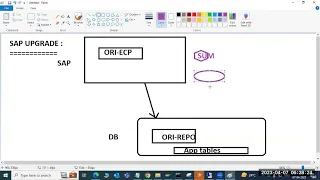
the system back us the backup so upgrade means we have to use the tools we have to use the some other tools to so upgrade for installation we will use the one tool what is the tool for installation of the SAP systems we will use the one tool that is called the S swpm tool right swpm yeah same as like for upgrade also we will use the one tool that is called the Su tool we will use it some tool software upgrade manager tool we will use it for upgrading the systems okay so first of
all before we go for upgrading And discussing first of all what is this patch patching what is this patching so normally normally when the any user or our team are in to find out any bug in sap product so normally software means definitely say some box right there are some new improvements some bugs definitely there is a bug right definitely there is a bug in the products so the code their code are their table their functional model there there is some definitely there is a bug in the product so the user he reports the same
to sap support and the programmer the sap person normally If You observe when we are working in the daily basis we got the one error that bug we got it one error one syntax error one bug we got it that is the sap product error we will raise a ticket with sap that sap person that sap program sap support engineer check and he develop a one node one bug you will develop a one node that is called the yes node okay that we will apply through S node sap note we will apply one bug right
at the same time multiple end users say uh he reports the bug and and also sap Al suspect that there is some new relay some new uh Corrections in one place that is called the sap support pack okay the support pack also includ include the so new enhancements earlier version of the sap right so earlier version of the sap means suppose so today one of the end user is working he got the one error one bug he detected like it's a bug it's bug in the sap product so he reports to us we will report
to the sap sap engineer Who provided this these softwares to us then sa support engineer he will sap support engineer he will investigate he will inform us saying that it's a bug so please implement the note okay first he will ask us to implement the node so we will apply the note through S node transaction for so okay but the same time multiple end users multiple bugs are happened so all this col collects all this called the so support package multiple simply say like combination of Simply say like combination of not in the simple words
combination of like collection of multiple SCP notes are called the support pack okay selection of multiple sap notes are called the support package the support packs are implemented in the sap system there the previously we have the transaction codes we have implemented using the support package but nowadays we have the tools are available sap developed tools are available so those tools we will discuss now so so what is my what is mean by support pack tag what is mean by so we have note and support pack and support pack stack what is mean by support
pack stack so support pack stack contains entire stack above Java packages all software components enti net stack B plus Java we are updating this is called the support pack stack bundle stack means it will bundle the all the components individual patches everything everything it will bundle it that is called the support pack stack so support pack stack normally but everything either support pack support pack stack version upgrade release upgrade so everything is common everything is common so common means so the web that we are working that is common so what we are going to update
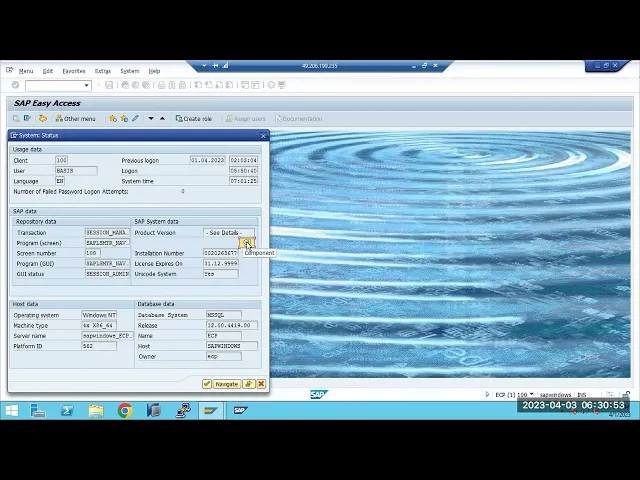
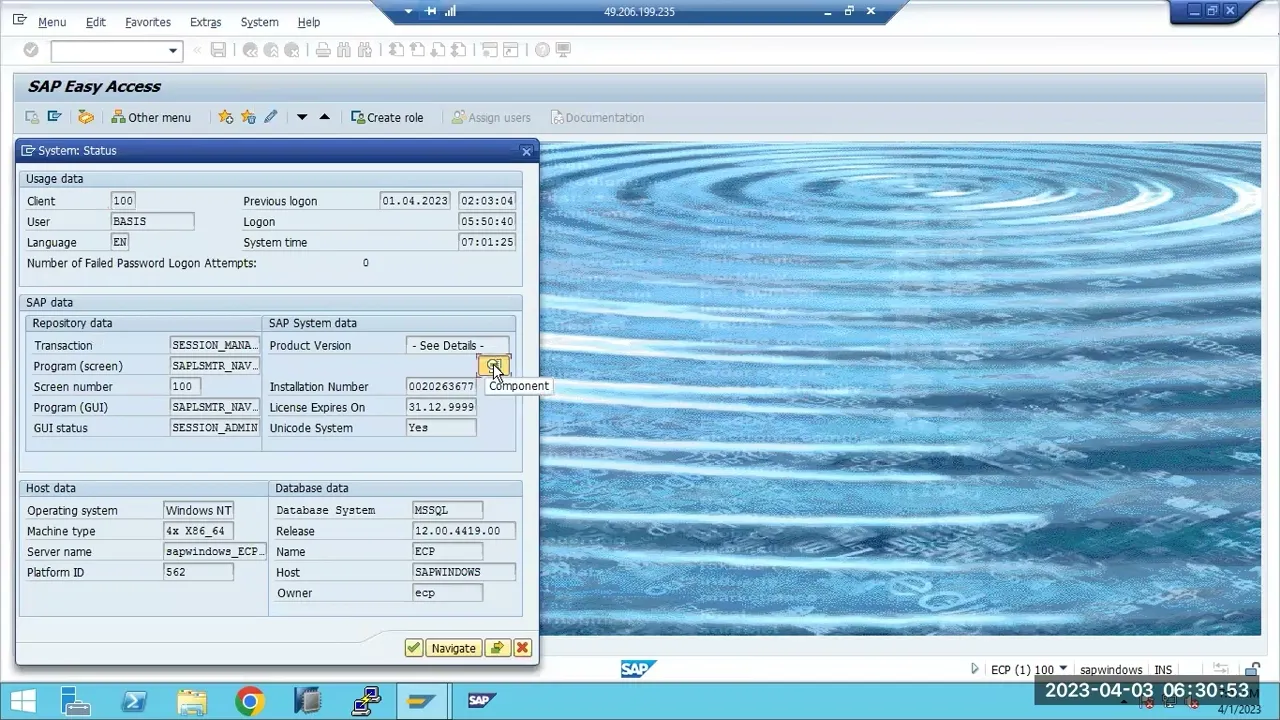
here what we will update here if we go in the system system status if you go to the system status we have the sap components are there if you go to the system data product version you just click on it we you can see here we have the sap components are there we are working in the system because of the all these components sap basis sap ABA gwf and UI sa pii so sa AP all these components are existing in our system that's why we are using these functionalities we are using Bas functionalities in as
basis components are there we are using above functionalities means because of the above related coding this everything is available Gateway functionalities means because of this component currently installed so like that you can see HR HR functionalities we are using means because of HR human resource related components are exist in our system that's why we are using the HR functionalities so for tracking so that's why each component so there is a each each functionality there is one component is available so insurance we can also use the insurance related components so FX so e recruitment e recruitment
related issues the functionalities okay so so then utilities telic commmunication related functionalities we want to use it learning and solutions functionalities so o business you can use these functionalities so any functionality right any functionality so the functionality exist in our system then only we are using the that that related transaction codes everything we are using it okay all these things what functionalities are installed what components are installed what is their version and everything we can find out from here see here you can find out from here so basis Sapore basis Sapore AB Sapore gwf and
Sapore G UI and Sapore BW all these components are exist here all these components are exist here and also each component they have the version they have the release version and Su level as well they this is the main release version this is the main release version and after that we have the sub verion SP level one main release version after that SP level one we have 001 we have so this is a support pack naming convention sapk that is the sapk star that is the sap support pack naming Convention of the each and every
support P they starts with the sapk sapk sapk okay sapk followed by the two versions followed by the versions okay for followed by the versions so you can see here what is the start description so all the support packs combined collection of all these support pack all these components are called the so we have one product version we have product version what is our product version we are working here ECC 6.0 ehp8 version So currently this is the system this is 6.0 ehp8 system this is the version of the product currently we are working in
this system okay which is the net you will get the Sap net it is the fur sap fur it is the S4 sap S4 so it is the mdz mdz CRM CRM related so each so what system you are working depends upon the product version that relates product version will be installed here that related product version will be installed in the so here installed here in the installed product version so collection of all these components is this one plus this one plus this collection of all this plus called the one product version okay one product
version so now you know what is Pat means suppose one of the basis person we are working we got one error right we got one error so that is like so something some component from transaction is not working which means there is a bug in the this release version this patch level this s SP level collection of SP is called the release version okay this SP this SP level SP level means support Pack level this see for this component this patch level is 01 release version is 750 okay like that we have to read it
okay for sap ABA we have release version is 750 and Patch level is 001 okay so suppose this this this version we have error this this version we have some errors so in order to fix this errors when we approach sap sap release the one note right so this error not only one note this is a multiple sap noes we have we have to implement it instead of implementing the multiple sap nodes sap release the one patch Sapore ABA 002 patch level higher patch level they will release it they will combine the new functionality and
they will release it and they will release the patch level here not only this patch entire system having some issues which means they will release the support patch all the system support pack entire stack we are upgrading means support pack stack upgrade we have so if you apply the only single that is the patch update you are updating everything everything all the components entire system you are bringing to the latest versions means that is called the sap major upgrade sap major SP level upgrades you are doing it so even though you are upgrading only you
are not upgrading SP level you updating SP release UPG only release version 750 to 760 760 to 770 you are updating means that is called the release upgrade so which level you are upgrading that is called the that level upgrade me release option you are upgrading that is called the release upgrade only SP level you are upgrading only sp sp level you are upgrading means this is a SCP support pack upgrade which means SP upgrade shortcut SP upgrade only you are updating only this patch level that is called the only sap so patch update patch
update only one patch you are updating multiple patches are called the so support package collection of support packs are called the SCP stack upgrade okay got it now so this is the differences where we can check them which system we are updating this is a very important guys so some people don't know when they they join the organization some people they don't know they are working in which system ECC DW net s CR which system they are working they don't they are not aware of about this one so people they don't know so then immediately
they will the manager they will find out even don't don't you know how to find out the sa product versions and which system you are working right so this is we installed then we know this is the E system without checking we can sell but the new people comes and if they check what is this system then in this case we have to go to the system status system status go to the D details here you can see the all the installed product version which version ECC 6.0 hp8 their related version and the components the
component related version you can find out from here so what is this exactly so everything we can find out from here okay so this is the this is the normal just information about the what is patch what is sp level what is release version so how to update how to update means how to do that one previously when we don't have previously when we don't have that this tools that time normally we used spam spam are sa transaction codes sa transaction codes for the updating or installing the new components right so saint is for the
Yon installation tool Sint is for the same transaction code same sa transaction code is for the Yon installation tools add on installation or uninstallation tool uninstallation tool unfortunately you you installed the one compon that you have to remove it then you can go to the S you can uninstall it suppose you want to install you forgot to during the installation time you forgot to add that component you want to add new component so in this case you can go to the Sint you can installing for installation you will get only base version right after that
you have to update it to lat lest versions in this case you have to use the spam spam is for the so spam is for the updating the existing components updating the existing components to the the higher versions we can use the spam transaction code software upgrade manager tool so previously we used these tools actually so if you go to the support pack upgraded tool so the previously we used this one so we can just go to the support packs load the packages from print end or application server print end means our desktop application server
means in the trans directory EPS folder it will refer it then we can install it that is the one way previously we used to do the through spam and S we will use it okay we will Define the queue and we will install it so that is the time taking process and previously we used this method and also downtime is very more here downtime is very more when you are updating from spam and Saint transaction code so Saint also you can see here Saint Saint add on installation you can see the addon installation here you
can install the add-ons so you here you can install the add-ons and everything you can install it you can install the add un installations so if you want to install the new one or if you want to uninstall it you can also do the uninstallation as well from here okay so one installation also we can do from here we can do you can load the packages then we can uninstall it we can load the packages and we can uninstall it all these things we can do that one all these things we can do that from
some spam or say we can do that one okay so this is the spam and say nowadays no one using these tools why because these are the old tools so only few only few are if one component you have to update that spam and Saint we can do that one but you are updating the system means normally nowadays everyone they will update all the patches all the components they will update entire system related components all these system related components either 100 200 300 components are there they will update all all they will update it right
all they will update to the latest versions or available versions they will update it agreed versions they will update it so this is the so sap components and catch update so suppose if you want to update to the latest vers to what to do either patch update or component update or update to this one what we have to do what we have to do so these things these things we will discuss now which kind of PR steps sap upgrade PR steps so previous now previously we used this transaction codes but everything is Beed by the
sum tool sum tool sum tool is the one of the tool same as like s swpm tool we have to download and we have to use this tool for the updating updating our SAP systems SAP systems any SAP systems from updating SAP systems from one version to another version from one version to another version there are a lot of Advantage by using this tool we can also reduce the down time why because for applying the support packs there should be some down time time is required why because so system during the online when the system
is online so we cannot update the patches when the system is down that time we have to apply the some of the comp from the patches we have to update so for that one we need to restart the system or so so it will be downtime procedure to avoid this type of issues sap released the one tool in the long back that is called the Su tool software upgrade manager tool they have released using this tool either one patch or two patch multiple patch component version upgrade version anything anything is possible using some tool and
also we can also reduce the some business downtime downtime also we can reduce it so suppose if banking sector banking applications critical applications banking applications are critical applications right nowadays each and every transactions everything we are doing the banking applications are down for one or two hours what happens they all the transactions will L and something some business impact will happen right so to avoid that one definitely they are using sap means definitely in one situation one day we have to update their Sab systems to the latest versions Even in our mobile phone only we
are updating all things to the latest versions all apps we are updating to the latest versions so our Android version also we are updating to the latest versions everything we are updating why because old version has some existing version as some bugs and some new features in the latest versions for that purpose we are updating our SAP systems are we updating our mobile apps or Android version we are updating to the so latest versions We Are updating even in one mobile we are updating means how critical we are to update in the sa systems why
because all entire business will happen through sap only so all suppose if you take the banking sector all banking systems banking service and the sap so definitely we have to update it the longer downtime definitely there is a Bing we have to reduce the down time in this case what you have to do we have to use the sum tool only to reduce the business downtime so that's why everyone they will use the sum tool for business downtime sometime for business downtime they will use it some tool right this is a tool they will use
it for the so business downtime okay so this is a sum tool we will use it for the business down time previously before the sometime we will use this transaction code for the so for updating or installing the new add-ons and everything we will use it right so sum tool to to use the sum tool what are the preparation steps we have to use it three steps that is called the pre patching steps or Preparation steps okay preparation or pre activities or we will call it as the three steps they will call it means before
the upgrade what you have to check now before the upgrade what you have to do before the upgrade so first of all we need to check the latest version which is available what is the latest version which is available in Marketplace is available in so available in in sap Marketplace why because everything we have to download from the available in which is available in in sap marketpl sap Marketplace so then once you check it out so once once you check it out then update the update the spam and spam are Saint versions We have to
update it version we have to update it we have to update the spam and SP version we have to update it so there is a spam and same versions We have to update it and also TP and R3 trans which means kernel kernel also should be up to date it's not mandatory but it's a optional TBN should be update should be up to date so to speed up our process it's optional step so why because as part of the some Kel also will be updated Kel also will be updated to the latest versions so definitely
so we have to update this Kel as well otherwise so just at least TP and R3 trans should be up to date higher versions okay these are the kernel TP R3 trans all the patches these are the kernel we already discussed in the previous class about the kernel upgrade how to do that one same as like ppr3 trans we have to update it otherwise you can ignore it okay so but so so check the latest versions which is available in the service Market Place if we go to the Service Marketplace support pack manage support support
software downloads so here we need to uh login we need to log to the so we need to log to the our system we need to log to the our system and get the support packs we need to log to the systems and check it out so let me open so just give me a minute so you are you got it right you are understanding right what is patch what is support pack where to check the component versions so all this information so you got it right so patch means single component single component if you
are updating that is the patch support pack means all the components which are installed in the system all the components are updating means that is called the support pack stack okay so entire stack upgrade means abop and Java everything you are updating means that is called the support pack stack okay so that is a support pack stack so yeah we previously we used previously we are using like some spam and St we are using but nowadays yes we are using Su tool Su tool is the one of the software upgrade manager tool so that will
be software upgrade manager tool that will be used for the updating the our SAP systems updating the our SAP systems somewhere I lost my user id forgot service. sap.com service. sap.com for the support pack upgrade so Support Service Marketplace so everything we can check it out we can download it from here all the software and everything we can download it or if you go to the access to my launch pad access to my Launchpad so here you will get the so you can download the stack. XML file and everything we can download it but for
here first of all what is our step first we want to verify the latest version of the support pack and support we are not doing installation support pack and patches so go to the here so maybe ECC right ECC here ECC see so we can check the latest versions what's there here latest versions what is there here so we can check it out from here latest version what is there from here one way this is the one way directly you can go to the software downloads we can check the latest version we can what is
there in the systems so suppose ECC right so you can check it out Erp so then here under the we are in the enhancement packages hp8 so hp8 right here here we are so check where is the ehp8 this is the hp8 so ehp8 is ehp8 so you can check the which component you are updating one compon Central applications so Sapore basis or Sapore AB or entire stack you are updating which one you are updating so you need to check e recuitment so fin basis so lend Solutions what you are updating here so you can
check the all things things are available here okay you can check all this each individual components are available here suppose you are upd the Sapore basis right Sapore basis we are updating so what is our current version we have so 750 sp01 we have SP 01 we have in the market but what is the current version we have so sap bases so 750 SP 006 we have right SP 0026 we have means we are in the 01 version only initial level when you are installing you will not get the latest versions you will get the
only base version base version you you will get it out now after the which is released on the 2015 it is released then after that 02 03 04 05 up to 26 current version is the 26 is available in the marketplace but we are in the 01 version only we are in the 01 version we are in the 01 you can see here if you go to the system status we are in the 01 version you can see 001 01 version we have we have in this 01 version so which means for this sap based
component we are in the 01 version so we can directly update only this component you are updating means that is a patch update only one component you are updating that is called the patch update multiple you are updating entire stack you are upgrading mean that is a support pack upgrade so that is the difference okay so one component you want to upgrade there is no usage why because one component there is a dependency on the all other components as well so better to update and entire SP level all the components we have to update it
so previously we have to download like this previously we have to download one by one one by one we have to download all this 0 to one one patch already installed the two patch thir three four five like five six up to 26 Pates we have to download then we have to update right previously we used to do this one download and update it so one component 26 patches but we have multiple component are there in the system then how many how many times you have to download it if you miss one component upgrade will
not happen some tool will detect so this is the manual efforts manual things for checking for downloading the patches and everything it's the manual efforts So to avoid this one so same as like H CHR as well to avoid this one for downloading the manual things and everything sap given the one solution sap given one solution so everything you can push to the download basket select all just push to the download basket from there at a time you can download all these things from at a time how to do that one means I will show
you how to do that one okay so this this is the one of the alternative they have given to us okay so if whatever the components you want to update one component you want to update just go select one component select one component okay so select the suppose we have the PLM UI okay PLM UI what is the version we have currently in the systemm U 7481 we have 7481 we have right 7481 we have so I want to update to the latest version which which is the 20 version we have but currently we have
001 we have I want to update the one version just one patch level I want to update it then you can download it just it will be downloaded just we click on it one patch will be downloaded automatically manually we have to do that one okay one patch we have to update it just I want to show I just I want to show you previously how we used to upload this patches and everything so just we went to the just any component just to we have downloaded the patch right then we have to move to
the server level we have to move you downloaded one patch it is coming to just I want to show previous how we did for through spam and saying okay so you updated to the here this patch you want to update to the latest version 002 0012 to 002 from this patch you want to update from 7481 to 002 how we have to do that one so go to the spam and Spain we have to log to the tri0 client for updating those components you have to log to the tri0 right you have definitely tri0 account
is required because tri0 is the master client if you update in the master client it will affect to the all the clients that's why we used to do from tri0 okay so spam you have to go to the spam go to the support pack load packages from frontend why because frint end means in your download folder you have uploaded here you have to update from here right you have to update from here so uploading from the workstation no I don't want to do this from here I want to do from application server then you have
to go here you have to go here trans directory and EPS in folder you have to place the file here then automatically system will pick up automatically system will pick up One automatically system will pick up that one okay so then once you load it here go to the display and defend button you have to display the Q now so which component this is the component you want to update it so this is the component you want to update it so so see here one component it has the latest version of the so support pack
manager it is saying that this one you have to update it first spam and Saint you have to update it that's why when you are doing the support pack upgrade always the support pack spam and Saint version you have to update it this is 59 750 59 version we have so we have to update that's why the first step we the next step we updated update the spam and S versions We have to update it so check the latest version we already checked as part of this one we already check the latest versions which is
available in the systems and one component we are trying to update it but it's saying that spam we have to update it spam version we have to update it how to update the spam version these are the plugins spam say these are the Y on tools we have to update it so how to do that one so here same same version same same procedure everything we have to go to the here downloads only everything you have to go to the downloads and you have to download the all the plugins and everything we have to download
it all the plugins and everything we have to go to here and we have to download download from the Service Marketplace only everything we have to go and download from the Service Marketplace we have to download it these are the tools actually so we have to download all these tools from here spam spam right spam update we have to we are in the 750 just go to the 750 spam version 750 spam version 750 so what is there so we are in the current version is 59 right 59 you can see 750 59 is the
version so 59 is the version right so 59 is the version but latest version is the 84 directly you can jump to the 84 or some other patch also you can update it 70 or directly you can jump to the 74 84 or 760 you can update it or so whatever you want like directly you can update it whatever you want you can update it directly so we will go for the 70 so you just click it it will be download the 60 on version it is getting downloaded see here is downloaded so so this
is a manual procedure for downloading there is automatic procedure also I will explain it once this manual procedure we completes I will explain that auto that procedure as well downloading only s user ID is required here for downloading the all the patches and everything as user is required now they are saying update the spam version first so we have to update this spam version then we have to update this spam version first now okay so go to the here support pack me import the spam and saying patch no spam and say patch update so we
have to load the patch from 10 why because we have not loaded this patch right we have not loaded this patch so when you are updating one component manually using the S it's saying that first you update the spam and S it will asking us to update it so then go to the here import the spam it's saying that spam update is 7 being 70 right 750 70 here 15 is there it is going to be 770 750 and 70 it is going to update it yes so see here it is saying that it is
getting updated it's getting updated so we have to it is preparing now so it is compiling it is checking all the objects and it will update it it will update it now see here in the status bar we will are getting what it exactly is doing and everything so we will get the information from here so always like when you are updating updating the spam and versions that version we have to update yeah you can see now main input is running now main input is running total in the spam we have 16 Pages not 16
I think 26 Pages we have in the spam 26 or 27 we have so each step one by one one by one it will complete first prerequisites then preparations spdd SP main import rddp so phes are there so each and every phase it will complete then it will come for to the main import phase main import phase it will come right so that's why you can see the here the steps are changing one by one one by one the steps are changing here now what it is happening this patch is importing as this patch is
importing as like this patch is importing as like transport it will there is one transport in the buffer there transport in the buffer will create the One Transport see here this creating One Transport it will create the one transport it will import it will create the transport and it will import it it will import it will create the transport and it will import it so it will create the patch as the transport automatically it will import it see here it is getting imported is importing like right this is what we are updating now so 750
70 spam and Saint version we are updating now see here that is failed request will not be imported this is failed so it is importing it is getting imported so here you can see the version you can see the so here you can see the status here it is getting imported I'm dialog mode I'm executing that's why we can see each and every step here so so you every step you can see it here this is getting imported this is getting imported okay you can also see the the import history you can see what it
is exactly doing here so restart the spam for read the information okay now 59 now go to the spam now go to the spam now you can see 70 how it is updated to the latest version how it is updated means so we have updated component the step number two so what we do is update the spam and Saint version this is the this is the version we updated to the latest versions right so see here it is updated in our in the class itself so see here it is updated to the 59 to 70
it is updated now we can go ahead this one why because so previously when you are updating one component one component it's saying that one component when you are saying that so you have to update this one spam and Saint version you have to update it something like that right so we updated this one done now you can go ahead here you can select you can select the you can go ahead here you can select the so the which patch one patch you are updating you can select it then you can update it but one
patch has some dependency each patch has there is a dependency so why because you have to update that dependency patch level also we have to update it so that dependency patch level also we have to update it that dependency patch level also we have to update it that we can see it here that we can see it here so if you go to the new support packes just select this one click on the display so this PLM UI we have right that is the version 001 to 02 we are updating for this has some dependency
right what is the dependency so so that that patch has some dependency on this Sapore APL component as well so which means some prequisite so that that patch has some dependency on the this patch you can see here Sapore so/ 618 that we have to update to the 02 patch level you have to update it 02 you have to update it so which means you can see all are meet so e i PLM UI so all components are the pre meet one is not fulfilled three is not fulfilled which means so this patch has dependency
on this component which means we have to update this one first now so we have to include this patch as well this we have to include or we have to update this patch also we have to update in our system okay this patch also we have to update that's not again so that's why this type of issues we may face it to avoid this one what people will will do they will update entire thing in at one go one go all components they will update it one go all components they will update right so just
download this one I want to show the two procedures actually some procedure and previously how we used to update all these Pates and everything I want to show this one so that's why so I'm doing in this manual way and we will use the SU tool as well Su tool also we will use nowadays everyone they are using the Su tool for updating their patches and everything so we will use the sum tool as well okay so this one also downloaded copy this one nor directly I can download it from here but the thing is
I forgot that uh that yes user ID so I will check my notes I'll make it ready for tomorrow but meanwhile we'll see the normal procedure how we are doing and normally how we are updating the each and every patch and everything I will I'm showing here now so we are trying to update this one but this component has dependency on the Sapore APL so Sapore APL component so if you see here saor APL Sapore APL component is the 01 version it's saying that it should be in the 02 that is the logistics and accounting
related right so Logistics and account related component it should be in the 02 version so that's why we are updating to the 02 version we are updating now 02 version we are updating now so let's see this is one of the biggest big topic it will take one week whole week it will take it because we have to discuss previously how we used to do the patching now how we are used to do that now we are discussing about the previously using this spam spam and same transaction code spam so this is the procedure we
have to follow previously each and every time we have to check and we have to import load everything this is the one of the worst procedure not the worst procedure time taking procedure if you have hundreds of Tes are there then you need to upload the times you have to import it right so this is otherwise we have to go to the EPS IND directory in the EPS IND directory we have to place all the patches we have to extract it at a time we have to extract it it's a time taking procedure but if
you use the sum tool you don't need to extract as well you order to extract using the sap car automatically some tool will take care of that one automatically some tool will take care of the so all the extractions loading all the dependencies everything it will take care of that one so for that one some tool required the one of the XML stack configuration file is required so for the for that one how to download means that we will discuss first once this completed then slowly we will go with with the some upgrade procedure we
will discuss see one patch how much time it is taking when I am uploading from the so PC decompress means arching so that is also when you're doing arching see it's going to the USR sap trans EPS so USR sap means sap Mt only that is a shared M directed so it is extracted right so now go to the display defin button now try to try to use this one no valid Sapore Sapore AP component this this component has the different version again so that's why to avoid all these dependencies all the prerequisites what we
have to do see here you want to import the evpl component see here how many components we have to update it Sapore AP then Sapore this one then this one CRM so then this one we have to update it then then AP component we have to update it all these things we have to update it so all these components we have to update it we have to update it more details all these components we have to update it so to avoid this type of updation manual procedure we have to use the sum tool we have
to use the sum tool procedure so for the sum tool what we have to do same we have to check the latest versions and update the spam and say this one then the fourth step is for the sum tool is for the fourth step calculate the calculate the calculate the stack dot stack configuration file stack configuration file we have to C Cate it for the fourth step so this is a very important step calculate the stack. conract configuration file so how to calculate the stack. configuration file means you have to go to the Service Marketplace
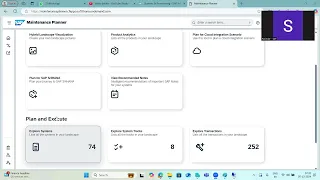
so go to the go to the so maintenance planner maintenance planner so this is the maintenance planner before applying so before calculating so here in the system apply the maintenance certificate maintenance certificate we have to apply in the S license transaction code s license transaction code we have to apply the maintenance license then we can we can calculate the stack the configuration file when you calculating the stack configuration file means what is the target version you are going to update it select it then download all the Pates in one go then we can run the
sum tool you can update it that is what we have to do it from the here in the stack configuration file okay calculate the stack configuration files okay so one go we have to update this one one go we have to update this one okay so maintenance planner we have to update all these things we have to update it maintenance planner planning the software packages and everything go to the access my Launchpad is going to the different one from there we can download it from there we can I will go to the another us already
here if you see the maintenance planner in the maintenance planner so you will get the list of systems here in the maintenance planner you will get the list of systems so are you are you guys are understanding what I'm saying is it clear till now how to update the patches and everything is it clear normally we be used to the spam and say right but the spam and say it will long procedure it's a old procedure that procedure we don't required but we should know what is the spam and say everything but if you go
with you go ahead with so if you if you check in the some procedure that is the latest procedure in every interview will ask the sum procedure have you performed the sap upgrade or sap patching using the sum tool or not yes means they will ask the questions can you tell me the preparation steps so first we need to check the latest versions which is available in the Service Marketplace upgrate the spam and Saint version canel is not mandatory so apply the license and calculate the stack. XML file stack configuration file we have to this
is the key file for the sum tool just go to the select your systems where how to do that one means we have to go to the this is for the calculation of the stack configuration file so for this one we have to go to the Service Marketplace maintenance planner then explore systems explore navigation this explore systems then select your system which system you are going to update select your system then select Target patch level Target patch level then once you the Target patch level once you selected Target patch level then so push the push
the all the patches to all the patches at a time to so download basket download basket download basket you can download basket you can push to the download basket then download download all at a time this is the so navigation so if anyone ask you how to calculate the stack. XML file means so this navigation you have to explain it this navigation you have to explain okay so same navigation we will do that one we went to the here maintenance planner explore systems we went to the maintenance planner then the maintenance planner so explore systems
in the maintenance planner so explore systems explore systems and the systems in explore systems you will see the all your SAP systems here all your in your landscape how many systems are there all your landcap systems are available here you can see all your SAP systems are available here so number of SAP systems are available here select any one of the system then we can upgrade it so suppose we are updating suppose these all systems are available here suppose you can see the all systems are available here so what if my system does not have
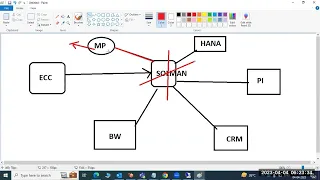
so this data will come automatically from the solution manager if we have the solution manager then this is the directly your system data will be updated here in the so maintenance planner in the maintenance planner in the systems it is updated your data is updated here you can see here automatically it will come from2 your sapc to solution manager solution manager to in the Service Marketplace your data related systems all the systems are available here so what if my client does not have the solution manager this is the question they will ask you in this
case what we have to do if don't have the solution manager what we have to do my Cent does not have the solution manager in this case how can I get how can I download the sap all the software XML file how can I download it in this case you have to download so this is one more procedure okay don't get confused okay so this is for if the solution manager having this we can do that one if you don't have solution manager are you getting uh like are you understanding or can I stop it
here can I continue tomorrow sir please continue tomorrow okay okay yeah that's why I'm asking why because it's a lengthy topics so you won't digest all these things and everything if you go slowly one by one so spoon by by spoon feeding then you will get all at one at so that's why I'm trying to ask these questions so don't think like that okay we have all time left something like that okay okay no problem so just check this four or five points related material I will send you in our group so just go through
it it's a lengthy procedure critical procedure let's see depends upon the your understanding your digestion of these things so we'll check tomorrow and day after tomorrow otherwise so yeah we'll we we'll go one by one okay so thank you guys thanks for your time we'll see you tomorrow yeah