hey what's up guys I'm going to do a quick little tutorial of how to do an ik animation for day um there's not a lot of information out right now there's there's a bit but it's kind of hard to kind of decipher you got to watch like long videos but I want to just do a quick tutorial and I'll probably follow up with some more if people you know appreciate this kind of content but uh so let's get started with um getting the GitHub which is made by Hunter Z and JD I'll have a link
to link to this in the description and uh once you get it um you just want to open it up open well first you want to do the blender plugin you want to put that in your uh blender add-on folder and um add it to blender but I'm not going to get into that most of you probably already know how to do that if not then just Google it but you want to go here open up poses right M4 rifle I it's basically a default one um we have our own that's kind of modified with
a a UV just to make sure there's no stretching or anything um we might up or I might you know share it with JD and them to update the GitHub but if you want you just message me if you want to know how to do it it's pretty easy anyway so we want to start off by getting our gun or Whatever item we're going to do so I'm going to do a P90 I'm going to go in here the the magazine needs to be included well if you plan on doing a Reload so I'm G
to go do that camo I get the whole thing selected everything included export fpx P90 I'm going to just I already made one but I'm going to do it again current selection only cuz that's what we have selected do not separate export normals is bad Master scale 100 there we go easy so now we want to go into here file import our gun sure you go to the right folder P90 and there it is so our objects all the way up here which yours might be somewhere else I don't I know why mine's there it's
probably because it's what I was selected I rename it the P90 and uh well here well actually I'll just separate it first so you want to separate your bones into separate objects so I'm going to just do the trigger well I'll do the magazine too might as well so I'll go into edit mode do that so I just pressed L for those unaware set press P to separate and then boom we now have another one I'll name it trigger well I'll be more specific and name it P90 trigger anyway we got the P90 we got
the trigger cool so from here you want to go to this little thing we were here want to go here constraints you want do child of um and then weapon route is what we want oh and of course one thing I left out here in your object settings you want to go to set that to zero set this to 90 very important and you want to do the same with the trigger and for the trigger we will also do child of Daisy character instead of weapon route we do weapon trigger and there's our trigger very
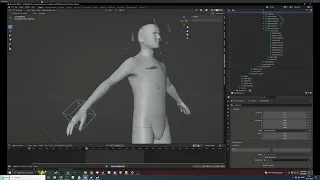
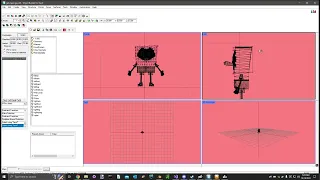
cool and I'm going to go and save as different um things so we don't overwrite the normal um file which probably doesn't matter to you but anyway so here here we want to go to the Armature you want to shift click to expand it all and you'll see there's quite a couple bones it's just a daisy skeleton I'm goingon to start off and say Do not mess with weapon route it's waste of time just don't touch it if you need to move the gun or whatever you're doing rightand dummy is the one that's what we're
going to start with so before you start animating you want to make sure you're in pose mode at the top here so object mode pose mode then cool you got your nice little skeleton right hand dummy I use the gizmos because I'm a blender Noob but some of you might be better and here you could see that you know things start to move when you move stuff so weapon or sorry right-and dummy is the one you want to move I'm just kind of line that up actually I'm not going to rotate the weapon route because
things get a little weird if you do once you get in game your gun might be a little rotated which I don't really want to deal with right now so I'm just going to do a kind of basic thing which that looks decent I mean you know if you just use a vanilla one it's going to look way worse so you know we'll be happy with this so this one we're gonna bring this bad boy right here leftand origin right hand origin those are the two you want to focus on when you're doing ik so
we got left hand origin selected we're going to kind of get him in the right position don't want to do that too much okay it's starting to look better that's why the UV is important you can kind of see when things start to go pretty bad we're getting there if you're if you're just you know a blender Noob I'm a blender Noob but like if you're more Noob than I am I'm just pressing R kind of rotating based off my orientation you get used to it you can just click up here and do the Gizmo
if you want a more visual thing oops it's up to you you know people have their own preferences their own workflow all right that's actually starting to get pretty good I think I can work with this so I'm going to save and I'm going to grab I'm going to go look for rather look for the thumb it's right there but I'm going to expand all right here shift click once again shift click left thumb grab my orientation so I get a bit better visualization of what I'm doing you really want to be careful when you're
messing with the fingers CU fingers don't bend as easily as they do in blender see that's what I'm trying to avoid right here I really hate this thumb to be honest kind of gota just play with it I think I could probably just work with that yeah let me give myself a little bit more leeway straighten that out yeah that's a little believable save let's find the left index I kind of speedrun this I don't want to take too much of your time watching me just be an idiot I know some of you better animators
are probably cringing at me it's all right all right I'm just going to call that to the middle guy needs to straighten up a little bit get him in there all right index last one no sorry ring it's the last one I'm gonna just go and straighten up this guy I'll do the pinky too why not nope that looked awful just G to do this one instead as you can see you could really mess up the fingers pretty easily so you got to be careful and yeah at that looks pretty good so you're pretty satisfied
or you know you just want to see it in game you just want to hit a right click insert key frame that will add all these bones to the key frame down here so yep oh yeah press a right click insert key frame just making sure oh you know what I just noticed I'm in the wrong one you actually well it doesn't really matter that much but you want to have an ik and it needs to be zero one so it's only one frame same thing a thing you could check all your things down here
yeah save cool so up here you should have your little the animation tools if you did your uh your plugin properly so we're going to go export txa go to wherever you want to go so I'm going to go to my MP7 here I I already got my um directory set up but I'm going to make a new folder P90 P90 ik. txa that's a good name um I don't think this matters but override FPS I just set to 30 out of habit at this point that's what JD told told us in the video so
I don't know any better Survivor ik2 hand because that's what this is two hands if you're doing a one hand you do a one hand pretty pretty obvious so export txa and yeah so I'm going to go and find my txa open it with vs code I mean this doesn't matter but I'm just kind of making sure that the data is all here which it is excuse me all right so we're all done with that now we want to go to uh workbench and let's see if this works I doubt oh it actually worked okay
cool so you go find your new you could just refresh it or just open it again um I'm pretty sure you just use a vanilla workbench like if you go into your P Drive which I'll just maybe it's not in the Drive uh steam steam apps common Daisy G if you open this you should be able to convert it I'm not trying to do that right now because I already have it open so once you do you find your little work drive I think you have to set it or something I don't know but open
workbench find your thing then register and import sorry I went off on a little tan it there but I feel like some people don't have workbench probably a lot of you don't so it should be imported there it is all righty so from here we got to grab a uh we got to do two things we got to set up the script we got to make an ASI so what I'm going to do is I'm going to go find I'm using now because I'm lazy so you want to go to your ik registration I'm using
the cz61 that's fantastic and um well while we're here let me just copy this P90 right here replace the I with our new one that we just made P90 P90 ik I'm going to tell you right now be sure you type this properly because it'll be a big headache if you uh if you make a typo actually I don't think we need an ASI for this we're just doing the the ik I'll probably do a video tomorrow on the states and um the firing because they're kind of required within ik but for now we're just
going to make it simple so I'm going to pack animations and pack our Scripts and then boot the game you don't have to use workbench to see your animation you boot it however you want to whatever your workflow is uh decision decision do I edit this or make you guys suffer I wonder if there's anything else I can go over [Music] um oh the ik constraints these are only used I mean this is when you're starting to do other stuff other than ik these are only used with ik you can just open them here and
if you want to disable them I don't recommend hiding them just set their influence you can actually if you have issues and you loading game and your like um your elbow is in your body try setting the influence on your uh on your left hand to zero and then just um adding key frames and exporting sometimes that works for me I really don't understand it but anyway oh speaking of your elbow going inside you that usually happens if you rotate but um looking at that that's pretty good that is exactly the hand placement I did
we want to move the gun a little bit forward but I'm going to troubleshoot this with you guys because I know how frustrating at least for me it was but luckily I literally just talked about it so left hand I'm going to just remove the influence and I'm just going to control a insert key frame actually I'm just going to take care of another thing that I saw that I I just don't like I'm going to just go to the rightand dummy actually rightand origin sorry right hand origin I'm just going to pull the gun
out a little bit uh oh I thought maybe it's rightand dummy does both no it doesn't maybe it's the constraint that's messing with it because I'm pretty sure if you mess with right hand origin left hand follows and yeah it does okay so it's just my constraint was [ __ ] up okay so yeah I saw the butt sock was pretty much in his shoulder I want to just get it out a little bit and yep that looks good okay but make sure the whole reason we're here we're going to remove the influence I Can't
Tell You Why that works I don't really understand all this it's quite frustrating to be honest but that is Day Z we uh we do game development but on extremely hard mode oh one thing um I didn't even export it did I I'm in a hurry for no reason all right export txa I'm G to just double check I did my settings right yep okay nope nope don't pack yet you got to register it's six o'clock when I'm recording this in the morning mind you I'm a little uh a little tired but wanted to make
sure I make this video as soon as I could and I'll probably just edit it or whatever tomorrow and upload it so here we are waiting for the server to boot fun stuff you can see how much fun I've been having all day RPG a million freaking times that one's just cursed though P90 should be way easier but yeah the first time I did like a rotated grip I think it took me like three hours just to get the ik so hopefully me making this tutorial and just telling you hey remove the left hand influence
and your grip starts to work with the right elbow placement that will save a lot of time hopefully and hopefully more people are motivated okay well it's better it's definitely not perfect definitely would be better if I just removed the fast but we don't we don't want that we want to go out a little bit more trying to think of how I would approach this right looks about what I left it with I'm going to just mess with it a little bit let me get that influence back up so I know what I'm actually working
with so right hand origin pull this out a little bit and we're going to mess with the left hand forearm Direction this is how the bone contraint kind of works and I'm going to just pull it out a little bit I'm going to go back to the ik I'm pretty sure this should be good I'm to remove the influence yet again contr a make sure you do this insert key frames if you've already um if you've already set up your key frames in here you could just uh click down here I have this stupid setting
enabled but you can just control a and this just updates the key frames that are in game but since it's an ik every bone gets used it doesn't really matter so same settings reimport resource we do this one should be good I have high hopes for it or it'll at least be good enough to be like you know hey guys you figured out from here I've showed you enough the rest of it is just going to be little tweaks yep it's pretty much exactly right that looks pretty good let me get that off so we
do a little lag there it goes and yeah look at that and nice little handheld animation a lot of people will appreciate that grab a P90 mag not that it really matters but I kind of just want to display what we're going to go over next so we're not going to do reload animations quite yet that's a whole beast in itself but when you shoot you'll notice that that requires uh an ASI and for you to make fire animations but luckily the fire animations are like two frames all you do is animate the bolt so
it'll be really easy I could probably make it probably like less than a f minute video hopefully we'll see anyway that's it guys hope you uh can figure this out and make some great stuff so see you