chat GPT search is the latest feature Sam is using to motivate the masses to fund his closed AI Monopoly today I'm going to show you how to build your own AI web search assistant using Python and the leading open source language models with olama olama is an OP source project allowing us to easily run a vast library of small and large language models on our consumer PCS whether you have no actual understanding of programming and never written a line of code in your life or you're a senior developer who writes code in your sleep this video will explain exactly how I built myol Lama web search agent from start to finish and how you can build the same program to run on your PC Today I firmly believe that the best AI future for humans is dependent on no one human controlling the key to the greatest and most powerful tool that Humanity will ever create I do sleep better at night knowing that anthropic Google Elon and many more billionaires are fighting to make AI democratized amongst more than one billionaire though what really gives me hope is the open-source effort to democratize AI getting clearly Stronger by the day my goal with videos like this is to empower more people to control your value received by these rapidly progressing AI models through teaching exactly how to build your own AI tools with the Python programming language python is not only the most recommended language to learn today by the leading AI experts it's also the programming language that Sam Elon Sundar and Dario are paying billions in salaries to have developed flippers train and run these AI models we are all seeing released by the day all of the AI tools we are rapidly adopting into our daily lives are literally just a bunch of python code so if you want practical videos to get you started coding AI applications to better fit your needs than what a for-profit company is offering to the public make sure you don't forget to subscribe to AI Austin before leaving this video and check out the many more videos I have created for you today if you would like to support me taking more time away from my work to create these free YouTube videos consider joining my Pro membership today by becoming an AI Austin Pro member you unlock the pro channels on my Discord server in here you will gain early access to a written version of each of the video tutorials with code blocks for each step of the tutorial and the source code for my complete program in the lazy Pro tutorial section I give you the simplest steps to download and run my code for anyone who doesn't care to have an in-depth understanding of how these programs work within the proat channel is where you can get the fastest responses from me and no I do not ever use AI to generate the responses from my Discord account to become a pro member before the price goes up for new members click the buy me a coffee Link in this video's description to join today all right now let's start coding a local AI Search Assistant for this program you will need python 3. 12 installed on your PC I will be using vs code as my code editor so if you don't have a code editor already installed on your PC that is what I would recommend using it is free and easy to install to run the open- source language models locally on our PCS you will need to install a llama from their official site next create a folder named search agent and open it in your code editor before we do start writing our code let's install the python libraries we will be using to build our search agent create a new file in your search agent folder named requirements. txt inside this file we can list the Python dependencies and the specific versions that I used for this demonstration in the terminal tab on vs code we can start a new terminal window then run this command to install each dependency in the requirements file now create a new file named search agent.
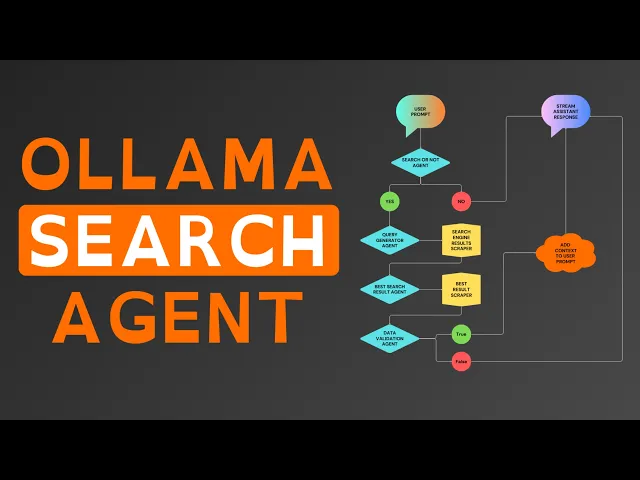
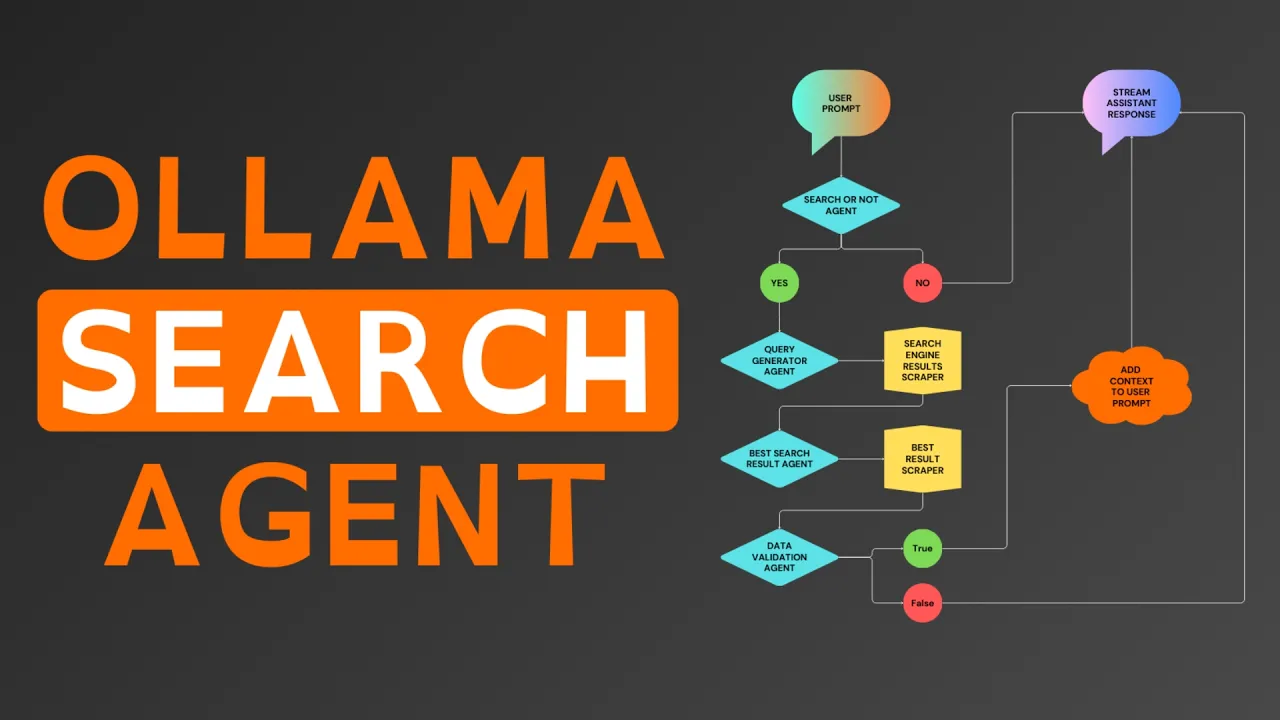
to start we will code out a simple olama commandline chat application then we will build out the agentic web search for giving our assistant context to our prompts start by importing olama into your Python program then online three we will create a new variable named assistant combo to be an empty list this list is what we will add our prompts and the responses from our assistant that we will send every time the program generates a new response for context Now define a function named stream assistant unor response in the function set assistant uncore convo as a global variable so changes to the assistant convo variable effectively save if any occur during this function call below that Global variable create a new variable in the function named response stream in resp response stream call ama's chat function to start generating the response in that function call we can specify the olama model we want to use pass the assistant messages for context and set stream equals true for the model this is where things get subjective and I can't give you one model that will work best for you for my language model to generate the assistant responses specifically I am using llama 318b that's because it's the best model I can run on this M2 MacBook Air with only 8 GB of RAM basically at this point if you don't already have an olama model in mind that works best on your PC I recommend testing out a few of the top recommended olama models here's a review of my recommendation for olama models given what is available at the time of creating this video once you have set up the model for your response stream below it create a new variable named complete uncore response to be an empty string We'll add each token generated from the language model to this variable so that it can be added to the assistant convo after the stream completes below the string run a print statement with our assistant message header now we can Loop through each of the chunks in the response stream as they are generated from the language model inside of that Loop we can print the chunk message content with end as an empty string and flush equals true below the print statement add the chunk message content to the complete response outside of the for Loop append the complete response to the assistant convo with the olama conversation formatting lastly for this function we can print two line braks to keep our command line clean and easy to read next we can Define another function named Main and again set assistant convo as a global variable in the function in this function we will create a while true Loop that will infinitely Loop through our next lines of code allowing us to create a conversation functionality that only ends when the user stops the program the first line in the while true Loop will request a prompt input to be typed into the command line then a the formatted prompt to assistant convo and last call the stream assistant response function after our functions we can use these two lines of code to effectively start up the main function if the python script is ran directly and not as a python dependency in another program after saving this file you have now created a program to prompt and stream responses from a local open-source language model that runs with maximum efficiency for your PC thanks to a llama now to start converting our program to a full fully functional search enabled AI assistant we are going to need a system message instructing the model how to behave with and without search context since we will have multiple worker agents to handle finding the relevant context to add to our prompts we will have multiple system messages to keep this python file cleaner create a new file named syore msgs dopy where we will store all of the system messages that we can load into the search agent. py program add this dictionary variable with the olama formatted system message this is the system message that I use to get things working but these things can always be improved so copy it for now but know that it's worth playing around with more for your own prompts save this python file and back in the search agent file import syore msgs which effectively Imports all of the code from that Python program into this Python program in the assistant convo list add the assistant message now let's discuss the agent flow this diagram I have created visualizes what the complete program we are building today will do in order to retrieve and add context to our prompts each of the triangles are our worker agents with a specific task you'll notice the first agent to receive our prompt is the search or not agent as you can imagine this worker's task is pretty self-explanatory after we send a prompt this agent will analyze the prompt and if it decides it's useful to perform a web search to get upto-date context on the topic of our prompt before responding with our assistant this worker generates a single token of true and if the prompt does not require a web search the agent will respond with one token of false now that you understand the agent that we will be building let's start coding out the Searcher not agent for our program first we need to create a system message for the Searcher not agent instructing it exactly how to respond for this task back in your search agent file Define a new function above the other functions named search or not we can set syore MSG in this function as the search or not message as the response variable we can use the AMA chat function to generate our response sending the formatted system message and the last message in assistant convo now the model that you choose to use for this specific worker agent may or may not be the same model that you choose to use for your assistant responses for each agent that we build in this program I recommend testing out different models for the specific worker's task to see what will perform best below response create a variable named content to select only the message content from the completed AMA chat response in the model testing phase I recommend printing content so you know exactly what the language model is generating as it should only be true or false given our system message but this will ensure the model you choose is handling the task of a true or false question reliably since I have already found the best model to handle this task Rel reliably given my PC specs I will remove this print statement now we can use an if statement to check if true is in content after converting content to all lowercase with a built-in python lower function and if true is in content return true else we can return false as the result for the search or not function down in your main function after appending the prompt check if search or not and if search or not returns true print web search required looking back at the agent diagram the next worker we will need to create is the query generator sticking with the theme of self-explanatory worker names this agent will handle the specific task of generating a web search query to find the data the model believes our assistant needs to respond correctly add this query message to your Sy messages file again noting that all of these system messages are just what works for me I'm betting many of you will make them even better so feel free to share anything that you found to work better in the comments below back in the search agent. piy File we can define a new function below the search or not function named query generator again we will set the Sy MSG variable in this function as the system message we created for this specific worker agent in another variable called query message we will format The Prompt with a message before adding the last message in assistant convo in response we can send the formatted system message and the query message as the user message to generate the response from the language model for this function we can simply return the response message content below this function create another function named aior search we use this function to define the order and the logic of exactly how our worker agent should be used to put things simply in our main function after checking if search or not we will call this function and it will return the correct web search context that we can add to our prompts within the main function in this new function create a variable named context equally none at the start of the function call print a message to terminal so we know which agent is working and in search query store the result from the query generator function now llama 3.
1 does seem to create good search queries in my experience but almost always puts the queries in quotes but when we put our query in quotes on Google or duck Dugo the search engine will only find pages that use the exact query as it is written in their web page versus the expected results of a non- quote wrapped query returning the web pages that are most relevant to the query so in the AI search function we can check if the first character in the search query is a quote and if so we can remove the first and last characters from search query in the main function we can remove the print statement and set a new variable context to equal the results returned from our new AI search function looking back at the agent diagram we will now see the worker functions in the yellow squares think of these yellow squares as the worker functions needed for our program that don't use a language model prompt to accomplish their task for the program this function will take our AI generated search query run it on duck. go scrape the 10 best results title link and search descriptions in search agent. at the top import requests and from bs4 import beautiful soup which is the common to use Python web scraping library that I will be using for this program to find a new function below the query generator function named duck dug goore search that takes query as an input parameter create a variable named headers where we can manually set up our web header settings for the web request that duck.
go will receive this allows us to format the header to mimic an actual web browser user in url we will construct the duck. go search link with our query attached to the end in the response variable we can use the request libraries git function to send our git request to the URL passing that headers as a parameter to the git function then we can use the request raise for status function to handle any errors if any occur during the web request in a variable called soup we can use beautiful soup to extract the response text from the HTML parser using the HTML parser with beautiful soup effectively creates an organized structure of the HTML scraped from the duck Dugo results page that we can search through in our code to extract necessary text and disclude HTML code being sent as context to our search agent next initialize a variable called results as an empty list this will store the structured data we extract from the search results now we can Loop through each of the search result elements using a for Loop and by adding a numerate to the loop we can keep track of the result number starting from one add a condition to limit the loop to the first 10 results unless you want to raise this number to have your search agent check more than the top 10 search results for the data needed within that Loop look for the results title which is the a tag with the result double a class this gives us the clickable titles code of the search result if the title is not found skip the result with a continue statement the HF attribute of the title tag contains the actual link to the search result we will store that as link next find the snippet of text accompanying the result which is the search description for that result this is wrapped in the a tag with a class of result Dore snippet now we can append a dictionary to our results list with the following Keys ID being the results index as tracked by en numerate link being the extracted URL from the result and search description being the clean snippet text and outside of the loop finally return the results list which now contains up to 10 structured search results each with its own unique ID link and description down in our AI search function we can create a new variable outside of the if statement named search results which will store the results from sending the search query to the new duck. go search function with the search engine scraping worker function ready the next agent in the program we need is the best search result agent this agent as the name suggests selects what the language model believes to be the single best search result to check for the data needed first in your system messages file add the best search result message for this agent and in the search agent file we can define a new function below the duck ducko search function named best search result that takes s results and query as input parameters start by setting the system message for this agent within the function then in best message format the user prompt to the agent with the search results user prompt and the AI generated search query when we prompt the language model for this agent we need the model to generate only a number from 0 to 9 selecting the index in the list of results that is the best result but using smaller language models fine-tune for General use chat Bots out of the box they do sometimes fail at this specific of a task to thee inre the chance of this essential agent failing we will let the agent attempt the response twice so that if the First Response fails it tries to generate a response one more time we can do this in our Python program by looping through the range of two then in that Loop use a TR statement to generate our ol chat response an attempt to return the response message content converted from a string to an integer with the python int function if the response from the language model is not only a number the int function in our program will produce an error message since we are doing this in a TR statement we can prevent our Python program from failing by running an accept statement after to handle any error messages to continue if so running continue in the case of this code makes the program go to the second attempt in the loop or Stop the Loop if it is already on the second attempt outside of the for Loop code will only run in the function if an integer wasn't already returned if the language model does fail to produce an index for any of our prompts we can further prevent this agent from failing by running return zero what this does is forces our program to select the first search result as the best search result in the case that the language model fails for this agent being so crucial to finding the best data most efficiently there is two methods I can recommend to improve the agent's performance Beyond mine option one being fine-tuning and option two being few shot learning for the sake of time I'm not going to go into depth on those Concepts in this video but if you want to learn fine tuning feel free to check out this video on my channel and to learn few shot learning consider this tutorial I made where I explain it in depth now in the AI search function we can create a new variable called context uncore found equaling false run a while loop until context found equals true or checks all 10 pages without finding the data needed in the while loop start with a variable named best result to store the result from passing search results and search query to our new agent below that start a try statement and inside we will create a variable called pageor link to be the link value in the best result dictionary using an accept statement to handle any errors we can print a message letting us know if it does fail then run continue which in this case restarts the code running from the first line in this while loop with our best search result agent coded we now need our second worker function to scrape all of the text Data from the best search results web page in our search agent file we will need to import traffy Lura beautiful soup is a great library for the simple task of scraping text from a specific site where we will know the exact HTML structure of the page will rarely if ever change but when scraping random search results the structure of the web page will vary widely making custom parsing difficult traffy Lura on the otherhand was built to automatically extract the main text from any site without manual rules this way our AI assistant consistently gets quality context from any web page so now let's define our worker function above the AI search function named scrape webpage that takes URL as an input parameter in a TR statement create a variable called downloaded to store the results from the traffy Lura fetch URL function and next return the results from traffy Laura's extract function setting include formatting and include links as true the extract function will return all of the text data without the HTML code but with the include formatting parameter will consider any line breaks spacing and other relevant formatting and format the python string accordingly which will allow our search agent to more reliably understand the text Data as it was meant to be read and if our accept statement runs we can return none back down in the AI search function we can create a variable in the while loop outside of the tri statement named pageor text this variable will store the results from running our scrape web page function on page link after we scrape the web Page's text we can remove the link from our search results with the python pop function now we have both of our our worker functions and two of the three worker agents needed for our search enabled assistance the final agent we need to create is the data validation agent unlike chat gbt search that simply scrapes the 15 best results from their proprietary search engine made up of company sites that they are financially embed with then adds all of the text from those pages to your prompt for context we want a more efficient search agent for our consumer PCS but also we want a search agent that doesn't bloat the conversation with duplicate or irrelevant context this will help minimize hallucinations as well as prevent our Search Assistant from summarizing shitty and irrelevant articles to supplement not finding data to respond correctly like Sam's tool to do this we need a worker agent to analyze the page text and decide whether it contains exactly the data we need and if it seems to be a reliable source for this data back in your system messages file create this contains data message instructing the agent exactly how we need it to analyze the search results page text now save your system messages file and you can exit out of it as the syore msgs dopy file is complete if you followed all of the steps to this point in the video in the search agent file to find the contains needed data function above AI search this function will take search content and query as inputs set the system message for the agent within the function then format needed prompt as we showed the model in our system message in the response variable we can generate the response with our model of choice for this specific agent select the response message content then if true is in the content after being converted to all lowercase return true as the function result else true wasn't in the response generated from our agent so we will return false from this function now we have all of our worker and agent functions for the program we just need to wrap everything together in our AI search and main function to finish coding our fully functional search agent in the AI search function we can check if page text exists and if so check if our contains needed data agent returns true approving the page text as the data our assistant actually needs and if so set context to equal page text then set context found to now be true which will stop the while loop from running again now outside of the while loop we can return context as the result from our AI search function in the main function the context variable will now receive the actual context found by our worker agents in the AI search function below context if a web search was performed we can remove the last prompt we sent to the assistant combo being that our AI search function will return none if for any reason the worker agents cannot find relevant search data we can check if context in our code if we did get context from the AI search function format prompt with the search result context before our actual prompt else context is none so we can format the prompt with a failed search message so that the assistant has context of a failed attempt at a web search now we can append the olama formatted prompt to our assistant convo you now have built a fully functional search enabled local AI assistant though at the start of this video I showed my program with colorized print statements to make it easy for us to identify our prompts the program messages and the assistant responses if you would like to colorize your print statements as well to make your program cleaner and easier to read at the top of your program from colorama import a knit for and style below the imports called the colorama and nit function setting autor reset equals true now for each of the program messages I will change the color to a bright red by calling colorama four class with the light red option for the print statement and stream assistant response I will print the responses in white since I have a dark mode terminal basically the assistant response is what you're going to be reading the most so make it the easiest to read color and for my prompt input color I will print the header and display my text input in a light green if you want to use any other colors here is a full list of all of the colorama options now you have fully completed building version 1.