[Music] [Music] nihao thank you everyone for turning up at nearly five o'clock after a long day of technical sessions we're very grateful to have you here to talk about how flutter renders widgets my name is matt sullivan my name is andrew fitzgibbon and we're going to spend next half an hour talking about how flutter works under the hood what we talk about today isn't really necessary for your day-to-day job by writing flutter but it will give you a solid understanding and help you to build performant flutter apps and so just to remind you in case
you missed it from the keynote this morning flutter is google's ui toolkit for building beautiful applications on the web mobile and desktop now as you can see you can do very interesting things with flutter and so we're going to do something very simple we have an app that has some text in the middle of the screen that's all we have this is like the simplest flutter app ever this is the very simplest app ever two widgets we have two widgets that's it and so when you first learn flutter one of the things you learn is
that everything is a widget and what we do under the hood is we build this widget tree and in this case we have a center and we have a text but let's make it a little bit more interesting just barely more interesting and make the background white we do that by adding a container at the top three widgets we now have three widgets and so our widget tree looks like this we have a container at the top a center and a rich text so i think matt it's undeniably true that everything in flutter is a
widget it's undeniably true it's undeniably true it's uncategorizable i just made that word up you just made up that word that's great well in reality that's not necessarily the case because if you dive into our documentation you will see statements like this where it says a widget is an immutable description of part of a user interface so looking into the docs you think about this and you go well you know immutability and uis don't go hand in hand because uis are not immutable different parts of your ui mutate and change your ui is constantly in
flux new widgets come in and go pieces are swapped in and out but if widgets are immutable how does flutter manage the state of your ui how does it represent change that's a great question matt it is a great question isn't it i'm going to answer it thank you so in reality what flutter has is flutter has three concepts for this it doesn't have one tree of widget it actually has three it has the tree of widgets the widget tree it has a tree of elements and finally it has a third tree which is a
tree of render objects and these three different concepts we combine together to make uis rendering or the rendering of a ui as performant as we possibly can so these are new concepts maybe for some of you so let's look at the flutter documentation again and see what it has to say about these three things so we've already seen that a widget is immutable and so that kind of makes sense because you are working with a declarative framework you declare what your ui is going to look like and so you configure it and you configure it
with widgets and so a widget describes the configuration of an element so what does that mean for an element well in fact what an element is it's an instantiation of those widgets it's the mutable piece of the tree for one of a better word it's the thing that manages updating and changing of the ui it controls everything you can think of it as managing the life cycle of widgets and thirdly we have a render object which is an object in the render tree and basically what that means is you have a tree of render objects
and that is what is going to lay out and paint your ui when flutter draws your ui it does not look at a tree of widget it looks at a tree of render objects which controls all of these things so let's look at this from a slightly different perspective we have configure lifecycle and paint and so how does this map to you eyes well on the configuration side of things configure lifecycle and paint maybe i should click faster so when you configure your ui basically this is you writing widgets you are assigning properties and values
um to the components and you're doing it through an api and that's what ends up as your widget tree then you have the life cycle and this is what is going to manage the whole life cycle of ui it's going to work out what components exist in your ui hierarchy and it's going to manage the relationship between these elements and handle their mutation and morphing and then finally you kind of have to paint your ui you actually have to draw these things on screen and that's where render objects come in each component knows how to
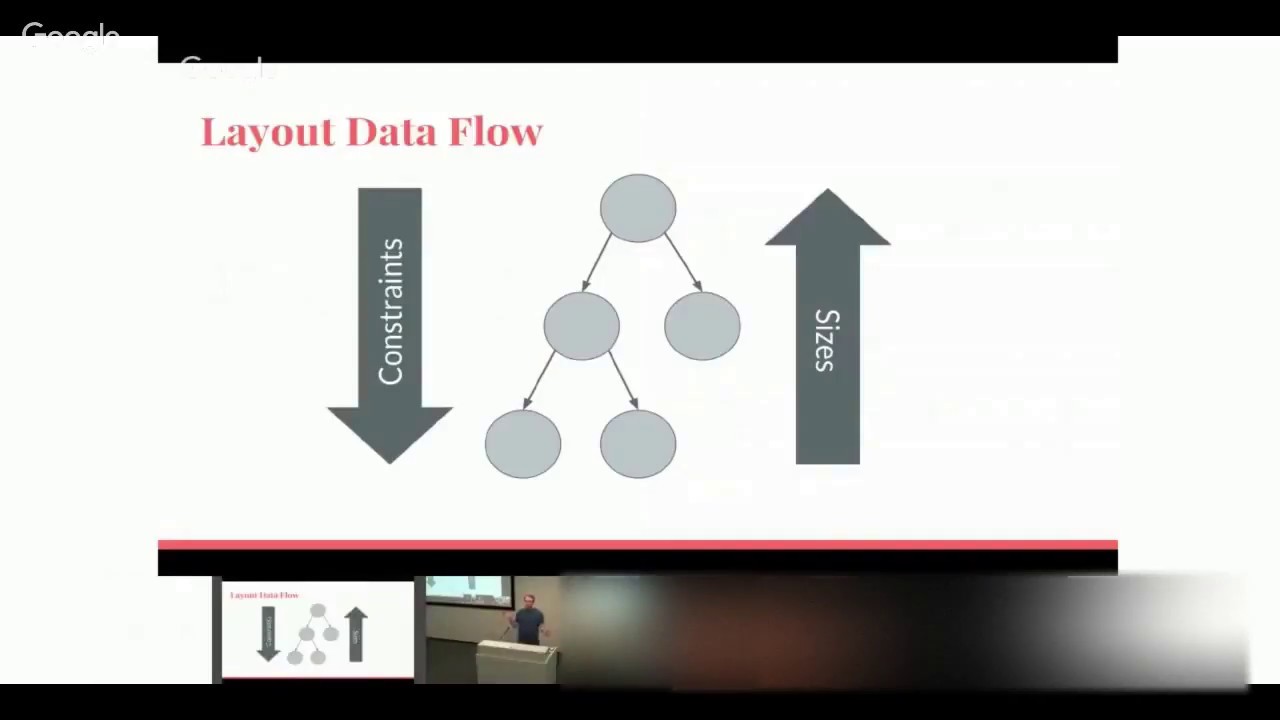
paint itself but importantly it also provides constraints for its children so for example when you saw a center widget and you have a some text what's happening in the rendering side is is that that center is constraining where that text can paint so these three concepts configure life cycle and paint they map really nicely onto the separation of concerns that flutter has between widgets elements and render objects and so we have our widget tree which does this is where you define this is where the configuration happens we have our element which is going to handle
our life cycle and we have the render object which is going to layout and it's going to paint and so you combine all these things together into these three trees which have these three different separations of concerns so there's a whole bunch of theory here and you might be asking yourself well this is great but this sounds more complicated than i need to render a ui why are you creating three things when one might be perfectly acceptable so let's start to jump in a slightly lower level and see um an example of this and we're
going to play with yes so now that matt has read us the documentation thank you matt we're going to look at some real code and some real examples here so take for example padding it's a very simple widget all it does is add some space around things so here's the code for it we have some padding and it has some text within it and it adds some space very simple let's remind ourselves of the responsibilities of the three trees widgets configure elements manage and render objects paint in the case of padding our widget has two
responsibilities it needs to know how much padding and it needs to know what is its child the element here really doesn't do anything much other than manage the widget and manage the render object and so speaking of the render object it also doesn't have to do much all it has to do is it's responsible for layout and size and in the case of padding it just needs to remember enough size for the child plus its padding and that's it that's all our three trees do and so by building ui your ui declaratively like this you
can actually get very performant apps because the flutter framework doesn't have to destroy very much it can reuse a lot of different components and so that still felt a little bit like theory that we still haven't really seen code right like i i showed some code but it hasn't really no so again let's drop down another level and let's actually look at the source code from the flutter framework for when it creates um a flutter app and what again is the most simplest app that we can come up with that same app that we showed
right up at the beginning nothing but text and no center object there's any more center there's just a single widget and so we have our rich text when flutter starts the app it calls the run app function it takes that widget that you give the run app and it puts it at the root of the tree now we have our widget tree it has a single widget at the root nothing more the next thing the flutter framework does is ask the widget to create the render object uh sorry it creates the render object element yes
yes the element first render object later that's right we'll get to the render object later okay so flutter asks the widget to create the element this is called the leaf render object element in this case that's where i got confused and it's a leaf element because it's at the leaf of the tree again our trees are only one level deep with one widget yes the next thing flutter does is ask the element to create the render object when it does that the widget then passes all of the configuration required to paint whatever that widget is
and so in this case it's text and so we have a number of text related properties and now we have our widget trees we have our rich text widget our leaf render object element which does not need any children and our render paragraph with actually which actually does the painting and so while i was talking about that i it felt kind of weird to me because sometimes text changes you want to change the label of a button or you want to change some other aspect of it and so matt what happens when something changes in
our widget so again you're probably still asking yourself why do we have three trees for this we seem to be doing a lot of work to get one thing on the screen and so the magic really starts to happen is when things change and what we're going to do is we're going to effect a change in a flutter app in the simplest way possible which means we're going to call run app twice in the same app right now twice yes for an app twice you would never call run app twice at least i couldn't think
of a good reason for doing it inside a flutter app but what this does is by calling run app it's going to take that first widget and it's going to replace it with a new widget and we're going to examine what happens to our super simple tree in this use case so we have our app um and it's going to go from this to this which is basically run app creating um the first rich text widget and then run out creating a new rich text widget with different text as you can see when we run
this the second piece of text is shown how does that get rendered on the screen so here is our three trees widget element and render object and the first thing that happens is run app is called and it pops our new widget um onto the root and at this point flutter's asking itself what am i going to do in this case i'm replacing one widget with another widget i've already done all this work to create these elements and render objects i'm going to need to work out what i can reuse if anything and what it's
going to do is it's going to call in the widget the can update method and this is very very simple all it's saying is when i'm comparing two widgets are the runtime types of both widgets the same in this case they're both rich text so yes and do the keys of these widgets match and we're not using keys at the moment so that doesn't matter so we have two widgets both of the same run type and flutter goes ah i can get rid of my old widget and i can now pop it back into um
these hierarchy of trees so what happens next is the element goes well hey you've just changed the widget that i point to so the configuration may be different so i kind of need to do something and so what happens at this point is element we'll call update render object which looks very similar to create render object except that what it's doing is it's taking the existing render object and it's updating the values inside it so our render paragraph is updated the text is updated and the next time flutter paints the ui using our render object
tree it's now going to paint the new values but notice what's happened here is we've swapped in an immutable one immutable widget for another immutable widget and we haven't created or destroyed anything else we've done a simple update so that seems like we've gotten some performance gains from that which is nice but having a widget tree of level one or depth one seems like kind of a super simple example so what happens when we have multiple widgets right so if we remember actually to our first app we had two widgets we had our text centered
in the middle of the app and so now we have two widgets we have center and text and so our widget tree looks like this flutter is going to go through each of these widgets in turn and it's going to start at the center and it's going to ask the center widget what is your element in this case the element is a single child render object element it's a bit of a mouthful but it means it has a single child pretty simple it then asks that element or the widget rather to create the render object
in this case the render positioned box only has to know where on the screen to put the child and that's it that's all it does for center and then it drops down to rich text and again we have our leaf render object element and flutter knows in this case that the last element it created needs a single child and so it gives a reference to the leaf render object element again a mouthful but that's okay up to the single child element and then as you'd expect it creates the render paragraph render object so once again
i feel myself wanting something to change and so matt what happens with multiple widgets when something changes well so far you've learned that we have difficulty naming element classes yes when we have leaf single element object tiled element but um what we're going to do now is we're going to do exactly the same trick as we did before we are going to take our app and we are going to call we're going to take our widget tree and we're going to call run app twice so in both cases we have center and we have some
rich text under it only in this when we call run up a second time we're going to change the properties of rich text so again we have two widgets with different properties at the leaf nodes so this is going to start to seem familiar to you we now instantiate the new widget tree so we have center we have rich text remember these two center widgets that you see are different widgets are immutable and we created one and now we've created a second and so what happens is flutter goes okay two center widgets they have the
same runtime i can probably reuse that these two rich texts also have the same runtime so maybe i could reuse other parts of the tree and that's what it does so it blows away our old widgets and it pops our new widget tree and it links in our single child element to center at this point it will call update but remember because center doesn't really have any properties other than its child what happens here is that render position box doesn't change our single child element doesn't change so we've popped a new one but our at
this point our render tree and our elementary have stayed the same we now wire in rich text um we're going to call update render object and that and what will happen is our render paragraph will be updated so looking at this again it's a simple example but you can start to see that the reason we have these three concepts is because it helps us optimize the amount of work we need to do to go from one ui state to an we don't throw everything away we try to reuse as much as we can and so
this will go for when you have multiple children we will do the same thing you might see an example of that in a second and when you have deep trees or broad trees and you're changing different pieces of it we will run through the same process and we will try to get from this state of your render tree to the next state as quickly as we can so we can maintain those frames per second and we have to do the least amount of work to get there so again this has been a little bit of
theory on that so to round it all off what we can do is we can look at a demo and so fitz what are we going to demo yes so i didn't walk away from matt for no reason i actually came over here to show you some actual code i know things have been very in the slides we haven't seen very much real things happening so i want to look at that right now and so here is another simple app it looks very similar to the simple app that we've been working with we have some
text and an image at the very bottom we have a button when i click on that button the text and the image change from hello flutter to hello dart and back again however many times i want to do that the code for this app is also very simple at the top with our run app we have a widgets app and the widget app has a single stateful element now the stateful element also doesn't do much it has a button and it has two trees that it switches between when we click the button and you can
see here that these two trees are almost identical we have a rich text and we have an image and we have some space in between them just to make things look kind of nice okay now what we remember from the talk is that when we replace some widgets with new widgets of the same type we expect the render objects to stay the same now the way we can do that here is use the dart developer tools so i'm going to open those up and the dart developer tools are a set of browser-based tools for debugging
and analyzing flutter and dart apps and so see you can see here on the left we have our widget tree and this is almost exactly what we'd expect at the root we have our widgets app that's what we called run app with was the widgets app and then all the way down onto our rich text our sized box which we use for spacing and an image okay matt can you do us a favor sure i would like you to take some notes you always take notes now okay i would like you to take some notes
and i'm going to use i'm going to use some some very very sophisticated technology you're going to use an app that you wrote i'm going to use i'm going to use this oh some paper okay i'm not familiar with it and i remember it i'm going to use this oh great so what notes would you like me to take i would like you to note the instance ids for our render objects you want me the instance ids the render objects okay yes so you'll see down here for our render objects there's this series of numbers
and letters and that indicates the exact instantiation of that object in the render tree okay so each one of our widgets has a render object as we saw earlier so we have the one for the rich text the one for the sized box and all the way at the bottom we have the one for our image okay and so you can see here you can also look at all the properties for the widgets too so you see here in our rich text we have hello flutter and that's what we'd expect because that's what's showing in
the app so i'm going to click our switch tree button and now we have hello dart with the new image and i will refresh the tree go back and look at that and we can confirm that everything's changed because our text property in the rich text now says hello dart okay and let's look at the render object instant ids again matt how does that compare to our notes which all right which is identical what's that it's the same oh great actually you sound surprised so our render our render object instance ids are the same for
the rich text the size box and all the way at the bottom again the image right yep all the same perfect okay but seeing that nothing changed isn't very exciting i'm gonna go to the code now and we used side sized box for some spacing in between our text and the image and again just to make things look nice but we can also use padding so i'm going to change the code to have padding i'm going to save that and click on switch tree because of flutter's hot reload i don't have to relaunch the app
at all i can just have it running here and when i go back to the dart developer tools and i click refresh in fact i can see that it's the new app because our widget tree has changed to padding great okay let's look at i'm going to click refresh again and look at our render object again matt is that the same instance id for rich text yes excellent is this the sa that's not even the same render object for padding is it no that's a different rounder object and that's not surprising because you have taken
a size box and you have taken a padding widget and they're not the same runtime type so you don't even know what we flutter didn't even know what type of render object it was going to create so that's why it's had to destroy it and rebuild the element and the render object for that widget right exactly so the padding render object has changed but we expect that to happen because it's a completely different widget our image is still the same render object the interesting thing about the image render object is that even though the image
itself is changing and this feels like something that might be expensive because it's a new image but in fact it's using the exact same render object and flutter is just telling it to render a different image file okay so now i'm going to switch tree again and refresh our widget tree so we've seen now that the sized box has come back our render object for the rich text is still the same one but let's look at the sized box one matt how does this compare to the previous id we had for size box that's a
completely different render object it's a completely different one yeah and so what we've seen here is that flutter took our padding and then when it was trying to replace it with a size box it determined it didn't need padding at all anymore it didn't need padding it didn't need whatever its element is it doesn't need whatever its render object is and it just threw it all away and then it created the ones for sized box but that's okay it's okay that it did that because basically nothing else in the app had to change all of
the other render objects all of the other elements stayed exactly the same so let's switch back to the slides and wrap it up so we showed some fairly simple examples and in reality when you build a flutter app you will have hundreds and hundreds of widgets in several several several layers of depth across a broad spectrum and rebuilding that entire tree is super super expensive which is why flutter adopts this method of using these three concepts to minimize the amount of processing it needs to do to make these change so let's wrap up let's let's
wrap ourselves up now let's wrap this up and remind ourselves of the responsibilities of the three trees widgets are there to configure your ui that is what you were writing you were declaratively defining what your ui is going to look like elements are there to make sure everything plays well together and that your widgets when they change are changed out things will be updated accordingly and render objects exist to paint things to the screen and using these three trees is why we are very happy with the performance that we get out of flutter apps thank
you very much