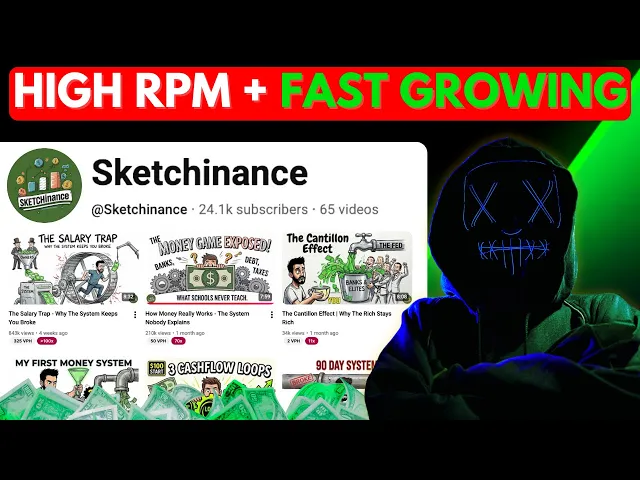
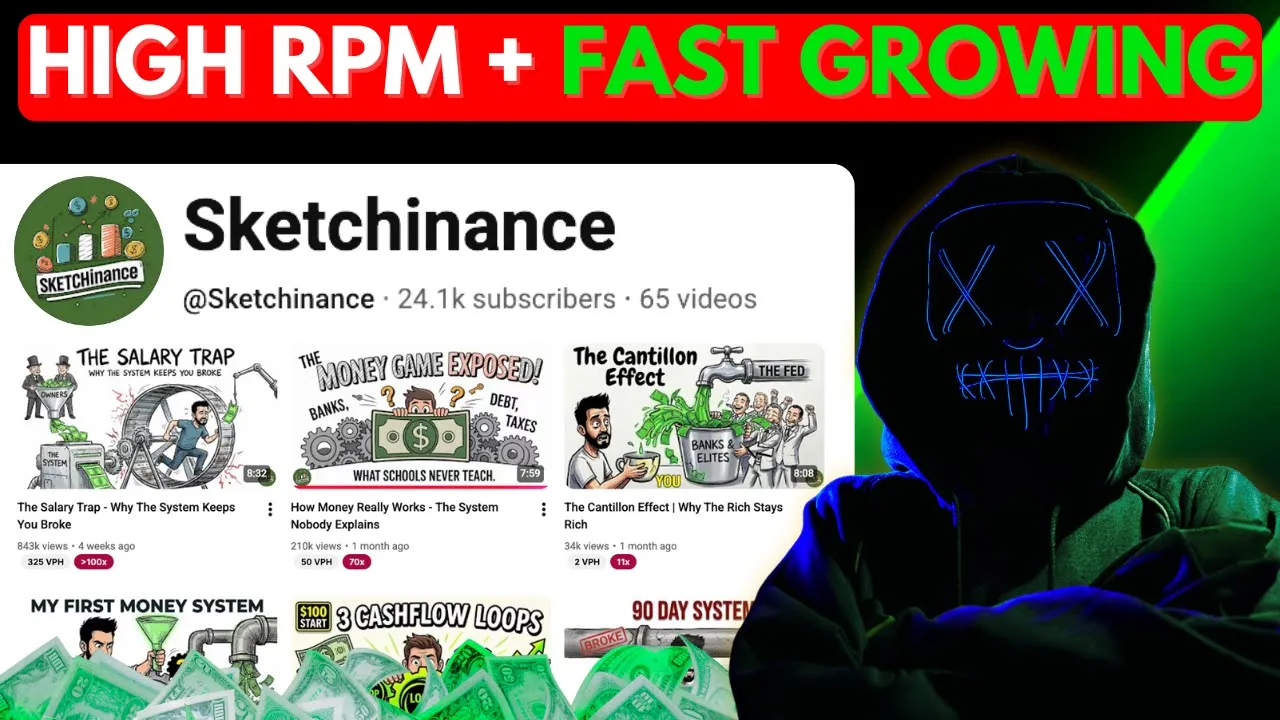
Hello, money makers. Before I saw this channel, I used to think it was impossible to start a channel in an overcrowded niche like finance and get 200,000 or 500,000 views within a month. But this channel totally proved me wrong.
And when I researched more to find out the secret of this channel, what I discovered simply blew my mind. The trick to win in the latest YouTube algorithm is don't think about the niche, focus on how you approach. And if you look at any video from Sketchinance, you can't help but agree with me.
They started publishing videos in the finance and wealth creation literally just 2 months ago. And within this time, they got 1. 2 million views in total.
Just 1 month since the start, their fourth video went crazy viral with 200,000 views straight. And after that, they never really had to look back ever again. All the videos back to back kept going viral, except a few got a bit low view, which is pretty much okay for a brand new channel.
in such an overcrowded niche. Instead, within just 1 and 1/2 months of starting, they threw another viral banger that got almost 800,000 views in just 21 days. Basically, the reason this channel became successful in such a short amount of time is not the niche it chose.
The reason is something I always say to everyone. You don't need to do something different or unique. You need to do the same thing everyone is doing, but in a new way.
And this particular channel showed exactly how to do that. If you look closely at their videos, they are choosing the same kind of topics. They are not offering any revolutionary solutions, but they approach the same ideas in a manner that no other channel in this niche was using or even thinking about.
And that is the real secret behind their success. If I have to explain their style, I'd say they created a crossover between the finance niche, which is usually serious and boring, and the animation or cartoon style niche. And this crossover resulted in a powerful mix.
Think of it like a cocktail. People love cocktails because they taste great, look aesthetic, and come in a nice glass. But the ingredients themselves are very generic.
So, what makes a cocktail special is the mix, which creates a completely new drink, a different taste, a different aesthetic. Plus, it even hits you faster. That's exactly what this channel is doing.
But the real question is, how do you do that? How do you replicate their process and their success? So in this video I will walk you through the entire process step by step from ideiation script writing to finally making it a ready to publish with a thumbnail.
Don't worry the entire tutorial with the prompt doc is completely free. But in return don't just say thank you to me. Instead subscribe to this channel and share this to give me motivation to keep up all the good work.
And now let's grab a cup of coffee and let's get started with the most important question. What should be the first step in building this kind of video? Think about it this way.
You wouldn't build a house without a blueprint, right? You'd end up with walls in the wrong places and doors that open into closets. The same thing happens with content creation.
To be a successful creator, spend real time researching what actually works in their niche before they create anything. Look at what's already getting views, study the patterns, and figure out what questions people are asking that aren't being answered well enough yet. But don't do this manually, wasting hours or days.
You need to build a system for this research. And that system starts with having a solid foundation of topic ideas that are basically pre-ested for success. Now, I've already done a chunk of this work for you.
I've put together documents with proven topic prompts for this. You can find the link in the description or hop into my free community and grab them there. These aren't just random ideas, but structured prompts that feed into AI tools and spit out topics that already have proof of concept.
Once you've got that prompt copied, you're going to paste it into your text generator. I use chat GPT because the free version works perfectly fine, but use whatever you want. Just make sure you replace the placeholder in the prompt with however many topics you want generated.
Let's say 20. Hit enter and you've got a list of video ideas that actually have a shot at performing. Now, pick the one that makes you think, "Yeah, people would actually click on that.
" Because if you're not excited about the topic, your audience sure won't be either. And once you've chosen, we're moving straight into the most important part of this. Writing the script.
Why is this the most important part? Because if your script lacks the spark, your channel would die before it even gets started. Here's what usually happens.
First, you feel excited about the topic. You sit down to write the script and after about three sentences, you realize you have no idea how to structure a video. Should it be funny?
Should it be serious? How long should it be? Should they explain everything in detail or keep it snappy?
And that way, you end up staring at a blank page for an hour and finally you write something that sounds like a high school essay. How do I know all these? Because I've been there, done that.
I tasted both the failure and success on YouTube firsthand. And that's how I have become an expert in this. But does it mean I have to be a good writer to create a great script?
Not really. There's AI for that. So, you just need to know how to prompt AI the right way.
But if you think AI generated scripts are garbage, I'd say take a pause and listen to what I said again. You get a garbage script when you just throw a topic at chat GPT and hope it spits out gold. Because AI writes scripts that sound robotic and boring.
It uses phrases like alternatively, tapestry, and all that cringe stuff that we never use in daily life. But you can make it right like a human only if you use proper prompts. So, I already have a custom script prompt ready for you that I've built and tested.
It's designed specifically to avoid all that robotic garbage and create something that actually sounds like a human wrote it. You'll find it in the same document as the topic prompts. Just copy it, paste it into your chat GPT or clawed AI, and swap out the placeholder with your chosen topic.
Within seconds, you'll have a full script that's way better than what most people are putting out. But even with a solid prompt, you still need to go through the script and edit it. I mean, you can add your own phrases, cut out anything that sounds stiff, and make it feel like you.
That human touch is what separates content people scroll past from content they actually watch. But wait, don't make a decision right now because I have another way too which might interest you more. Listen up.
Instead of writing the script separately and then creating the video, you can use an AI tool that does both at the same time, not one after another. It's called Gulpo AI. And to understand how it works, pay close attention.
In this tool, you can do almost everything in one place. That is the main reason I looked into Gulpo AI in the first place. It lets you write a script using AI or you can paste your own text.
If you have research, you can even upload a PDF and let the tool pull information from it. After that, you choose things like voice style, video length, music, language, and whether the video should be vertical or horizontal. The reason I picked this tool is because the output feels very close to the reference channel.
The overall style match really well. Honestly, I feel the reference channel might be using the same tool or something very similar to create their videos. You also have a control over video length.
If you want exactly 2 minutes, 5 minutes or 10 minutes, it delivers that length properly. If you want to try it yourself, I have added the link in the description. So, let's start with scripting first.
Okay, let me show you exactly how to use this thing. When you first log into Gulpo AI, you'll see a workspace that's pretty simple. There's a big text box at the top labeled prompt content.
Now, you've got two ways to approach this. You can either let the AI generate the entire script from scratch, or you can paste in a script you've already written. Let's start with letting the AI do the work because honestly, that's the fastest path to getting your first video published.
All you need to do is give it your topic, not a full paragraph or a detailed outline. Give it just the topic. The AI model in this tool is smart enough to figure out what kind of video to create based on that one sentence.
So let's say your topic is this. You type that in and that's it. Now before you hit generate, you need to set up a few options.
First, make sure audio only is unchecked. This option is for podcasts, not for normal videos. Second, decide if you want to give the AI any instructions on voice style or video style.
This is optional. So, if you don't have a preference, leave it blank. Third, and this is important, make sure the box that says edit script after generation is checked.
This lets you review and edit the script before the video gets made. Also, make sure color is checked unless you want a black and white video, which you probably don't. Then, scroll down to the bottom options.
You'll see music choices. Since our reference channel Sketch and Ants doesn't use background music, let's choose none. Next, choose your video length.
If you're just testing things out, go with one or two minutes. Because this is a trial, you can always make longer videos later. Choose male or female voice.
Pick your orientation, horizontal for long- form YouTube, vertical for shorts, and select your language. There's also a style option where classic gives you fully colored animations, and improved, which is in beta mode, gives you a different visual style that's a bit more sketch-like. There's also a formal style available, but we won't use that either because viewers on YouTube aren't a fan of formal styles.
So, let's go with classic. Once all that's set, hit generate script. Within a minute or two, the AI will spit out a full script.
Read through it. If it sounds good, hit the button to generate the video. If it needs some editing, make your edits first and then sit back and wait about 10 minutes.
When it's done, you'll get an email notification. Open it up and check out your video. I guarantee it's going to look way more professional than anything you thought you could create on your own.
And now that you've got one video done, you can create it this way faster than trying to do everything manually. And the result, it's undeniably good, isn't it? But wait, don't think our video is over just because we created the video already.
Inside the main workspace of Gulpo AI, you will see a switch right next to script mode called own narration. This option is meant for users who already have their own narration or voice over. Turn this switch on and the workspace will immediately change.
You will then see an option to upload your voiceover file. Upload it and adjust the settings below such as tone, video ratio, resolution, and other preferences. After that, the process remains the same.
Just create the video and within moments, your video will be ready. It is really that fast and that easy. But if you think you still need some help step by step, you can join my separate course and coaching program on YouTube automation growth with AI, where I share premium resources, proven prompts, step-by-step systems, and insider strategies that I don't share anywhere else.
You'll also get direct access to me, weekly live calls, and a network of creators who are building channels just like you. If you're serious about growing faster and don't want to waste months figuring everything out alone, this community is the shortcut. You can find the link in the description and join today for $199 only.
By the way, you might have already guessed that an AI tool so great can never be completely free, right? Gulpo AI has different pricing tiers and for someone serious about building a channel growth plan with $199 per month gives you 150 minutes of color video. That's more than enough if you ask me.
However, business plan gives you $390 of video per month with a $499 per month price tag. Has powerful features like using your own audio perhaps from 11 Labs, voice cloning, editing frame by frame, recording screens, and making a product demo, allowing Gulpo to even understand and render script and video instruction to have great cinematic control over your video. I know Gulpo sounds a bit expensive, but the value it provides is more than worth and there is no other single tool that can do this at this point.
Let me give you a solid reality check. If you hired someone on LinkedIn, Upwork, or Fiverr to script your video, record a professional voice over, animate it in the whiteboard style, and edit it all together. You'd still be paying at least $200 per video or more.
and it would take days, maybe weeks to get the final product. Now, compare that to Gulpo AI. You get all of that done in about 10 minutes or so.
And the result actually looks professional, like really professional. So, now you decide what's the better choice. Now, let me tell you that we are not over yet.
There's still one last step that most people completely ignore and it costs them thousands of views. Your video could be the best thing ever made, but if your thumbnail sucks, nobody's clicking on it. I see this all the time.
Someone spends hours making a great video uploads it with some boring generic thumbnail that looks like every other thumbnail in the niche, and then wonders why they're stuck at 50 views. Meanwhile, another creator with a worse video, but a killer thumbnail is pulling in 10,000 views in the first day. Thumbnails are the ad billboard for your content.
Now, the good news is you don't need to be a graphic designer to create a great thumbnail. You just need to know how to prompt an AI image generator the right way. And just like with the script, I've already created a prompt that does this for you.
Head back to that same document and copy the thumbnail prompt. Paste it into chat GPT and replace the placeholder with your video topic. Hit enter and ChatGpt will spit out a detailed prompt designed specifically for creating a high-erforming thumbnail.
Now take that prompt and paste it into your favorite image generator. I like using Whisk AI and the Nano Banana model inside it because it's fast and the results are solid, but you can use whatever works for you. Just make sure you select the right aspect ratio, which is 16x9.
Hit generate and within seconds you'll have a thumbnail that actually looks professional. If you're branding your channel with specific colors, make sure you edit the prompt to include those. Maybe your brand color is red, so you want the text or the main elements in red.
Just add that to the prompt before generating. The difference between a channel that gets high traffic and one that dies silently often comes down to these little details: title, thumbnail, and the first 10 seconds of the video. Nail those three things and the algorithm will push your content.
All right, let's bring this all together because you've got the tools, you've got the process, but the real question is, are you actually going to do this? Most people will watch this, think it's interesting, then move on. A month later, nothing has changed because not everyone takes action.
But if you're still here, you're different. You're not looking for motivation. You want something you can actually use.
You've got the topic prompts, the script prompts, the exact tools, and the thumbnail process. Everything is laid out step by step. The only thing left is doing the work.
Your first video won't be perfect. It won't go viral. Even our reference channel's first video was not viral.
What matters is starting. So, generate a topic, pick one, create the script, turn it into a video with Gulpo AI, make the thumbnail, and upload it, then repeat. This isn't a shortcut.
It's a system that works if you work it. The creators winning today are not special. They just started earlier.
Let me give you a challenge. Publish your first video this week, not later, but this week. even if it feels uncomfortable.
And honestly, it's not only about YouTube. You can literally do the same on Instagram, Tik Tok, X, or even on LinkedIn for personal branding, too. I mean, you don't always have to make long- form content.
You can share daily anecdotes in 1 minute or 2-minute videos, or you can share daily reels on something. But the overall video creation time is much faster now. While the outcome looks incredibly unique and once you do, you're no longer someone who plans.
you're someone who executes. So decide, are you watching or are you building? And let me know in the comments what other niches you want to learn a framework on so I can bring you that tutorial for you.
And to get more valuable tutorials like this, subscribe to this channel and keep following our work. See you soon. Now, let's check out the demo video.
Imagine a hole you can't climb out of. Every handful of dirt you claw away just makes the wall steeper. This isn't misfortune.
It's a machine, a debt trap. You take a loan to fix the car so you can keep your job, then another for groceries. Soon, you're taking a new loan just to pay the interest on the old one.
This is the cycle. Payday lenders can charge interest rates that soar past 300%. Pulling you into a financial undertoe.
For the lenders, this isn't a flaw in the system. It's the feature. Debt is their most profitable product.
They've even devised rent a bank schemes where predatory lenders use chartered banks as a front to bypass state laws that cap interest rates, letting them charge whatever they want. And the scale is staggering. It's one in five people who lose their car to a title loan.
It's the 54 lowincome nations where debt payments now cost more than public healthare. It's a global architecture where wealth flows from the indebted to the lenders. Here at home, American household debt has swelled to a record $18 trillion.
It's sold to us as a normal part of life, the key to a house or an education. But it's also a cage. The system is designed not for you to pay it off, but to comfortably carry it forever.
Because the trap isn't just about money. It's about time. Your time spent working to service a debt that was never meant to be repaid.
The real cost isn't the interest.