maybe you've been using the ASA AI features that are currently available like smart projects smart summaries smart goals smart chat all of these different things that Asa has made available and they're pretty cool but what I am here to tell you today before you leave and think well I already know all about the Assa AI options they're pretty cool but they're not blowing my mind the newest one smart workflows is truly very amazing and we at I do have the unique opportunity to test these smart workf flows and I want to give you a preview
of what this looks like and hopefully convince you about how amazing it is I'm going to be using the example of lead enrichment and qualification so taking a potential lead who initially contacted us and walking that all the way through the process of assigning a sales consultant and then sending out an email and preparing for the first meeting if that particular example doesn't speak to you I promise this will still be a very informative video and hopefully fill your mind with lots of ideas and give you inspiration as to how a sauna Ai and smart
workflows can really be a part of your process and Asuna okay so for this particular example we are going to play the role of I do your Asuna consultant and licensed reseller and we are going to use an Asuna form of course to bring in new leads that are coming to our website or anywhere else we might be tracking leads if you don't use an Assa form don't worry what I'm going to show you with Asuna AI is still going to be applicable in this form we are trying to ask minimal questions so that we
don't require that the lead have to fill out a bunch of information but still the bare minimum of what we need for our smart workflow to function properly so we are requesting that they fill out their name their email what exactly they need do they need licenses and consulting or both a very brief snippet about what they're looking for in a management software the date they hope to integrate by and then a miscellaneous is there anything else you'd like to know so our potential lead would come to this form by whatever means they did and
submit it here and as you know with the sauna forms this form submission is going to create a task in a nisana project that we're going to go take a look at now so this project is where I am housing all of these submissions and all these potential leads and this is where I'm going to show you a couple of features available with these smart workflows I'm not going to Showcase everything possible because there really is so much but hopefully what I show you today will inspire you with everything you can do with a sauna
AI so this new lead is showing up in this first section under new lead this is the email address that was just submitted so we're going to kick off this smart workflow by moving this task from my new lead section to the data enrichment section so just like in your regular rules when you need a rule to run you need some sort of trigger it works the same exact way with these smart workflows so I'm going to move this from the new lead section to data enrichment and you have to give it a little bit
to let that rule run depending on the complexity of the rule it could take a few seconds or a little bit longer so we can see here immediately A lot has happened the first thing we notice is that the task has been renamed and what what I want to specifically call out right now is that part of this task name is now the company name and if you recall from our form this was actually not even a question we asked in the form so our AI was able to extract the company name from the email
address provided so this is one example really quickly to show you how AI can dynamically fill in information for us and that's what the rest of this is actually showing us so it renamed the task according to the rule along with some dynamic information it filled in the industry the size of the company the recommended Assa plan based on the information provided and how many potential licenses we could sell when we open up this task we can see that I also had a comment posted by AI to give us a recap of that information as
well so it's telling us again the industry it's giving us the name of the CEO again the size of the company and then I've also asked AI to pull in any recent news that might be interesting helpful for my sales team lead to know so we can see here what's been going on with this company it included the LinkedIn page for this company and then again another brief paragraph about what this company does in case the sales lead is not familiar and then a short paragraph about why it filled in the information that it did
so that we can always see and understand how AI took the information and filled out these fields so just like rules AI is filling all of this information out dynamically but of course according to the standards and guidelines that we are going to give it let's take this lead through the next step which now that we have extracted some information and added some good data points now we want our AI to help us assess if this lead is a high match or a low match to the type of leads that we want to work with
just like previously I'm going to trigger this next phase by moving it from data enrichment to lead scoring and let's see what happens so again you're going to have to give it a few seconds to let it run that rule but eventually you will see it has completed what I've asked it to do and AI is saying that this is a high match for Caterpillar so let's open up the task details again and we can see that we have another comment to take a look at and so again AI has given us their Summary of
why they think this is a very high match so just like I said before this rule is running and AI is dynamically posting this comment based on the guidelines that I have given so we as a company have established guidelines and standards as to what it means to have a high match lead um what it means to have a no match lead and everything in between So based on those guidelines it read the information filled in my custom field and posted this comment the next phase of this now that I do have my lead score
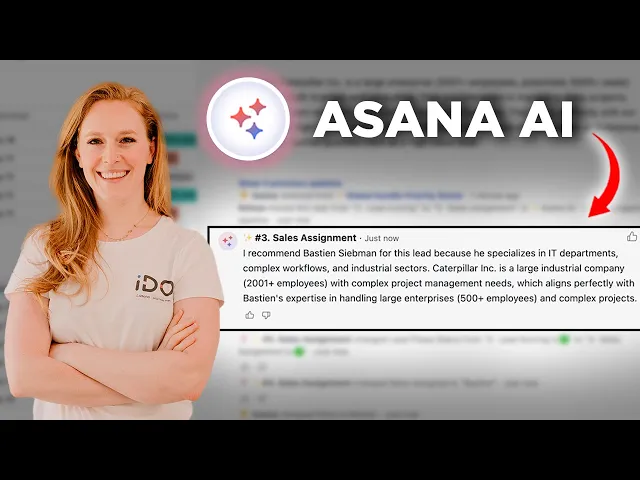
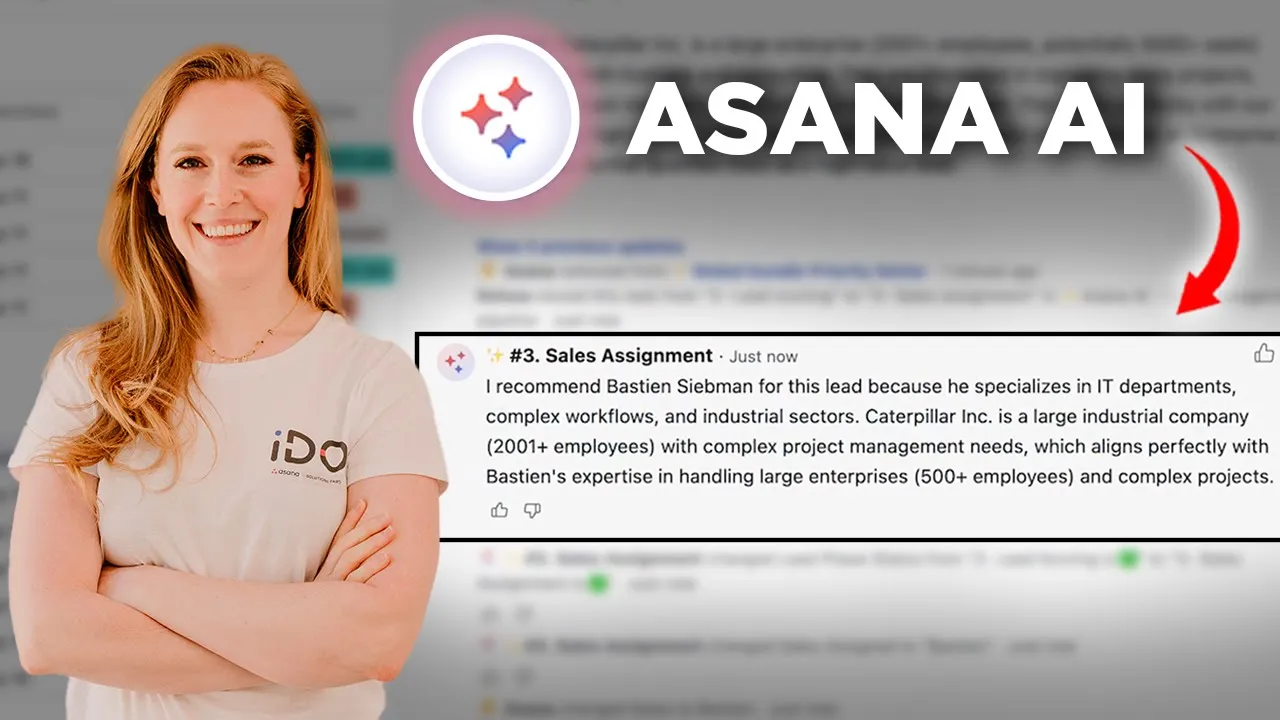
is to now assign this to one of my sales team members in the same way my sales team members are going to receive certain leads based on the type of leads that they manage so I have some guidelines and some standard standards that I have uploaded into my rule so that when AI is dynamically assigning the salesperson they know who to choose so let's take a look and see which sales consultant has been assigned we can scroll down to the bottom and again another comment is posted I recommend Bastion for this lead because he specializes
in it departments complex workflows and Industrial sectors and caterpillar is a large Industrial company so this is why AI recommended Bastion it took my guidelines that I gave it and it assigned Bastion so again hopefully your mind is already thinking through all the various possibilities of all of the things that you have to ask one of your co-workers or colleagues or employees to do when there are very clear instructions there is a clear path forward and someone is having to spend their own time filling out all of this information instead we could use ASA AI
to create these smart workflows to save you and your team time a couple more examples of what else we can do here we also have a draft email so either Bastion can create his own email or we can ask again our smart workflow to draft an email to contact this lead initially again based on the information that they've provided in that initial contact form and then the recommended seats ass SAA plan and any other information that maybe the sales team member might have added to the task at this point so let's take a look at
the email that my ass AI has recommended for this particular lead we are going to find it in the description box because that is how we set up this rule of course you could have the email populated in a comment in the description box in a subtask in a custom field in a variety of ways depending on how you want to set up this process for you so I can read through this email or if I'm Bastion and I am taking on this sales lead I can read through this and edit this but ASA AI
has done that initial step and helped me helped inspire me put together an initial email taking in all those key elements from the form submission for example it even references the the fact that one of the questions in the form submission was what exactly is a portfolio according to a sauna so it actually answered this question in the email so Bashan could now take this and copy and paste it into his own email and send it out or we even have a rule for that so I can also send this email again dynamically via a
smart workflow by taking in information because I already have the email of this client filled out in one of these custom Fields so I'm going to ask AI to take the information inform from the task which would be this email address and I've also pasted that draft email into a custom field and through a smart workflow I can use AI to actually send this email out for me some other ideas that I have here are also to have this smart workflow prepare a meeting agenda so again I could add in more information into the description
box as this lead continues to move through the process and when I move it into this section to prepare a meeting it can actually give me a proposed agenda for that meeting that I can read through just to remind myself where we're at what they're looking for um tweak the agenda that it might have suggested and whatnot so a lot of possibilities here this is just a few things you can do with a sauna Ai and these amazing Smart workflows in case you didn't know I wanted to take a quick second to make sure that
you know who we are at I do and what it is that we do we are ASA licensed resellers as well as Asuna Consultants so whether you're looking to purchase Asuna licenses so that you can get the awesome benefits of being an IO client or you are looking to onboard a sauna for the first time at your company or even optimize current use reach out to us anytime we would love to help okay so now that you've seen this smart workflow in action let's walk through how to set it up it is just like creating
new rules so if we were wanting to add a new rule to this section we can add a rule and we're going to come up to our rule Builder right here so I went ahead and just added this rule directly to this section but of course you don't have to do it that way you can go to your customize menu and add a new rule from there what we want to do is we want our smart workflow to take a particular action so fill a custom field post a comment move to a section create a
task all of those things that we're used to with rules so let's say for this example we want to post a comment instead of typing in that comment I am actually going to select to fill this comment by Ai and that is what's trigger triggering my smart workflow and I do want to take a second here to explain that what you are seeing right now is the beta version of this user interface so what I show you right now might have a little bit of changes by the time that you might be able to use
this so just keep that in mind might be showing you exact okay so once I've asked this to fill the comment by AI you can see that I got this box that popped up around the condition as well as the action so what I want to do here is now I'm going to add instructions once I add instructions this is where I can give AI those guidelines that I mentioned earlier so if you're used to working with things like chat GPT to really get the most out of chat GPT or other AI software you need
to give it context and directions you need to specify what you want it to do so this is where I can give the context of you are an assuna consultant and licensed reseller this form is for all of the leads and people who are potentially interested in buying license from us or buying consulting services so I'm going to give all of these instructions to my AI right here I can get very specific here I can even ask it to post with using specific emojis or in a particular format so for example I've just posted some
instructions giving it that context explaining the instructions giving the format of what I want that content to include and then any additional miscellaneous directions that I want to give so I also want to point out that you can give additional Direction and guidelines by attaching PDF files right now what's available is um files from your computer or the Google Drive so if for example on my sales consultant smart workflow I actually have a document where I store the types of leads that each sales team member should take so that document I have now uploaded into
my smart workflow instructions here and that's how I am utilizing that feature something else I want to comment on is that if in my instructions in the guidance box here I ask it to to change a custom field for example but I don't actually make that an action over here then the AI is not going to do that so anything that you want your smart workflow to do for you has to be an action over here so if I choose let's choose one of our custom Fields maybe it's priority instead of selecting the one option
I have I'm going to select fill by AI if we do the same thing perhaps we want to change the task title again instead of typing in the task title I can actually choose fill by Ai and I could combine it with something that I do want to type maybe I want it to be filled by AI but still have the words new lead for example so any action that you want to take place in this smart workflow make sure you have those actions in the rule itself and then in the instruction guidance box that's
where you're going to give specific information about hey how AI should know what to do how to do it follow a format or any other guidance that you may have and once you're done just like with a regular rule don't forget to name that rule and then hit publish and you're ready to go there's a lot more that we can explore here that AI can do and these smart workflows are going to be super powerful so as you guys are thinking about this and taking ideas and inspiration from this lead management process hopefully you will
find ways to adapt them and make them work for you and your team and of course we're always here to help you if you have questions don't hesitate to reach out