always sell before you build we've made it as easy as possible to validate product ideas by automating the entire process of setting up stripe subscriptions super base for user data and logins and even versell to deploy AI generated websites and validate your ideas in minutes generate landing pages dashboards and even entire products just like we did step by step like speaking to a software engineer many Founders I know make this mistake of building for years before getting customers and they fall into the Trap of thinking they need to add a new feature to get a
customer you can avoid this trap by following first principles and treating it like an objective experiment to quickly validate a list of ideas and increase your probability of success each new idea is another shot on goal live mode now even uses ideogram 2.0 to generate relevant hero pictur pictures product photos and logos for you live this is the first website editor on the planet to use the state-of-the-art image generator ideogram 2.0 which currently beats even Dolly and flux this allows strongly validating ideas quickly by charging customers with the professional landing page from idea to paying
customer in 5 minutes flat it even generates logos for you even developers seem to have a hard time with authentication since there's no API to really set this stuff up yet and so we actually automated the entire process in the browser using cheat layer itself Simply Save all of your keys following this tutorial and we automate all the hard Parts it's kind of magical and fun to watch next you need to get your landing page in front of customers to validate it and we're helping with that too so after you've generated your landing page using
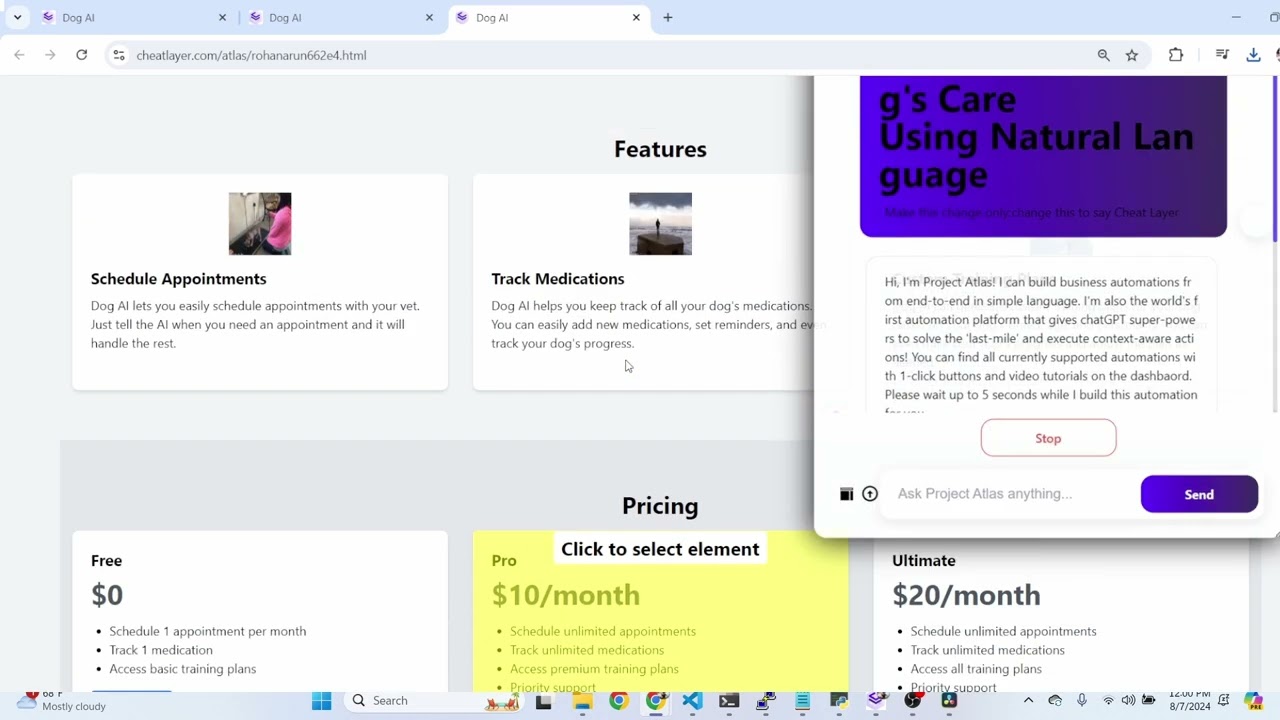
live mode you'll be presented with this uh website that's been published on cheat.com Atlas And if you hit alt s you can hit alt again to select any element you want and edit it in real time you can edit it using this pop-up modal or ask project Atlas to edit it like a software engineer this can add functional tools apps games uh basically anything you can imagine in a browser so very quickly I'm going to generate a new landing page to go through the process from end to end once you generate the landing page you
can see it's instantly published to our cheat.com webbsite you so you can share it with friends but it also starts the proc process of deploying it to GitHub then setting up stripe for you configuration configuring G GitHub for authentication setting up superbase as your database for users and then even deploying it to versel we actually use live mode to generate the code for all these API Integrations so it's cloning an entire file system in the browser which is wild if you if you're a developer and this hasn't been done before even by versel itself because
there's no API to do this so we we we're combining llms plus the ability for cheat layer just to automate everything to make it as easy as possible after it's done it instantly deploys it to versel so now you can see this is now your own verell website which you can link to a um a custom domain and if you click the signin page it actually goes to your back end which instantly allows you to charge customers using stripe subscriptions all of your products in your stripe account will now show up here and you can
add a new product and it will automatically show up in your new backend this is a very strong way way to validate products rather than just using a weight list because you can now instantly charge customers from just an idea after it sets everything up for you since you've already configured all your keys you can immediately log in and then add products to stripe I've already been adding products for for testing but basically if you go to stripe and then click your product catalog you can give the product any name and description and a monthly
reoccurring amount and add the product and then it will instantly get uh populated in your back end on your dashboard here's how we set this up I'm going to go walk through the process of resetting all my keys and starting from scratch so in the cheat layer agents dashboard you can click agents settings and then we need to set up super base versel stripe GitHub and ideogram so we're going to start with GitHub open GitHub and log in and we need to go to settings in GitHub in the top right hand corner click the navigation
menu click settings and then on the left scroll all the way down to the bottom and click developer settings next we need to generate a classic token so click tokens classic and then generate a new classic token you can call this whatever you want it's helpful to call it cheat layer and then give it a no expiration and permissions for repo and writing writing packages and then finally generate the token and copy the generated token back to the cheat layer agent settings menu paste it and then click okay similarly add your stripe and ideogram API
Keys which are fairly straightforward I'll cover the ones that are a little bit complicated okay next we're going to set up versel in versel Click the top right hand corner and go to account settings then click settings and then tokens generate a new token without expiry that has access to the full account [Music] and next we'll set up versel after we've set up versel we're going to set up super base by logging into super base and creating a new project as soon as you create a new project we'll be able to set up the API
key and then go back to super base get the service roll key and then the superbase URL won't be ready until it's finished setting up the project so for now what we can do is go set up an account level token access token and then click generate new access token out when you're outside of all the projects and then copy this token back into the last input in the cheat layer superbase settings and by now it should have set up the URL for you so if you go to your projects your new project will be
created and there'll be a URL at the bottom of the settings copy that URL and click okay now if you have our Chrome extension installed it's going to go ahead and configure super base for you it's going to open the SQL editor and type in all this code we're speeding this up here so it takes a minute uh it's kind of crazy how much it has to go through so you can imagine that it's kind of hairy for people to do it themselves but we've automated the whole process for you so you don't have to
worry about what this means it's basically configuring all of your super based tables I believe this is the first service that's automated the entire process of setting up super base from end to end including authentication and verell and if you go back and check your tables after it's done you'll see what it's basically done for you and then finally we also need to install the GitHub and versell app and configure it to link to your versell account just make sure it has access just like this and click save that's all you need now go get
your first custom