hello everyone welcome back to my channel my name is p and this is video number 15 in the series DK 2024 and in this video we'll be looking into very important scheduling concept which is node Affinity so we'll be doing the demo we'll be looking into the concept in depth and we'll also be looking into the difference between affinity and tains and tolerations the one that we have covered in the previous video and as always there will be some sample task in the GitHub repository for you to complete and the comments and like Target of
this video is 170 comments and 170 likes in the next 24 hours I'm sure you can do that and after that as soon as the target is completed I will be uploading the next video on resources request and limits which is another important concept so yeah so without any further Ado let's start with the video okay so earlier we looked into Toleration tains and Toleration and we found out that it has some limitations for example like let's say we have set the Toleration with GPU equal to true and because there was a taint on the
Node GP equal to true so that's why we set the desired Toleration and we said one of the available effects but it has some limitations like we cannot add multiple conditions and expressions and there is really no good way of scheduling the uh pod on the node right because you know even though this map matches like even though this Toleration with gpus matches with this but it does not prevent that GPU equal to true to be scheduled on any other node right because these other two nodes does not have the taint on it so this
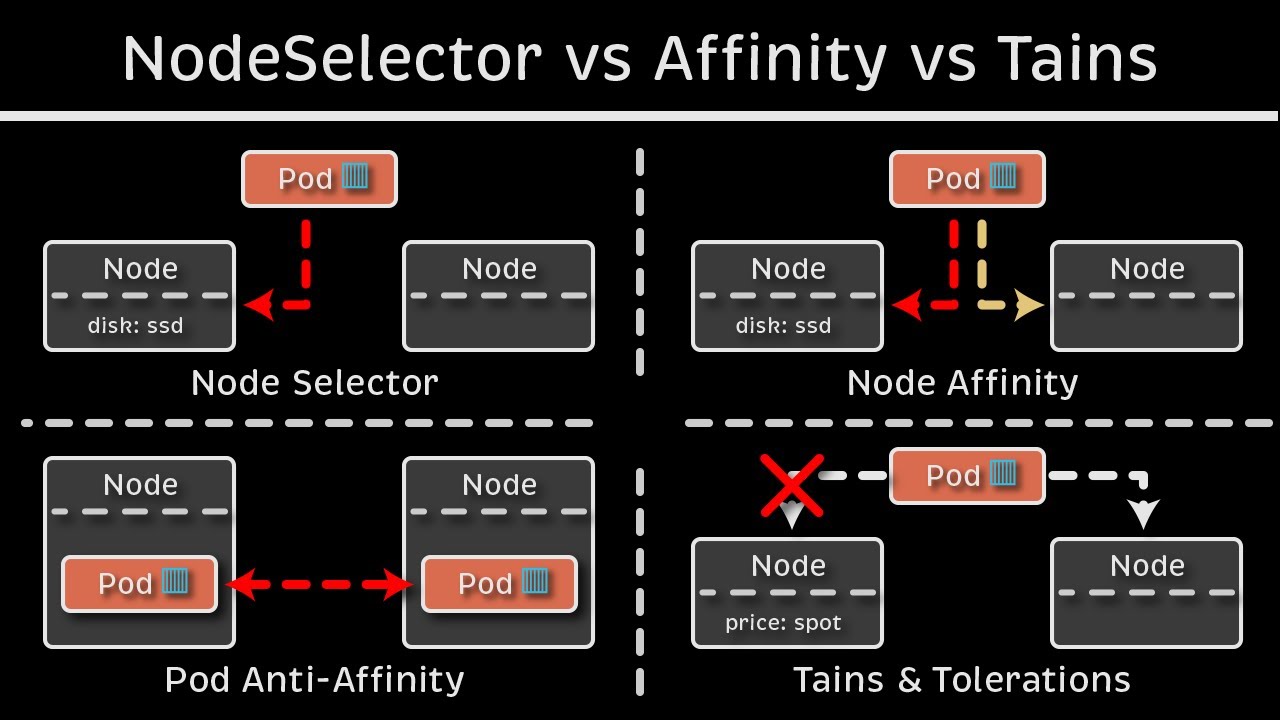
pod can be scheduled on those nodes as well so it provides the ability for node to accept certain type of parts or to restrict certain type of Parts but it does not provide or the guarantee to be scheduled on a particular node so for that we use an additional concept which is no definity let's see how it works so for example we have three nodes over here right node one node two and node 3 node one has a label again we do this with the help of labels and selectors so node one has the label
disk equal to HDD and the rest of the two nodes have label disk equal to SSD that means all the high performing workloads all the workload that is dis intensive will be running that on node 2 or three that's what our main goal is the node one is bigger in size but then the dis attached to that is sdd based on the label that we have specified so we will not be running any uh disk incentives or IO incentives workload on that so we have let's say three pods one with affinity set as disk not
equal to SSD disk equal to SSD and dis in SSD and sdd like earlier we see with the Toleration stains and Toleration we cannot add multiple conditions for example disk in s SSD and sdd like we have done here or disk not equal to SSD and there are other conditions as well which we'll see so these are nothing but the operators so those operators were not there in tense and tolerations but it is there in Affinity so uh let's say we have this pod which says disk is not equal to SSD so that means this
part will be scheduled on this node right because even though the enable is not matching but it is satisfying the condition with the help of operator now if it says dis equal to SSD or dis in SSD or SSD sdd so this pod can go in either of these nodes so let's say this has been scheduled over here and now the third part it says Affinity dis in SSD or sdd so this part can go on node one or node 3 right right so let's say it's schedule on this node this is how node Affinity
works it matches the labels with the Affinity set as part of the pods but even though we have matched the label let's say someone update the disk label right the label that we have on the Node someone updates it after the board has been scheduled someone update it to let's say a blank value okay someone removed the disk equal to SSD part just there is a blank label with the name dis without any value so how would that impact like in case of T and Toleration it would have been evicted but in case of affinity
we have two properties that takes care of it so these are the two properties that are really important so it looks like a sentence but it is a property so if you read over here it says required during scheduling ignored during execution and prefer during scheduling ignore during execution the last part is same in both the properties which says ignored during executions that means if the part has already been scheduled on the Node even after that there has been a change in the node labels or anything it won't impact the existing pods those existing pods
will keep on running it will only impact the newer parts that are yet to be scheduled or that we will be scheduling after we have set the affinity and the difference between those two mainly is required during scheduling the first part if you look at it required during scheduling it means that it will make sure to schedule the pod on the matching operator node right so let's say if uh there is this pod so it will make sure that it will schedule this with the matching Affinity so dis in s SSD or sdd so either
on uh these two nodes or this noes so any of these noes right it can schedule the Bo on any of these nodes but it will make sure that it will do the scheduling but in case of the second property that we have which says prefer during scheduling that means it will prefer if this label is matching let's say it tries to match the label and it does not find the label or if the node does not have enough resources to schedule it even then it will schedule the Pod so it will schedule the pod
on this note even though let's see the labels are not matching now the dis label is empty and we only need SSD or sdd even though it will schedule the Pod because it says referred during scheduling and the first property make sure that the Pod is scheduled only if the matching label is there so if the label is not matching I'm I'm just explaining it again so that because it's it is sometime confusing but I am explaining it so that I'll I'll try to explain it the it in the simple words so that it will
make sense now so let's do it one more time so the first one is required during scheduling it will make sure that the part only gets scheduled when the operator matches with the label right so for example SSD or sdd it will make sure that it will only scheduled if we have a matching label if let's say this is anything else U any other like local disk okay so this local disk is not a kubernetes concept it is there in GK but let's just add it for the sake of this example so let's say Affinity
dis in in local dis now it says the label is not matching with any of those but then it will not schedule the Pod so it the Pod will be stuck in the pending State and you will see an error message or the warning message in the describe that uh no Affinity matches something like that but if we take the example of the second one prefer during execution it will first try to match the Affinity with the labels if it does not find even then it will schedule the port on any of the nodes so
that's the main difference between those two so in the cases where scheduling is our priority that we have to schedule the Pod no matter if it matches with the label or not then we go with the second option preferred during scheduling and where our node is the priority like this part has to be scheduled on a particular node only in those cases we go with the first property which is required during scheduling and we have seen that ignore during execution is same for both that means any changes made to the node labels or anything else
will not impact the existing running Parts okay let's uh look at this with the help of a demo so here is our I'm I'm going to copy the same yaml that we've used earlier the Pod yaml and in the day 15 folder I will create a new file with Affinity do yaml as the name okay let me copy it paste it over here and now I'm going to remove the Toleration because now we don't need the Toleration instead we need Affinity okay and now the syntax is like there are few lines in the syntax so
uh we go ahead back to the documentation and let's search Affinity okay and let's um okay there it is so I'm just going to copy this entire section and uh I will explain everything so it has to go inside Affinity to spaces okay so let's see what all these things are so it starts with affinity so Affinity will go at the same level of container so that means it is a child of spec everything has to go inside spec unless it is part of container so let's say there is a changes in the container image
or how the images are pulled or any secrets which we'll be looking into later so unless those are these things it has to go inside spec so it in the place of Toleration where we have used Toleration earlier so affinity and then there's this property how the scheduling has to be made so this is the first one required during scheduling ignored during execution and this is in camel casing so first letter is small and whenever there is a change of the word uh there is the capital letter so during scheduling ignored during execution okay so
this is the camel case now it will make sure that uh the Pod only gets schedule if it has the matching Affinity with the matching label and operators like the combination of those after that we have node selector terms node selector terms uh would be either an expression or an operator like how would it match that with the node labels right so inside that there is an array this is an array and the element is match expression and this is again an array with the key operator and value now key is disk type operator is
in and values is SSD so we can add more values over here first let's see if we our pod if our node has any labels so get nodes hyphen hyphen show labels so let's see um yeah our nodes does not have any of these matching labels so let's try with that okay okay so it will check it will match the expression where Disk type in SSD and this expression will be matched against the node label okay and let's uh keep everything as same and let's see if we have any pod running okay I'm going to
delete these pods you delete pod engine X engine X new and ready okay deleted now let's check again okay so we don't have any PS running now and let's save it and then I'm going to apply this file Affinity DOL okay it says um unknown field spec. Affinity do okay maybe uh the format is not correct let me see let's compare it with this so so I guess I have missed this this this property so nor Affinity inside Affinity nor Affinity because there are two concept there is not Affinity there is not anti- Affinity uh
anti- Affinity we be covering later on it's not part of cka so we'll cover this outside the CK series U but for now we have to mention after Affinity no definity okay and yeah everything has else has to go inside that so I'm going to shift everything two spaces to the right so command shift no it's U options shift in Mac okay and I have shifted everything two places to the right let's save the file and let's apply the changes again okay it says created so now if we do get pods the Pod is stuck
in pending state it because we don't have matching label and if we do the describe on this describe pod let's see the error or warning that it shows says zero of three notes are available because one node which is our control plane node has a taint that this part does not tolerate and two nodes did not match boths Affinity or selector right because we have used the affinity and it does not match with any of the available nodes so now let's uh add label to the node with value as disk type SSD okay so Cube
CTL label node or we need the node name first so get nodes let's apply to this worker node cctl label node node name and U value would be disk typeal to SSD says it's labeled and if we do a get pods uh get noes show label now we should see the label somewhere over here okay here it is dis type equal to SSD and as soon as we added the label let's see the status of pod now it's running now and if we see on which node it is running we can do that with describe
or we can do get pods hyphen oide okay it says CK cluster 3 worker node on which we added the label so this is how you will schedule the pod on that note now let's see what will it do if we make some changes let's create a new file okay I'm going to create a new file and copy this affinity 2. AML okay me paste it over here let's make some changes uh I'll change the name to Red is new use the same image everything instead of required during scheduling we do preferred during scheduling okay
there is an extra R okay prefer during scheduling ignore during execution let's see what will happen now and let's change this value to something that is not available so values let's say sdd Okay Cube CTL apply hyphen f redis oh sorry not redis it's Affinity 2. EML I might have made a mistake in the name of this property let's see uh the exact syntax of it prefer during scheduling ignore during okay and then we have to add something called as preference okay so that means it will prefer uh this match expression but even though it
does not find it it will even then it will schedule the part so let's add this as well before the matching uh expression okay note selector terms and preference no it it has to be after preferred scheduling and before note select let's see if it works this time we have preference match expressions and okay and no it's still not correct okay I'll copy everything from here so has to be Infinity till here okay now it has Affinity node affinity and then we have preferred during scheduling ignored during execution we have weight like we are providing
that first you check this because it has the high so you check this expression and this is the preference and match the disk type with the value as a sdd which does not exist so now if we apply this says created get pods container creating and container is running so you see even though we do not have any node with this matching label even though it scheduled the Pod because we we have selected the property as preferred during execution so it must try to match this expression with the node label if if it founds it
then it will use that pod for the scheduling if it does not found even then it will schedule the pod on any of the available nodes because we are using prefer during scheduling so these two this this is the main difference between these two properties and this Mak sure that this property either we using the first one or this one this property makes sure that even though we make any changes to the node the running pod does not get impacted so if we let's say delete the node label uh here is the label command and
if we just you know uh let's say delete this we have unlabeled it even though the parts will keep on running it will not impact the existing running Bo it will impact the pods that will be scheduling after this right so that's uh the main difference between these two parts now we also have one more uh like there are many operators you can check the documentation but the one that I have wanted to show you is exist operator right so instead of in we can use exist and if we can remove the value so it
will just have key and operator exist okay let's make this change over here in this in this ml so I'll just remove the values and operators is exist so what it will check this expression will check if we have any label with the name Disk type even though it is blank even though it has any value whatsoever it will just check that this label exist or not and it will use that node to schedule the part so let's say uh we give it a different name red is three okay and now we have uh the
label that we had on the Node we removed the value of it so now we only have the dis type label with without any value so get nodes and hyph show labels right and um yeah it it removed that label oh no sorry sorry we did not uh remove the value we removed the label so let's label this again and we're going to label it with blank value like this okay so now if we do uh show labels you see uh there is a label with dis type equal to null there is no value to
that label okay and let's try try to apply this manifest now apply hyphen f and it was Affinity EML okay it says created and if we look at pods the Pod is scheduled and on which node on the same node you see oh no this one cka cluster 3 worker node which is a node one and it was scheduled because it found the label it don't have to match the values it just we are using the exist operator that means it will found the value and it will schedule the part and you can also try
with not in or equals all the operators there are the list of operators in the documentation so you can check that out but this is what I wanted you to see and let's see if we miss anything so uh let's have a look at the quick difference between node affinity and T and tolerations right right so if we go back over here all right so let's say we have these three pods okay and these three nodes node green node blue and node 3 then we have three pods one with the Toleration color equal to green
one with the Toleration color equal to Blue and this part has the Affinity GPU equal to true and we have the TS and labels as well on the nodes so this node we want our pod with color color equal to Green to be scheduled only on this particular node with the taint color equal to Green right so if we were using TS and Toleration this will go and first it will check this node and because this matches the tains and Toleration it will schedule the pod on this node but if it does not check this
Noe first let's say if this part check this Noe first like I mean Schuler doeses that so ular let's say check this node first if it is okay to schedule this part on this node it will not be able to schedule it because there is a taint with the color blue and what if the scheduler check this node so this part will be scheduled on this node because there is no taint on this node so how do we prevent that from happening right we we don't want our uh pod with Toleration color equal to Green
to be scheduled on any of the node except this node right so how do we prevent that from happening we do that with the help of node Affinity Plus St and Toleration so let's say uh this part get schedule on this node this part get schedule on this node and because we have the Affinity right uh GP equal to true this will make sure that this part will only be scheduled on the Node with the matching labels and the Affinity rules so it will be scheduled on this node similarly with this particular pod what we
can do is we can add a label on this node with GP equal to True okay and we add the node Affinity on this pod with GPU equal to True okay so we'll add the Affinity with GPU equal to true let's group this together and now this part has a toleration with color equal to green and Affinity now if it tries to go on this oh no no no no we have to give a separate Affinity right so uh let's not use that let's use GP equal to false and GP equal to false over here
as well okay now let's see so now first it will go let's say if it does not go on this node let's say if it tries to be schedu on this particular node so let's match what it has it has Toleration that's okay but it also has an affinity with GP equal to false which does not match with this node so it will move on to the next node now it has this node has a taint so this does not tolerate it because the taint values key value is different and we don't have the matching
Affinity as well but when it goes to this node it has a taint with color equal to Green and this pod is able to tolerate that tint with color equal to green and it also has the matching Affinity with the matching node label GP equal to false to this part will be scheduled on this node so that is why we just don't use node Affinity or tints and Toleration we use both of those to make sure our nodes are only accommodating the parts that are meant for it it is most important in case where let's
say we have a large node and uh that that node is dedicated to run some particular type of workload let's say some GPU specific workload or some AIML specific workload or we have a node with the high performance that is only meant to run data warehousing workload so on in those cases like there are many other use cases for that but in those cases we use the combination of node affinity and Tain and all ation I hope the difference between these two is clear now and it makes more sense now all right so that's it
about this video I hope this node Affinity is no more a buzz word it's as simple as any other kubernetes concept so try to practice is try to maybe re-watch the video If you still have any doubts or if you have any issues while doing the handson maybe rewatch it and maybe the things will be clear after that and you know where to reach out if you still face any issues so Discord Community YouTube comment section feel free to reach out and someone will help you plus try to complete the likes and comment Target of
this video as well and I will see you soon with the next video in the next 24 hours or as soon as the target is completed so thank you so much for watching I wish you have a good day I will see you with the next video soon





![Kubernetes Tutorial for Beginners [FULL COURSE in 4 Hours]](https://img.youtube.com/vi/X48VuDVv0do/maxresdefault.jpg)