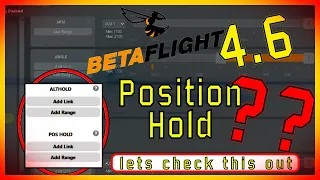
betaflight recently added position hold into the upcoming release of betaflight 4.6 which is still in development but you can Flash it if you want to use it and test it before we get all excited about it let's check out what position hold can do get it out there I'm just going to go right into position hold position hold there we go so in position hold I have it set and It's oddly enough you can do two things you have to you can have it in position hold without altitude hold um but you can see here
this is position hold with altitude hold uh and obviously you can do altitude hold without position hold as well so it's really up to you um in IAP for example that's not a choice if you're in position hold you are in altitude hold period um which I would think is what you want anyways but nevertheless you can choose in beta plate to move the craft around uh you can see here I can just move the sticks and it will go into angle mode it is always going to have have that kind of overshoot because it
literally goes into angle mode then when you let go it's going to flip into position hold mode and then grab its position but it's not too bad um another thing that's uh in the code that's a little different is if you just drop the throttle all the way to zero it's not going to decrease in throttle you'd have to be slightly above zero throttle to actually uh have it you know so if I go up you can see it will go up if I go down you can see it will go down but if I
just go in the middle it's going to um turn that off if I go all the way down it's not it's just going to hold its altitude there that's a little different so one thing that you'll also see is if you go side to side you're going to see it drop uh in altitude like if I go back and forth here you'll see it see how it drops and spring back up that is not the controller or the software that is your barometer the pressure um changes the pressure must go down uh on the barometer
as it goes has that air going across it which then tells it it's raising an altitude so it drops the quad so that's a input sensor issue more than anything so when you see that or if you you know don't want that how you can see it's going down there that's really just a sensor issue more than anything so um don't be thinking that's a tuning issue that's a sensor see how it's going way down now when I stop it it bounces up to its altitude so it does really well um as you can see
just in a steady state uh if I bring this down a little bit oo a little bit of a drop there if I bring that and just hold it there does pretty good I would say for its altitude hold uh and position hold so hands off kind of new option in beta flight that you can take a little break set it in a position hold and uh it will hold it there I would think that's super helpful for cine lifter folks that just want to hold position while they're waiting for uh the go so they
don't have to be on the sticks all the time you can see it's not perfect went down there a little bit but if you're up you know you're probably not going to be hovering right above the ground uh then you're in good shape my battery's actually getting a little low too so after that's done of course we're going to flip it out of both of those and then you have to want to be on the sticks there a little bit and might expect expect some uh changes there with altitude so just be cautious about that
depending on where you have your throttle Set uh and all that kind of jazz but and obviously then I can just flip an altitude hold and then position hold now we're in a position hold and I don't know why it do Dove down there I think that was me but yep well that's all fine and good when we're just hovering there but what if we're doing a little bit more Dynamic moves what if we're really pushing it forward in angle mode and then just letting the sticks go and does it hold a lock what if
we're inverted and we just switch it into position hold what does it do there so let's look at it so one big question I had with this is let me check check out position hold you can see oo not too great it's probably getting a little bit better hdop so there's my position hold after it kind of found itself let see how it goes with when I move forward you can see one thing I've noticed with this uh now I'm looking under the the goggles it's it's smoother so than inav iav um you can get
a very jerky position hold just because of the way it uses the accelerometer data and I'm not sure if data flight's doing that differently you can work it out with inav but um this is a pretty smooth position hold and you can see it fighting the wind there uh so I do have some a little bit of Breeze here you can see how it will drop down drops down because that uh that uh barometer data but then doesn't too too bad it picks it back up gets where it needs to be and it's it's a
I mean it's pretty freaking good man um for position hold especially when you're on the gauze yeah it drops down uh and there when you start getting off course there a little bit when you get all oh gosh there it can get you so I I think the next thing I want to know and I think I already know the answer so here what it does is so when you actually move the sticks it takes you out of position hold right I'm flying Acro or angle mode at this point and then when I take my
finger off the stick then it it's going to go into position hold it like uh picks a coordinate locks it so the other big question I had is when I'm um flying around Acro type style and do something like this and flip it into position hold how does it do and notice I dropped I have the throttle dropped so that's kind of a good uh thing it's not doing great on position hold though at all so flip that out of position hold that was going off to Never Never Land somewhere so that's probably not great
so let's uh just get it out here calm it down a little bit and then flip it in and then there it's not too bad but oh oh oh oh where you going buddy I don't know if I had the stick down it was dropping because of that or not so there we're not bad but if I do a big Dynamic move let's see that not that it's that big of a dynamic move but let's so was inverted and triggered position hold how does it do got throttle dropped all the way to zero it does
not do great it was starting to go over to Never Never Land so you got to be cautious about that it seems like you almost want to be sitting still it will flip you back back over but then you're going off to Never Never Land so don't do that um looks like for now you need to kind of be in a position it's pretty freaking cold out today you know if I get to a spot kind of level off and then I can even then you just got to watch a little bit of toilet bowl
in there and then you can kind of get out of position hold right by by moving the sticks cuz now I'm in angle mode right so go up a little bit and obviously with all this we're keeping in mind this is this is V1 right so now now I'm okay right so like big Dynamic drastic moves um if you flip it in the position hold you're probably going off to Never Never Land you better flip it out of position hole pretty quick um but when you get a steady state and put in position hold it's
pretty you know it's not very shaky so that's pretty good so my best hunch with that is it has to do with the accelerometer just like if you're flying a whoop inside and you hit the couch it gets kind of drunk for a little bit I think when you're doing big Dynamic moves or uh just some fast uh flying or something maybe that uh the accelerometer you know knowing where the gravity Vector is pointing down is a little off and maybe that needs a little bit more attention or work to see if that can be
made any better but you probably want to know if I want to check this out how can I flash this to my flight controller so you go to the apps. betaf flight.com website it's going to use Google Chrome or Edge and then from there you're going to do expert you do all the checkboxes like I have shown here uh in my experience with this you have to press the be the bootloader button or whatever on your flight controller then plug it into USB so it's in dfu mode right off the bat and then you click
this no reboot sequence mileage may vary maybe other people maybe that's just me with my flight controller I'm uh doing a lot of this stuff with the same flight controller speb F7 V4 uh nevertheless you click development here you pick your board then come down into here options you are going to need you're going to want altitude hold uh mode in there I would think uh you will probably also want to have magnetometer as well you will work a little bit better with the magnetometer integrated into your GPS unit but is not requ required there's
a um use mag off option in the CLI in the near future you will probably also see up here something that relates to position hold and you would just pick that here as well but for now what you're going to type in down here is paor hold uncore mode that also may change to position uncore hold just that not pause hold mode just position underscore hold uh shortly after this PR uh gets merged which uh I would think is going to be within the next week so it's probably going to be position uncore hold and
I would say within a week or two and I would further say that probably in a week or two as well you're probably just going to be able to select it in that pull down box once that is done down here you hit load firmware which is right there and that will build it for your specific flight controller down here and when it's built you will hit this flash firmware button right there now this is a good time I'm going to remind you and there's going to be other prompts that reminds you that this is
development firmware right now so at your own risk this should be for testing or just curiosity sake you know I don't know if I would be really putting in kind of production rig but that's up to you uh you're a big boy seems to work fairly decent but uh again this is still a development Bill we're not at the stable release yet for betaflight 4.6 once that is all done you just get your flight control all set up I would recommend before flashing you'd save a diff and then you can reload that back in if
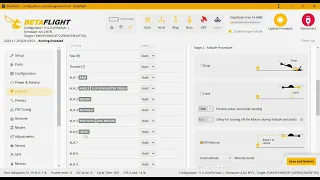
you don't know how to do that you probably shouldn't be messing with this right now as an unstable release and and uh in here you will see a altitude hold uh mode here and a position hold mode as well that you can have on uh obviously here you can see that when I am in position hold with Ox 4 I am also in altitude hold because this thing is stretched further um that's what I would recommend to have both the same time but you don't need it you can have it in two different switches and
have it activate with position hold only and then you're adjusting the altitude manually or vice versa if you do go into the CLI most of the stuff for this is under get autopilot so if you just type in get Auto uh you will be able to see things uh like your Min throttle Max throttle uh you're going to see your gains for the controller for altitude controller and position controller also if you're in here and type in get mag you will see down here there's a position hold without magnetometer and you would turn that to
on and in that case with that being turned on then you would have to fly forward for a while then it calibrates a virtual magnetometer and that virtual magnetometer will then be used in position hold um for the pr reading that uh it's not going to work as well but honestly inav has the same functionality it works pretty darn good so I wouldn't you know I'd give it a shot for sure uh obviously you want to be careful uh with it and all that good stuff but uh yeah you have to trigger this to mag
you know trigger that to on you'd have to fly forward for a while before you could uh turn on position hold and U yeah give it a give it a whirl well that will do it I will drop a link to this PR down below this is the one that introduced position hold so you can read all more about it big huge thanks to Chris Thompson for introducing altitude hold and position hold to the bfly project and with follow-up encouragement by Lon and karate BR uh they're thanked in this post as well and I know
they're very active with uh you know helping out and um doing their part for code review and test flying and all that kind of good stuff and cheering Chris along I know this was a lot of work uh for him and he's been engaged in beta flight for a long time if you're interested in a little bit more depth on this check out the link below I'm going to have a patreon video we're going to go through the blackbox logs that you know with these flights and showing uh some of the parameters that you can
look at blackbox to tune it out a little bit better if you are interested what are some of the terms made do there's a some low pass filters involved just really getting into the the meat of it and uh how you can really take it to the next level on understanding how position hold works please do thank Chris and all the betaflight devs that work hard on this stuff below I will also have a link to the betaflight patreon if you're interested in that you should be I'm a patreon of betaf flight to give back
to these guys that give so much to the community see you guys on the next one
![Betaflight 4.6 Altitude HOLD [preview]](https://i.ytimg.com/vi_webp/eoxceps6Dhk/mqdefault.webp)