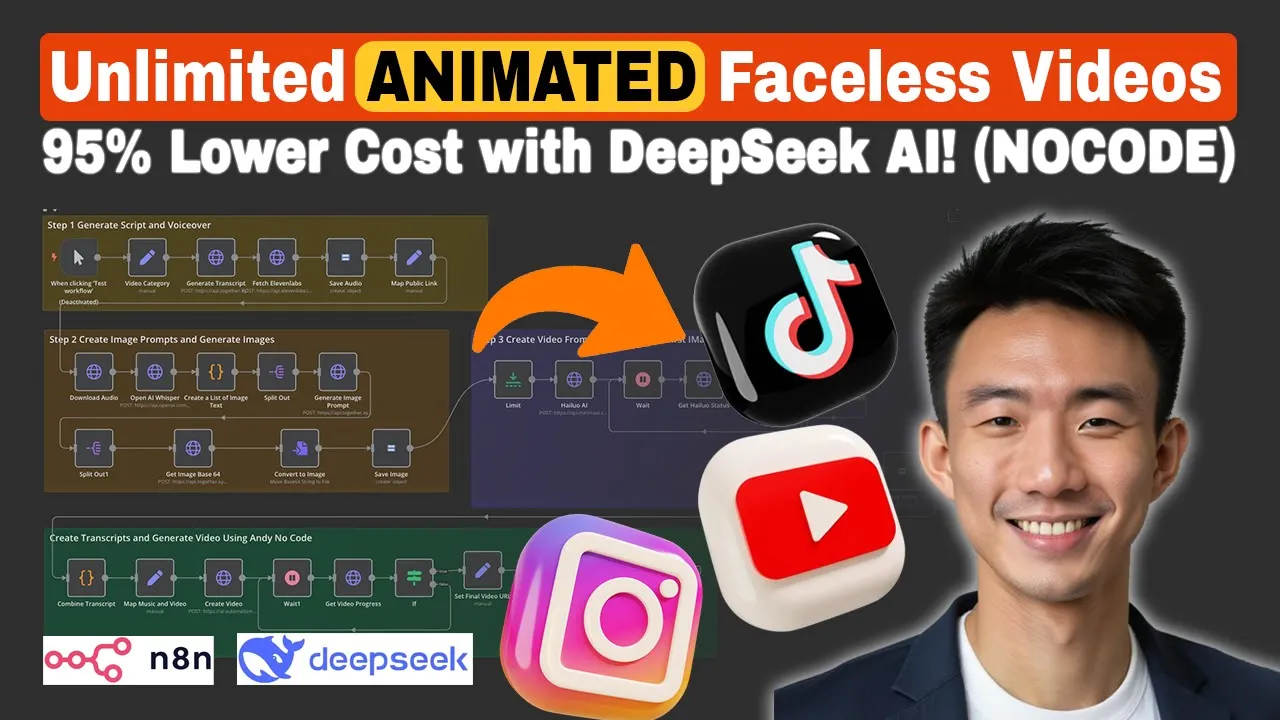
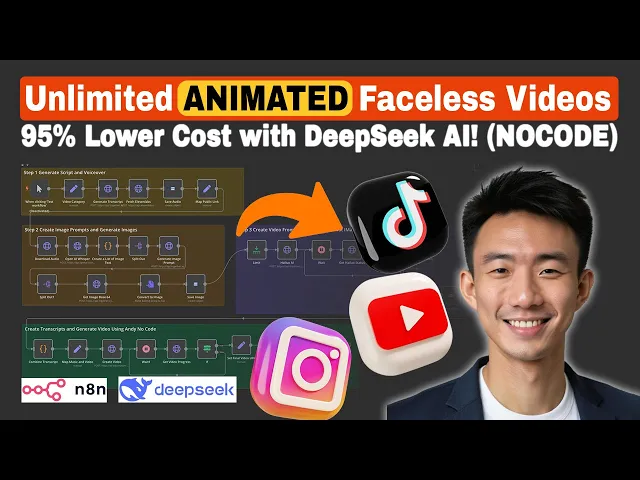
hi this is Andy in this video we will talk about how you can create an animated faceless video and automatically post to Tik Tok YouTube and Instagram with our AI agent 2.0 and today we are going to teach you how you can create an NN workflow to do this and let me show you the demo video that we can output from this workflow a tiny polar bear cub wobbles across the ice his paws slipping with every step ahead a crack in the ice Whispers danger Mama Bear rumbles low guiding him back to safety his first
lesson the world is vast but her love is vastest great this is the quick demo let me show you the NAA workflow and at the end of this video I'll share with you how we can get this template and support all right this is our NN workflow let me quickly run this first okay so this is our Google spreadsheet we are going to update this go spreadsheet with the um AI agent um this is the video title this is the video URL um Instagram post status Tik to post status YouTube post status posting time captions
and issues after the um ending workflow is um being run um everything will be updated on this Google spreadsheet so let's wait for a bit great the Google spreadsheet is updated let's take a look at our video here let's copy this and P it here the jungle whispered Secrets as a tiny duck waddled into the unknown mud clung to its feathers but not its Spirit a Jaguar's Shadow loomed then purred yes a jungle cat adopted a duck and in that chaos a friendship blazed wilder than the forest itself that's great so this is our quick
demo let's dive into our n workflow all right after we make the phases video we are going to automatically post them to YouTube let's get started um this one is our YouTube channel uh you can see the last video posted was in January uh let's pause it now all right let's try to refresh our YouTube channel great it is uploaded and let's take a look at this the jungle whispered Secrets as a tiny duck waddled into the unknown mud clung to its feathers but not its Spirit a Jaguar Shadow loomed then Pur yes a great
it is uploaded successfully all right after we upload to Youtube let's upload to Instagram let's get started this is our Instagram page and the last post we uploaded was back in January so let's take a look at it great is completed let's take a look at our Instagram let's refresh it nice is uploaded let's take a look waddled into the unknown mud clung to its feathers but not its Spirit a Jaguar's Shadow loomed then purred yes a jungle cat adopt did a duck great and we can see the status here it is posted on Instagram
all right after YouTube Instagram let's do Tik Tok we are going to upload automatically to Tik Tok and this one is our Tik Tok account and the last uh post was back in um January in the heart of the Jungle where the tree so let's take a look at our workflow all right it's successfully posted let's refresh it great the jungle whispered Secrets as a tiny duck wled into the unknown mud clung to its feathers but not its Spirit great as we can see um the um Guru spreadsheet the post status for Tik Tok is
posted as well Instagram Tik Tok YouTube all completed all right after regenerate the video and then upload to Youtube Instagram and Tik Tok automatically uh let's take a look at how we can setting things up first of all we need to um have several credential set up to Kickstart first of is the 11 laps is the AF voice and then we are going to use open AI whisper API to transcribe the audio voice from 11 labs and we are going to use highw AI to generate the animation uh and then we're going to use together
AI uh for the flux image model and dip seek uh for the uh transcription and then uh we are going to use uh Google Cloud Storage to store everything and last but not least we are going to do uh and not code for the rendering all right so let's take a look everything uh one by one first of all is 11 Labs uh we can go to 11 labs and then we can go to my account and we can go to the settings and API key you can create your own API key and then uh
we can set up a header off here and you can name it as 11 laps uh we can input x i API Hy key and we can take a look at the documents here we need to um take a look here we can just paste the API key here okay so after you create the API key you can just paste it here so that's for 11 laps and then for high LW is for Generate the animated uh video again we create another head off here we put authorization we need to go to High law ai.
FAL and apply for API and we will go to this page which is Minimax tocom this is the API platform all right we go to account your profile we'll get the group group ID first of all this group ID uh we will input this to this one this is where we need to copy and paste the group ID I'll will explain it uh further um in the later stage but this is where we need to get the a group ID as for the API key we go to API key tab create a new secret key
and uh we are going to paste it here and what we need to bear in mind is that we need to add Bearer space before pasing API key so we go back here we input barer space and then paste the API key we created from here all right that's for high LW all right for to together AI so we can choose um this one again authorization we just paste the API key copy and paste it here that's how easy you can set it up for together Ai and then for um Google Cloud Storage we can
go to console. cloud.google.com and we can go to storage cloud storage here all right we can go to bucket and click create bucket you can name it um any name for the bucket name that you want and then we go to U API and service credentials all of 2.0 client IDs create credentials all right and then what we are going to do we need to set things up first of all we'll paste the client ID after we create the O of client ID here and then we'll paste the c key and we need to copy
this redirect URL and pays it here when we set up the credentials we need to paste it for example we choose here we need to paste it here all right and then we create everything and copy and paste here and last but not least we will uh connect to the Google account here and then everything will set up last but not least we will need to set up the um uh connection with any no code to for the rendering so we go to n end for the credentials um we need to add the query off
API uncore key and then we can go to any no code api. code.com dashboard and um we can copy this API key and for documentation um you can take a look at this mix video uh Generation all right and then we can copy the API key and paste it here okay so that's how we can set up everything um here all right let's dive into our N&M workflow there are mainly four steps the first one is to generate script and voice over um using dips for the transcript and then um 11 LS for the voice
and then second step is to create image prompts and generate images um so the third step is to create a video from high law Ai and last but not least we're going to create transcript and generate free deal um using any no code to merge everything okay so let's dive into first work for first um first note again is edil we just um rename it into uh feto category we use man mapping feto category we just input the cute duck cute duck story in the jungle you can name it in different story you want and
uh Please be aware of this bucket name it should be the same as the bucket name you created on Google Cloud Storage that's very important and then this is the unique ID okay we are going to use this unique ID later for this note it is a HTTP request note um you can just search HTTP HTTP request and we just rename it as generate transcript method we choose post and this is the URL you just copy and paste because we are using together um uh a API uh generic credential type header off we just created
U the header off on credentials um you can choose header off from um uh you can choose together AI from the head off and then we have uh enabled scent body just a m type and then we choose using Json let's take a look the Json here model we choose deep seek hi Ai deep seek fe3 and this is a prompt we need to Jason stringify everything so you are a YouTube video script writer specializing in Ultra short narratives craft a 15sec force that transforms a given video category for something like cooking Tech Fitness into
a captivating micro story and this is requirements and we provided the rules and like this is the deliverables okay and then for the user prompt we will have the video category here which is like um The Prompt that what we would like the video to be like cute duck story in the jungle we input it in the previous note here which is this one all right after that we will have the 11 laps to generate the audio so we need to copy and paste this uh api. 111 laps. V1 text to speech and the later
part is the voice that we would like to use so we can go to 11 laps and then we can choose the voice here and then copy The Voice ID and paste it here and we use post method again for authentication we choose generic credential type head off 11 laps API that we set up before send body enabled um Json for the body content type using fils below name um we put text and then we just try and drop here this one the message content so as you can see the J uh the jungle whispered
Secrets as a tiny duck wled into the unknown okay so this is the value we input it and we can uh feel here this isle whispered Secrets as a tiny duck waddled into the unknown mud clung to its feathers but not great this is the audio generated from um um 11 laps and we need to save the audio to Google cloud storage and we connect with our Google Cloud Storage account and uh resource we choose object operation we choose create and this is is the bucket name we just TR and drop um from the previous
notes and then um for The Voice uh for the object name we choose force and the ID um that's why we need to create the ID here because um when we have the specific ID we it prevent from caching okay so that's very important because we uh received feedback on on the previous uh first workflow for the fa video that um some of the um uh The Voice MP3 or other files cache okay and then for projections um which choose all properties uh enabled use input binary field input binary field which is data all right
everything is set here for this we choose uh another edit field uh note and then we rename it as map public link which is menu mapping um audio URL string and we we input this we can just copy and paste this first and we need to copy I mean we can uh try and drop the video category Jason bucket name this one bucket name but we need to input first so we can make sure we're getting the first um Json bucket name as always and then do storage. googleapis.com svoy and this is the uh voice
category for like the unique ID again so we can drag and drop this one and add first here and MP3 and this is the audio URL all right so that's the first workflow all right for the second workflow um we are going to download the audio that we created um this is the audio link and then we are going to use this note uh to download the audio so this note is the HTTP request note uh we rename it is as uh download audio we choose uh get method we can just drag and drop this
um Json audio URL none for authentication so this is your U MP3 file that we just uh created and we are going to use open AI whisper API to um do the transcription and we use post method uh API open ai.com uh f one audio and/ transcription predefine credential type open AI open AI account um enabled send body and body content type form data form data time stamp okay and then value as word form data model wh one form data response format fos uh Json and and binder file file data here everything is set you
can just copy and paste the settings here and then for this one uh we use this to create a list of image texts um basically we are going to provide uh this template and all the codes um to our uh community so you can just take a look uh take a look at it now or you can just U copy the whole workflow um in our community all right basically it is for creating a list of image tags because we are going to uh have different images to be in our video and then we're going
to do the split out this split out you can just search this split out note and the fils to uh split out which is groups and then um this one this one is the group that we need to the fields that we need to split out and then none no other fields included we are going to create an image prompt uh for each uh image because we have to create a couple of image we need to use a couple of different texts to as the image prompt okay this one is the together um um AI
URL we use post method generic credential type head off together AI enabled stand body Json using Json and again we are using deeps here um system prompt again we need to J Jason stry everything uh you are an image prompt designer your task is to convert the following transcript text into image prompt for image generation model take the context of the whole video story and create custom image prompt for a snippet of transcript and um this is style of image you can change the The Prompt here and then or you can just stick to ours
as well F story sample output and this is the content basically this is the image prom all right um B basically this is the context and then we can ask this dips to generate image prompt all right right okay and then we have the split out here split out note um again we TR this one is the field that we need to we would like to split out U destination field name which is prompt as you can see this are the prompts for the image for the generating the image so we created um this image
prompt based on the transcription so that we can generate the image with the image prompt here okay again um same settings for together we use post method what different this time is that we use the flux model here we use the flux model from Black Forest lap um so again we need to strength everything um this one this one is prompt um we created from dip seek and this one is a negative prompt PRP as you can see on the right hand side this is a result so this um flux model is going to generate
the image based on this prompt and also negative prompt this is the width height and steps all right and we'll convert the base 64 string to file to convert to image this is the operation this is output this is data so we can view the output here so for example this one is the image this one is another image and this one is the third one all right last but not least we are going to save the image to our Google Cloud Storage resources as uh we choose object uh operation which choose create bucket name
again we just uh choose the first one um video category and drop this one we choose first and then object name again image and then um hien try and drop this video category which we input first as well do jpeg all properties enabled use uh input binary fi and then input B field which is data all right so that's it for the second workflow all right let's talk about the third workflow after we save the image here we are going to have the limit note here before the high LW AI for the h AI we
are turning the image into uh animation um the reason why we set limit here we because we just want to have the first image to turn into the animation with HW um we may have another video or another discussion in the community on how we can turn all the images into animation in the future uh but for this demo purpose we just use the first image um and turn it from image to animation with Hyo AI um this one is the HTTP HTTP request note um again we use post method uh this one is the
API URL we use Minx and then um generic credential type head off um this is the head with we set up just now at the beginning and we enabled s body um Json body content type using fils below first frame image um HTTP uh and then we need to just try and drop them um bucket um and then do storage Google ai.com and then CH the name which is the image all right this one is the bucket and then uh we can just have the name here just J drop here model we choose F h01
prompt um this one is prompt generate image prompt so we can go back here this one is the prompt we can drag and drop this a small determined uh duck with Muddy feathers okay and then that's it for this note and we need to set up this weight note here for exle 30 seconds after time interval this one with second because um sometimes um we don't know how long it would take High uh to finish the animations so um we just want to keep tracking it um with this uh loop so this one is the
get high low status note htb Quest again we choose get method um this one is the URL and we need to input the ID here so try and drop the task ID um gener credential type head off high AR is the same as the previous High node and we need to add the if note here Jason status um just Dr and drop um this one if it is equals to status then it can proceed to the next stage if not keep looping wait for another 30 seconds get the status see if it is Success not
if not keep looping all right if is set um then we can move to the next stage get high L download link again we choose get here um we have this uh URL this one is a group ID group ID again we need to go back to profile your profile um group ID this one is the API from Minimax all right and um this is the file ID you can just drag and drop here json. file ID all right um header off um H Ai and then um enabled send headers using Fields below Authority api.
Min maxi. chat all right then we will have another HTTP request note to download the F we we name it to the download F get method and then json. file. URL which is this one we trck and drop this one all right so we can feel this okay this one is generated from highw and we can save it to our Google Cloud Storage again credential connect with Google class storage account object as a resource create as an operation uh bucket name we just and drop uh from the video category um here just drag and drop
here first as well and then for the object name TR and drop the unique ID first as well um this is fedo hyphen all right MP4 this time and um all properties enabled uh use input binary fields and then input the binary fields we put data here so that's it for the third workflow all right here is the last workflow here to create the animated video um we create a transcript and gener video using any not code uh API first of all um we need to have this note you can add it by searching code
and it's for combining the transcript um you can copy and paste this or you can just get it from our community all right and then this one is the edit note uh edil note uh we maap the music and video uh this is the music URL and this is the video URL and this one we search for video category here and then we drag and drop the bucket name again we need to name it as the first and storage. googleapis.com BG MP3 this is the background music that was stored um in the Google storage Google
cloud storage and then this is the video URL all right we can Jo and drop this this is the bucket name again it's the same as uh as the one above and we need to get the video and then hien the unique ID and drop here again we need to choose first here MP4 so we need to map map music and video here and we create a video okay you can just copy and paste this one we use post method so that's when we are going to use Andy Noe code API to create a video
to combine everything um we enabled uh send body Json as the body content type um using Json to specify body and the type which just makes video data um and then we have background URL um which is the background music just right and drop this one media list we have the UR uh video URL and then array from uh you can just copy and paste this one and then this one you can just copy and paste this so basically um this is the bucket name again this is the image because we have the video and
then we have the image so um that's how we are going to combine everything and this one is the voice again we put first here the audio URL and then for transcript we string stringify everything combin transcript here this one the transcript and time stamps all right and the next note is to wait um for some 30 seconds again we need to uh make sure that everything is processed so um if it is assessed we'll go go to the next stage if not we will keep tracking uh the progress here this one is the HTTP
request note which is SC method here you can copy and paste this one uh this is the data ID just dry and drop here all right and generic credential type query or any no code API and we choose the if note here Json data status again if it is done if equals to done that it proceeds to next if not it will keep looping and waiting to get the progress until it's done for this note it is the edit fi note uh we rename it to set final video URL and menu mapping Mode Final video
URL this one is it so uh we can copy and paste sorry this one the jungle whispered Secrets as a tiny duck waddled into the unknown mud clung to its feathers but not its Spirit a Jaguar great so this is the final URL and um um this we can just we can just try and drop this jon. dat URL uh after um API noco.com and we will get the caption SC all right um we choose post post method uh copy and paste this one for together a uh API generic cral typeed off together AI same
settings Jason using Json we use DPS to create the caption again we need to Json stringy everything transform the following transcript into a YouTube short title and captions the title should be Punchy and attention grapping Max 30 words while the caption should be concise engaging and Fally descriptive Max 500 Words focus on keeping the tone energetic and appealing to YouTube shorts viewers incorporate a clear C to action where relevant while preserving the transcripts core message ofo using emojis and um basically this is a system prompt and output schammer we put this one uh and then
for user this is a prompt basically we just try and drop the message from uh generate uh transcript all right okay yeah so basically this is how we can set things up let's take a look at the next note for this one is turn Jason to object you can copy and paste this well uh this one as well again we will have this uh template in our community so you can just copy and paste um the whole an workflow and last but not least we are going to save data here and for this one uh
you need to connect with your Google Sheets account it's very easy you can set up on credentials search for Google Sheets and then just sign in with your Google uh sheet account and sheets within document append Ro uh append R and then uh from this we choose um video post and this one the sheets that we want you can just connect with the document you want or any sheet you want we map each column manually for the values we sent uh the video title we can just and drop the uh video title here all right
this is the title just straight drop this one when jaro adopt a dock so this is a title and the video URL we can Dr and drop get video progress this one this well need the URL just try and drop this one all right and for Instagram post uh status pending Tik Tok post stus pending uh YouTube post uh stus pending we will set it as pending as a default um value and uh for captions we put um here content and then caption try and drop this one so everything is set here so um that's
it for the four major workflows after uh going through the whole uh workflow for generating the animated video we are going to talk about how we can upload to Youtube Instagram and Tik Tok automatically so let's first uh let's first dive into the uh YouTube One first um we can have a schedule trigger here uh or you can choose another trigger um for trigger s trigger we choose um day one day um and then um for this one um we are going to get the video from the your YouTube uh to by reading the Google
Sheets here and we are going to read the YouTube post status so if it is showing as pending we are going to proceed to the next stage to download short video we will get the short video from the Google Sheets to get the video URL and then we will post to YouTube and for this YouTube uh account credential we can set up here first of all you can search for our YouTube uh the um credentials here say search YouTube and then um we can go to Google Cloud API and then we can search for YouTube
data API fe3 um you can enable this API and after you enable this API you can set up another credentials and we can copy this all or redirect URL and we create credentials or client ID for example web applications we can paste the redirect URL here and then after we click create we will have the client ID and client server key we can just paste it here all right and for the account we need to sign in with the account for for the YouTube account that you would like to post to remember this account you
need to sign it with the Google account that you would like to post the YouTube too all right that's how you can set it up for the YouTube credential for resource we choose you uh video operation we choose upload and then um you can just p p copy and paste this Json video title and replace all this one copy and paste and region code you can choose yours we're based in Hong Kong so we choose Hong Kong and we choose film and animation for the category name or ID because this is the animated video and
data we choose uh we we put data as the input biner field and description this one is a caption all right so that's it for the YouTube uh workflow all right after uploading to YouTube um we are going to set up um the workflow to automatically upload the animated videos to Instagram first of all this one is the Ed fils no we can choose edit fils here and then we can rename it as first SS Global uh is where we are going to input the asss token app ID for the asss token we are going
to get it here we go to developers. facebook.com U graph API Explorer and then this is the assess token we can copy uh and past it here okay um how we can get this as token we need to first of all we need to create our own meta app um and then we need to go to this page to generate this as a token and for the app ID this is where we set up the app um we set up this for example this one is called easy reals this one is our map ID and
and we are going to paste it here which CH Manu mapping here um we are going to use this two um string in the later notes okay and for this one um we choose HTTP request as a note uh we name it as exchange long credentials okay this one is the query or we set it up for the ASR API we input client secret and how we are going to get the secret key all right it's here this one this one is a Ser key we we click show and then copy and past pays it
to here all right remember it is a query off all right um You can just copy and paste this URL um but remember you can refer to the app ID and also SS token U by um just dragging and droing the Abid Jason Abid and also Jason as a token from the previous note and um yeah basically that's how we set and then for this one um we get page ass token this one is another HTTP request note which is get method um you can copy and paste this one as well this one is s
token okay and for this one um we are going to get linked um Instagram accounts we can copy and paste this one as well this one is the ID and this one is the as a token okay get method none for authentication and then this note is to retrieve the Instagram account information copy and paste this one as well um this one is the Instagram purs account ID and this one is asset token okay and we are going to get the asset token from get page assess token here all right and we're going to use
reddits to store um the value and we choose just link it to your Reddit account um set choose set as the operation key which choose fpor sscore token you can name it in the way that you want for the key uh for the value again we are going to have the SS token here we use Gap page SS token for this one again we use another redit to uh set the Instagram page ID we have set as the operation page uncore ID as a key we just uh get the ID from the previous note which
is here and then for this part we are going to uh have another trigger we use schedu trigger here and we are going to get the video from um Instagram so we are going to refer to go sheets this time we are going to refer to Instagram post status if it is pending we are going to get um the U media from the go sheets from the link and then we are going to retrieve the page ID um from reddits we we going to use get as the operation and then re cheve the S token
for the Instagram okay uh after we get everything for the Instagram account we're going to post the Instagram media this one is the HTTP request um note we choose post method copy and paste this URL and then choose non SD authentication enabled uh send body Json as the body Cent type using Jason as for the media type which is reals fre URL we can just um drag and drop to grab video from Instagram here get the video URL and then we are going to get the caption um from the Google um sheet as well and
this is the asset token all right um last okay this one we are going to add this uh weight media upload for example we wait for one minute because sometimes we don't know if it is successfully posted uh we just would like to just make sure that um if we give enough time um it can post successfully uploaded to the Instagram for this one um for this another HTTP request note we Post in Instagram will here we choose post method copy and paste this URL as well this is the page ID and um copy and
paste this Json creation ID ID just choose Json ID ass token R choose asss token basic basically here from here and last but not least after it's everything is posted uh is posted on Instagram we need to update a video status on this of Instagram um so the post status we CH post it the r number we need to choose this one okay posting time we choose now and we choose um column to match on row number match column manually and everything is um will be the same um we choose update row as the operation
all right that's how we can upload the animated videos faceless video to Instagram automatically after uploading to YouTube and Instagram automatically we are going to talk about how we can upload the an animated faes video to Tik Tok and by the way I want to pinpoint uh something for this workflow first for this workflow it is uh only applicable for private Tik Tok account private Tik Tok account for now for public um Tik Tok account uh we are going to discuss more in our community and how we are going to post our videos automatically through
public to Public Accounts but for this workflow we are going to talk about how we can automatically post to private T accounts okay so let's get started first of all we are going to U Tik Tok for developers T developers. Tik tok.com apps we need to create uh your own app for example click uh connect an app and then you can name it as the way that you want for example we name it as NN we go to sendbox and this is the client key and client secret key okay first of all let's go to
the first note this this is the edit Fields note and then we rame it set parameters for Tik Tok Manu mapping first of all all are the strings the first string we are going to use is client key so copy here from here and past it here also the Ser key how about scope let's scroll down so you can input your app icon name it for the category you can choose it as your own description terms of service privacy policy uh platform which one you choose um your URL loog in kit okay so this you
redirect URL is very important let me talk about this later and for this one um we need to enable this direct post all right for Scopes this is the scope that I mentioned user info basic fedo publish basically these are the ones all right we need to add this and then we need to add the Tik Tok username here that's very important okay and this one is the response type we choose code and this one is the redirect URL basically this URL is this web hul um because we choose test URL you can just copy
and paste if you would like to use production URL you can copy this um in our general purpose for our demo purpose we just use the test URL we copy that webo URL and paste it here also we paste it here we web and then we paste it here all right for State um you can just copy and paste uh we just have created this as a unique um string so these are the parameters for the tkk account and then we are going to um have another edit Fields note to Red link to have the
redir link to get the O off URL so Manu mapping redir link as a string copy and paste this basically it includes uh the client key the scope and then the redirect URL the state so it includes everything we need and we need to set up a web c here so this done as a trigger we choose get as the HTP HTTP method that's the path none for authentication respond which CH immediately we will get the set paramet retrieve so we have the paramet here we are going to retrieve here set another edit notes edit
fil note here basically everything the same get everything the same from from this note and we will have another HTTP request note here to exchange the take Tik Tok assess token that's how we are going to get the Tik Tok assess token uh post method uh copy and paste this URL for uh Tik Tok API nonone SD authentication send headers using Fields below colon type applications um x w form you encoded enabled send body from you encoded using fils below clent key you can drag and drop this one as a client key secret key code
Type we choose authorization it's code redirect URL this one after we run this we are going to get the Tik Tok ass token here and we are going to set it here um in the reddits so we choose set as the operation key we choose Tik Tok SS token and we can drag and drop for example the whole Json data Json expire date expire in we need to times uh a th because for now we are using milliseconds and this one we it's in seconds so that's why we need to times a th000 for this
expir in okay and last but not least we are going to Jason strength ify everything and that's the value all right after the the uh first to work to get the SS token we are going to um the third one third part schedule the trigger here and set um parameters for refresh again it's the same as the above clent key CL secret scope response type um r URL state which is Manu mapping as mode here we are going to get the SS token from the reddits that we set before so we choose get SD operation
SS token so TI to SS token automatic key type Jason pars so copy and paste this all right run ones for items again for this code you don't need to worry we are going to provide this in our community so you can go to community to copy the whole workflow for this one we are going to get the video from Tik Tok so when the video is not posted so if the value is showing as pending we are going to get the video URL all right and then um we need to check if it is
expired already for the token so we have another note this is SS token expired date if it is less than now in Mill seconds then um we need to refresh it if not it's okay we can still um make sure the SS so is okay and then we clean it if we need to refresh it we need to have this HTTP request note which is post method and copy and paste this URL none SD authentication enable stand sand headers um specify heads using Fields below content type and this is a value copy and paste form
your encod it using Fields below client key same um client secret same gr type refesh token refresh token and then we can just copy and paste this one all right and we will have the refreshed to ticket of token and we're going to update here all right and if it it's not expired we can just use this note um we can have it as a code note and then we rename it as asset token clean copy and paste this and then take to assess token Manu map SS token string SS token here all right and
then we will go to the next note HTTP request note to download the video so we are going to grab the video from Tik Tok which is here we are going to get the URL from the Google sheet and then we download the UR and collect the buffer size because Tik Tok needs to know the buff size so we need to collect the bu size for that all right we are going to get the upload URL for Tik Tok and another HTTP request note we we name it as get upload URL for Tik Tok post
method copy and paste this URL remember it is post publish URL all right authentication is not enable send headers using Fields below authorization remember to add barrier space and then paste this token all right content type just drag and drop just uh copy and paste this values for Json let's take a look it's very important let's pay attention to this again for this PR level as I me mentioned at the beginning it is for private accounts only for this work for now so we need to set as self only for this three uh values we
choose as force and this is the title we can just dry and drop from um um grab video from uh Tik Tok which is this one just and drop the video title for video uh cover time stem thousand brand content tole Force brand organic tole Force Disco video content false and I would like to highlight this is if this video is aigc we need to say it is true because it's a fa faceless video generated by AI for Source info uh we choose I upload video size that's why we need to get the bu size
from the note here we need to um tell Tik Tok the what the fal size is what's the chunk sizes and then total chunk uh accounts here so that's how we set up this note and then we are going to set up another note to download video here just drag and drop copy and paste this expression use get method and then we are going to upload to Tik Tok we just put method um again we get the um upload you here just copy and paste this expression authentication um and heads using Fields below content type
video/ MP4 content range copy and paste this the buffer size um send body and and body file data as the input data field name okay this is the final final note we are going to upload um the video status for Tik Tok uh again we are going to map each column manually um column match on row number and this is row number copy this expression post time and we go we're going to um put posted as the post status as Tik to great so this is the workflow for automatically upload um the phes videos to
private Tik Tok accounts let me show you where you can get the template of this workflow and all other NN AI agent workflows we have created this is our school community any no code premium first of all we share all of our existing and future phases video automation templates also we include other Advanced AI agent templates like social media automation lead gen data Automation and more basically every template we covered in our YouTube videos and also more other additional templates as well and we understand that support is very important so we provide priority Tech Support
to provide fast answers to to solve all your questions and we will do a monthly call to help you stay ahead with expert insights as well the total value is already more than $5,700 and you can join our community to get all of the service with just $39 per month and it is a limited time over also we provide some other bonus for example like uh inside SS we'll invite top agency owners and faes video creators to join our community to share their winning stories and formula and tactics and we'll provide some more tutorials and
best practice for Cutting Edge AI tools as well let's build AI agents that makes money see you there



![The Ultimate Social Media AI Agent for Facebook, Instagram, LinkedIn & Threads [No-Code]](https://img.youtube.com/vi/QtIXE7WAr94/maxresdefault.jpg)