hey everyone budget nerd here with a long time requested video if you haven't seen my do-it-yourself budget home network video the link is in the description go check it out I talked about my network and show a little of how I set it up on the cheap some of the questions I frequently get are how do i hook everything up what does each thing do what's the point of this network what part gives me the Wi-Fi access or how does this setup help me share my internet so let's go over the basics of the whole
setup here comes a very nerdy home networking 101 in this video you'll just see the basics if you already understand the basics then comment if I missed something if you want to skip to a specific part here's the breakdown these are also in the description so first off let's talk about IP addresses an IP address or Internet Protocol address is given to each and every computer on a network doesn't matter if that's your home network or your internet service provider or ISPs network that you pay to be a part of it gets an IP address
the IP address is the identity of your computer on the network and without it devices on the network won't know where to send their data I like to use the analogy of snail mail each house on the street will need its own address or the mailman won't know where to deliver your bills the most basic of ways to connect to a network would be to pay an ISP for access to their network and with it access to the Internet you can't get free Internet really unless you steal your neighbor's Wi-Fi and I don't really recommend
that you'll need to pay an ISP for access if you're on a tight budget call them up and ask about any cheaper plans to have lots of times they will have plans that they don't advertise so they'll send you a modem to lease or you can purchase your own what's a modem you ask a simple way to think of a modem is we'll convert the signal coming from your ISP into something the PC can understand in this instance let's go with cable internet service is that's what I have and I can easily show that hooking
it up is easy screw on the cable line to the modem and then an Ethernet cable into the back of the modem and then the other side to your laptop this is the most basic setup even though it's not ideal nor recommended more on that later your laptop will be assigned an IP address by the ISP and it will now have an internet connection through the Ethernet cable well what if you have more than one computer or device you could add a switch a switch will allow you to add more ports to a network to
hook everything up this way you'd plug in the ethernet cable into the modem and then the other end to the switch now run an Ethernet cable from a port on the switch to any of your devices now your devices are connected to the network through the switch you should be able to share files and other things and share the internet connection but as I mentioned this setup is not ideal each of these devices will need their own IP address remember and your ISP may only give you so many some may only give you one or
two maybe three once you exceed this number whatever it is those additional devices will not get an IP address and won't be able to communicate on the network also all of these devices will be exposed on the public Internet which is a large security risk the best way to share your internet connection between multiple devices is to add a router between your modem and your devices now a router is a device that routes traffic between two different networks the two different networks we would be connecting with this router would be the public network of your
ISP and your now new private network on the other side of the router now instead of everything being on the public network aka the Internet you can have all of your devices behind the router on a private network which is better for security a router will also take care of handing out IP addresses to all of the devices is you connect to it and it will have plenty to give out so you connect your modem to the LAN or Internet port on the router and then connect your devices to any of the land ports on
the router these parts are in essence a switch built into the router if you want to think of it that way if you need more Ethernet ports than your router has you can add a switch this picture will show you how to connect up a switch to a router now we're missing one thing right all of our devices at this point have to be connected to the network with an Ethernet cable where's our Wi-Fi zat to give wireless access to this network you could add a wireless access point you plug in your wireless access point
into one of the LAN ports on the router or to a switch somewhere in the network add power if your switch or router won't provide it and after a tiny bit of configuring you have wireless access now if a modem and a router and a switch and an access point sounds somewhat overwhelming then there's good news for you rather than have all of these separate devices you can get them all in one unit this is what I have most people call it a router and that is correct but it's a router switch access point combo
technically it is a router that has LAN ports built in which you could call the switch with built-in access point you can even rent devices from your ISP that are modem router access point combo units everything you need in one unit leasing one of these combo units is usually the cheapest way to get started but the rent can add up over the months Plus these combo units from the ISPs are known for not having great private network speed and few options and are oftentimes limited by your ISP if you want the most out of your
home network you can get a modem and then a separate router access point combo unit which will give you full control better network speed and more features you can oftentimes find a cheap modem and a cheaper router on Craigslist just make sure the modem you get is compatible and make sure the route will at least support the 802 11 n standard or better it will say on the box or is usually pretty easy to find in the specs I've put a few links in the description and for some decent budget routers if you're interested now
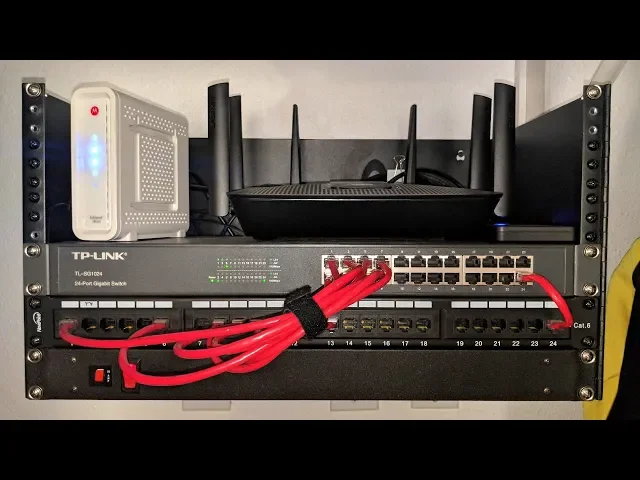
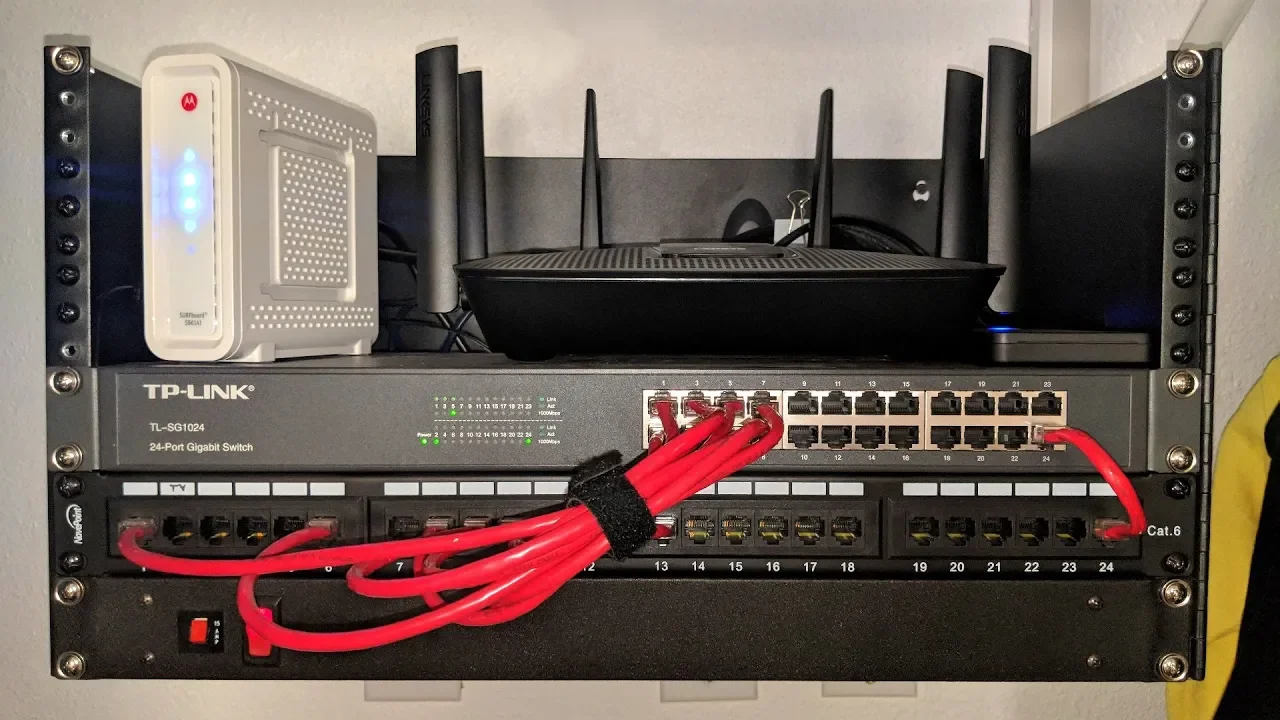
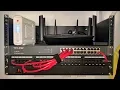
that we know this we can easily understand what each device is in my rack in my closet and what each one does first this is my modem which is connected to the LAN Internet port on my router this is my router it routes the traffic between my private network and the public network letting me share my internet connection between all my devices the router has a built-in access point which gives my wireless devices access to my network and in turn the Internet this is my patch panel which gives my permanent Ethernet cables running through my
walls a place to terminate we really didn't cover this in this video but I do have a video about patch panels check it out if you want link is also in the description this is just a large switch that is connected to my router giving me many more Ethernet ports for my devices I like to wire anything I can and this last one is just a rack mounted power strip so my setup is a little over the top it's true but with any network of any size similar to this you can share your internet connection
share files movies photos and videos share printers remote into any PC from any other PC if the PC has software that supports that even from outside your private network you could add a network attached storage or an external hard drive to your router if it supports it and get network storage so there there's lots you can do with a network like this well thanks for watching hopefully this was helpful if there's something you didn't understand or is there something you want me to elaborate on ask in the comments