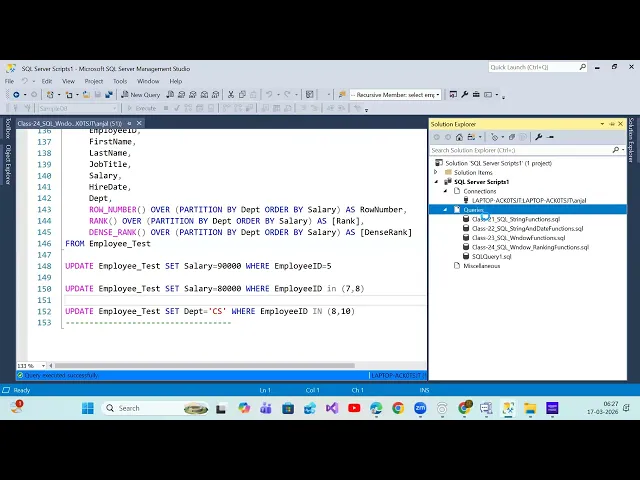
Sir, I don't know if if you noticed that some people are texting on Telegram saying they having trouble accessing it. Oh, this link itself they are not uh able to join. Yeah. Okay, I think looks like it's working. Okay, so let's get started. All right, recording. I have already started. Okay. So let me quickly talk what we discussed uh last week right in our previous class. So basically we are talking about uh windows function. So in windows function what we discussed uh we talked about you know aggregate functions how to use overclass right so in
overclass we have three argument that we discussed order by uh and once you defined order by accordingly uh your calculation is going to be happen right and for the calculation you are also um creating some window by providing additional parameter to the over clause right partition by so that will basically partition your data based on the key that you're defining uh and on top of that you're basically Calculation will happen so basically here you are creating a scope for our functions to do the calculations right so into that uh context we we discussed about aggregate
functions how they are talking. We also talked about ranking functions, right? How you can uh get the row number, how you can get ranking like a rank, a dense rank. If you see the definition, right? The only difference between rank and dense rank is the rank is going to skip the sequence. If there is a same value, right? It will give you the unique number. But for if again after that if you are getting a next value another value the sequence will be skipped right and that is something is not done by dense rank. So
whenever you are calculating the rank and all right so you can prefer to use you know dense rank. So I will quickly run it again and I'll show you so that you are ready with the understanding of the query and the result here. Let me down. All right. So, hope you got this. So, what we're doing, we are basically partitioned by what? We are partitioned by department, right? So computer Science, are you sharing your screen or is it only me? I don't I don't see your screen. I can see your screen. I can. Yeah, me
too. I can I also can. Yeah, but my slide is like freezing. I see I see it now. It's on my It was on my side. Thank you very much, guys. Okay. Okay. So, I think it is working for most of you. If anyone facing some problem right, you can rejoin. Uh that should not be a problem actually. Okay. So let me uh Okay. So you see that we have partitioned it by first department. So computer science then data science and it right. Then the row number obviously it is going to create unique numbers. So
because we have partitioned by department. So for each of the department you will get an unique number 1 2 6 then 1 then 1 2 3 right and rank will generate again unique number but if there is a duplicate value it will skip the sequence right. So like 1 2 3 right 1 2 3 3 and then it is kept skipped the sequence number now it is reaching to six right It is assuming like 1 2 3 4 5 and then it should be six but in between you got the same rank so it has
given same number but it has skipped the sequence but that is something like we can resolve using tense rank so rank will give you like uh you know unique numbers like if if they have same value right you will get the same value and then the next one will be the next rank it is not going to skip any uh sequence here. So hope you got this query and the result understanding will move to the next function. Before uh you move to the next function, can I ask you a question? Yeah, please go ahead. Uh
yesterday like when I was submitting a homework, uh CTE really give me a hard time finishing it. Uh what would you suggest? How how how should I like get more understanding of it? Like I I forgot how to do it and I had a hard time doing it. uh no worries. So basically you know like it it's just a practice uh maybe uh we can do on the database that we have already created ins SMS or maybe uh you can go to one of the one one or two website we found right there you can
do some uh testing based on the sample data they're providing. So it's just a practice actually. Uhhuh. I see. Right. it it's just a practice maybe if you're facing challenges with CT understanding right so uh you can do couple of uh uh examples couple of tutorial right and then definitely you'll get better understanding on the concept that is the only way to do it yeah yeah I didn't practice CTE much I was practicing the previous stuff yeah CT is nothing but it's a just we are basically uh dividing our complex query in in different different
parts right instead of one big query I'll create let's say two to three queries and I will put inside the city CT just structure you're defining but at the end we are writing the same query right that we learned how to join how to use aggregate functions all right how to do the calculations everything we are doing the same way but only we are dividing our complex query in different query so that it looks better and we can manage it better. See yeah that's all I mean it is just a structure we are creating on
top of the SQL queries. Yeah, it gave me like hard time. Yesterday I couldn't finish it like I wanted to but definitely you guys will face little bit And uh complexity during uh recursive city but normal city is just a normal city not just the query that you are putting inside the city that's all but for yes uh for recursive city you might get uh some challenges there. All right um I'll try to practice more. Thank you. Yeah, you're welcome. So, let's get started. Anybody else has any questions? Okay. So, we'll go and open a
new query window. Right. Then what we're going to discuss today uh we'll talk about you know like uh analytic functions. So we talked about aggregate functions, we talked about ranking functions, now we are going to talk about analytic functions. And that's uh lead lag. Lag meaning you know you wanted to get previous value. lead meaning you want it to go next value and then first value and then we have a last value. So these are the functions we are going to understand as part of analytic functions right Not frequently they are being used uh but
yeah definitely it is very very useful uh we'll see the use case of it. So lead function we'll try to understand first lead uh lead function is used to access data from the next row right let's say there are 100 records and you are running uh some query and then like on the in the second row only you wanted to see the what is the value for the third row or fifth row or 10th row right let's say salary right so there have uh 10 uh employee salary and then when you're trying to get only
the salary for fifth employee ID along with the fifth employee ID you also wanted to get the salary for let's say seventh employee ID right so we'll see how you can do that how you can get access the data from the next row in the current row while you are reading the current row how you can access the data the value from the next row and next row could be just next row or maybe after two or three uh records. Right? So it is very very useful for comparing the data between current row and the
next row. So when you wanted to compare the data between uh current row and next row, you can go and use lead. For example, let's say if you will go in the past uh for example, let's say 10th of March this year, right? What was the stock price for one of the organization for one of the company, right? Stock price say uh so and then for 10th you wanted to know and you also wanted to know for 11th right? So either you put like a select star from the table where date in 10th and 11th
but I wanted to get in a single row right because when when you pass two dates then it will give you at least two records but I wanted to get into single row what was the stock price on 10th March and 11th March or maybe 10th March and 15th March right so that is where you can go and use lead function. Let's see how it looks like and then you will get better understanding. Right? So we'll use the same table go here select and then you know start and then play test. So let me run
this. Uh before that I'll just get the you know columns. So what you need maybe you need first name, last name, job title, salary and if you wanted to get other information You can get it right. So I'll just copy this. I'll put it here. I'll move it a little right side. You can keep it here also. Right? And then I'll just put it here. Then we'll go and do the lead and lag functions. Right? So let's say lead then uh basically you are looking for which value because in your table you have multiple columns
but like with the current row which value you wanted to see. So you wanted to see salary right? What is the next employee salary? So you just put salary then again our over clause then we'll say order by salary right and then I will just put as lead value for example right simple very very simple So let me just run. We'll see little complex examples but the concept wise it's very simple. Okay. So let me run this like this. We'll run our actual table as well. We'll compare the result. So if you see that now
You see here for the first row for the first row and how this become first row because you have employee ID 1 2 8 right here then one is John but it became first row forever. ever. But why? Because you know our data got sorted based on the salary order by salary right and when we are not providing any explicit value then it would be increasing order right asc is working de which is something you have to provide explicitly right if you want the data is sorted in descending order this is fine now if you
see that for this salary for this record what is the next employees salary which is 67,000 right and you are getting in the first row itself for this record what is the next salary value which is 68,000 you are getting here on the right side the last column calculated column right then let's say for for for basically let's say this record right so the next value is 80,000 and you're getting 80,000 like that and for the last record do we have any next value? No. Right? Then you are getting null value. So meaning it is
basically giving you like data from the next row in the result set. You might be wondering what Is the use case? Use case wise we'll discuss but let's try to understand the concept. Okay. So it's not like uh you can get only the value of the next row. Okay. You can go beyond that. You can say okay give me the uh fourth record value. So I'm reading this record let's say fourth row and from this I want the fourth row value as a next value lead value then you have option right so lead function accept
three parameter one parameter that we have already defined which is salary the column name it's mandatory offset okay so let's try to understand quickly the lag also then we'll go and we'll try to understand the different parameters it supports right so simple lag and I will just put lag here so as name suggest right you can simply get the previous value let's send this so if you see here uh for for this one the next one is 67,000 which is coming the previous one is not there and you are getting null value simply Right. Any
confusion about this concept? I do not see the difference to be honest. You guys should see the difference, right? This is lead value. This is lag value. So lead meaning next value. Lag meaning previous value. So if you read the first row, I'm sorry 67,000. The previous value is 63,000. But it doesn't show. Okay. So let's just focus on the first row. First row has having the salary is 63,000. Is there any previous record? No. Right. So if we go to lag then it should be null. Getting my point. Looking at the at the lead
value. I'm sorry my fault. Yeah. So yeah. So if you see the lead value then that's a 67,000 and you are getting that. Similarly for the last record we don't have a lead value and we are getting null value and we have the lag value and we are getting the value. That is how this function working. Now by default it will give you the just next row value or just previous row value. Yeah. question. Okay. And now let's try to understand different parameter that this function accept. So lead it accept three parameter lead or like
Both. Okay. So I'll just put it like this. lag then column name then offset right and then default value like this you know offset meaning how many days you want it to go previous or next records like not days how many record basically how many records you want it to go back or forward right and default value is meaning if there is no value coming like null value so with any specific value you wanted to replace and that is the default so here itself let's copy this and provide all the parameter to these functions lead
salary then the offset I will say let's say three. Okay. And if there is null value then I will say zero. Right? And similarly lag I will say three. Then if there is no value I will say zero. So let's see that uh so with offset right so I will say offset and then I'll just give it here also. Let me run this. So you will see the difference in the calculation. Now can you see this is the first this is our actual salary lead and lag they are just checking the just previous row or
next row and you are getting the value accordingly. Now look at the lead value offset and the offset value we have given three right. So for this record 1 2 3 this is the value coming as a lead and previously we don't have any value for this record then we'll get zero for this record also we do not have any previous value right I mean we have a previous value but this is just one offset right you are given three offset so it will go to uh previous third row actually right but we don't have
any row so that is the reason we'll see uh zero that is null coming And we have given some default value. And for this one 2 3 that's 80,000 and you are getting 80,000. So you got my point like uh basically uh you can provide the offset like how many records it should go back or forward and then if there is no value it is returning null. So what is the value that you can replace with when it says offset does it go forward or does it go backwards. It it it depends on the function
that you are using. If you're using lead, it will go forward and if you're using lag, it will go backward. I see. Yeah. So depending on the function that you we are using negative numbers to go backwards also. If we will put negative number, right? Let's see. So it's going to be zero. for sorry uh let's uh go back here see offset parameter for lag and lead function cannot be negative value because negative doesn't make any sense right if you wanted to go back then give lead sorry lag and if you you wanted to go
forward then you give lead function that's all you don't need to give uh minus value likewise we use our date add function right if you are you wanted to go in the past date you will say minus and if you wanted to go in future date you will say plus but here uh because for the going back itself we have a different function and going forward we have it's a different function so we don't need to provide any negative value for these functions let's see if there is any question the chat window Okay. So now
we'll go to the table isn't created by here. Actually this table we created here in in sample DB only. Maybe I'll share the script also how we have created. And guys can somebody tell me how to get the script of existing table? Can one of you tell me? Uh basically Sam is asking like he he do not have the script of the table and you wanted to share the script of this table employee test. How you can share the script because somewhere you might have written create table table name and the column column name and
its uh data types but for example you missed that query. So you have the table created. Right mouse click and create a table. Yeah, we can uh uh we can go here in the database. Right click here and then go to tables. Let's say for example I have employee test. So this is the table. Right click on this. Go to or create. You know where it is script create new table. Yeah, like this third query window and quickly it will create the uh script for this table and then you go ahead and you just execute
it. But what about if you wanted to share script as well as data also with somebody then how to do that? This is just a script. You the person will be able to create the table that is fine. But you wanted to share the data insert statement as well. So that exact table and the data also should be available for somebody to use. How you can do that? You have to if you have the same database, can't you just share the database like look it up the database? Yeah, we can definitely share the whole database.
But you know like I just wanted to share the table script and its data that's all. So let's say script wise you right clicked here and got the script. If you wanted to get data also on top of the DB you have to create right click and then go to uh somewhere generate a script right go to next then it will list down all the objects that you have created in the uh database you go here and select which table you want let's say employee test the one that we are looking for and you go
to next then you will get an option which is advance when you go to advance Here is the option where you wanted to go with schema only. Schema meaning your table name, columns, data types but no I wanted to go with the schema and data. So when you say schema and data say okay now you wanted to go to new query window right you can save this script somewhere or you can just uh get the script into new query window say next next and then it will be finished then we'll have our you know the
table creation script as well as data insertion script as well like this and this file you can save to somebody if they are looking for that's a lot of data Yeah. No, I mean we have very less infamy some 10 or eight records but yeah if there is millions of Record this one is not recommended then because it will take a lot of time to generate and then somebody will insert it right. So then either you take a backup of your DB and share with that person and they will be able to get that. Yeah
it's easier to take a backup than Yeah. So this is how for a small set of tables or very few tables you can generate the script and share with somebody. Okay. So this is how I'll share with you. Um I'll save the file and I'll share that's not a problem. Now lead and lag function we understood. Let's do one of the example. Okay. So for example it's about you know stock price also. I do have a sample table. Let's say create and then run our lead and lag function and see that. Okay. So there we
will also I will also check like your understanding about over clause all the parameters that we proceed like uh like uh partition by order by right so I'll just simply create this stock price table and we have a data for a couple of dates for two different stocks Apple and Google so let me run this and then simply I'll run circar on on top of this table. See how the data looks like. Select star from stock prices. And that's all. So if you See uh we have the data. Now what we'll do, we'll copy the
columns. I'll go back and I'll delete this. We'll put it here. Right? Then what we'll do, we'll go and apply lead and lag function. Right? So that's all. Now I will use the lead and like function. I'll copy this here quickly. And we just need to change the column name. Right? So I'll go here and then I will just look for the previous and next day stock price with the current day. Right? So I'll replace with salary here and order by price by price. This is fine. Okay. Let me run this. Uh, no. So, you
want to do order by price or you wanted to do order by date? Order by date, right? So, let me just put date and then date. You see the result and then we'll talk about it. Okay. I will also do one thing. Select star from this one. Now we'll see. So we have uh uh like four records for Apple and four records for Google. Now you're looking for uh let's say the first day and pre the next day and previous day value for this stock. So now the thing is it's not coming correct right because
like you want the previous and next day value for the same stock right because here if you see Apple we have current day let's say 150 for example previous day we don't have any value next day you got this one getting my point next day you got this value 2700 and then that is falls under Google right so basically I want the previous value next value specific to Apple right or maybe for Google so what I have to do partition by partition we have we have to do partition by we have let's say multiple customers
multiple products multiple department so you wanted to go previous and back department wise Right. So we have to say here partition by. So we'll say partition by stock symbol. Partition by stock symbol. This is the one. I'll copy and let's put it here Guys. I'll put it here and then run. Now let's see. Can you see that apple and and it created a window for the calculation right it's not it is not going outside the window now if you see that apple you have 150 that's the let's say current day and there is a lead
value which is 151 and then previous value which is null and now for this one the last record right the next value we don't have it is not going beyond the boundary it is just looking for apple and for apple there is no entry Right? After that the Google stock details started here. Right? So for the lead value it is going to null and for lag well it is going to be you know like previous value. Getting my point. Any any questions here? No. Okay. So uh let's check for one of the date right one
of the date. Uh so if I will go let's say I'll take this one where let's say date equals to this I will run this not this one I'll run this So you are getting for uh 02 02 two for apple you can see that we have null null value and then uh you know for uh this Google also you have null null value but this is not the expectation right I mean uh we are looking for uh let's say 2nd October right yeah 2nd October 2023 for Apple and Google so at least for 2nd
October I should have the value for 3rd October and the 1st October also, right? That is the expectation, right? So lead meaning the next uh value, lag meaning the previous value. And then if you wanted to know like which one like how many record, how many days you wanted to go previous or next, right? How many records you wanted to go previous and next, that is something opposite you can define. And the default if it is coming null uh then what value you wanted to do right but here if you're running this query you're not
getting the exact record that you're looking for because for 2nd of se uh October right we have the value for 1st October and 3rd October also but that value is not coming here why because it is just running for a specific date and there is no value so let's see let's do one thing let's do One thing it could be a multi- state multi-statement so what I'll do I will just put into city with let's say CTE and then I'll simply say as open the bracket now close the bracket and then you say select star
from city where star from city where this date equal to 2nd of September. Now you see that right? So basically on the day of this like 2nd September October you have this is the price it was there for 2nd October and this was for lead like previous day value and sorry next day value and this was the previous day value. Getting my point? So actually within one row for Apple you are able to see three days value of a stock current day, previous day and next day. This previous day and next day value can be
changed. Right? You wanted to go back only two records or three records or 10 records back. Right? So that is something you can change with offset. Getting my point? Any question that you have? How did you manage to get the C with CTE the previous and what did it change said that Actually uh like uh what it changed if I'm just you know like putting where condition I'm just putting where condition within this query then first it filtered the record and that it ran the function. So let's say if it filtered the record we got
only two records right we got only two records and then our lead and lag function are running so previous also zero for next also zero right but when we are we got all the data it's everything you got now on top of it you are actually filtering this okay right basically uh you got all the data Then on top of it you are filtering you can put into temp table also right you can put this data into temp table and you can simply run a filter and you will get the data for 2nd of se
October right but when you are putting where condition here itself here right then what is happening the data filter the data got filtered and then your function is getting applied like this but you don't have the you have yeah you have only two records for example let's say for now then lead and lag will show you null and null right for Apple we don't have any previous value no next value for Google we don't have any previous value no next value right so you'll see null and null But here we are before filtering we are
getting all the data and then on top of it I'm filtering this so I got the data for multiple dates Okay, give me the result for one of the date. Right, that is what it is happening. So with the CTE you just add them add uh another filter on top or you just No. So with the CT I got everything and then from that I I just wanted to get data for a particular date. For example, let's say if I wanted to put into uh you know temp table. So how we'll do that? So here
before from you say into temp table this name could be anything I got it now it will insert into temp table then your temp table is actually available in this session right if you go outside it won't be available select the start from this table and you run it and then if you wanted to get for a particular date then you say where and then uh put the date filter and then simply we'll get the data from for that particular date. Okay. So this is how it is working uh because uh within the CT if
you are putting where condition it is filtering the data and then it is running the function. But let get all the data and filter the data by the date after that. Okay. So there is some question in the chat window. Let me just go through it. Can you share with us? Yeah, I'll share. I'll share. Stop. Right. This is fine. Okay. Yeah. Yeah. Next day price. That's true. I can we can change the alias name. It's true. Now you know we'll go to our next function. Next function is what like uh the le like first
value and last value. And that way you know we will be done with our over clause or window function. Okay. So here we'll do couple of complex example. Yeah. Go ahead please. No no I I just turn on microphone by accident. Sorry. Okay. No no no worries. No worries. So first value and last value. This is the last type of function that we are discussing as part of you know like a window function. We talked about aggregate function. We talked about Ranking functions. We are talking about analytic functions. So first value will return the value
of a specified expression from the first row in ordered set of records. For example, like uh you wanted to know you know like u the oldest employee in your organization, right? So you order your employee data based on the hire date, right? based on the higher date if you order uh and that to ascending order right the very first value will be the date for your oldest employee right like if you are saying select a star from your employee table order by hire date so the first row very first row will give you the oldest
employee and your last row will give you the newest employee I right. So that is the first value and that is the last value I wanted to get in the result. So that in the same result I can see who is the oldest employee in my organization and who was the newest employee in my organization. Right? We'll see one more complex example uh with the like first value and last value. So that is where we can use you know like a first value and last value function. Let's see with the example. We'll use the same
table. Okay. We have the employee data. We'll just try to understand the uh like newest and uh oldest employee of organization start from this table. Let me run this. Okay. So I'll just uh get a specific column name here. So we'll say first name, comma. Now first value you know this this won't come in uh you know pink color this is how it will come only black. So let's say I wanted to get the first name of the employee who is oldest and then I wanted to get first name of the employee who is a
newest employee. So this is the function within that you need to provide the column name and then over clause right over and then what you need to do you need to order by higher date right order by higher date. All right. And then you can say as oldest employee and then similarly I'll copy this and put it here. And you saw that right in these uh these kind of function lead lag ranking dense Rank uh row number we are not using one of the parameter which is range between unbounded preceding and current row right the
default value itself working perfectly fine meaning when you are running uh calculation using aggregate function then you might there might be a chance you are getting a wrong result uh using default value. So you have to explicitly provide that value but everything's going good then you don't need to provide that uh parameter to the over clause explicitly right if you see the wrong result then you provide it. So with ranking and our you know lead lag function we have not provided that explicit value for range between unbounded uh preceding and unbounded uh following right we
haven't provided the default itself working fine so you don't need to worry about that now here also we are not providing that right we are just looking for our oldest and newest employee so I will say newest employee Right. Right. And let's run this. And before running this, we'll also run select star like here. And then I will say order by order by higher date. Okay. Like this. I'll say select staff. Okay. Let me run this. So let's go and then you see that higher date right. So it is sorted your data based on the
higher date that it is ascending order right. So this is the oldest employee in your organization. Daniel oldest employee, right? This is oldest employee. Who is the newest employee? Which is Jana? This one right now. Correct. Right. Yeah. But if you see that here, oldest employee Daniel is coming perfectly fine. But newest employee is not coming correctly. If you validate the data, Janice should be the newest employee. Isn't it? So if Janice should be a newest employee, meaning this function is giving wrong value. One second. I think we have not used last value, right? We
have to use last value here. Last value because these are the two function we are trying to understand. first value and last value. This is the function within that I have given the column name and then your order like Over clause. Now you see that so uh Daniel is coming for all the records meaning he's the oldest employee. This is fine. And as per this record, you can also see uh like 29th of March Denel joined this organization. Who is the oldest employee in the organization? Newest employee should be this one. Uh like uh you
know what is that? This is fine right? 2022 newest will be Olivia, right? This is fine. Yeah, newest will be Olivia. But that result is not coming properly here. Meaning you know what it means the you know the default parameter that we have right which is range between unbounded preceding and following the default parameter is not giving the right result. What is the default unbounded preceding and current true that's the default. So default is not giving you the correct result. If you see the default is not giving you the correct result, you have to explicitly
define that third argument. So we'll say range or maybe let it be. We'll create a new column and we'll just give explicit value then we'll compare the result. Right? So last value this is fine. And then here I will say range between unbounded preceding And unbounded following. And what is the default one? Unbounded following. Instead of unbounded following, you will have a current row which is the default. Getting my point? Now we are providing explicit value which is unbounded following, right? That's not the default one. Let's see the result now. Can you see that? So
Daniel is the oldest employee and Olivia is the latest employee, right? Similarly, let's say you wanted to get the customer. Let's say there are 100 customers for example and you are running your sales business from last 5 years. You wanted to know for each of the customer or maybe for a couple of the customer which was the first purchase. Let's say I in last 5 years I placed 100 orders for example but for the first order what was the amount and for the recent the last order what is the amount? So you wanted to get
first purchase and last purchase for a customer you can use first value and last value function. Getting my point? We'll see that example. But here the example is to show you the you know like um First uh like oldest employee and newest employee in your organization. You got this point or you have any questions? No no question right simple. So yeah uh newest employee should be that is how it is coming now. So we are all set. So that my so what is the key takeaway here? Basically sometimes your default value does not give you
the right result. Then what you have to do? You have to supply explicit value for this particular parameter. For ranking even for lead and lag we have not used. For ranking we have not used they are giving the right result. But for aggregate function definitely in some of the scenario you might have to provide the explicit value for the third argument. Okay. So here also with like a first value you don't need but for last value you have to provide uh the explicit value. Let's see the another example. For example, we have customer order details
in our adventure box, right? So, I'll just take this like a DW I'll take it here and then simply we'll use we are changing the context of the DB use this one. You can change from here or you can change from here. Now I will just go and uh you know like select star from back internet sales and then what I'll do I'll take couple of you know uh customers. So I'll just do first this customer key customer key. Okay, let me get couple of customers and then we'll do that first purchase and last purchase.
So, copy this and I will say select star from this where customer key in open and close the bracket because you have multiple values, right? You have to put in within the bracket. You have to put between. Oh no, between is not suitable here. Yeah, between is not suitable here because the numbers are not continuous. Uh even they're continuous. So in between values also will come in the list, right? So I'll just run this and then we got it here for a couple of customers. Uh then for those customers, what we'll do? we'll we'll just
try to understand their first purchase and last purchase. For example, I'll go and do Order by okay order by uh what I'll do customer key customer key ascending order. So I'll run this and then if you see the result. So for the customer key uh this is the customer you know we have multiple purchase. Uh for this customer also we have multiple purchase like this. For this one three then 14 and 07 will remove. Okay. 14 and 07 will remove like this. We may still keep them. Yeah. Let it be here. Let it be. All
right. So, let it be here. Now, let's go and run our function. So now here instead of or let it be here I'll just go and get into another query and we'll remove this star. We will use the column whatever we need. So let's say I'm going for looking for customer key because customer name uh is not here right. So to get the customer name what you have to do guys join the other table Join the dim customer table based on the customer key and that is how you'll be able to access all the uh
columns from the dim customer table. But for now let's say customer key is enough. So customer key and then uh I wanted to get first value, last value. Uh so let me do one thing. I'll copy these three and let's put it here and we will change the value accordingly. So now I'll go here. uh then what I need I need uh here basically because we are trying to get what we are trying to get the sales amount right so we have to change this column as a sales amount no not like this shift alt
then this is how sales amount right and then order by is basically you know order by date. So, first purchase and this is the last purchase, right? Based on the date. So, you have to say based on the order date here. I'll remove this. So, you click here shift alt then click here. So, here like I'll say first purchase purchase and then this is the last purchase Right and then last purchase I'll just put it here also we'll see what is happening with the default what is not happening with the default so I'll see this
okay now let's send this I think we are all set let me run Okay. Uh one second I'll get sales amount also so that we can compare actually right. So sales amount also let's get into the selector statement. Now this is fine. Okay. Let's see that for 07 it is coming done. Okay. This is fine. We'll check this one. But for for the customers who has more you know orders then you see that Now if you see here for this customer this is this was the first uh sorry this is the sales amount and the
first purchase is this one and the last purchase is this one something wrong happening right let's do one thing let's bring the order date also otherwise there would be confusion actually So order date also will bring then we'll run it. Okay. Now 6 9 9 and this is fine. This is for the one that's fine for the this one where we have multiple record. Let's see. So this is 4th 7th 7 16th. This is fine order by. So this was the first right? This was the first and we are getting first as a two. Now
guys you you tell me what is the challenge that we're facing and how we can fix it. We getting orders for one person. No no no. So yeah that's expected right from multiple like a multiple order could be from one person but what is not there that we should use to get the right result look at the query. Yeah that is correct. So we have to do partition otherwise how it will run the calculate calculation run for each of the customer right the partition by is required here. So we have to put Customer key. Yes.
Partition by customer key. Simple by customer key space. Now you should see the correct result. Now let's run this. For this guy only one uh order placed. Then you got uh 53 53 53. No problem for this particular customer. If you see guys, there are total four uh order placed, right? Four order placed. Now you see first is 2049, right? And first order is 2049. You got it. Last order is 2049. Unless that is what actually if you are going with the default value of range between unbounded proceeding and current row that will give you
wrong result. So with the last value we have always to use the explicit value range between unbounded preceding and unbounded following right and then you see that it is giving you correct result isn't it? It's the same though. Sorry, it's the same results. No, no. See, for this customer, the first place order was 2049 that we got here. All right. And the last one was 2294 and that we getting here actually not here. This middle one is basically with the default and it is not giving us the correct result. This is the one. I see
the difference now. Okay. Yeah. Okay. Got it. So, similarly for this customer also, let's see quickly and then we'll see the final result. You see, you guys see first order was 2443. That is what we are getting. And last order was 35. That is what we are getting here. Similarly for this customer also you guys get it. So first is 5 to 9 here and last one is 34 for this customer. We don't have multiple orders. So you are getting the same value for this customer. 539 and then 8.99 is the last one. This is
how. So now what we can do we can we can basically we can comment out this once you validate you can comment out this. You can comment out this and then you can simply put like a distinct right and then comment out the date also because if you put order date then you will not be able to get right. So if you Run this then see the data your customer this is the customer this was the first purchase and last purchase. This was the customer first purchase and last purchase. You got the point right? We
are getting the uh first and last purchase for the customer. Can we order by more than one column? Yeah, we can do we can order by more than one column. What's the syntax through comma? Yeah, we can put comma. Let me do that. So, we can simply say uh for example here I will put comma and then we'll do one thing. What we'll do? will do. No, no, no. I meant in the window function in first that I know first value or last value you're saying order by order date. Can we add for example order
by sales date? Let's do sales amount. Yeah. Yeah. We can do comma separated value we have to provide. So let's do here and see if it is uh changing the result. Okay. So let me just run the query. Yeah. So, let me just run this query just Can you guys see the difference? Let's not run like this. We'll just segregate this into different query window and then you guys should be able to see the difference. So here I'll remove this sales amount for now and then there in the first query we have the sales amount.
Let me run this. So first query has this uh two column in order. See the data uh getting changed right. Can you guys see the change? Yeah. So like then if you order based on two columns then on top of that your calculation is happening right order date and amount they will be sorted and then your calculation will happen with the function then there might be a change but either within the over clause or maybe outside over clause the order by can be placed by comma separated it. So do you guys want to understand this
result because we have to enable some other columns to see how the calculation happening. So that is something you guys can do at your side. But what is happening like first data is getting sorted based on the order by that you have provided and then you are getting the uh calculation happened there. So this one is the right one this result and this is the wrong one actually happening this see the first uh like purchase is going in the last purchase like here for this customer. Okay. So this is something you can validate but based
on the kind of order by columns that you are providing the data is getting sorted and then your calculation happening there. Okay. So, let me Okay. So, there is a question wondering how can we get the second third purchase. Okay. So, tell me guys how you can get the second and third purchase. I think to get the first last because get the first or last. Okay. You say second and third purchase. Yeah. Yeah. So let me just go through the question. So like first how to get the second uh and third purchase. We'll see that
how we can get it right. Uh I think to get the first or last row is okay because we can also use stop and order by. But how can we get you know second third values? Can you show how to find the second highest salary in the employee list table? Okay, this is fine. Now you guys can you guys think about how to get the first, second and third purchase and we use lead function with lead lead will not give you lead will give you just um let's First function offset you have to use lead.
Yeah let's yeah let's do together. Okay. So, uh what I'll do, we'll do from scratch. So, let's say I'm doing select star from select star from c uh fact internet sales internet cells. Okay, this is fine. Now, one of you mention a row number. So, we'll just go for let's say here what I need actually customer key. Then, uh there are sales amount sales amount then you know what was the date? Order date. Okay, order date. This is fine. Now what I'll do I'll use row number. Okay, row number and then what you need basically
based on the order date. Okay. So row number for what? Let's say sales amount not sales amount. Okay. row number will not require anything over and then you know order by date I will say order by date okay and then let it be now uh as you know let it be we'll give some column name as a for example Now I'll just put a filter at least for couple of this is fine. Okay. Now here I'll say partition by partition by our customer key. This is fine in let's see what the result looks like and
then we'll do something there. Okay. So for this guy, can you see 4 716th, right? For this guy. So 1 2 3, right? So you wanted to get first order, second order, third order, right? Just till third order, right? So what you have to do? So you just put with CTE as open the bracket and then you already close the bracket actually and then you say select star from you know CTE where a Less or equal to three for example just I'm putting so let's see what the result looks like. So for each of the
customer right uh you are getting this just one second. right? So here if you see that like we are getting if you remove this a dot right so we can see like top three like a first second third uh uh purchase amount for all of the customers right for this customer we have only one so we are getting only one but for this customer we have three uh like 1 2 3 right from top first order second order third order and then for this customer first second third for this customer first second third so This
is how you can get it. Are you getting this point? Right. So, let me do one thing. So this one you got the point right like you you are able to get uh let's say top three records for the customers for each of the customer. So any follow-up queries on this? Any question? Row number you you you got the point right? How when to use row number? Yes. Okay. So I was thinking one more thing actually to do this uh because you know this is something you are getting in the rows right maybe you are
looking for to get into columns right so let me see one thing so you you might need to do poting and all uh to to get the what I'm thinking to convert it. Actually, you know, like u first purchase amount and the let's this one right we are getting this is the first purchase amount 2049 and date also then 742 and then 34. So basically uh for these customers right if you wanted to uh you know this is something like you are getting row by row right row by row but you wanted to get column
by column then how you can do that how you can do that actually so you need to use couple of advanced features here getting my point like you raised the question I'm ask like you guys are getting my point for example let's say This one what is happening? Actually you are getting first purchase and last purchase. It is just two columns right? But you wanted to get this first purchase, second purchase, third purchase in the same row. Then how you can do that? So we have to use you know like little advanced calculation and then
you should be able to get it. Right. So there is a function which we call p and pote. This is something like when you are converting rows into column and column into rows there is a function we say p there is a function we call that p. So do you want to uh you want me to introduce the pod function here or maybe we can discuss tomorrow. This was a very valid question. Let's say you wanted to get like this is the first, second, third, fourth, fifth. Can I form? I think it's uh Oh my
god. Can you show us though? But explain tomorrow cuz I still want to see visually. We'll we'll we'll we'll discuss. But for now, uh this is something uh you got this point how the first and last purchase we are getting in the same row for the customer. And in our case the second query that we have written this is something like we are getting three record if the customer has three purchase order here right like this uh what I want I want to get this first as a first purchase this value as A here second
purchase this value as a here third purchase so basically I wanted to convert rows into columns that is the process we call poting right so poting we'll discuss then tomorrow because this is also one of the important concept we'll see and that's a simple one we'll see okay but this is how we can so now important is what you are putting into partition by that's a very important so even let's say in one day there are 10 orders and you wanted to get the top one then what you have to do can somebody tell me
let's say there are five order placed within one day and you wanted to get the top one for each of the customer you wanted to get top first record that is placed on that particular day then what you have to do top five or top value no no so what you have to do you have to partition by customer and you know order date when you partition based on customer key and order date. Then your row number will be generated 1 2 3 based on the customer key and then order date and maybe to get
the top one you can get the first where this equal to first. So partition by is very important. So that is where you need to understand because we are not getting for one customer. You cannot say top one. We are getting for 10 customers. So within one uh let's say a and if you see like uh uh order date if you get uh like if you uh give it like a just simple so ascending order right so uh let's say at 9:00 a.m. at 12:00 p.m. at 5:00 p.m. right but you want to get the
5:00 p.m. that offer that purchase right then what you have to do you have to say descending right then it will list down 1 2 3 and get the wherever it's one and get the result so that is the important actually you are not doing it for one customer you can simple you cannot simply say uh top 10 top five you have to put uh uh properly use the partition by then tomorrow we'll understand the ping how you can convert your uh you know the rows into column right putting is very common if you guys
are working with excel she seat right we have p functions there also uh we'll discuss in SQL server how it works u then you know we'll go for the next concept any question guys yeah yeah yeah this is the one uh second highest salary this is like very common question uh people ask this is something we'll discuss now worries so pouting and while conditions while loop and then uh you know like we discussed about if condition case statement we are also going to uh talk about yeah it's like a transpose yes it's like a transpose
the Pot we'll discuss so what we are going to discuss tomorrow we are going to discuss about and then we'll talk about how to get top fifth nth salary very common question and then we'll talk about you know uh like while loop okay all right so I think whatever we discussed today you got the point uh we'll continue on this tomorrow any question for today guys no thank you no questions thank you uh you're welcome Welcome guys. Uh so let's connect tomorrow. Please do the practice at your home. We're about to finish SQL. We'll start
a new topic which is Microsoft Azure maybe in in a in a week or two and then we'll need a subscription. We'll discuss about that that time. No worries. Okay guys, thank you so much for joining me today. Uh see you tomorrow. Thank you everyone. Thank you. Thank you. Thank you everyone.