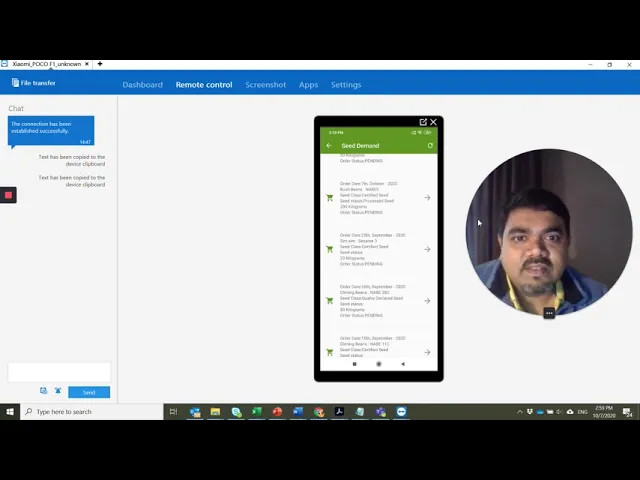
hi so i'm going to show you the general applications of this htts mobile application so as you click this is the landing page this is already logged in but i'll just show you that how i can go you have to basically enter your credentials here and then you can login yeah and we have four sections here the seed ordering section the seed stock section the registration section and the quality assurance system from the seed ordering system you can request a quotation you can really tell that which crop you want how much which class which seed
class uh how much quantity and when so you can send the request from here so that's the first first part then you can also see the what are the quotations that you have already requested so what are the seeds you have already ordered here so this will this section will have all your uh these uh that your uh quotation request so you can see that you have already received some of the the quotations that you have received and then you can go for with the seed demand so what are the that is the seed market
what are the seeds which varieties which crops are currently being in demand in the in the whole of uganda you can see the dates you can see which crop which variety and all and then you can see check out the quotations also here you can check out the orders what order you have placed so that's all about the seed ordering section then you have the registration section so basically in the registration section is only available with the administration so they can register either a cuties producer seed merchant or a seed grower registration if someone comes
to them they can just click here and then start filling up the form and this form will be submitted here the form is submitted and then it it will be scrutinized and then accepted so you get a new newly registered either qds producer or seed merchant the quality assurance is basically for the crop declaration form to submit planting returns and for routine seed field inspections so you can have the crop declaration form for qda so which crop which seed you have already planted you can fill up the form and it will sync with the server
and the and the authorities will be having it to scrutinize and approve it and then you can have the planting returns for the certified seeds you can even use the barcode function here you can enter your enter the number using using a barcode here so this is regarding you can also routine of the um the the seed inspectors using this format can also uh enter the field inspection reports here so based on the based on the lot number all the details here are filled up and ultimately it can either be approved or rejected that decision
also can be made here and you can submit the inspections and next is the seed stock here actually the seed stock things are not available with the admin these are normally with the logins of the uh the seed producers the seed company the qds producers normally they have maintained the seed stock okay so these are the four functions that we have within the this this application





![Upbeat Lofi - Power and Energize Your Workday - [R&B, Neo Soul, Lofi Hiphop]](https://img.youtube.com/vi/ONcY0BM5EAg/maxresdefault.jpg)







![Upbeat Lofi - Deep Focus & Energy for Work [R&B, Neo Soul, Lofi Hiphop]](https://img.youtube.com/vi/THh4fT0O7IY/maxresdefault.jpg)