hello everyone this is presentation video one of full stack banking application I will follow the rubric and try to be as brief as possible so let's start present a diagram explaining the front end middle tier and back end of your application here's my front end military middle tier and a back end my front end is built using Create react app with browser router for the routing process dot EMB dot node EMB to determine if the app is running in production mode then I can set a variable to either localhost or the deployed apps location I
am using a single CSS file and all my components are placed in one directory I removed reacts strict mode because it renders everything twice and that means saving twice to the database in some instances of my code um my front end connects to the middle tier using axios I am not using a super agent okay then let's continue with the middle tier it has cores to allow cross-origin requests path and all to get the directory name which I found necessary for the app to function properly when deployed and when they use user clicks refresh I
used chalk to highlight console logs because it looks nice and at the back end I used Firebase email and password authentication and for the database mongodb Atlas using a dull and now we continue with describe the component architecture of the front end uh we will jump into the diagram in just a bit but first let's take a look at the code at the top level you can see the router and the context then there's the number bar and then there's the routes for the landing page sign up login and the rest and finally a pop-up
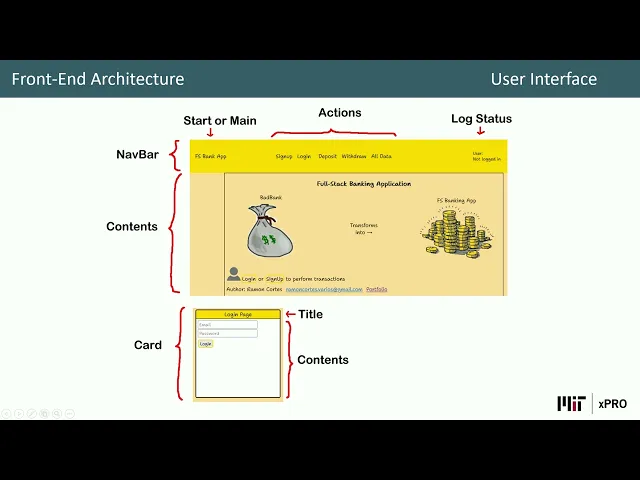
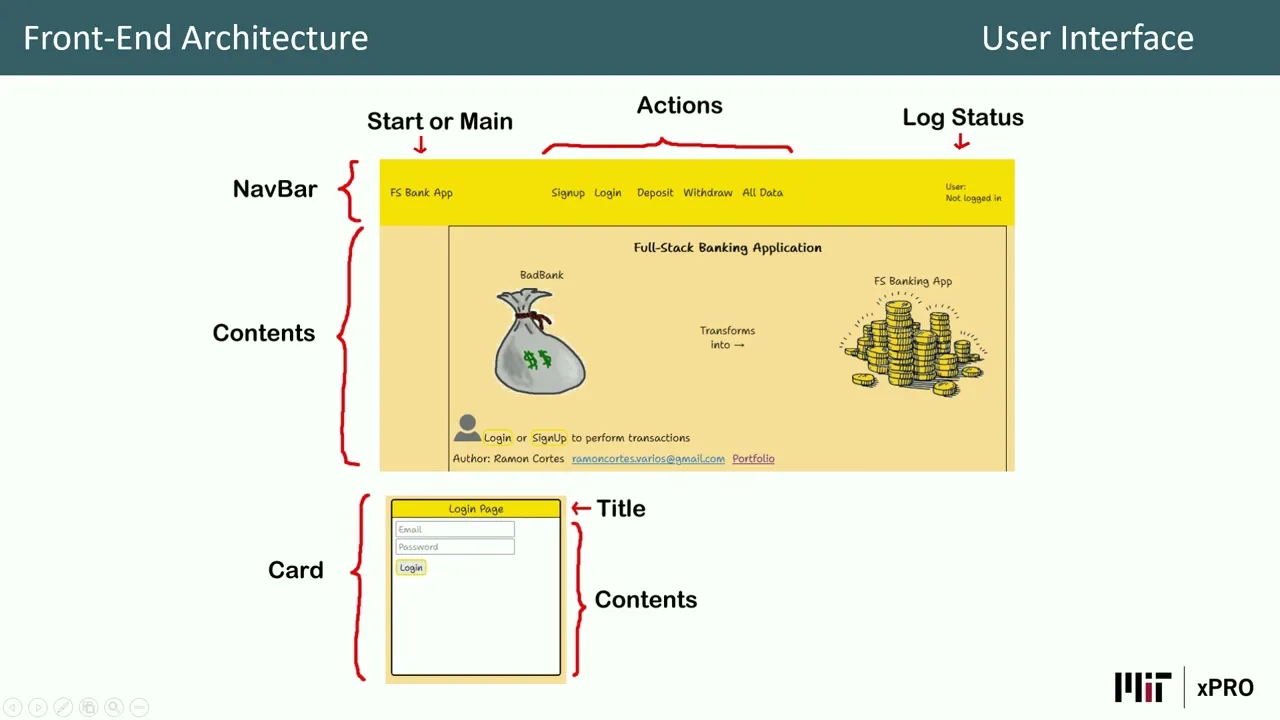
component here's the diagram which shows pretty much the same at the top level it's the app with the router State and context then we have the number bar routes and the pop-up component then all the routes we have the landing page sign up login Etc and finally we have the smaller components or soup components if you will and as you can see it's very simple and now let's go with describe my user interface design decisions first we have a log status at the top right corner because it's required so then I continued with um another
bar at the top in the center we have the actions and on the left we have the the bottom the bottom to to start our main and the rest it's for the content all the contents okay now let's continue with highlight at least two methods of Authentication um I did not read carefully enough the requirements here and the noticed late in the process that two authentication methods methods were required so I thought we could choose to develop one or the other so since I did not want to modify my code that late in the process
to prevent unknown issues that might come up I only offer Firebase email and password authentication uh these are the methods or functions that I use for this purpose um why did I take this approach because it's the the process I'm most comfortable with and what what challenges did I encounter when establishing Authentication we already had an exercise but we used web version 8. and my project is in module mode and how it is I overcome them well luckily Google has side by side the both both ways to implement this so it was not that difficult
so that's it for video one and I will see you in video two