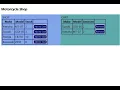
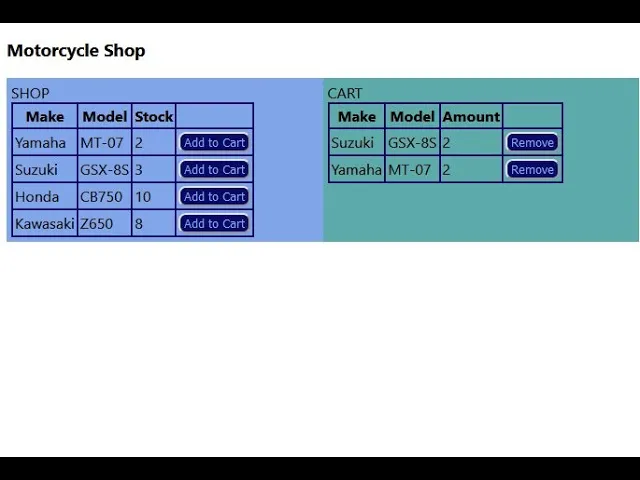
hello as an exercise I did uh the first step of a shopping cart and here's the functionality on the left you have a shop and on the right you have a cart if you click an item on the shop it will add it to your cart and if you click it on the card it will remove it from there here's a glimpse of how it works first I'm getting the information from the shop from strappy so I used Postman to get this code I simply copy and paste you using axios and I'm setting my shop
list or my state with the response data that I received from strappy so first we import everything our shop our card State and axios then we initialize the state which is my shopping list and my card list are the only things that we need and then we render the page uh here's the title and we have a shop on the left and a card on the right and I'm sending all the state into those components here's an extra step because the information that we get from strappy it's encapsulated meaning it's inside data.data dot attributes I
did a small function to format that and get rid of all those levels so let's move on into our shop and our card components first let's see the shop they are pretty much the same shop and card so I made a common component which I named make table so in the case of the shop the we sent the shop list and the bottom that it will create will do add to cart in the case of the card it we will send the card listing instead of the shop list and the button will remove from the
cart so now let's see what make table does which is just a table here's the table and here's the table headers make model and the amount or stock and all the rows and all the rows simply get the list that it is receiving and will draw a row with a make model and the stock of each item and the last item it's the button that will do whichever we are asking it to do in the case of the shop it's the other two cart as I said and in the case of the card it will
be removed from the card so now let's see what the other two card does and they remove from cart functions okay so the add to cart function will check if the shop list item has a stock greater than zero if that's true it will reduce it or decrease it and if the item already exists on the car it will simply increase it if it doesn't exist in the cart it will create it and set it to 1. so that's pretty simple and well of course it took me quite a while and then let's see the
remove from cart function so this one will check which model we are returning into the shop or into the stock and when we find it it will increase the amount and then it will remove it from the cart if the stock is greater than one it will simply decrease it otherwise it will remove it entirely uh so I think that's all here's the remove you will remove it decrease it and increase it on the other side on the shop and the opposite once we reach zero here it will add nothing else and we can return
the items into the shop so that's all I added a link into the my GitHub account so you can copy or Fork the code









![Fourier Neural Operator (FNO) [Physics Informed Machine Learning]](https://img.youtube.com/vi/W8PybqAk6Ik/maxresdefault.jpg)